Spring Cloud Gateway 安全验证完整解决方案
1. 架构设计
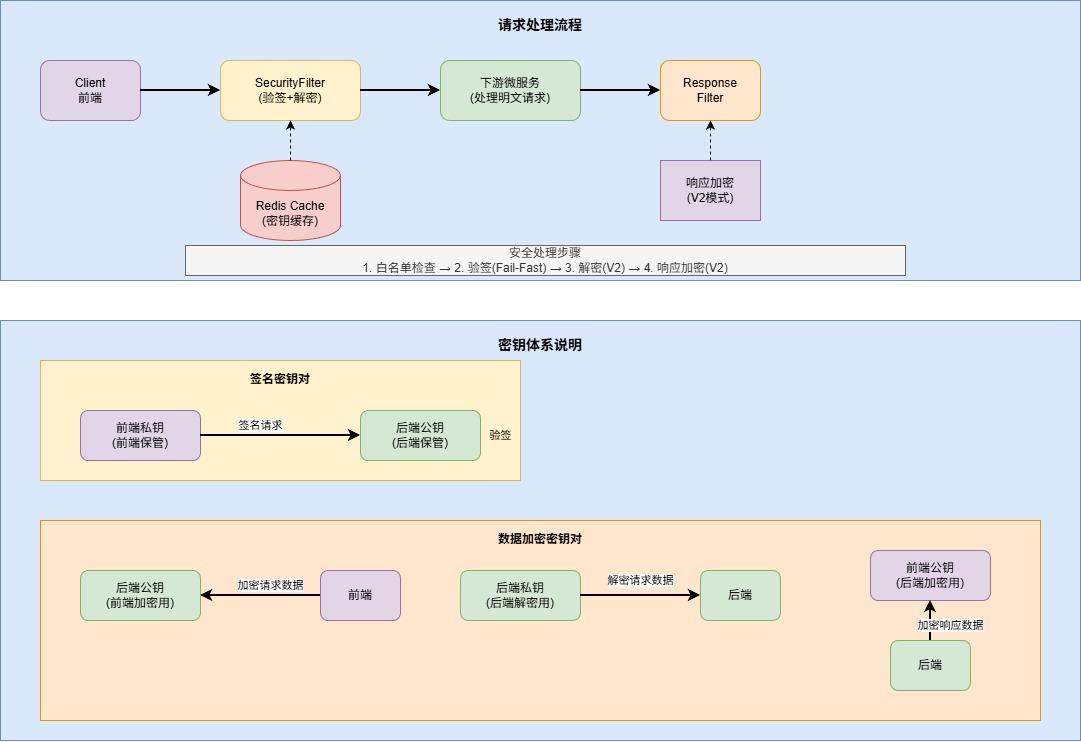
2. Maven 依赖
<?xml version="1.0" encoding="UTF-8"?>
<project xmlns="http://maven.apache.org/POM/4.0.0"
xmlns:xsi="http://www.w3.org/2001/XMLSchema-instance"
xsi:schemaLocation="http://maven.apache.org/POM/4.0.0
http://maven.apache.org/xsd/maven-4.0.0.xsd">
<modelVersion>4.0.0</modelVersion>
<parent>
<groupId>org.springframework.boot</groupId>
<artifactId>spring-boot-starter-parent</artifactId>
<version>3.2.0</version>
<relativePath/>
</parent>
<groupId>com.example</groupId>
<artifactId>gateway-security</artifactId>
<version>1.0.0</version>
<name>Gateway Security Module</name>
<description>
Spring Cloud Gateway 安全验证模块
- 支持 RSA 签名验证
- 支持 RSA 数据加解密
- 支持 V1(仅签名) 和 V2(签名+加密) 两种模式
</description>
<properties>
<java.version>17</java.version>
<spring-cloud.version>2023.0.0</spring-cloud.version>
<fastjson2.version>2.0.40</fastjson2.version>
</properties>
<dependencyManagement>
<dependencies>
<dependency>
<groupId>org.springframework.cloud</groupId>
<artifactId>spring-cloud-dependencies</artifactId>
<version>${spring-cloud.version}</version>
<type>pom</type>
<scope>import</scope>
</dependency>
</dependencies>
</dependencyManagement>
<dependencies>
<dependency>
<groupId>org.springframework.cloud</groupId>
<artifactId>spring-cloud-starter-gateway</artifactId>
</dependency>
<dependency>
<groupId>org.springframework.boot</groupId>
<artifactId>spring-boot-starter-data-redis-reactive</artifactId>
</dependency>
<dependency>
<groupId>com.alibaba.fastjson2</groupId>
<artifactId>fastjson2</artifactId>
<version>${fastjson2.version}</version>
</dependency>
<dependency>
<groupId>commons-codec</groupId>
<artifactId>commons-codec</artifactId>
</dependency>
<dependency>
<groupId>org.projectlombok</groupId>
<artifactId>lombok</artifactId>
<optional>true</optional>
</dependency>
<dependency>
<groupId>org.springframework.boot</groupId>
<artifactId>spring-boot-starter-test</artifactId>
<scope>test</scope>
</dependency>
<dependency>
<groupId>io.projectreactor</groupId>
<artifactId>reactor-test</artifactId>
<scope>test</scope>
</dependency>
</dependencies>
<build>
<plugins>
<plugin>
<groupId>org.springframework.boot</groupId>
<artifactId>spring-boot-maven-plugin</artifactId>
<configuration>
<excludes>
<exclude>
<groupId>org.projectlombok</groupId>
<artifactId>lombok</artifactId>
</exclude>
</excludes>
</configuration>
</plugin>
</plugins>
</build>
</project>
3. 配置文件
3.1 application.yml
server:
port: 8080
spring:
application:
name: gateway-security
data:
redis:
host: localhost
port: 6379
password:
database: 0
timeout: 3000ms
lettuce:
pool:
max-active: 8
max-idle: 8
min-idle: 2
max-wait: -1ms
cloud:
gateway:
routes:
- id: user-service
uri: lb://user-service
predicates:
- Path=/api/user/**
- id: order-service
uri: lb://order-service
predicates:
- Path=/api/order/**
security:
skip-urls:
- /api/public/**
- /api/health/**
- /api/doc/**
- /swagger-ui/**
- /v3/api-docs/**
cache:
key-prefix: "gateway:channel:"
expire-seconds: 3600
logging:
level:
com.example.gateway: DEBUG
org.springframework.cloud.gateway: INFO
3.2 SecurityProperties.java - 配置属性类
package com.example.gateway.config;
import lombok.Data;
import org.springframework.boot.context.properties.ConfigurationProperties;
import org.springframework.stereotype.Component;
import java.util.ArrayList;
import java.util.List;
@Data
@Component
@ConfigurationProperties(prefix = "security")
public class SecurityProperties {
private List<String> skipUrls = new ArrayList<>();
private CacheConfig cache = new CacheConfig();
@Data
public static class CacheConfig {
private String keyPrefix = "gateway:channel:";
private long expireSeconds = 3600;
}
}
4. 数据模型
4.1 ChannelDataVo.java - 渠道数据模型
package com.example.gateway.model;
import lombok.AllArgsConstructor;
import lombok.Builder;
import lombok.Data;
import lombok.NoArgsConstructor;
import java.io.Serial;
import java.io.Serializable;
@Data
@Builder
@NoArgsConstructor
@AllArgsConstructor
public class ChannelDataVo implements Serializable {
@Serial
private static final long serialVersionUID = 1L;
private String code;
private String name;
private String signPublicKey;
private String dataPublicKey;
private String dataPrivateKey;
private Integer status;
public boolean isEnabled() {
return status != null && status == 1;
}
}
4.2 GatewayRequest.java - 统一请求模型
package com.example.gateway.model;
import lombok.AllArgsConstructor;
import lombok.Builder;
import lombok.Data;
import lombok.NoArgsConstructor;
@Data
@Builder
@NoArgsConstructor
@AllArgsConstructor
public class GatewayRequest {
private String code;
private Long timestamp;
private String nonce;
private String businessBody;
private String sign;
}
4.3 GatewayResponse.java - 统一响应模型
package com.example.gateway.model;
import lombok.AllArgsConstructor;
import lombok.Builder;
import lombok.Data;
import lombok.NoArgsConstructor;
@Data
@Builder
@NoArgsConstructor
@AllArgsConstructor
public class GatewayResponse<T> {
private Integer code;
private String message;
private T data;
public static <T> GatewayResponse<T> success(T data) {
return GatewayResponse.<T>builder()
.code(200)
.message("success")
.data(data)
.build();
}
public static <T> GatewayResponse<T> error(Integer code, String message) {
return GatewayResponse.<T>builder()
.code(code)
.message(message)
.build();
}
}
5. RSA 工具类
package com.example.gateway.utils;
import lombok.extern.slf4j.Slf4j;
import org.apache.commons.codec.binary.Base64;
import javax.crypto.Cipher;
import java.io.ByteArrayOutputStream;
import java.nio.charset.StandardCharsets;
import java.security.*;
import java.security.spec.PKCS8EncodedKeySpec;
import java.security.spec.X509EncodedKeySpec;
import java.util.Map;
import java.util.TreeMap;
@Slf4j
public final class RsaUtils {
public static final String SIGN_ALGORITHM = "SHA256withRSA";
public static final String KEY_ALGORITHM = "RSA";
public static final String CIPHER_ALGORITHM = "RSA/ECB/PKCS1Padding";
public static final int KEY_SIZE = 2048;
private static final int MAX_ENCRYPT_BLOCK = KEY_SIZE / 8 - 11;
private static final int MAX_DECRYPT_BLOCK = KEY_SIZE / 8;
private RsaUtils() {
throw new UnsupportedOperationException("Utility class cannot be instantiated");
}
public static String buildSignContent(Map<String, Object> params) {
if (params == null || params.isEmpty()) {
return "";
}
Map<String, Object> sortedMap = new TreeMap<>(params);
StringBuilder content = new StringBuilder();
for (Map.Entry<String, Object> entry : sortedMap.entrySet()) {
String key = entry.getKey();
Object value = entry.getValue();
if (!"sign".equals(key) && value != null && !"".equals(value.toString())) {
if (content.length() > 0) {
content.append("&");
}
content.append(key).append("=").append(value);
}
}
return content.toString();
}
public static boolean verify(Map<String, Object> params, String publicKeyStr, String sign) {
if (params == null || publicKeyStr == null || sign == null) {
log.warn("验签参数不完整: params={}, publicKey={}, sign={}",
params != null, publicKeyStr != null, sign != null);
return false;
}
try {
String content = buildSignContent(params);
log.debug("验签原文: {}", content);
byte[] keyBytes = Base64.decodeBase64(publicKeyStr);
X509EncodedKeySpec keySpec = new X509EncodedKeySpec(keyBytes);
KeyFactory keyFactory = KeyFactory.getInstance(KEY_ALGORITHM);
PublicKey publicKey = keyFactory.generatePublic(keySpec);
Signature signature = Signature.getInstance(SIGN_ALGORITHM);
signature.initVerify(publicKey);
signature.update(content.getBytes(StandardCharsets.UTF_8));
boolean result = signature.verify(Base64.decodeBase64(sign));
log.debug("验签结果: {}", result);
return result;
} catch (Exception e) {
log.error("验签异常: {}", e.getMessage(), e);
return false;
}
}
public static String sign(Map<String, Object> params, String privateKeyStr) {
try {
String content = buildSignContent(params);
log.debug("签名原文: {}", content);
byte[] keyBytes = Base64.decodeBase64(privateKeyStr);
PKCS8EncodedKeySpec keySpec = new PKCS8EncodedKeySpec(keyBytes);
KeyFactory keyFactory = KeyFactory.getInstance(KEY_ALGORITHM);
PrivateKey privateKey = keyFactory.generatePrivate(keySpec);
Signature signature = Signature.getInstance(SIGN_ALGORITHM);
signature.initSign(privateKey);
signature.update(content.getBytes(StandardCharsets.UTF_8));
byte[] signBytes = signature.sign();
return Base64.encodeBase64String(signBytes);
} catch (Exception e) {
throw new RuntimeException("RSA签名失败", e);
}
}
public static String encrypt(String content, String publicKeyStr) {
if (content == null || content.isEmpty()) {
return content;
}
try {
byte[] keyBytes = Base64.decodeBase64(publicKeyStr);
X509EncodedKeySpec keySpec = new X509EncodedKeySpec(keyBytes);
KeyFactory keyFactory = KeyFactory.getInstance(KEY_ALGORITHM);
PublicKey publicKey = keyFactory.generatePublic(keySpec);
Cipher cipher = Cipher.getInstance(CIPHER_ALGORITHM);
cipher.init(Cipher.ENCRYPT_MODE, publicKey);
byte[] data = content.getBytes(StandardCharsets.UTF_8);
byte[] encryptedData = doFinalWithBlock(cipher, data, MAX_ENCRYPT_BLOCK);
return Base64.encodeBase64String(encryptedData);
} catch (Exception e) {
throw new RuntimeException("RSA加密失败", e);
}
}
public static String decrypt(String content, String privateKeyStr) {
if (content == null || content.isEmpty()) {
return content;
}
try {
byte[] keyBytes = Base64.decodeBase64(privateKeyStr);
PKCS8EncodedKeySpec keySpec = new PKCS8EncodedKeySpec(keyBytes);
KeyFactory keyFactory = KeyFactory.getInstance(KEY_ALGORITHM);
PrivateKey privateKey = keyFactory.generatePrivate(keySpec);
Cipher cipher = Cipher.getInstance(CIPHER_ALGORITHM);
cipher.init(Cipher.DECRYPT_MODE, privateKey);
byte[] encryptedData = Base64.decodeBase64(content);
byte[] decryptedData = doFinalWithBlock(cipher, encryptedData, MAX_DECRYPT_BLOCK);
return new String(decryptedData, StandardCharsets.UTF_8);
} catch (Exception e) {
throw new RuntimeException("RSA解密失败: " + e.getMessage(), e);
}
}
private static byte[] doFinalWithBlock(Cipher cipher, byte[] data, int blockSize)
throws Exception {
int inputLen = data.length;
int offset = 0;
try (ByteArrayOutputStream out = new ByteArrayOutputStream()) {
while (inputLen > offset) {
int len = Math.min(inputLen - offset, blockSize);
byte[] block = cipher.doFinal(data, offset, len);
out.write(block);
offset += len;
}
return out.toByteArray();
}
}
public static KeyPair generateKeyPair() {
try {
KeyPairGenerator generator = KeyPairGenerator.getInstance(KEY_ALGORITHM);
generator.initialize(KEY_SIZE, new SecureRandom());
return generator.generateKeyPair();
} catch (NoSuchAlgorithmException e) {
throw new RuntimeException("生成RSA密钥对失败", e);
}
}
public static String[] generateKeyPairBase64() {
KeyPair keyPair = generateKeyPair();
return new String[] {
Base64.encodeBase64String(keyPair.getPublic().getEncoded()),
Base64.encodeBase64String(keyPair.getPrivate().getEncoded())
};
}
}
6. 渠道数据服务
6.1 ChannelDataService.java - 服务接口
package com.example.gateway.service;
import com.example.gateway.model.ChannelDataVo;
import reactor.core.publisher.Mono;
public interface ChannelDataService {
Mono<ChannelDataVo> getChannelDataByCode(String code);
Mono<Boolean> refreshCache(String code);
Mono<Boolean> isValidChannel(String code);
}
6.2 ChannelDataServiceImpl.java - 服务实现
package com.example.gateway.service.impl;
import com.alibaba.fastjson2.JSON;
import com.example.gateway.config.SecurityProperties;
import com.example.gateway.model.ChannelDataVo;
import com.example.gateway.service.ChannelDataService;
import lombok.RequiredArgsConstructor;
import lombok.extern.slf4j.Slf4j;
import org.springframework.data.redis.core.ReactiveStringRedisTemplate;
import org.springframework.stereotype.Service;
import reactor.core.publisher.Mono;
import java.time.Duration;
import java.util.Map;
import java.util.concurrent.ConcurrentHashMap;
@Slf4j
@Service
@RequiredArgsConstructor
public class ChannelDataServiceImpl implements ChannelDataService {
private final ReactiveStringRedisTemplate redisTemplate;
private final SecurityProperties securityProperties;
private static final Map<String, ChannelDataVo> DATABASE = new ConcurrentHashMap<>();
static {
DATABASE.put("APP_IOS", ChannelDataVo.builder()
.code("APP_IOS")
.name("iOS客户端")
.signPublicKey("MIIBIjANBgkqhkiG9w0BAQEFAAOCAQ8AMIIBCgKCAQE...")
.dataPublicKey("MIIBIjANBgkqhkiG9w0BAQEFAAOCAQ8AMIIBCgKCAQE...")
.dataPrivateKey("MIIEvgIBADANBgkqhkiG9w0BAQEFAAOCAQ8...")
.status(1)
.build());
DATABASE.put("APP_ANDROID", ChannelDataVo.builder()
.code("APP_ANDROID")
.name("Android客户端")
.signPublicKey("MIIBIjANBgkqhkiG9w0BAQEFAAOCAQ8AMIIBCgKCAQE...")
.dataPublicKey("MIIBIjANBgkqhkiG9w0BAQEFAAOCAQ8AMIIBCgKCAQE...")
.dataPrivateKey("MIIEvgIBADANBgkqhkiG9w0BAQEFAAOCAQ8...")
.status(1)
.build());
}
@Override
public Mono<ChannelDataVo> getChannelDataByCode(String code) {
if (code == null || code.trim().isEmpty()) {
return Mono.empty();
}
String cacheKey = buildCacheKey(code);
return redisTemplate.opsForValue().get(cacheKey)
.map(json -> {
log.debug("缓存命中: key={}", cacheKey);
return JSON.parseObject(json, ChannelDataVo.class);
})
.switchIfEmpty(Mono.defer(() -> loadAndCacheChannelData(code, cacheKey)))
.filter(ChannelDataVo::isEnabled)
.doOnNext(data -> log.debug("获取渠道数据成功: code={}", code))
.doOnError(e -> log.error("获取渠道数据失败: code={}, error={}", code, e.getMessage()));
}
private Mono<ChannelDataVo> loadAndCacheChannelData(String code, String cacheKey) {
return loadFromDatabase(code)
.flatMap(data -> {
String json = JSON.toJSONString(data);
Duration expireDuration = Duration.ofSeconds(
securityProperties.getCache().getExpireSeconds()
);
return redisTemplate.opsForValue()
.set(cacheKey, json, expireDuration)
.doOnSuccess(success -> log.debug("缓存写入成功: key={}", cacheKey))
.thenReturn(data);
})
.switchIfEmpty(Mono.defer(() -> {
log.warn("渠道不存在: code={}", code);
return Mono.empty();
}));
}
private Mono<ChannelDataVo> loadFromDatabase(String code) {
log.debug("从数据库加载渠道数据: code={}", code);
ChannelDataVo data = DATABASE.get(code);
if (data != null) {
return Mono.just(data);
} else {
return Mono.empty();
}
}
@Override
public Mono<Boolean> refreshCache(String code) {
String cacheKey = buildCacheKey(code);
return redisTemplate.delete(cacheKey)
.map(count -> count > 0)
.doOnSuccess(deleted -> {
if (deleted) {
log.info("缓存刷新成功: code={}", code);
} else {
log.debug("缓存不存在,无需刷新: code={}", code);
}
})
.doOnError(e -> log.error("缓存刷新失败: code={}, error={}", code, e.getMessage()));
}
@Override
public Mono<Boolean> isValidChannel(String code) {
return getChannelDataByCode(code)
.map(data -> data != null && data.isEnabled())
.defaultIfEmpty(false);
}
private String buildCacheKey(String code) {
return securityProperties.getCache().getKeyPrefix() + code;
}
}
7. 安全验证过滤器
package com.example.gateway.filter;
import com.alibaba.fastjson2.JSON;
import com.alibaba.fastjson2.JSONObject;
import com.example.gateway.config.SecurityProperties;
import com.example.gateway.exception.SecurityException;
import com.example.gateway.model.ChannelDataVo;
import com.example.gateway.model.GatewayResponse;
import com.example.gateway.service.ChannelDataService;
import com.example.gateway.utils.RsaUtils;
import lombok.RequiredArgsConstructor;
import lombok.extern.slf4j.Slf4j;
import org.springframework.cloud.gateway.filter.GatewayFilterChain;
import org.springframework.cloud.gateway.filter.GlobalFilter;
import org.springframework.core.Ordered;
import org.springframework.core.io.buffer.DataBuffer;
import org.springframework.core.io.buffer.DataBufferUtils;
import org.springframework.http.HttpHeaders;
import org.springframework.http.HttpStatus;
import org.springframework.http.MediaType;
import org.springframework.http.server.reactive.ServerHttpRequest;
import org.springframework.http.server.reactive.ServerHttpRequestDecorator;
import org.springframework.stereotype.Component;
import org.springframework.util.AntPathMatcher;
import org.springframework.util.PathMatcher;
import org.springframework.web.server.ServerWebExchange;
import reactor.core.publisher.Flux;
import reactor.core.publisher.Mono;
import java.nio.charset.StandardCharsets;
import java.util.Map;
@Slf4j
@Component
@RequiredArgsConstructor
public class SecurityFilter implements GlobalFilter, Ordered {
private final ChannelDataService channelDataService;
private final SecurityProperties securityProperties;
private final PathMatcher pathMatcher = new AntPathMatcher();
private static final String ENCRYPT_HEADER = "encrypt";
private static final String ENCRYPT_MODE_V2 = "v2";
public static final String CHANNEL_DATA_ATTR = "gateway.channel.data";
public static final String ENCRYPT_MODE_ATTR = "gateway.encrypt.mode";
@Override
public Mono<Void> filter(ServerWebExchange exchange, GatewayFilterChain chain) {
ServerHttpRequest request = exchange.getRequest();
String path = request.getURI().getPath();
if (isSkipUrl(path)) {
log.debug("白名单放行: path={}", path);
return chain.filter(exchange);
}
return DataBufferUtils.join(request.getBody())
.flatMap(dataBuffer -> {
byte[] bytes = new byte[dataBuffer.readableByteCount()];
dataBuffer.read(bytes);
DataBufferUtils.release(dataBuffer);
String rawBody = new String(bytes, StandardCharsets.UTF_8);
log.debug("收到请求: path={}, body={}", path, rawBody);
return doSecurityCheck(rawBody, request.getHeaders(), exchange)
.flatMap(newBody -> {
return chain.filter(buildNewExchange(exchange, newBody));
});
})
.switchIfEmpty(Mono.defer(() -> {
log.warn("请求体为空: path={}", path);
return buildErrorResponse(exchange, HttpStatus.BAD_REQUEST, "请求体不能为空");
}))
.onErrorResume(e -> handleException(exchange, e));
}
private Mono<String> doSecurityCheck(String rawBody, HttpHeaders headers,
ServerWebExchange exchange) {
try {
JSONObject bodyJson = JSON.parseObject(rawBody);
if (bodyJson == null) {
return Mono.error(new SecurityException("请求体格式错误", HttpStatus.BAD_REQUEST));
}
String code = bodyJson.getString("code");
String sign = bodyJson.getString("sign");
String businessBody = bodyJson.getString("businessBody");
Long timestamp = bodyJson.getLong("timestamp");
String nonce = bodyJson.getString("nonce");
if (code == null || sign == null || businessBody == null) {
return Mono.error(new SecurityException("缺少必要参数", HttpStatus.BAD_REQUEST));
}
if (!isValidTimestamp(timestamp)) {
return Mono.error(new SecurityException("请求已过期", HttpStatus.BAD_REQUEST));
}
String encryptMode = headers.getFirst(ENCRYPT_HEADER);
return channelDataService.getChannelDataByCode(code)
.switchIfEmpty(Mono.error(new SecurityException("非法渠道: " + code, HttpStatus.FORBIDDEN)))
.flatMap(channelData -> {
exchange.getAttributes().put(CHANNEL_DATA_ATTR, channelData);
exchange.getAttributes().put(ENCRYPT_MODE_ATTR, encryptMode);
@SuppressWarnings("unchecked")
Map<String, Object> paramsMap = bodyJson.toJavaObject(Map.class);
boolean verifyResult = RsaUtils.verify(
paramsMap,
channelData.getSignPublicKey(),
sign
);
if (!verifyResult) {
log.warn("签名验证失败: code={}", code);
return Mono.error(new SecurityException("签名验证失败", HttpStatus.UNAUTHORIZED));
}
log.debug("签名验证成功: code={}", code);
String finalBusinessBody = businessBody;
if (ENCRYPT_MODE_V2.equalsIgnoreCase(encryptMode)) {
try {
finalBusinessBody = RsaUtils.decrypt(
businessBody,
channelData.getDataPrivateKey()
);
log.debug("数据解密成功: code={}", code);
} catch (Exception e) {
log.error("数据解密失败: code={}, error={}", code, e.getMessage());
return Mono.error(new SecurityException("数据解密失败", HttpStatus.BAD_REQUEST));
}
}
bodyJson.put("businessBody", finalBusinessBody);
return Mono.just(bodyJson.toJSONString());
});
} catch (Exception e) {
log.error("安全校验异常: {}", e.getMessage(), e);
return Mono.error(new SecurityException("请求处理失败: " + e.getMessage(), HttpStatus.BAD_REQUEST));
}
}
private ServerWebExchange buildNewExchange(ServerWebExchange exchange, String newBody) {
byte[] bodyBytes = newBody.getBytes(StandardCharsets.UTF_8);
DataBuffer buffer = exchange.getResponse().bufferFactory().wrap(bodyBytes);
ServerHttpRequest decoratedRequest = new ServerHttpRequestDecorator(exchange.getRequest()) {
@Override
public Flux<DataBuffer> getBody() {
return Flux.just(buffer);
}
@Override
public HttpHeaders getHeaders() {
HttpHeaders headers = new HttpHeaders();
headers.putAll(super.getHeaders());
headers.setContentLength(bodyBytes.length);
headers.remove(HttpHeaders.CONTENT_LENGTH);
headers.add(HttpHeaders.CONTENT_LENGTH, String.valueOf(bodyBytes.length));
return headers;
}
};
return exchange.mutate()
.request(decoratedRequest)
.build();
}
private boolean isSkipUrl(String path) {
return securityProperties.getSkipUrls().stream()
.anyMatch(pattern -> pathMatcher.match(pattern, path));
}
private boolean isValidTimestamp(Long timestamp) {
if (timestamp == null) {
return false;
}
long currentTime = System.currentTimeMillis();
long diff = Math.abs(currentTime - timestamp);
long maxDiff = 5 * 60 * 1000;
return diff <= maxDiff;
}
private Mono<Void> handleException(ServerWebExchange exchange, Throwable e) {
log.error("请求处理异常: path={}, error={}",
exchange.getRequest().getURI().getPath(), e.getMessage());
HttpStatus status = HttpStatus.INTERNAL_SERVER_ERROR;
String message = "服务器内部错误";
if (e instanceof SecurityException se) {
status = se.getStatus();
message = se.getMessage();
}
return buildErrorResponse(exchange, status, message);
}
private Mono<Void> buildErrorResponse(ServerWebExchange exchange,
HttpStatus status, String message) {
exchange.getResponse().setStatusCode(status);
exchange.getResponse().getHeaders().setContentType(MediaType.APPLICATION_JSON);
GatewayResponse<Void> response = GatewayResponse.error(status.value(), message);
String responseBody = JSON.toJSONString(response);
DataBuffer buffer = exchange.getResponse().bufferFactory()
.wrap(responseBody.getBytes(StandardCharsets.UTF_8));
return exchange.getResponse().writeWith(Mono.just(buffer));
}
@Override
public int getOrder() {
return -100;
}
}
8. 响应加密过滤器
package com.example.gateway.filter;
import com.alibaba.fastjson2.JSON;
import com.alibaba.fastjson2.JSONObject;
import com.example.gateway.model.ChannelDataVo;
import com.example.gateway.utils.RsaUtils;
import lombok.RequiredArgsConstructor;
import lombok.extern.slf4j.Slf4j;
import org.reactivestreams.Publisher;
import org.springframework.cloud.gateway.filter.GatewayFilterChain;
import org.springframework.cloud.gateway.filter.GlobalFilter;
import org.springframework.core.Ordered;
import org.springframework.core.io.buffer.DataBuffer;
import org.springframework.core.io.buffer.DataBufferFactory;
import org.springframework.core.io.buffer.DataBufferUtils;
import org.springframework.http.HttpHeaders;
import org.springframework.http.server.reactive.ServerHttpResponse;
import org.springframework.http.server.reactive.ServerHttpResponseDecorator;
import org.springframework.stereotype.Component;
import org.springframework.web.server.ServerWebExchange;
import reactor.core.publisher.Flux;
import reactor.core.publisher.Mono;
import java.nio.charset.StandardCharsets;
@Slf4j
@Component
@RequiredArgsConstructor
public class ResponseEncryptFilter implements GlobalFilter, Ordered {
private static final String ENCRYPT_MODE_V2 = "v2";
@Override
public Mono<Void> filter(ServerWebExchange exchange, GatewayFilterChain chain) {
String encryptMode = exchange.getAttribute(SecurityFilter.ENCRYPT_MODE_ATTR);
if (!ENCRYPT_MODE_V2.equalsIgnoreCase(encryptMode)) {
return chain.filter(exchange);
}
ChannelDataVo channelData = exchange.getAttribute(SecurityFilter.CHANNEL_DATA_ATTR);
if (channelData == null) {
log.warn("渠道数据为空,跳过响应加密");
return chain.filter(exchange);
}
ServerHttpResponseDecorator decoratedResponse = new EncryptingResponseDecorator(
exchange.getResponse(),
channelData
);
return chain.filter(exchange.mutate().response(decoratedResponse).build());
}
private class EncryptingResponseDecorator extends ServerHttpResponseDecorator {
private final ChannelDataVo channelData;
public EncryptingResponseDecorator(ServerHttpResponse delegate,
ChannelDataVo channelData) {
super(delegate);
this.channelData = channelData;
}
@Override
public Mono<Void> writeWith(Publisher<? extends DataBuffer> body) {
if (body instanceof Flux) {
Flux<? extends DataBuffer> fluxBody = Flux.from(body);
return super.writeWith(
DataBufferUtils.join(fluxBody)
.map(dataBuffer -> {
byte[] content = new byte[dataBuffer.readableByteCount()];
dataBuffer.read(content);
DataBufferUtils.release(dataBuffer);
String originalResponse = new String(content, StandardCharsets.UTF_8);
log.debug("原始响应: {}", originalResponse);
String encryptedResponse = encryptResponseData(originalResponse);
log.debug("加密响应: {}", encryptedResponse);
byte[] newContent = encryptedResponse.getBytes(StandardCharsets.UTF_8);
HttpHeaders headers = getDelegate().getHeaders();
headers.setContentLength(newContent.length);
DataBufferFactory bufferFactory = getDelegate().bufferFactory();
return bufferFactory.wrap(newContent);
})
);
}
return super.writeWith(body);
}
private String encryptResponseData(String jsonBody) {
try {
JSONObject json = JSON.parseObject(jsonBody);
if (json == null) {
return jsonBody;
}
Object data = json.get("data");
if (data == null) {
log.debug("响应 data 为空,跳过加密");
return jsonBody;
}
String dataStr;
if (data instanceof String) {
dataStr = (String) data;
} else {
dataStr = JSON.toJSONString(data);
}
String encryptedData = RsaUtils.encrypt(dataStr, channelData.getDataPublicKey());
json.put("data", encryptedData);
log.debug("响应加密成功: code={}", channelData.getCode());
return json.toJSONString();
} catch (Exception e) {
log.error("响应加密失败,返回原始数据: error={}", e.getMessage(), e);
return jsonBody;
}
}
}
@Override
public int getOrder() {
return -2;
}
}
9. 异常处理
9.1 SecurityException.java - 安全异常
package com.example.gateway.exception;
import lombok.Getter;
import org.springframework.http.HttpStatus;
@Getter
public class SecurityException extends RuntimeException {
private final HttpStatus status;
public SecurityException(String message, HttpStatus status) {
super(message);
this.status = status;
}
public SecurityException(String message, HttpStatus status, Throwable cause) {
super(message, cause);
this.status = status;
}
}
9.2 GlobalExceptionHandler.java - 全局异常处理
package com.example.gateway.exception;
import com.alibaba.fastjson2.JSON;
import com.example.gateway.model.GatewayResponse;
import lombok.extern.slf4j.Slf4j;
import org.springframework.boot.web.reactive.error.ErrorWebExceptionHandler;
import org.springframework.core.annotation.Order;
import org.springframework.core.io.buffer.DataBuffer;
import org.springframework.http.HttpStatus;
import org.springframework.http.MediaType;
import org.springframework.http.server.reactive.ServerHttpResponse;
import org.springframework.stereotype.Component;
import org.springframework.web.server.ResponseStatusException;
import org.springframework.web.server.ServerWebExchange;
import reactor.core.publisher.Mono;
import java.nio.charset.StandardCharsets;
@Slf4j
@Order(-1)
@Component
public class GlobalExceptionHandler implements ErrorWebExceptionHandler {
@Override
public Mono<Void> handle(ServerWebExchange exchange, Throwable ex) {
ServerHttpResponse response = exchange.getResponse();
if (response.isCommitted()) {
return Mono.error(ex);
}
HttpStatus status;
String message;
if (ex instanceof SecurityException se) {
status = se.getStatus();
message = se.getMessage();
} else if (ex instanceof ResponseStatusException rse) {
status = HttpStatus.valueOf(rse.getStatusCode().value());
message = rse.getReason();
} else {
status = HttpStatus.INTERNAL_SERVER_ERROR;
message = "服务器内部错误";
log.error("未处理异常: ", ex);
}
log.warn("请求异常: path={}, status={}, message={}",
exchange.getRequest().getURI().getPath(), status, message);
response.setStatusCode(status);
response.getHeaders().setContentType(MediaType.APPLICATION_JSON);
GatewayResponse<Void> errorResponse = GatewayResponse.error(status.value(), message);
String responseBody = JSON.toJSONString(errorResponse);
DataBuffer buffer = response.bufferFactory()
.wrap(responseBody.getBytes(StandardCharsets.UTF_8));
return response.writeWith(Mono.just(buffer));
}
}
10. 测试示例
10.1 RsaUtilsTest.java - 工具类测试
package com.example.gateway.utils;
import org.junit.jupiter.api.BeforeEach;
import org.junit.jupiter.api.DisplayName;
import org.junit.jupiter.api.Test;
import java.security.KeyPair;
import java.util.HashMap;
import java.util.Map;
import static org.junit.jupiter.api.Assertions.*;
class RsaUtilsTest {
private String publicKey;
private String privateKey;
@BeforeEach
void setUp() {
String[] keyPair = RsaUtils.generateKeyPairBase64();
publicKey = keyPair[0];
privateKey = keyPair[1];
}
@Test
@DisplayName("测试签名原文构建 - 应按字典序排序")
void testBuildSignContent() {
Map<String, Object> params = new HashMap<>();
params.put("code", "APP_IOS");
params.put("timestamp", 1703318400000L);
params.put("businessBody", "{\"userId\":\"10001\"}");
params.put("nonce", "abc123");
params.put("sign", "xxxxx");
String content = RsaUtils.buildSignContent(params);
assertTrue(content.startsWith("businessBody="));
assertTrue(content.contains("&code="));
assertTrue(content.contains("&nonce="));
assertTrue(content.endsWith("×tamp=1703318400000"));
assertFalse(content.contains("sign="));
}
@Test
@DisplayName("测试签名与验签")
void testSignAndVerify() {
Map<String, Object> params = new HashMap<>();
params.put("code", "APP_IOS");
params.put("timestamp", System.currentTimeMillis());
params.put("businessBody", "{\"userId\":\"10001\"}");
String sign = RsaUtils.sign(params, privateKey);
assertNotNull(sign);
boolean result = RsaUtils.verify(params, publicKey, sign);
assertTrue(result);
}
@Test
@DisplayName("测试加密与解密 - 短文本")
void testEncryptAndDecryptShortText() {
String plainText = "Hello, RSA!";
String cipherText = RsaUtils.encrypt(plainText, publicKey);
assertNotNull(cipherText);
assertNotEquals(plainText, cipherText);
String decryptedText = RsaUtils.decrypt(cipherText, privateKey);
assertEquals(plainText, decryptedText);
}
@Test
@DisplayName("测试加密与解密 - 长文本(测试分段加密)")
void testEncryptAndDecryptLongText() {
StringBuilder sb = new StringBuilder();
for (int i = 0; i < 100; i++) {
sb.append("这是一段测试文本,用于测试RSA分段加密功能。");
}
String plainText = sb.toString();
String cipherText = RsaUtils.encrypt(plainText, publicKey);
assertNotNull(cipherText);
String decryptedText = RsaUtils.decrypt(cipherText, privateKey);
assertEquals(plainText, decryptedText);
}
@Test
@DisplayName("测试验签失败 - 数据被篡改")
void testVerifyFailOnTamperedData() {
Map<String, Object> params = new HashMap<>();
params.put("code", "APP_IOS");
params.put("timestamp", System.currentTimeMillis());
params.put("businessBody", "{\"userId\":\"10001\"}");
String sign = RsaUtils.sign(params, privateKey);
params.put("businessBody", "{\"userId\":\"10002\"}");
boolean result = RsaUtils.verify(params, publicKey, sign);
assertFalse(result);
}
}
10.2 SecurityFilterTest.java - 过滤器测试
package com.example.gateway.filter;
import com.alibaba.fastjson2.JSON;
import com.example.gateway.config.SecurityProperties;
import com.example.gateway.model.ChannelDataVo;
import com.example.gateway.model.GatewayRequest;
import com.example.gateway.service.ChannelDataService;
import com.example.gateway.utils.RsaUtils;
import org.junit.jupiter.api.BeforeEach;
import org.junit.jupiter.api.DisplayName;
import org.junit.jupiter.api.Nested;
import org.junit.jupiter.api.Test;
import org.junit.jupiter.api.extension.ExtendWith;
import org.mockito.Mock;
import org.mockito.junit.jupiter.MockitoExtension;
import org.springframework.cloud.gateway.filter.GatewayFilterChain;
import org.springframework.core.io.buffer.DataBuffer;
import org.springframework.core.io.buffer.DefaultDataBufferFactory;
import org.springframework.http.HttpHeaders;
import org.springframework.http.HttpStatus;
import org.springframework.http.MediaType;
import org.springframework.mock.http.server.reactive.MockServerHttpRequest;
import org.springframework.mock.web.server.MockServerWebExchange;
import reactor.core.publisher.Flux;
import reactor.core.publisher.Mono;
import reactor.test.StepVerifier;
import java.nio.charset.StandardCharsets;
import java.security.KeyPair;
import java.util.Arrays;
import java.util.HashMap;
import java.util.Map;
import static org.assertj.core.api.Assertions.assertThat;
import static org.mockito.ArgumentMatchers.any;
import static org.mockito.ArgumentMatchers.anyString;
import static org.mockito.Mockito.*;
@ExtendWith(MockitoExtension.class)
@DisplayName("SecurityFilter 安全过滤器测试")
class SecurityFilterTest {
@Mock
private ChannelDataService channelDataService;
@Mock
private GatewayFilterChain filterChain;
private SecurityFilter securityFilter;
private SecurityProperties securityProperties;
private KeyPair signKeyPair;
private KeyPair dataKeyPair;
private ChannelDataVo testChannelData;
@BeforeEach
void setUp() {
securityProperties = new SecurityProperties();
securityProperties.setEnabled(true);
securityProperties.setSignTimeout(300000L);
securityProperties.setSkipPaths(Arrays.asList("/api/health", "/api/public/**"));
securityFilter = new SecurityFilter(securityProperties, channelDataService);
signKeyPair = RsaUtils.generateKeyPair();
dataKeyPair = RsaUtils.generateKeyPair();
testChannelData = ChannelDataVo.builder()
.code("TEST_CHANNEL")
.name("测试渠道")
.signPublicKey(RsaUtils.getPublicKeyString(signKeyPair))
.dataPrivateKey(RsaUtils.getPrivateKeyString(dataKeyPair))
.dataPublicKey(RsaUtils.getPublicKeyString(dataKeyPair))
.status(1)
.securityLevel(2)
.build();
when(filterChain.filter(any())).thenReturn(Mono.empty());
}
private GatewayRequest createValidRequest(String businessBody) {
Map<String, Object> params = new HashMap<>();
params.put("code", "TEST_CHANNEL");
params.put("timestamp", System.currentTimeMillis());
params.put("nonce", "test-nonce-" + System.nanoTime());
params.put("businessBody", businessBody);
String sign = RsaUtils.sign(params, RsaUtils.getPrivateKeyString(signKeyPair));
return GatewayRequest.builder()
.code("TEST_CHANNEL")
.timestamp((Long) params.get("timestamp"))
.nonce((String) params.get("nonce"))
.businessBody(businessBody)
.sign(sign)
.build();
}
private GatewayRequest createV2EncryptedRequest(String plainBusinessBody) {
String encryptedBody = RsaUtils.encrypt(
plainBusinessBody,
RsaUtils.getPublicKeyString(dataKeyPair)
);
Map<String, Object> params = new HashMap<>();
params.put("code", "TEST_CHANNEL");
params.put("timestamp", System.currentTimeMillis());
params.put("nonce", "test-nonce-" + System.nanoTime());
params.put("businessBody", encryptedBody);
String sign = RsaUtils.sign(params, RsaUtils.getPrivateKeyString(signKeyPair));
return GatewayRequest.builder()
.code("TEST_CHANNEL")
.timestamp((Long) params.get("timestamp"))
.nonce((String) params.get("nonce"))
.businessBody(encryptedBody)
.sign(sign)
.build();
}
private MockServerWebExchange createExchange(String path, String body, String encryptMode) {
MockServerHttpRequest.BodyBuilder builder = MockServerHttpRequest
.post(path)
.contentType(MediaType.APPLICATION_JSON);
if (encryptMode != null) {
builder.header("encrypt", encryptMode);
}
MockServerHttpRequest request = builder.body(body);
return MockServerWebExchange.from(request);
}
@Nested
@DisplayName("白名单路径测试")
class WhitelistTests {
@Test
@DisplayName("精确匹配白名单路径应该直接放行")
void shouldSkipExactWhitelistPath() {
MockServerWebExchange exchange = createExchange("/api/health", "", null);
Mono<Void> result = securityFilter.filter(exchange, filterChain);
StepVerifier.create(result)
.verifyComplete();
verify(filterChain).filter(exchange);
verifyNoInteractions(channelDataService);
}
@Test
@DisplayName("通配符匹配白名单路径应该直接放行")
void shouldSkipWildcardWhitelistPath() {
MockServerWebExchange exchange = createExchange("/api/public/info", "", null);
Mono<Void> result = securityFilter.filter(exchange, filterChain);
StepVerifier.create(result)
.verifyComplete();
verify(filterChain).filter(exchange);
}
@Test
@DisplayName("安全校验禁用时应该直接放行")
void shouldSkipWhenSecurityDisabled() {
securityProperties.setEnabled(false);
MockServerWebExchange exchange = createExchange("/api/secure/data", "", null);
Mono<Void> result = securityFilter.filter(exchange, filterChain);
StepVerifier.create(result)
.verifyComplete();
verify(filterChain).filter(exchange);
}
}
@Nested
@DisplayName("参数校验测试")
class ParamValidationTests {
@Test
@DisplayName("空请求体应该返回 400 错误")
void shouldReturn400WhenBodyIsEmpty() {
MockServerWebExchange exchange = createExchange("/api/secure/data", "", null);
Mono<Void> result = securityFilter.filter(exchange, filterChain);
StepVerifier.create(result)
.verifyComplete();
assertThat(exchange.getResponse().getStatusCode())
.isEqualTo(HttpStatus.BAD_REQUEST);
verify(filterChain, never()).filter(any());
}
@Test
@DisplayName("无效 JSON 应该返回 400 错误")
void shouldReturn400WhenJsonInvalid() {
MockServerWebExchange exchange = createExchange(
"/api/secure/data",
"invalid json {",
null
);
Mono<Void> result = securityFilter.filter(exchange, filterChain);
StepVerifier.create(result)
.verifyComplete();
assertThat(exchange.getResponse().getStatusCode())
.isEqualTo(HttpStatus.BAD_REQUEST);
}
@Test
@DisplayName("缺少必要参数应该返回 400 错误")
void shouldReturn400WhenMissingRequiredParams() {
String body = """
{
"code": "TEST_CHANNEL",
"timestamp": %d,
"nonce": "test-nonce",
"businessBody": "test"
}
""".formatted(System.currentTimeMillis());
MockServerWebExchange exchange = createExchange("/api/secure/data", body, null);
Mono<Void> result = securityFilter.filter(exchange, filterChain);
StepVerifier.create(result)
.verifyComplete();
assertThat(exchange.getResponse().getStatusCode())
.isEqualTo(HttpStatus.BAD_REQUEST);
}
}
@Nested
@DisplayName("时效性校验测试")
class TimestampValidationTests {
@Test
@DisplayName("过期的请求应该返回 401 错误")
void shouldReturn401WhenRequestExpired() {
GatewayRequest expiredRequest = GatewayRequest.builder()
.code("TEST_CHANNEL")
.timestamp(System.currentTimeMillis() - 600000L)
.nonce("test-nonce")
.businessBody("test")
.sign("fake-sign")
.build();
String body = JSON.toJSONString(expiredRequest);
MockServerWebExchange exchange = createExchange("/api/secure/data", body, null);
Mono<Void> result = securityFilter.filter(exchange, filterChain);
StepVerifier.create(result)
.verifyComplete();
assertThat(exchange.getResponse().getStatusCode())
.isEqualTo(HttpStatus.UNAUTHORIZED);
}
@Test
@DisplayName("未来时间的请求应该返回 401 错误")
void shouldReturn401WhenRequestFromFuture() {
GatewayRequest futureRequest = GatewayRequest.builder()
.code("TEST_CHANNEL")
.timestamp(System.currentTimeMillis() + 600000L)
.nonce("test-nonce")
.businessBody("test")
.sign("fake-sign")
.build();
String body = JSON.toJSONString(futureRequest);
MockServerWebExchange exchange = createExchange("/api/secure/data", body, null);
Mono<Void> result = securityFilter.filter(exchange, filterChain);
StepVerifier.create(result)
.verifyComplete();
assertThat(exchange.getResponse().getStatusCode())
.isEqualTo(HttpStatus.UNAUTHORIZED);
}
}
@Nested
@DisplayName("渠道校验测试")
class ChannelValidationTests {
@Test
@DisplayName("无效渠道码应该返回 401 错误")
void shouldReturn401WhenChannelNotFound() {
when(channelDataService.getChannelDataByCode("UNKNOWN_CHANNEL"))
.thenReturn(Mono.empty());
GatewayRequest request = GatewayRequest.builder()
.code("UNKNOWN_CHANNEL")
.timestamp(System.currentTimeMillis())
.nonce("test-nonce")
.businessBody("test")
.sign("fake-sign")
.build();
String body = JSON.toJSONString(request);
MockServerWebExchange exchange = createExchange("/api/secure/data", body, null);
Mono<Void> result = securityFilter.filter(exchange, filterChain);
StepVerifier.create(result)
.verifyComplete();
assertThat(exchange.getResponse().getStatusCode())
.isEqualTo(HttpStatus.UNAUTHORIZED);
}
@Test
@DisplayName("已禁用的渠道应该返回 401 错误")
void shouldReturn401WhenChannelDisabled() {
ChannelDataVo disabledChannel = ChannelDataVo.builder()
.code("TEST_CHANNEL")
.status(0)
.build();
when(channelDataService.getChannelDataByCode("TEST_CHANNEL"))
.thenReturn(Mono.just(disabledChannel));
GatewayRequest request = createValidRequest("test");
String body = JSON.toJSONString(request);
MockServerWebExchange exchange = createExchange("/api/secure/data", body, null);
Mono<Void> result = securityFilter.filter(exchange, filterChain);
StepVerifier.create(result)
.verifyComplete();
assertThat(exchange.getResponse().getStatusCode())
.isEqualTo(HttpStatus.UNAUTHORIZED);
}
}
@Nested
@DisplayName("签名验证测试")
class SignatureValidationTests {
@Test
@DisplayName("有效签名应该通过验证并放行")
void shouldPassWithValidSignature() {
when(channelDataService.getChannelDataByCode("TEST_CHANNEL"))
.thenReturn(Mono.just(testChannelData));
GatewayRequest request = createValidRequest("{\"userId\": 123}");
String body = JSON.toJSONString(request);
MockServerWebExchange exchange = createExchange("/api/secure/data", body, null);
Mono<Void> result = securityFilter.filter(exchange, filterChain);
StepVerifier.create(result)
.verifyComplete();
verify(filterChain).filter(any());
}
@Test
@DisplayName("无效签名应该返回 401 错误")
void shouldReturn401WithInvalidSignature() {
when(channelDataService.getChannelDataByCode("TEST_CHANNEL"))
.thenReturn(Mono.just(testChannelData));
GatewayRequest request = GatewayRequest.builder()
.code("TEST_CHANNEL")
.timestamp(System.currentTimeMillis())
.nonce("test-nonce")
.businessBody("test")
.sign("invalid-signature-base64")
.build();
String body = JSON.toJSONString(request);
MockServerWebExchange exchange = createExchange("/api/secure/data", body, null);
Mono<Void> result = securityFilter.filter(exchange, filterChain);
StepVerifier.create(result)
.verifyComplete();
assertThat(exchange.getResponse().getStatusCode())
.isEqualTo(HttpStatus.UNAUTHORIZED);
verify(filterChain, never()).filter(any());
}
@Test
@DisplayName("签名被篡改应该返回 401 错误")
void shouldReturn401WhenSignatureTampered() {
when(channelDataService.getChannelDataByCode("TEST_CHANNEL"))
.thenReturn(Mono.just(testChannelData));
GatewayRequest request = createValidRequest("{\"userId\": 123}");
request.setBusinessBody("{\"userId\": 456}");
String body = JSON.toJSONString(request);
MockServerWebExchange exchange = createExchange("/api/secure/data", body, null);
Mono<Void> result = securityFilter.filter(exchange, filterChain);
StepVerifier.create(result)
.verifyComplete();
assertThat(exchange.getResponse().getStatusCode())
.isEqualTo(HttpStatus.UNAUTHORIZED);
}
}
@Nested
@DisplayName("V2 加密模式测试")
class V2EncryptionTests {
@Test
@DisplayName("V2 模式应该成功解密业务数据")
void shouldDecryptBusinessBodyInV2Mode() {
when(channelDataService.getChannelDataByCode("TEST_CHANNEL"))
.thenReturn(Mono.just(testChannelData));
String plainBusinessBody = "{\"userId\": 123, \"action\": \"query\"}";
GatewayRequest request = createV2EncryptedRequest(plainBusinessBody);
String body = JSON.toJSONString(request);
MockServerWebExchange exchange = createExchange("/api/secure/data", body, "v2");
Mono<Void> result = securityFilter.filter(exchange, filterChain);
StepVerifier.create(result)
.verifyComplete();
verify(filterChain).filter(any());
}
@Test
@DisplayName("V2 模式解密失败应该返回 401 错误")
void shouldReturn401WhenDecryptFails() {
when(channelDataService.getChannelDataByCode("TEST_CHANNEL"))
.thenReturn(Mono.just(testChannelData));
Map<String, Object> params = new HashMap<>();
params.put("code", "TEST_CHANNEL");
params.put("timestamp", System.currentTimeMillis());
params.put("nonce", "test-nonce");
params.put("businessBody", "not-a-valid-encrypted-base64");
String sign = RsaUtils.sign(params, RsaUtils.getPrivateKeyString(signKeyPair));
GatewayRequest request = GatewayRequest.builder()
.code("TEST_CHANNEL")
.timestamp((Long) params.get("timestamp"))
.nonce((String) params.get("nonce"))
.businessBody("not-a-valid-encrypted-base64")
.sign(sign)
.build();
String body = JSON.toJSONString(request);
MockServerWebExchange exchange = createExchange("/api/secure/data", body, "v2");
Mono<Void> result = securityFilter.filter(exchange, filterChain);
StepVerifier.create(result)
.verifyComplete();
assertThat(exchange.getResponse().getStatusCode())
.isEqualTo(HttpStatus.UNAUTHORIZED);
}
@Test
@DisplayName("V1 模式不应该尝试解密")
void shouldNotDecryptInV1Mode() {
when(channelDataService.getChannelDataByCode("TEST_CHANNEL"))
.thenReturn(Mono.just(testChannelData));
GatewayRequest request = createValidRequest("{\"userId\": 123}");
String body = JSON.toJSONString(request);
MockServerWebExchange exchange = createExchange("/api/secure/data", body, "v1");
Mono<Void> result = securityFilter.filter(exchange, filterChain);
StepVerifier.create(result)
.verifyComplete();
verify(filterChain).filter(any());
}
}
@Nested
@DisplayName("完整流程集成测试")
class IntegrationTests {
@Test
@DisplayName("完整 V1 流程:验签通过后应该放行")
void shouldCompleteV1FlowSuccessfully() {
when(channelDataService.getChannelDataByCode("TEST_CHANNEL"))
.thenReturn(Mono.just(testChannelData));
String businessData = """
{
"userId": 12345,
"action": "queryBalance",
"params": {
"accountType": "savings"
}
}
""";
GatewayRequest request = createValidRequest(businessData);
String body = JSON.toJSONString(request);
MockServerWebExchange exchange = createExchange("/api/account/balance", body, "v1");
Mono<Void> result = securityFilter.filter(exchange, filterChain);
StepVerifier.create(result)
.verifyComplete();
verify(filterChain).filter(any());
verify(channelDataService).getChannelDataByCode("TEST_CHANNEL");
}
@Test
@DisplayName("完整 V2 流程:验签并解密后应该放行")
void shouldCompleteV2FlowSuccessfully() {
when(channelDataService.getChannelDataByCode("TEST_CHANNEL"))
.thenReturn(Mono.just(testChannelData));
String plainBusinessData = """
{
"userId": 12345,
"action": "transfer",
"params": {
"toAccount": "6222021234567890",
"amount": 1000.00
}
}
""";
GatewayRequest request = createV2EncryptedRequest(plainBusinessData);
String body = JSON.toJSONString(request);
MockServerWebExchange exchange = createExchange("/api/account/transfer", body, "v2");
Mono<Void> result = securityFilter.filter(exchange, filterChain);
StepVerifier.create(result)
.verifyComplete();
verify(filterChain).filter(any());
}
}
}
💬 评论