登录鉴权
一、设计理论
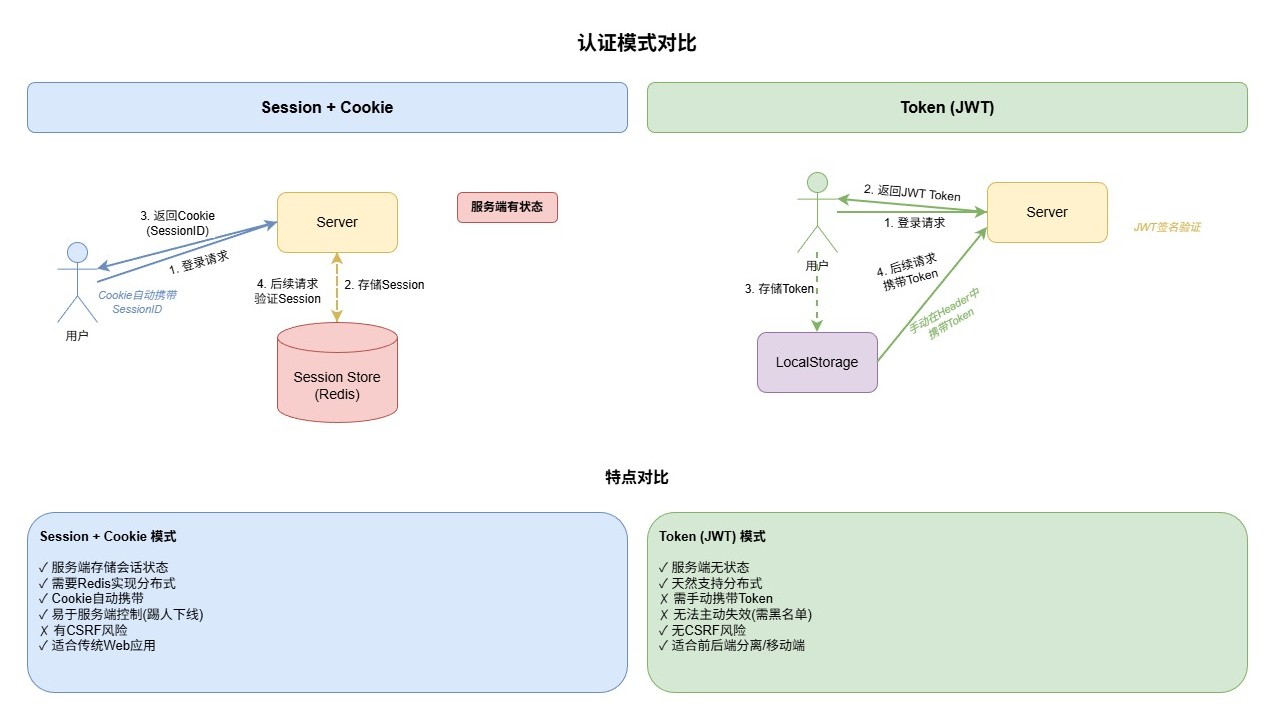
1.1 两种鉴权模式对比
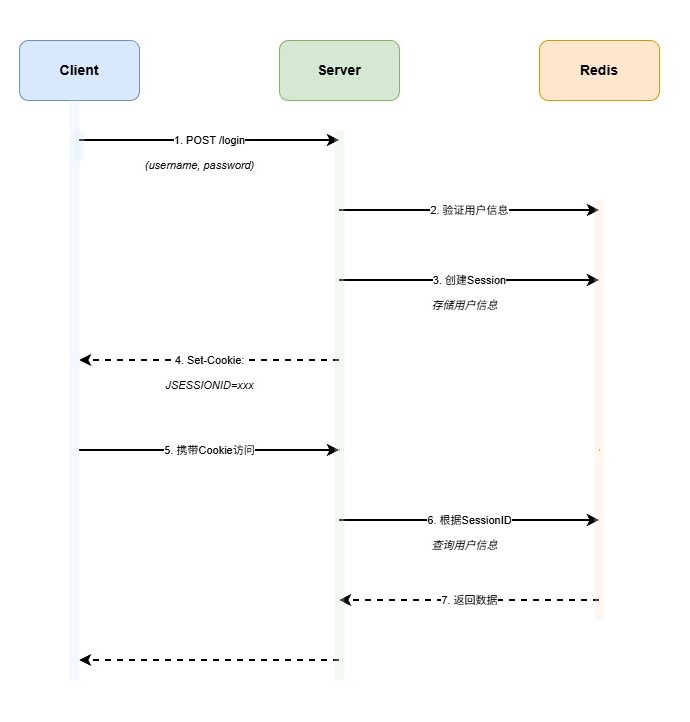
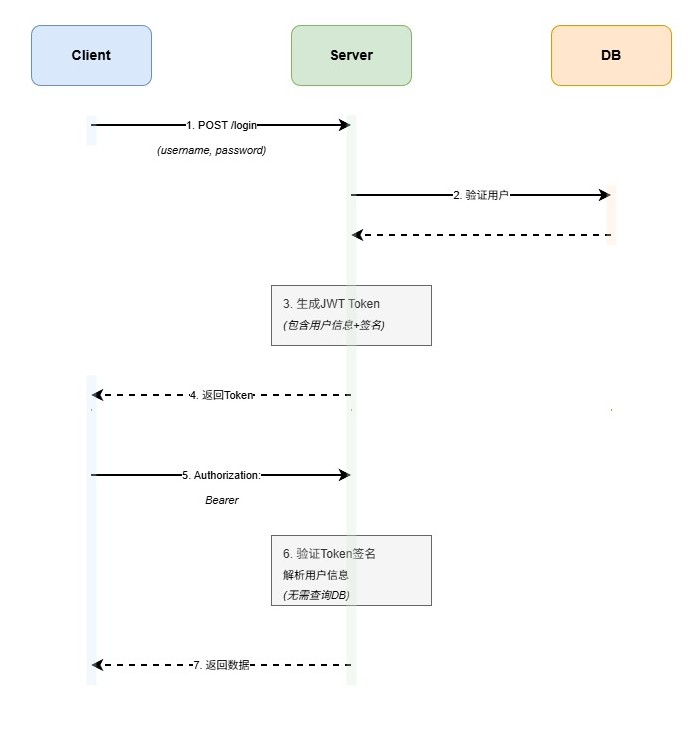
1.2 认证流程图
Session-Cookie 模式
JWT Token 模式
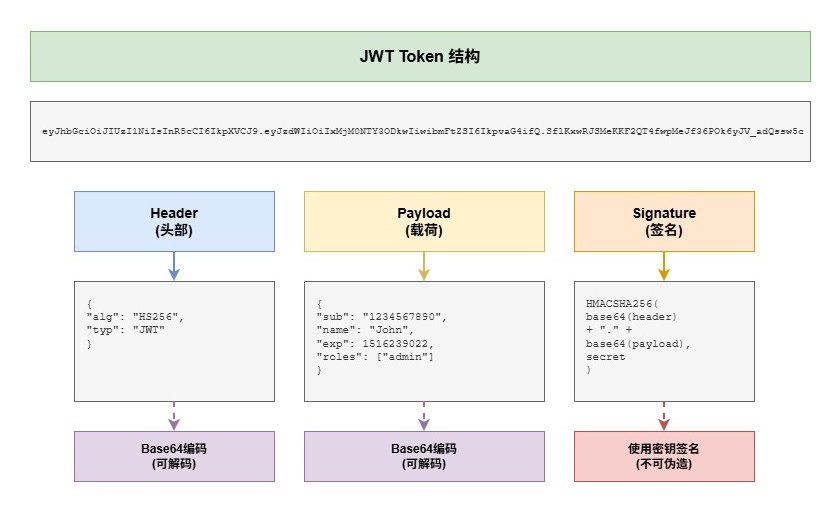
1.3 JWT Token 结构
二、Session + Cookie + Redis 模式实现
2.1 项目结构
src/main/java/com/zwnsyw/zwwwspringbootbasetemplate/
├── config/
│   └── AppProperties.java              # 统一配置属性类
├── security/
│   └── session/
│       ├── SessionStore.java           # Session 存储接口
│       ├── InMemorySessionStore.java   # 内存存储实现(开发环境)
│       ├── RedisSessionStore.java      # Redis 存储实现(生产环境)
│       └── SessionCookieManager.java   # Session Cookie 管理器
└── model/
    └── vo/
        ├── LoginUserVO.java            # 登录用户信息
        └── SessionInfoVO.java          # Session 信息 VO

src/main/resources/
├── application.yml                     # 主配置文件(通用默认值)
├── application-dev.yml                 # 开发环境配置
├── application-prod.yml                # 生产环境配置
├── .env.dev                            # 开发环境变量(不提交 Git)
└── .env.prod                           # 生产环境变量(不提交 Git)
2.2 配置文件
主配置文件 application.yml
# =====================================================
# application.yml - 主配置文件
# =====================================================
# 此文件包含所有环境通用的默认配置
# 环境特定配置在 application-{profile}.yml 中覆盖
# 敏感信息通过 .env.{profile} 环境变量注入
# =====================================================

spring:
  application:
    name: ${APP_NAME:ZwwwSpringBootBaseTemplate}

  profiles:
    active: ${SPRING_PROFILES_ACTIVE:dev}

  # ---------- 数据源配置 ----------
  datasource:
    url: jdbc:mysql://${DB_HOST:localhost}:${DB_PORT:3306}/${DB_NAME:zwwwspringbootbasetemplate}?useSSL=false&serverTimezone=Asia/Shanghai&allowPublicKeyRetrieval=true
    username: ${DB_USERNAME:root}
    password: ${DB_PASSWORD:zw200495}
    driver-class-name: com.mysql.cj.jdbc.Driver
    hikari:
      minimum-idle: 5
      maximum-pool-size: 20
      idle-timeout: 300000
      max-lifetime: 1200000
      connection-timeout: 30000
      pool-name: HikariPool

  # ---------- JPA 配置 ----------
  jpa:
    hibernate:
      ddl-auto: update
    show-sql: true
    properties:
      hibernate:
        format_sql: true
        dialect: org.hibernate.dialect.MySQL8Dialect

  # ---------- Redis 配置 ----------
  data:
    redis:
      host: ${REDIS_HOST:localhost}
      port: ${REDIS_PORT:6379}
      password: ${REDIS_PASSWORD:}
      database: ${REDIS_DATABASE:0}
      timeout: 10s
      lettuce:
        pool:
          max-active: 20
          max-idle: 10
          min-idle: 5
          max-wait: 3s

# ---------- 服务器配置 ----------
server:
  port: ${SERVER_PORT:8080}
  servlet:
    context-path: /api

# ------ MyBatis Plus 配置 ------
mybatis-plus:
  configuration:
    map-underscore-to-camel-case: false
    default-enum-type-handler: org.apache.ibatis.type.EnumOrdinalTypeHandler
  global-config:
    db-config:
      logic-delete-field: isDelete
      logic-delete-value: 1
      logic-not-delete-value: 0

# ---------- 应用配置 ----------
app:
  name: ${APP_NAME:ZwwwSpringBootBaseTemplate}
  version: ${APP_VERSION:1.0.0}
  debug: ${APP_DEBUG:true}

  # 安全配置
  security:
    password-salt: ${APP_SECURITY_PASSWORD_SALT:default-salt-change-in-production}
    bcrypt-strength: ${APP_SECURITY_BCRYPT_STRENGTH:10}

  # JWT 配置
  jwt:
    secret: ${APP_JWT_SECRET:default-jwt-secret-change-in-production-must-be-long}
    expiration: ${APP_JWT_EXPIRATION:604800}
    token-prefix: "Bearer "
    header-name: Authorization

  # Session 配置
  session:
    store-type: ${APP_SESSION_STORE_TYPE:memory}
    timeout-minutes: ${APP_SESSION_TIMEOUT_MINUTES:30}
    cookie-name: ${APP_SESSION_COOKIE_NAME:ZSESSION}
    cookie-path: ${APP_SESSION_COOKIE_PATH:/}
    cookie-domain: ${APP_SESSION_COOKIE_DOMAIN:}
    same-site: ${APP_SESSION_SAME_SITE:Lax}
    http-only: ${APP_SESSION_HTTP_ONLY:true}
    secure: ${APP_SESSION_SECURE:false}
    sliding-window: ${APP_SESSION_SLIDING_WINDOW:true}
    redis-key-prefix: ${APP_SESSION_REDIS_KEY_PREFIX:session:}
    cleanup-interval-ms: ${APP_SESSION_CLEANUP_INTERVAL_MS:300000}

  # 文件上传配置
  file:
    max-size: ${APP_FILE_MAX_SIZE:10485760}
    allowed-formats: ${APP_FILE_ALLOWED_FORMATS:jpg,jpeg,png,gif,webp,pdf}
    upload-path: ${APP_FILE_UPLOAD_PATH:./uploads}

  # 用户配置
  user:
    max-password-retry: ${APP_USER_MAX_PASSWORD_RETRY:5}
    max-login-device: ${APP_USER_MAX_LOGIN_DEVICE:3}
    lock-minutes: ${APP_USER_LOCK_MINUTES:30}

  # CORS 配置
  cors:
    allowed-origins: ${APP_CORS_ORIGINS:http://localhost:5173,http://localhost:3000}

# ---------- Knife4j 配置 ----------
knife4j:
  enable: ${KNIFE4J_ENABLE:true}
  setting:
    language: zh_cn
    swagger-model-name: 实体类

# ---------- 日志配置 ----------
logging:
  level:
    root: ${LOG_LEVEL:INFO}
    com.zwnsyw: DEBUG
    org.springframework.security: DEBUG
  pattern:
    console: "%d{yyyy-MM-dd HH:mm:ss} [%thread] %-5level %logger{36} - %msg%n"
开发环境配置 application-dev.yml
# =====================================================
# application-dev.yml - 开发环境配置
# =====================================================

mybatis-plus:
  configuration:
    log-impl: org.apache.ibatis.logging.stdout.StdOutImpl

knife4j:
  enable: true

logging:
  level:
    com.zwnsyw: DEBUG
生产环境配置 application-prod.yml
# =====================================================
# application-prod.yml - 生产环境配置
# =====================================================
# 通过环境变量注入敏感配置,此文件可以提交到 Git
# =====================================================

spring:
  config:
    activate:
      on-profile: prod

  # ---------- 数据源配置 ----------
  datasource:
    url: jdbc:mysql://${DB_HOST}:${DB_PORT}/${DB_NAME}?useSSL=true&requireSSL=true&serverTimezone=Asia/Shanghai&characterEncoding=utf8mb4
    username: ${DB_USERNAME}
    password: ${DB_PASSWORD}
    hikari:
      minimum-idle: 10
      maximum-pool-size: 50
      idle-timeout: 300000
      max-lifetime: 1800000
      connection-timeout: 30000

  # ---------- Redis 配置 ----------
  data:
    redis:
      host: ${REDIS_HOST}
      port: ${REDIS_PORT}
      password: ${REDIS_PASSWORD:}
      database: ${REDIS_DATABASE:0}
      timeout: 10s
      lettuce:
        pool:
          max-active: 50
          max-idle: 20
          min-idle: 10
          max-wait: 5s

  # ---------- JPA 配置 ----------
  jpa:
    hibernate:
      ddl-auto: validate
    show-sql: false
    properties:
      hibernate:
        format_sql: false

# ---------- 应用配置 ----------
app:
  name: ${APP_NAME:ZwwwSpringBootBaseTemplate}
  version: ${APP_VERSION:1.0.0}
  debug: false

  # 安全配置
  security:
    password-salt: ${APP_SECURITY_PASSWORD_SALT}
    bcrypt-strength: ${APP_SECURITY_BCRYPT_STRENGTH:12}

  # JWT 配置
  jwt:
    secret: ${APP_JWT_SECRET}
    expiration: ${APP_JWT_EXPIRATION:604800}

  # Session 配置(生产环境使用 Redis)
  session:
    store-type: ${APP_SESSION_STORE_TYPE:redis}
    timeout-minutes: ${APP_SESSION_TIMEOUT_MINUTES:30}
    cookie-name: ${APP_SESSION_COOKIE_NAME:ZSESSION}
    cookie-path: ${APP_SESSION_COOKIE_PATH:/}
    cookie-domain: ${APP_SESSION_COOKIE_DOMAIN:}
    same-site: ${APP_SESSION_SAME_SITE:Strict}
    http-only: ${APP_SESSION_HTTP_ONLY:true}
    secure: ${APP_SESSION_SECURE:true}
    sliding-window: ${APP_SESSION_SLIDING_WINDOW:true}
    redis-key-prefix: ${APP_SESSION_REDIS_KEY_PREFIX:prod:session:}

  # 文件上传配置
  file:
    max-size: ${APP_FILE_MAX_SIZE:10485760}
    allowed-formats: ${APP_FILE_ALLOWED_FORMATS:jpg,jpeg,png,gif,webp,pdf}
    upload-path: ${APP_FILE_UPLOAD_PATH:/var/data/uploads}

  # 用户配置
  user:
    max-password-retry: ${APP_USER_MAX_PASSWORD_RETRY:3}
    max-login-device: ${APP_USER_MAX_LOGIN_DEVICE:3}
    lock-minutes: ${APP_USER_LOCK_MINUTES:60}

  # CORS 配置
  cors:
    allowed-origins: ${APP_CORS_ORIGINS:}

# ---------- Knife4j 配置 ----------
knife4j:
  enable: ${KNIFE4J_ENABLE:false}
  production: true

# ---------- 日志配置 ----------
logging:
  level:
    root: ${LOG_LEVEL:WARN}
    com.zwnsyw: INFO
    org.springframework.security: WARN
  file:
    name: /var/log/app/application.log
  logback:
    rollingpolicy:
      max-file-size: 100MB
      max-history: 30

# ---------- 服务器配置 ----------
server:
  port: ${SERVER_PORT:8080}
  tomcat:
    max-threads: 200
    min-spare-threads: 20
    accept-count: 100
开发环境变量 .env.dev
# =====================================================
# .env.dev - 开发环境配置
# =====================================================
# IDEA 配置方式:
# 1. 安装 EnvFile 插件
# 2. Run/Debug Configurations → EnvFile 标签 → 勾选 Enable
# 3. 添加此文件路径
# =====================================================

# ============ Spring Profile ============
SPRING_PROFILES_ACTIVE=dev

# ============ 应用信息 ============
APP_NAME=ZwwwSpringBootBaseTemplate-Dev
APP_VERSION=1.0.0-dev
APP_DEBUG=true

# ============ 服务器配置 ============
SERVER_PORT=8080

# ============ 数据库配置 ============
DB_HOST=localhost
DB_PORT=3306
DB_NAME=zwwwspringbootbasetemplate
DB_USERNAME=root
DB_PASSWORD=zw200495

# ============ Redis 配置 ============
REDIS_HOST=localhost
REDIS_PORT=6379
REDIS_PASSWORD=
REDIS_DATABASE=0

# ============ JWT 配置 ============
APP_JWT_SECRET=dev-jwt-secret-for-local-development-only-simple-key
APP_JWT_EXPIRATION=86400

# ============ 安全配置 ============
APP_SECURITY_PASSWORD_SALT=Dev@Salt#2024!LocalDevelopment
APP_SECURITY_BCRYPT_STRENGTH=4

# ============ Session 配置 memory/redis ============
APP_SESSION_STORE_TYPE=redis
APP_SESSION_TIMEOUT_MINUTES=60
APP_SESSION_COOKIE_NAME=ZSESSION
APP_SESSION_COOKIE_PATH=/
APP_SESSION_COOKIE_DOMAIN=
APP_SESSION_SAME_SITE=Lax
APP_SESSION_HTTP_ONLY=true
APP_SESSION_SECURE=false
APP_SESSION_SLIDING_WINDOW=true
APP_SESSION_CLEANUP_INTERVAL_MS=300000

# ============ 文件上传配置 ============
APP_FILE_MAX_SIZE=10485760
APP_FILE_ALLOWED_FORMATS=jpg,jpeg,png,gif,webp,pdf
APP_FILE_UPLOAD_PATH=D:/uploads/dev

# ============ 用户配置 ============
APP_USER_MAX_PASSWORD_RETRY=10
APP_USER_MAX_LOGIN_DEVICE=5
APP_USER_LOCK_MINUTES=5

# ============ CORS 配置 ============
APP_CORS_ORIGINS=http://localhost:5173,http://localhost:3000

# ============ 文档配置 ============
KNIFE4J_ENABLE=true

# ============ 日志配置 ============
LOG_LEVEL=DEBUG
生产环境变量 .env.prod
# =====================================================
# .env.prod - 生产环境配置
# =====================================================
# 部署方式:
# 方式一:source .env.prod && java -jar app.jar
# 方式二:Docker 环境变量注入
# 方式三:K8s ConfigMap/Secret
#
# 安全提醒:
# - 此文件包含敏感信息,绝不能提交到 Git
# - 确保文件权限为 600:chmod 600 .env.prod
# - 生产密钥至少 32 位随机字符
# =====================================================

# ============ Spring Profile ============
SPRING_PROFILES_ACTIVE=prod

# ============ 应用信息 ============
APP_NAME=ZwwwSpringBootBaseTemplate
APP_VERSION=1.0.0
APP_DEBUG=false

# ============ 服务器配置 ============
SERVER_PORT=8080

# ============ 数据库配置 ============
# TODO: 替换为真实生产数据库配置
DB_HOST=prod-mysql.example.com
DB_PORT=3306
DB_NAME=prod_database
DB_USERNAME=prod_db_user
DB_PASSWORD=super_secure_database_password_here_min_16_chars

# ============ Redis 配置 ============
# TODO: 替换为真实 Redis 配置
REDIS_HOST=prod-redis.example.com
REDIS_PORT=6379
REDIS_PASSWORD=redis_secure_password_here_min_16_chars
REDIS_DATABASE=0

# ============ JWT 配置 ============
# 生成方式:openssl rand -base64 64
APP_JWT_SECRET=production_jwt_secret_must_be_very_long_and_secure_at_least_256_bits_change_this
APP_JWT_EXPIRATION=604800

# ============ 安全配置 ============
# 生成方式:openssl rand -base64 32
APP_SECURITY_PASSWORD_SALT=Prod@Salt#2024!YourSecureRandomString!@#$%ChangeThis
APP_SECURITY_BCRYPT_STRENGTH=12

# ============ Session 配置(生产环境使用 Redis)============
APP_SESSION_STORE_TYPE=redis
APP_SESSION_TIMEOUT_MINUTES=30
APP_SESSION_COOKIE_NAME=ZSESSION
APP_SESSION_COOKIE_PATH=/
APP_SESSION_COOKIE_DOMAIN=.example.com
APP_SESSION_SAME_SITE=Strict
APP_SESSION_HTTP_ONLY=true
APP_SESSION_SECURE=true
APP_SESSION_SLIDING_WINDOW=true
APP_SESSION_REDIS_KEY_PREFIX=prod:session:

# ============ 文件上传配置 ============
APP_FILE_MAX_SIZE=10485760
APP_FILE_ALLOWED_FORMATS=jpg,jpeg,png,gif,webp,pdf
APP_FILE_UPLOAD_PATH=/var/data/uploads

# ============ 用户配置 ============
APP_USER_MAX_PASSWORD_RETRY=3
APP_USER_MAX_LOGIN_DEVICE=3
APP_USER_LOCK_MINUTES=60

# ============ CORS 配置 ============
# TODO: 替换为真实域名
APP_CORS_ORIGINS=https://www.example.com,https://admin.example.com

# ============ 文档配置(生产环境禁用)============
KNIFE4J_ENABLE=false

# ============ 日志配置 ============
LOG_LEVEL=WARN
2.3 统一配置属性类 AppProperties.java
package com.zwnsyw.zwwwspringbootbasetemplate.config;

import lombok.Data;
import org.springframework.boot.context.properties.ConfigurationProperties;
import org.springframework.stereotype.Component;
import org.springframework.validation.annotation.Validated;

import javax.validation.constraints.Max;
import javax.validation.constraints.Min;
import javax.validation.constraints.NotBlank;

/**
 * 应用配置属性 - 统一配置入口
 *
 * ==================== 使用说明 ====================
 *
 * 本类采用三层配置管理机制:
 * 1. application.yml - 主配置文件(所有环境通用的默认值)
 * 2. application-{profile}.yml - 环境特定配置(dev/test/prod)
 * 3. .env.{profile} - 环境变量文件(敏感信息,不提交 Git)
 *
 * ==================== 加载顺序 ====================
 *
 * 1. application.yml 中的默认值被加载
 * 2. application-{spring.profiles.active}.yml 覆盖默认值
 * 3. 系统环境变量或 .env 文件中的值最终覆盖以上配置
 *
 * 示例:
 * - 在 application.yml 中定义: app.name: default-name
 * - 在 application-dev.yml 中覆盖: app.name: dev-name
 * - 在 .env.dev 中注入: APP_NAME=local-dev-name
 *
 * ==================== 注入方式 ====================
 *
 * 1. 字段注入(简单场景):
 *    @Autowired
 *    private AppProperties appProperties;
 *
 * 2. 构造器注入(推荐,便于测试):
 *    public MyService(AppProperties appProperties) {
 *        this.appProperties = appProperties;
 *    }
 *
 * 3. 方法参数注入:
 *    public void myMethod(@Qualifier("appProperties") AppProperties config) { }
 *
 * ==================== 环境变量映射 ====================
 *
 * YAML 配置 -> 环境变量(Spring 会自动转换):
 * - app.name -> APP_NAME
 * - app.jwt.secret -> APP_JWT_SECRET
 * - app.jwt.expiration -> APP_JWT_EXPIRATION
 * - app.file.max-size -> APP_FILE_MAX_SIZE
 * - app.session.store-type -> APP_SESSION_STORE_TYPE
 * - app.session.timeout-minutes -> APP_SESSION_TIMEOUT_MINUTES
 *
 * 注:在 .env 文件中使用大写 + 下划线格式
 *
 * ==================== 配置文件检查列表 ====================
 *
 * ✓ application.yml - 主配置,包含所有默认值
 * ✓ application-dev.yml - 开发环境覆盖
 * ✓ application-test.yml - 测试环境覆盖
 * ✓ application-prod.yml - 生产环境覆盖(关键值从环境变量读取)
 * ✓ .env.dev - 开发本地环境变量(.gitignore)
 * ✓ .env.test - 测试环境变量(.gitignore)
 * ✓ .env.prod - 生产环境变量(不提交,服务器手动创建)
 */
@Data
@Component
@Validated
@ConfigurationProperties(prefix = "app")
public class AppProperties {

    /** 应用名称 */
    @NotBlank(message = "应用名称不能为空")
    private String name;

    /** 应用版本 */
    private String version = "1.0.0";

    /** 是否开启调试模式(仅用于标识,实际由 spring.profiles.active 决定) */
    private boolean debug = false;

    /** 安全配置 */
    private SecurityConfig security = new SecurityConfig();

    /** JWT 配置 */
    private JwtConfig jwt = new JwtConfig();

    /** Session 配置 */
    private SessionConfig session = new SessionConfig();

    /** 文件上传配置 */
    private FileConfig file = new FileConfig();

    /** 用户相关配置 */
    private UserConfig user = new UserConfig();

    /** CORS 配置 */
    private CorsConfig cors = new CorsConfig();

    // ==================== 内部配置类 ====================

    /**
     * 安全配置
     * 来源: application.yml + .env.{profile}
     */
    @Data
    public static class SecurityConfig {

        /**
         * 密码静态盐值 - 生产环境必须从环境变量注入
         * 用于增强 BCrypt 加密的安全性
         */
        @NotBlank(message = "密码盐值不能为空")
        private String passwordSalt;

        /**
         * BCrypt 加密强度 (4-31)
         * 开发环境建议: 4-6 (快速)
         * 生产环境建议: 10-12 (安全)
         * 强度每增加1,计算时间翻倍
         */
        @Min(value = 4, message = "BCrypt强度最小为4")
        @Max(value = 31, message = "BCrypt强度最大为31")
        private int bcryptStrength = 10;
    }

    /**
     * JWT 配置
     * 来源: application.yml + application-{profile}.yml + .env.{profile}
     */
    @Data
    public static class JwtConfig {
        /** JWT 密钥 - 生产环境必须从 .env.prod 注入,不要使用默认值 */
        @NotBlank(message = "JWT密钥不能为空")
        private String secret;

        /** 过期时间(秒),默认7天 */
        @Min(value = 60, message = "JWT过期时间不能少于60秒")
        private long expiration = 604800;

        /** Token 前缀,默认 Bearer */
        private String tokenPrefix = "Bearer ";

        /** Authorization Header 名称,默认 Authorization */
        private String headerName = "Authorization";

        /** 获取过期时间(毫秒)- 方便在代码中使用 */
        public long getExpirationMs() {
            return expiration * 1000;
        }
    }

    /**
     * Session 配置
     * <p>
     * 统一管理 Session 相关的所有配置
     * </p>
     *
     * ==================== 配置示例 ====================
     *
     * application.yml:
     * app:
     *   session:
     *     store-type: memory          # memory 或 redis
     *     timeout-minutes: 30         # Session 过期时间(分钟)
     *     cookie-name: ZSESSION       # Cookie 名称
     *     sliding-window: true        # 是否启用滑动窗口
     *
     * ==================== 环境变量 ====================
     *
     * APP_SESSION_STORE_TYPE=redis
     * APP_SESSION_TIMEOUT_MINUTES=60
     * APP_SESSION_COOKIE_NAME=ZSESSION
     */
    @Data
    public static class SessionConfig {

        /**
         * Session 存储类型
         * - memory: 内存存储(开发环境,单机部署)
         * - redis: Redis 存储(生产环境,分布式部署)
         */
        @NotBlank(message = "Session 存储类型不能为空")
        private String storeType = "memory";

        /**
         * Session 过期时间(分钟)
         */
        @Min(value = 1, message = "Session 过期时间最小为 1 分钟")
        private int timeoutMinutes = 30;

        /**
         * Cookie 名称
         */
        @NotBlank(message = "Cookie 名称不能为空")
        private String cookieName = "ZSESSION";

        /**
         * Cookie 路径
         */
        private String cookiePath = "/";

        /**
         * Cookie 域名(空表示不设置,使用当前域名)
         */
        private String cookieDomain = "";

        /**
         * SameSite 属性
         * - Strict: 严格模式,完全禁止跨站请求携带 Cookie
         * - Lax: 宽松模式,允许部分跨站请求(GET 请求导航)
         * - None: 允许跨站请求(需要 Secure=true)
         */
        private String sameSite = "Lax";

        /**
         * 是否设置 HttpOnly(防止 XSS 攻击,JS 无法访问)
         */
        private boolean httpOnly = true;

        /**
         * 是否仅 HTTPS(生产环境应为 true)
         */
        private boolean secure = false;

        /**
         * 是否启用滑动窗口(每次访问刷新过期时间)
         */
        private boolean slidingWindow = true;

        /**
         * Redis Key 前缀
         */
        private String redisKeyPrefix = "session:";

        /**
         * 内存清理间隔(毫秒),仅内存存储生效
         */
        private long cleanupIntervalMs = 300000; // 5 分钟

        /**
         * 判断是否使用 Redis 存储
         */
        public boolean isRedisStore() {
            return "redis".equalsIgnoreCase(storeType);
        }

        /**
         * 判断是否使用内存存储
         */
        public boolean isMemoryStore() {
            return "memory".equalsIgnoreCase(storeType);
        }

        /**
         * 获取超时时间(秒)
         */
        public long getTimeoutSeconds() {
            return timeoutMinutes * 60L;
        }

        /**
         * 获取超时时间(毫秒)
         */
        public long getTimeoutMs() {
            return timeoutMinutes * 60L * 1000L;
        }
    }

    /**
     * 文件上传配置
     * 来源: application.yml + application-{profile}.yml
     */
    @Data
    public static class FileConfig {
        /** 最大文件大小(字节),默认10MB */
        private long maxSize = 10485760;

        /** 允许的文件格式(逗号分隔) */
        private String allowedFormats = "jpg,jpeg,png,gif,webp,pdf";

        /** 上传路径 */
        private String uploadPath = "/uploads";

        /** 获取允许的格式列表(数组形式,便于校验) */
        public String[] getAllowedFormatArray() {
            return allowedFormats.split(",");
        }

        /** 获取最大文件大小(MB)- 方便在错误提示中使用 */
        public long getMaxSizeMB() {
            return maxSize / (1024 * 1024);
        }
    }

    /**
     * 用户相关配置
     * 来源: application.yml + application-{profile}.yml
     */
    @Data
    public static class UserConfig {
        /** 密码最大重试次数,超过后锁定账户 */
        private int maxPasswordRetry = 5;

        /** 最大同时登录设备数 */
        private int maxLoginDevice = 3;

        /** 账户锁定时间(分钟) */
        private int lockMinutes = 30;
    }

    /**
     * CORS 跨域配置
     * 来源: cors.allowed-origins(在 application.yml 中定义)
     * 注:虽然放在 app 下,但实际配置在 cors 节点,需要手动读取
     */
    @Data
    public static class CorsConfig {
        /** 允许的源(逗号分隔) */
        private String allowedOrigins = "http://localhost:5173,http://localhost:3000";

        /** 获取允许的源列表(数组形式) */
        public String[] getAllowedOriginsArray() {
            if (allowedOrigins == null || allowedOrigins.isEmpty()) {
                return new String[]{"*"};
            }
            return allowedOrigins.split(",");
        }
    }

    // ==================== 便捷方法 ====================

    /** 是否为生产环境 */
    public boolean isProduction() {
        return !debug;
    }

    /** 是否为开发环境 */
    public boolean isDevelopment() {
        return debug;
    }
}
2.4 Session 存储接口 SessionStore.java
package com.zwnsyw.zwwwspringbootbasetemplate.security.session;

import com.zwnsyw.zwwwspringbootbasetemplate.model.vo.LoginUserVO;

/**
 * Session 存储接口
 * <p>
 * 抽象 Session 的存储逻辑,支持多种实现:
 * - 内存存储(开发环境)
 * - Redis 存储(生产环境)
 * - 未来可扩展:数据库、MongoDB 等
 * </p>
 *
 * ==================== 设计思想 ====================
 *
 * 1. 接口抽象:不关心具体存储方式
 * 2. 策略模式:运行时根据配置选择实现
 * 3. 可扩展:新增存储方式只需实现此接口
 *
 * ==================== 使用示例 ====================
 *
 * @Autowired
 * private SessionStore sessionStore;
 *
 * // 创建 Session
 * String sessionId = sessionStore.createSession(loginUserVO);
 *
 * // 获取 Session
 * LoginUserVO user = sessionStore.getSession(sessionId);
 *
 * // 删除 Session
 * sessionStore.removeSession(sessionId);
 */
public interface SessionStore {

    /**
     * 创建 Session
     *
     * @param user 登录用户信息
     * @return 生成的 Session ID
     */
    String createSession(LoginUserVO user);

    /**
     * 获取 Session 中的用户信息
     * <p>
     * 如果启用了滑动窗口,每次获取都会刷新过期时间
     * </p>
     *
     * @param sessionId Session ID
     * @return 用户信息,不存在或已过期返回 null
     */
    LoginUserVO getSession(String sessionId);

    /**
     * 更新 Session 中的用户信息
     * <p>
     * 用于用户信息变更后同步更新 Session
     * </p>
     *
     * @param sessionId Session ID
     * @param user      新的用户信息
     * @return true 更新成功,false Session 不存在
     */
    boolean updateSession(String sessionId, LoginUserVO user);

    /**
     * 删除 Session
     *
     * @param sessionId Session ID
     */
    void removeSession(String sessionId);

    /**
     * 检查 Session 是否存在且有效
     *
     * @param sessionId Session ID
     * @return true 存在且有效,false 不存在或已过期
     */
    boolean existsSession(String sessionId);

    /**
     * 获取 Session 剩余生存时间(秒)
     *
     * @param sessionId Session ID
     * @return 剩余秒数,-1 表示不存在,-2 表示永不过期
     */
    long getSessionTTL(String sessionId);

    /**
     * 刷新 Session 过期时间
     * <p>
     * 手动刷新,用于"保持登录"等场景
     * </p>
     *
     * @param sessionId Session ID
     * @return true 刷新成功,false Session 不存在
     */
    boolean refreshSession(String sessionId);

    /**
     * 删除用户的所有 Session(用于强制下线)
     *
     * @param userId 用户 ID
     * @return 删除的 Session 数量
     */
    int removeAllSessionsByUserId(Long userId);
}
2.5 内存存储实现 InMemorySessionStore.java
package com.zwnsyw.zwwwspringbootbasetemplate.security.session;

import com.zwnsyw.zwwwspringbootbasetemplate.config.AppProperties;
import com.zwnsyw.zwwwspringbootbasetemplate.model.vo.LoginUserVO;
import lombok.Data;
import lombok.RequiredArgsConstructor;
import lombok.extern.slf4j.Slf4j;
import org.springframework.boot.autoconfigure.condition.ConditionalOnProperty;
import org.springframework.scheduling.annotation.Scheduled;
import org.springframework.stereotype.Component;

import javax.annotation.PostConstruct;
import java.util.Map;
import java.util.UUID;
import java.util.concurrent.ConcurrentHashMap;
import java.util.concurrent.atomic.AtomicInteger;

/**
 * 内存 Session 存储实现
 * <p>
 * 适用场景:
 * - 开发环境
 * - 单机部署
 * - 测试环境
 * </p>
 *
 * ==================== 注意事项 ====================
 *
 * 1. 服务重启后 Session 会丢失
 * 2. 不支持分布式部署(多实例间 Session 不共享)
 * 3. 需要定期清理过期 Session,防止内存泄漏
 *
 * ==================== 启用条件 ====================
 *
 * 配置 app.session.store-type=memory 时自动启用
 */
@Slf4j
@Component
@RequiredArgsConstructor
@ConditionalOnProperty(name = "app.session.store-type", havingValue = "memory", matchIfMissing = true)
public class InMemorySessionStore implements SessionStore {

    private final AppProperties appProperties;

    /**
     * 获取 Session 配置(便捷方法)
     */
    private AppProperties.SessionConfig getSessionConfig() {
        return appProperties.getSession();
    }

    /**
     * Session 数据结构
     */
    @Data
    private static class SessionData {
        private LoginUserVO user;
        private long expiryTime;  // 过期时间戳(毫秒)
        private long createTime;  // 创建时间戳

        public boolean isExpired() {
            return System.currentTimeMillis() > expiryTime;
        }

        public long getRemainingTTL() {
            long remaining = (expiryTime - System.currentTimeMillis()) / 1000;
            return remaining > 0 ? remaining : -1;
        }
    }

    /**
     * Session 存储容器(线程安全)
     */
    private final Map<String, SessionData> sessions = new ConcurrentHashMap<>();

    /**
     * 用户 ID 到 Session ID 的映射(用于强制下线)
     */
    private final Map<Long, String> userSessionMap = new ConcurrentHashMap<>();

    @PostConstruct
    public void init() {
        AppProperties.SessionConfig config = getSessionConfig();
        log.info("InMemorySessionStore initialized, timeout: {} minutes, sliding-window: {}",
                config.getTimeoutMinutes(),
                config.isSlidingWindow());
    }

    /**
     * 定时清理过期 Session
     * <p>
     * 每 5 分钟执行一次,清理过期的 Session,防止内存泄漏
     * </p>
     */
    @Scheduled(fixedDelayString = "${app.session.cleanup-interval-ms:300000}")
    public void cleanupExpiredSessions() {
        if (sessions.isEmpty()) {
            return;
        }

        AtomicInteger count = new AtomicInteger(0);
        long now = System.currentTimeMillis();

        sessions.entrySet().removeIf(entry -> {
            boolean expired = entry.getValue().getExpiryTime() < now;
            if (expired) {
                // 同时清理用户映射
                LoginUserVO user = entry.getValue().getUser();
                if (user != null) {
                    userSessionMap.remove(user.getId());
                }
                count.incrementAndGet();
            }
            return expired;
        });

        if (count.get() > 0) {
            log.debug("Cleaned up {} expired sessions, remaining: {}", count.get(), sessions.size());
        }
    }

    @Override
    public String createSession(LoginUserVO user) {
        if (user == null || user.getId() == null) {
            throw new IllegalArgumentException("User or userId cannot be null");
        }

        AppProperties.SessionConfig config = getSessionConfig();

        // 生成唯一的 Session ID
        String sessionId = generateSessionId();
        long now = System.currentTimeMillis();
        long expiryTime = now + config.getTimeoutMs();

        // 创建 Session 数据
        SessionData data = new SessionData();
        data.setUser(user);
        data.setExpiryTime(expiryTime);
        data.setCreateTime(now);

        // 存储 Session
        sessions.put(sessionId, data);

        // 存储用户到 Session 的映射(用于强制下线)
        // 注意:这里会覆盖旧的 Session,实现"单点登录"效果
        String oldSessionId = userSessionMap.put(user.getId(), sessionId);
        if (oldSessionId != null && !oldSessionId.equals(sessionId)) {
            // 移除旧 Session
            sessions.remove(oldSessionId);
            log.debug("Removed old session for user {}: {}", user.getId(), oldSessionId);
        }

        log.debug("Session created: sessionId={}, userId={}, expiryTime={}",
                sessionId, user.getId(), expiryTime);

        return sessionId;
    }

    @Override
    public LoginUserVO getSession(String sessionId) {
        if (sessionId == null) {
            return null;
        }

        SessionData data = sessions.get(sessionId);
        if (data == null) {
            return null;
        }

        // 检查是否过期
        if (data.isExpired()) {
            removeSessionInternal(sessionId, data);
            log.debug("Session expired: sessionId={}", sessionId);
            return null;
        }

        AppProperties.SessionConfig config = getSessionConfig();

        // 滑动窗口:每次访问刷新过期时间
        if (config.isSlidingWindow()) {
            data.setExpiryTime(System.currentTimeMillis() + config.getTimeoutMs());
        }

        return data.getUser();
    }

    @Override
    public boolean updateSession(String sessionId, LoginUserVO user) {
        if (sessionId == null || user == null) {
            return false;
        }

        SessionData data = sessions.get(sessionId);
        if (data == null || data.isExpired()) {
            return false;
        }

        AppProperties.SessionConfig config = getSessionConfig();

        data.setUser(user);
        // 更新时也刷新过期时间
        data.setExpiryTime(System.currentTimeMillis() + config.getTimeoutMs());

        log.debug("Session updated: sessionId={}, userId={}", sessionId, user.getId());
        return true;
    }

    @Override
    public void removeSession(String sessionId) {
        if (sessionId == null) {
            return;
        }

        SessionData data = sessions.remove(sessionId);
        if (data != null && data.getUser() != null) {
            userSessionMap.remove(data.getUser().getId());
            log.debug("Session removed: sessionId={}, userId={}", sessionId, data.getUser().getId());
        }
    }

    @Override
    public boolean existsSession(String sessionId) {
        if (sessionId == null) {
            return false;
        }

        SessionData data = sessions.get(sessionId);
        if (data == null) {
            return false;
        }

        if (data.isExpired()) {
            removeSessionInternal(sessionId, data);
            return false;
        }

        return true;
    }

    @Override
    public long getSessionTTL(String sessionId) {
        if (sessionId == null) {
            return -1;
        }

        SessionData data = sessions.get(sessionId);
        if (data == null) {
            return -1;
        }

        return data.getRemainingTTL();
    }

    @Override
    public boolean refreshSession(String sessionId) {
        if (sessionId == null) {
            return false;
        }

        SessionData data = sessions.get(sessionId);
        if (data == null || data.isExpired()) {
            return false;
        }

        AppProperties.SessionConfig config = getSessionConfig();
        data.setExpiryTime(System.currentTimeMillis() + config.getTimeoutMs());
        log.debug("Session refreshed: sessionId={}", sessionId);
        return true;
    }

    @Override
    public int removeAllSessionsByUserId(Long userId) {
        if (userId == null) {
            return 0;
        }

        String sessionId = userSessionMap.remove(userId);
        if (sessionId != null) {
            sessions.remove(sessionId);
            log.debug("Removed session for user {}: {}", userId, sessionId);
            return 1;
        }

        return 0;
    }

    /**
     * 生成唯一的 Session ID
     */
    private String generateSessionId() {
        return UUID.randomUUID().toString().replace("-", "");
    }

    /**
     * 内部移除 Session 方法
     */
    private void removeSessionInternal(String sessionId, SessionData data) {
        sessions.remove(sessionId);
        if (data != null && data.getUser() != null) {
            userSessionMap.remove(data.getUser().getId());
        }
    }

    /**
     * 获取当前活跃 Session 数量(用于监控)
     */
    public int getActiveSessionCount() {
        return sessions.size();
    }

    /**
     * 获取所有 Session 信息(用于调试)
     */
    public Map<String, SessionData> getAllSessions() {
        return new ConcurrentHashMap<>(sessions);
    }
}
2.6 Redis 存储实现 RedisSessionStore.java
package com.zwnsyw.zwwwspringbootbasetemplate.security.session;

import com.fasterxml.jackson.core.JsonProcessingException;
import com.fasterxml.jackson.databind.ObjectMapper;
import com.zwnsyw.zwwwspringbootbasetemplate.config.AppProperties;
import com.zwnsyw.zwwwspringbootbasetemplate.model.vo.LoginUserVO;
import lombok.RequiredArgsConstructor;
import lombok.extern.slf4j.Slf4j;
import org.springframework.boot.autoconfigure.condition.ConditionalOnProperty;
import org.springframework.data.redis.core.StringRedisTemplate;
import org.springframework.stereotype.Component;

import javax.annotation.PostConstruct;
import java.util.Set;
import java.util.UUID;
import java.util.concurrent.TimeUnit;

/**
 * Redis Session 存储实现
 * <p>
 * 适用场景:
 * - 生产环境
 * - 分布式部署
 * - 需要 Session 持久化
 * </p>
 *
 * ==================== Redis Key 设计 ====================
 *
 * Session 数据:session:{sessionId} -> JSON(LoginUserVO)
 * 用户映射:session:user:{userId} -> sessionId
 *
 * ==================== 启用条件 ====================
 *
 * 配置 app.session.store-type=redis 时自动启用
 * 需要配置 Redis 连接信息
 */
@Slf4j
@Component
@RequiredArgsConstructor
@ConditionalOnProperty(name = "app.session.store-type", havingValue = "redis")
public class RedisSessionStore implements SessionStore {

    private final StringRedisTemplate redisTemplate;
    private final AppProperties appProperties;
    private final ObjectMapper objectMapper;

    /**
     * Session Key 前缀
     */
    private String sessionKeyPrefix;

    /**
     * 用户到 Session 映射的 Key 前缀
     */
    private String userSessionKeyPrefix;

    /**
     * 获取 Session 配置(便捷方法)
     */
    private AppProperties.SessionConfig getSessionConfig() {
        return appProperties.getSession();
    }

    @PostConstruct
    public void init() {
        AppProperties.SessionConfig config = getSessionConfig();
        sessionKeyPrefix = config.getRedisKeyPrefix();
        userSessionKeyPrefix = config.getRedisKeyPrefix() + "user:";

        log.info("RedisSessionStore initialized, keyPrefix: {}, timeout: {} minutes, sliding-window: {}",
                sessionKeyPrefix,
                config.getTimeoutMinutes(),
                config.isSlidingWindow());
    }

    @Override
    public String createSession(LoginUserVO user) {
        if (user == null || user.getId() == null) {
            throw new IllegalArgumentException("User or userId cannot be null");
        }

        AppProperties.SessionConfig config = getSessionConfig();

        // 生成唯一的 Session ID
        String sessionId = generateSessionId();
        String sessionKey = sessionKeyPrefix + sessionId;
        String userSessionKey = userSessionKeyPrefix + user.getId();
        int timeoutMinutes = config.getTimeoutMinutes();

        try {
            // 序列化用户信息
            String userJson = objectMapper.writeValueAsString(user);

            // 存储 Session
            redisTemplate.opsForValue().set(sessionKey, userJson, timeoutMinutes, TimeUnit.MINUTES);

            // 检查是否有旧 Session(单点登录)
            String oldSessionId = redisTemplate.opsForValue().get(userSessionKey);
            if (oldSessionId != null && !oldSessionId.equals(sessionId)) {
                // 删除旧 Session
                redisTemplate.delete(sessionKeyPrefix + oldSessionId);
                log.debug("Removed old session for user {}: {}", user.getId(), oldSessionId);
            }

            // 存储用户到 Session 的映射
            redisTemplate.opsForValue().set(userSessionKey, sessionId, timeoutMinutes, TimeUnit.MINUTES);

            log.debug("Session created in Redis: sessionId={}, userId={}, timeout={}min",
                    sessionId, user.getId(), timeoutMinutes);

            return sessionId;

        } catch (JsonProcessingException e) {
            log.error("Failed to serialize user for session: {}", e.getMessage());
            throw new RuntimeException("Session creation failed", e);
        }
    }

    @Override
    public LoginUserVO getSession(String sessionId) {
        if (sessionId == null) {
            return null;
        }

        String sessionKey = sessionKeyPrefix + sessionId;
        AppProperties.SessionConfig config = getSessionConfig();

        try {
            String userJson = redisTemplate.opsForValue().get(sessionKey);
            if (userJson == null) {
                return null;
            }

            // 滑动窗口:每次访问刷新过期时间
            if (config.isSlidingWindow()) {
                redisTemplate.expire(sessionKey, config.getTimeoutMinutes(), TimeUnit.MINUTES);
            }

            return objectMapper.readValue(userJson, LoginUserVO.class);

        } catch (JsonProcessingException e) {
            log.error("Failed to deserialize session data: sessionId={}, error={}",
                    sessionId, e.getMessage());
            return null;
        }
    }

    @Override
    public boolean updateSession(String sessionId, LoginUserVO user) {
        if (sessionId == null || user == null) {
            return false;
        }

        String sessionKey = sessionKeyPrefix + sessionId;
        AppProperties.SessionConfig config = getSessionConfig();

        // 检查 Session 是否存在
        if (Boolean.FALSE.equals(redisTemplate.hasKey(sessionKey))) {
            return false;
        }

        try {
            String userJson = objectMapper.writeValueAsString(user);
            redisTemplate.opsForValue().set(sessionKey, userJson,
                    config.getTimeoutMinutes(), TimeUnit.MINUTES);

            log.debug("Session updated in Redis: sessionId={}, userId={}", sessionId, user.getId());
            return true;

        } catch (JsonProcessingException e) {
            log.error("Failed to update session: sessionId={}, error={}", sessionId, e.getMessage());
            return false;
        }
    }

    @Override
    public void removeSession(String sessionId) {
        if (sessionId == null) {
            return;
        }

        String sessionKey = sessionKeyPrefix + sessionId;

        // 先获取用户信息,用于清理用户映射
        try {
            String userJson = redisTemplate.opsForValue().get(sessionKey);
            if (userJson != null) {
                LoginUserVO user = objectMapper.readValue(userJson, LoginUserVO.class);
                if (user != null && user.getId() != null) {
                    redisTemplate.delete(userSessionKeyPrefix + user.getId());
                }
            }
        } catch (JsonProcessingException e) {
            log.warn("Failed to parse session for cleanup: {}", e.getMessage());
        }

        // 删除 Session
        redisTemplate.delete(sessionKey);
        log.debug("Session removed from Redis: sessionId={}", sessionId);
    }

    @Override
    public boolean existsSession(String sessionId) {
        if (sessionId == null) {
            return false;
        }
        return Boolean.TRUE.equals(redisTemplate.hasKey(sessionKeyPrefix + sessionId));
    }

    @Override
    public long getSessionTTL(String sessionId) {
        if (sessionId == null) {
            return -1;
        }

        Long ttl = redisTemplate.getExpire(sessionKeyPrefix + sessionId, TimeUnit.SECONDS);
        return ttl != null ? ttl : -1;
    }

    @Override
    public boolean refreshSession(String sessionId) {
        if (sessionId == null) {
            return false;
        }

        String sessionKey = sessionKeyPrefix + sessionId;
        AppProperties.SessionConfig config = getSessionConfig();

        if (Boolean.FALSE.equals(redisTemplate.hasKey(sessionKey))) {
            return false;
        }

        redisTemplate.expire(sessionKey, config.getTimeoutMinutes(), TimeUnit.MINUTES);
        log.debug("Session refreshed in Redis: sessionId={}", sessionId);
        return true;
    }

    @Override
    public int removeAllSessionsByUserId(Long userId) {
        if (userId == null) {
            return 0;
        }

        String userSessionKey = userSessionKeyPrefix + userId;
        String sessionId = redisTemplate.opsForValue().get(userSessionKey);

        if (sessionId != null) {
            redisTemplate.delete(sessionKeyPrefix + sessionId);
            redisTemplate.delete(userSessionKey);
            log.debug("Removed all sessions for user {}", userId);
            return 1;
        }

        return 0;
    }

    /**
     * 生成唯一的 Session ID
     */
    private String generateSessionId() {
        return UUID.randomUUID().toString().replace("-", "");
    }

    /**
     * 获取当前活跃 Session 数量(用于监控)
     * <p>
     * 注意:这个操作在大量 Session 时可能较慢
     * </p>
     */
    public long getActiveSessionCount() {
        Set<String> keys = redisTemplate.keys(sessionKeyPrefix + "*");
        // 排除用户映射的 key
        if (keys != null) {
            return keys.stream()
                    .filter(key -> !key.contains(":user:"))
                    .count();
        }
        return 0;
    }
}
2.7 Session Cookie 管理器 SessionCookieManager.java
package com.zwnsyw.zwwwspringbootbasetemplate.security.session;

import com.zwnsyw.zwwwspringbootbasetemplate.config.AppProperties;
import com.zwnsyw.zwwwspringbootbasetemplate.model.vo.LoginUserVO;
import lombok.RequiredArgsConstructor;
import lombok.extern.slf4j.Slf4j;
import org.springframework.stereotype.Component;

import javax.servlet.http.Cookie;
import javax.servlet.http.HttpServletRequest;
import javax.servlet.http.HttpServletResponse;

/**
 * Session Cookie 管理器
 * <p>
 * 统一管理 Cookie 的创建、读取、删除,以及与 SessionStore 的交互
 * </p>
 *
 * ==================== 职责 ====================
 *
 * 1. 创建 Session 并设置 Cookie
 * 2. 从请求中读取 Session ID
 * 3. 从请求中获取登录用户信息
 * 4. 清除 Session 和 Cookie
 * 5. 刷新 Session
 *
 * ==================== 安全特性 ====================
 *
 * 1. HttpOnly: 防止 XSS 攻击,JS 无法访问 Cookie
 * 2. SameSite: 防止 CSRF 攻击
 *    - Strict: 完全禁止跨站请求携带 Cookie
 *    - Lax: 允许部分跨站请求(如链接跳转)
 *    - None: 允许跨站请求(需要 Secure=true)
 * 3. Secure: 仅 HTTPS 传输(生产环境必须开启)
 *
 * ==================== 使用示例 ====================
 *
 * // 登录时创建 Session
 * sessionCookieManager.createSessionAndSetCookie(loginUserVO, response);
 *
 * // 获取当前登录用户
 * LoginUserVO user = sessionCookieManager.getLoginUserFromRequest(request);
 *
 * // 登出时清除 Session
 * sessionCookieManager.clearSessionAndCookie(request, response);
 */
@Slf4j
@Component
@RequiredArgsConstructor
public class SessionCookieManager {

    private final SessionStore sessionStore;
    private final AppProperties appProperties;

    /**
     * 获取 Session 配置(便捷方法)
     */
    private AppProperties.SessionConfig getSessionConfig() {
        return appProperties.getSession();
    }

    /**
     * 创建 Session 并设置 Cookie
     *
     * @param user     登录用户信息
     * @param response HTTP 响应
     * @return 生成的 Session ID
     */
    public String createSessionAndSetCookie(LoginUserVO user, HttpServletResponse response) {
        // 创建 Session
        String sessionId = sessionStore.createSession(user);

        // 设置 Cookie
        addCookieToResponse(response, sessionId);

        log.debug("Session created and cookie set: sessionId={}, userId={}",
                sessionId, user.getId());

        return sessionId;
    }

    /**
     * 从请求中获取 Session ID
     *
     * @param request HTTP 请求
     * @return Session ID,不存在返回 null
     */
    public String getSessionIdFromRequest(HttpServletRequest request) {
        Cookie[] cookies = request.getCookies();
        if (cookies == null || cookies.length == 0) {
            return null;
        }

        String cookieName = getSessionConfig().getCookieName();
        for (Cookie cookie : cookies) {
            if (cookieName.equals(cookie.getName())) {
                // 添加 sessionId 格式校验
                String value = cookie.getValue();
                if (isValidSessionId(value)) {
                    return value;
                }
            }
        }
        return null;
    }

    private boolean isValidSessionId(String sessionId) {
        // 验证 sessionId 格式(应该是 UUID 去掉横线)
        return sessionId != null && sessionId.matches("^[a-f0-9]{32}$");
    }

    /**
     * 从请求中获取登录用户信息
     *
     * @param request HTTP 请求
     * @return 登录用户信息,未登录或 Session 过期返回 null
     */
    public LoginUserVO getLoginUserFromRequest(HttpServletRequest request) {
        String sessionId = getSessionIdFromRequest(request);
        if (sessionId == null) {
            return null;
        }
        return sessionStore.getSession(sessionId);
    }

    /**
     * 清除 Session 和 Cookie
     *
     * @param request  HTTP 请求
     * @param response HTTP 响应
     */
    public void clearSessionAndCookie(HttpServletRequest request, HttpServletResponse response) {
        String sessionId = getSessionIdFromRequest(request);

        // 清除 Session
        if (sessionId != null) {
            sessionStore.removeSession(sessionId);
        }

        // 清除 Cookie
        removeCookieFromResponse(response);

        log.debug("Session and cookie cleared: sessionId={}", sessionId);
    }

    /**
     * 刷新 Session 过期时间
     *
     * @param request HTTP 请求
     * @return true 刷新成功,false Session 不存在
     */
    public boolean refreshSession(HttpServletRequest request) {
        String sessionId = getSessionIdFromRequest(request);
        if (sessionId == null) {
            return false;
        }
        return sessionStore.refreshSession(sessionId);
    }

    /**
     * 更新 Session 中的用户信息
     *
     * @param request HTTP 请求
     * @param user    新的用户信息
     * @return true 更新成功,false Session 不存在
     */
    public boolean updateSession(HttpServletRequest request, LoginUserVO user) {
        String sessionId = getSessionIdFromRequest(request);
        if (sessionId == null) {
            return false;
        }
        return sessionStore.updateSession(sessionId, user);
    }

    /**
     * 检查 Session 是否有效
     *
     * @param request HTTP 请求
     * @return true 有效,false 无效或不存在
     */
    public boolean isSessionValid(HttpServletRequest request) {
        String sessionId = getSessionIdFromRequest(request);
        return sessionId != null && sessionStore.existsSession(sessionId);
    }

    /**
     * 获取 Session 剩余时间(秒)
     *
     * @param request HTTP 请求
     * @return 剩余秒数,-1 表示不存在
     */
    public long getSessionRemainingTime(HttpServletRequest request) {
        String sessionId = getSessionIdFromRequest(request);
        if (sessionId == null) {
            return -1;
        }
        return sessionStore.getSessionTTL(sessionId);
    }

    /**
     * 强制用户下线(删除所有 Session)
     *
     * @param userId 用户 ID
     * @return 删除的 Session 数量
     */
    public int forceLogout(Long userId) {
        return sessionStore.removeAllSessionsByUserId(userId);
    }

    /**
     * 添加 Cookie 到响应
     * <p>
     * 设置安全相关的 Cookie 属性
     * </p>
     */
    private void addCookieToResponse(HttpServletResponse response, String sessionId) {
        AppProperties.SessionConfig config = getSessionConfig();

        String cookieName = config.getCookieName();
        String cookiePath = config.getCookiePath();
        String cookieDomain = config.getCookieDomain();
        String sameSite = config.getSameSite();
        boolean httpOnly = config.isHttpOnly();
        boolean secure = config.isSecure();

        // 构建 Set-Cookie 头(支持 SameSite 属性)
        StringBuilder cookieBuilder = new StringBuilder();
        cookieBuilder.append(cookieName).append("=").append(sessionId);
        cookieBuilder.append("; Path=").append(cookiePath);

        if (cookieDomain != null && !cookieDomain.isEmpty()) {
            cookieBuilder.append("; Domain=").append(cookieDomain);
        }

        if (httpOnly) {
            cookieBuilder.append("; HttpOnly");
        }

        if (secure) {
            cookieBuilder.append("; Secure");
        }

        if (sameSite != null && !sameSite.isEmpty()) {
            cookieBuilder.append("; SameSite=").append(sameSite);
        }

        // 使用 Set-Cookie 头,支持现代浏览器的 SameSite 属性
        response.addHeader("Set-Cookie", cookieBuilder.toString());

        log.debug("Cookie set: {}", cookieBuilder);
    }

    /**
     * 从响应中移除 Cookie
     */
    private void removeCookieFromResponse(HttpServletResponse response) {
        AppProperties.SessionConfig config = getSessionConfig();

        String cookieName = config.getCookieName();
        String cookiePath = config.getCookiePath();

        // 设置 Cookie 过期
        Cookie cookie = new Cookie(cookieName, "");
        cookie.setPath(cookiePath);
        cookie.setMaxAge(0);
        cookie.setHttpOnly(true);
        response.addCookie(cookie);

        log.debug("Cookie removed: {}", cookieName);
    }
}
2.8 更新 LoginUserVO
package com.zwnsyw.zwwwspringbootbasetemplate.model.vo;

import com.fasterxml.jackson.annotation.JsonIgnore;
import com.fasterxml.jackson.annotation.JsonIgnoreProperties;
import com.zwnsyw.zwwwspringbootbasetemplate.model.entity.User;
import io.swagger.v3.oas.annotations.media.Schema;
import lombok.AllArgsConstructor;
import lombok.Builder;
import lombok.Data;
import lombok.NoArgsConstructor;

import java.io.Serializable;
import java.util.HashSet;
import java.util.Set;

/**
 * 登录用户视图对象(包含权限信息,用于 Session 存储)
 *
 * @author Zwww
 */
@Data
@Builder
@NoArgsConstructor
@AllArgsConstructor
@JsonIgnoreProperties(ignoreUnknown = true)  // 忽略未知字段
@Schema(description = "登录用户信息")
public class LoginUserVO implements Serializable {

    private static final long serialVersionUID = 1L;

    @Schema(description = "用户ID")
    private Long id;

    @Schema(description = "账号")
    private String userAccount;

    @Schema(description = "用户名")
    private String userName;

    @Schema(description = "头像")
    private String userAvatar;

    @Schema(description = "用户角色集合")
    private Set<String> roles;

    @Schema(description = "用户权限集合")
    private Set<String> permissions;

    @Schema(description = "Token 过期时间(毫秒)")
    private long expirationMs;

    /**
     * 权限缓存时间戳(内部使用,不返回给客户端)
     * 用于判断权限缓存是否已过期(30 分钟)
     */
    @JsonIgnore
    @Schema(hidden = true)
    private long permissionsCacheTime;

    /**
     * 从 User 实体构建 LoginUserVO
     *
     * @param user        用户实体
     * @param roles       角色集合
     * @param permissions 权限集合
     * @return LoginUserVO
     */
    public static LoginUserVO fromEntity(User user, Set<String> roles, Set<String> permissions) {
        if (user == null) {
            return null;
        }
        return LoginUserVO.builder()
                .id(user.getId())
                .userAccount(user.getUserAccount())
                .userName(user.getUserName())
                .userAvatar(user.getUserAvatar())
                .roles(roles != null ? roles : new HashSet<>())
                .permissions(permissions != null ? permissions : new HashSet<>())
                .build();
    }

    /**
     * 判断是否拥有指定角色
     *
     * @param role 角色标识
     * @return 是否拥有
     */
    public boolean hasRole(String role) {
        return roles != null && roles.contains(role);
    }

    /**
     * 判断是否拥有指定权限
     *
     * @param permission 权限标识
     * @return 是否拥有
     */
    public boolean hasPermission(String permission) {
        return permissions != null && permissions.contains(permission);
    }

    /**
     * 判断是否为管理员
     *
     * @return 是否为管理员
     */
    public boolean isAdmin() {
        return hasRole("admin");
    }

    /**
     * 判断用户是否为超级管理员
     */
    public boolean isSuperAdmin() {
        return roles != null && roles.contains("super_admin");
    }

    /**
     * 获取 Token 过期时间(秒)
     */
    public long getExpirationSeconds() {
        return expirationMs / 1000;
    }
}
2.9 滑动窗口
刷新拦截器 SessionRefreshInterceptor.java
package com.zwnsyw.zwwwspringbootbasetemplate.security.interceptor;

import com.zwnsyw.zwwwspringbootbasetemplate.security.session.SessionCookieManager;
import lombok.RequiredArgsConstructor;
import lombok.extern.slf4j.Slf4j;
import org.springframework.stereotype.Component;
import org.springframework.web.servlet.HandlerInterceptor;

import javax.servlet.http.HttpServletRequest;
import javax.servlet.http.HttpServletResponse;

/**
 * Session 刷新拦截器
 * <p>
 * 实现滑动窗口机制:每次有效请求都会刷新 Session 过期时间
 * </p>
 */
@Slf4j
@Component
@RequiredArgsConstructor
public class SessionRefreshInterceptor implements HandlerInterceptor {

    private final SessionCookieManager sessionCookieManager;

    @Override
    public boolean preHandle(HttpServletRequest request, HttpServletResponse response, Object handler) {
        // 尝试刷新 Session
        if (sessionCookieManager.refreshSession(request)) {
            log.trace("Session refreshed for request: {}", request.getRequestURI());
        }
        // 无论刷新成功与否,都继续处理请求
        // 权限检查由 AuthInterceptor 负责
        return true;
    }
}
SecurityConfig
package com.zwnsyw.zwwwspringbootbasetemplate.security.config;

import com.zwnsyw.zwwwspringbootbasetemplate.security.interceptor.AuthorizationInterceptor;
import com.zwnsyw.zwwwspringbootbasetemplate.security.interceptor.SessionRefreshInterceptor;
import lombok.RequiredArgsConstructor;
import org.springframework.context.annotation.Configuration;
import org.springframework.web.servlet.config.annotation.InterceptorRegistry;
import org.springframework.web.servlet.config.annotation.WebMvcConfigurer;

@Configuration
@RequiredArgsConstructor
public class SecurityConfig implements WebMvcConfigurer {

    private final AuthorizationInterceptor authorizationInterceptor;
    private final SessionRefreshInterceptor sessionRefreshInterceptor;

    @Override
    public void addInterceptors(InterceptorRegistry registry) {
        // 1. Session 刷新拦截器(优先级最高,order=0)
        // 每次请求刷新 Session 过期时间,实现滑动窗口
        registry.addInterceptor(sessionRefreshInterceptor)
                .addPathPatterns("/**")
                .excludePathPatterns(
                        "/static/**",
                        "/favicon.ico",
                        "/doc.html",
                        "/swagger-resources/**",
                        "/webjars/**",
                        "/v3/api-docs/**",
                        "/health",
                        "/error"
                )
                .order(0);

        // 2. 权限验证拦截器(order=1)
        registry.addInterceptor(authorizationInterceptor)
                .addPathPatterns("/**")
                .excludePathPatterns(
                        // 静态资源
                        "/static/**",
                        "/favicon.ico",
                        // Swagger/Knife4j
                        "/doc.html",
                        "/swagger-resources/**",
                        "/webjars/**",
                        "/v3/api-docs/**",
                        // 健康检查和错误页面
                        "/health",
                        "/error"
                )
                .order(1);
    }
}
2.10 权限强制刷新
package com.zwnsyw.zwwwspringbootbasetemplate.service.serviceimpl;

import com.zwnsyw.zwwwspringbootbasetemplate.mapper.PermissionMapper;
import com.zwnsyw.zwwwspringbootbasetemplate.mapper.RoleMapper;
import com.zwnsyw.zwwwspringbootbasetemplate.mapper.UserRoleMapper;
import com.zwnsyw.zwwwspringbootbasetemplate.model.entity.UserRole;
import com.zwnsyw.zwwwspringbootbasetemplate.model.vo.LoginUserVO;
import com.zwnsyw.zwwwspringbootbasetemplate.security.context.SecurityContext;
import com.zwnsyw.zwwwspringbootbasetemplate.security.enums.Logical;
import com.zwnsyw.zwwwspringbootbasetemplate.security.handler.PermissionHandler;
import com.zwnsyw.zwwwspringbootbasetemplate.service.PermissionCacheService;
import lombok.RequiredArgsConstructor;
import lombok.extern.slf4j.Slf4j;
import org.springframework.beans.factory.ObjectProvider;
import org.springframework.cache.annotation.CacheEvict;
import org.springframework.cache.annotation.Cacheable;
import org.springframework.stereotype.Service;

import java.util.HashSet;
import java.util.List;
import java.util.Set;
import java.util.stream.Collectors;

import static com.zwnsyw.zwwwspringbootbasetemplate.constant.UserConstant.SUPER_PERMISSION;

/**
 * 权限缓存服务实现
 * <p>
 * 缓存策略:
 * - 用户权限缓存 Key: user:permissions:{userId}
 * - 用户角色缓存 Key: user:roles:{userId}
 * - 缓存时间:默认 30 分钟(可在配置中调整)
 * </p>
 */
@Slf4j
@Service
@RequiredArgsConstructor
public class PermissionCacheServiceImpl implements PermissionCacheService {

    private final PermissionMapper permissionMapper;
    private final RoleMapper roleMapper;
    private final UserRoleMapper userRoleMapper;
    private final ObjectProvider<PermissionHandler> permissionHandlerProvider;

    @Override
    @Cacheable(value = "user:permissions", key = "#userId",
            unless = "#result == null || #result.isEmpty()")
    public Set<String> getPermissions(Long userId) {
        log.debug("Loading permissions from database for user: {}", userId);

        Set<String> permissions = permissionMapper.selectPermissionCodesByUserId(userId);

        // 如果是管理员,添加超级权限
        Set<String> roles = getRoles(userId);
        if (roles.contains("admin")) {
            permissions = new HashSet<>(permissions);
            permissions.add(SUPER_PERMISSION);
        }

        log.debug("Loaded {} permissions for user: {}", permissions.size(), userId);
        return permissions;
    }

    @Override
    @Cacheable(value = "user:roles", key = "#userId",
            unless = "#result == null || #result.isEmpty()")
    public Set<String> getRoles(Long userId) {
        log.debug("Loading roles from database for user: {}", userId);
        Set<String> roles = roleMapper.selectRoleCodesByUserId(userId);
        log.debug("Loaded {} roles for user: {}", roles.size(), userId);
        return roles;
    }

    @Override
    @CacheEvict(value = {"user:permissions", "user:roles"}, key = "#userId")
    public void clearUserCache(Long userId) {
        log.info("Cleared permission cache for user: {}", userId);
    }

    @Override
    public void clearRoleCache(Long roleId) {
        // 查询该角色关联的所有用户
        List<UserRole> userRoles = userRoleMapper.selectList(
                new com.baomidou.mybatisplus.core.conditions.query.LambdaQueryWrapper<UserRole>()
                        .eq(UserRole::getRoleId, roleId)
        );

        // 清除这些用户的缓存
        Set<Long> userIds = userRoles.stream()
                .map(UserRole::getUserId)
                .collect(Collectors.toSet());

        for (Long userId : userIds) {
            clearUserCache(userId);
        }

        log.info("Cleared permission cache for {} users related to role: {}", userIds.size(), roleId);
    }

    @Override
    @CacheEvict(value = {"user:permissions", "user:roles"}, allEntries = true)
    public void clearAllCache() {
        log.info("Cleared all permission caches");
    }

    /**
     * 带权限刷新的权限检查
     *
     * 使用场景:
     * 1. 权限变更后需要立即生效
     * 2. 用户在 Session 中权限已过期(超过 30 分钟未更新)
     * 3. 需要检查最新的权限配置
     *
     * @param permissions 需要的权限码数组
     * @param logical AND/OR 逻辑
     * @param forceRefresh 是否强制从数据库刷新权限
     * @return true 用户拥有权限,false 没有权限
     *
     * 使用示例:
     * // 强制刷新权限并检查
     * hasPermissionWithRefresh(new String[]{"user:add"}, Logical.AND, true);
     *
     * // 正常检查,如果权限超过 30 分钟未更新则自动刷新
     * hasPermissionWithRefresh(new String[]{"user:add"}, Logical.AND, false);
     */
    public boolean hasPermissionWithRefresh(String[] permissions, Logical logical,
                                            boolean forceRefresh) {
        LoginUserVO user = SecurityContext.getCurrentUser();
        if (user == null) {
            log.debug("User not authenticated");
            return false;
        }

        Set<String> userPermissions = user.getPermissions();

        // 强制刷新或权限缓存已过期
        if (forceRefresh || isPermissionCacheExpired(user)) {
            log.debug("Refreshing permissions for user: {}, forceRefresh: {}",
                    user.getId(), forceRefresh);

            // 从数据库重新加载权限
            userPermissions = getPermissions(user.getId());
            user.setPermissions(userPermissions);
            user.setPermissionsCacheTime(System.currentTimeMillis());

            log.debug("Permissions refreshed for user: {}, count: {}",
                    user.getId(), userPermissions.size());
        }

        // ✅ 获取 PermissionHandler 实例并进行权限检查
        // 通过 ObjectProvider 的 getIfAvailable() 延迟获取,避免循环依赖
        PermissionHandler handler = permissionHandlerProvider.getIfAvailable();
        if (handler == null) {
            log.warn("PermissionHandler not available");
            return false;
        }

        return handler.hasPermission(permissions, logical);
    }

    /**
     * 检查权限缓存是否已过期
     *
     * 权限缓存过期时间:30 分钟
     * 如果用户在 Session 中的权限超过 30 分钟未更新,认为缓存过期
     *
     * @param user 当前用户信息
     * @return true 缓存已过期,需要刷新;false 缓存仍然有效
     */
    private boolean isPermissionCacheExpired(LoginUserVO user) {
        if (user == null) {
            return true;
        }

        long cacheTime = user.getPermissionsCacheTime();
        if (cacheTime == 0) {
            // 首次检查,缓存时间为 0,认为已过期
            return true;
        }

        long currentTime = System.currentTimeMillis();
        long cacheDuration = currentTime - cacheTime;

        // 30 分钟 = 30 * 60 * 1000 毫秒
        long expireThreshold = 30 * 60 * 1000L;

        boolean expired = cacheDuration > expireThreshold;
        if (expired) {
            log.debug("Permission cache expired for user: {}, duration: {} ms",
                    user.getId(), cacheDuration);
        }

        return expired;
    }

    /**
     * 刷新当前登录用户的权限
     *
     * 使用场景:
     * 1. 用户权限变更后,刷新当前用户的权限缓存
     * 2. 需要立即生效新权限
     *
     * @return true 刷新成功,false 当前没有登录用户
     *
     * 使用示例:
     * permissionCacheService.refreshCurrentUserPermissions();
     */
    public boolean refreshCurrentUserPermissions() {
        LoginUserVO user = SecurityContext.getCurrentUser();
        if (user == null) {
            log.debug("No current user to refresh permissions");
            return false;
        }

        return refreshUserPermissions(user.getId());
    }

    /**
     * 刷新指定用户的权限
     *
     * @param userId 用户 ID
     * @return true 刷新成功
     */
    public boolean refreshUserPermissions(Long userId) {
        if (userId == null) {
            return false;
        }

        log.info("Refreshing permissions for user: {}", userId);

        // 清除缓存,强制从数据库重新加载
        clearUserCache(userId);

        // 如果用户在线,更新其 SecurityContext 中的权限
        LoginUserVO currentUser = SecurityContext.getCurrentUser();
        if (currentUser != null && currentUser.getId().equals(userId)) {
            Set<String> newPermissions = getPermissions(userId);
            currentUser.setPermissions(newPermissions);
            currentUser.setPermissionsCacheTime(System.currentTimeMillis());
            log.info("Updated SecurityContext permissions for user: {}", userId);
        }

        return true;
    }

    /**
     * 批量刷新用户权限
     *
     * 使用场景:
     * 1. 权限配置全局变更
     * 2. 某个角色的权限变更
     *
     * @param userIds 用户 ID 列表
     */
    public void batchRefreshUserPermissions(List<Long> userIds) {
        if (userIds == null || userIds.isEmpty()) {
            return;
        }

        log.info("Batch refreshing permissions for {} users", userIds.size());

        for (Long userId : userIds) {
            refreshUserPermissions(userId);
        }
    }

    /**
     * 📋 使用说明
     * 1. 审计日志(auditLog)- 4 个使用场景
     * 场景调用方式说明访问被拒绝auditLog(request, null, "ACCESS_DENIED", "NOT_LOGIN")未登录权限检查失败auditLog(request, user, "PERMISSION_CHECK_FAILED", "Required: user:add")权限不足角色检查失败auditLog(request, user, "ROLE_CHECK_FAILED", "Required: admin")角色不足访问成功auditLog(request, user, "ACCESS_GRANTED", "SUCCESS")通过验证
     * 输出日志示例:
     * AUDIT: userId=1001, account=admin, method=POST, uri=/api/user/add, action=ACCESS_GRANTED, result=SUCCESS
     * AUDIT: userId=1002, account=user, method=DELETE, uri=/api/user/delete, action=PERMISSION_CHECK_FAILED, result=Required: user:delete
     * AUDIT: userId=ANONYMOUS, account=ANONYMOUS, method=GET, uri=/api/login, action=ACCESS_DENIED, result=NOT_LOGIN
     *
     * 2. 权限强制刷新(hasPermissionWithRefresh)- 4 个方法
     * 方法 1:权限检查 + 自动刷新
     * // 正常权限检查,30 分钟自动刷新一次
     * boolean hasPermission = permissionCacheService.hasPermissionWithRefresh(
     *     new String[]{"user:add"},
     *     Logical.AND,
     *     false  // 不强制刷新
     * );
     * 方法 2:权限检查 + 强制刷新
     * // 权限变更后立即生效
     * boolean hasPermission = permissionCacheService.hasPermissionWithRefresh(
     *     new String[]{"user:add"},
     *     Logical.AND,
     *     true  // 强制从数据库重新加载
     * );
     * 方法 3:刷新当前用户权限
     * // 在权限变更后调用,自动更新当前用户的 SecurityContext
     * permissionCacheService.refreshCurrentUserPermissions();
     * 方法 4:刷新指定用户权限
     * // 刷新某个用户的权限(如果该用户在线会立即生效)
     * permissionCacheService.refreshUserPermissions(userId);
     *
     * // 批量刷新多个用户的权限
     * permissionCacheService.batchRefreshUserPermissions(Arrays.asList(userId1, userId2));
     * ```
     *
     * ---
     *
     * ## 🔄 **权限缓存刷新流程**
     * ```
     * 权限变更
     *     ↓
     * 调用 refreshUserPermissions(userId) 或 clearUserCache(userId)
     *     ↓
     * 清除 Redis 缓存
     *     ↓
     * 如果用户在线:
     *   ├─ 更新 SecurityContext 中的权限
     *   └─ 更新 permissionsCacheTime 时间戳
     *     ↓
     * 下次权限检查立即生效
     * ```
     *
     * ---
     *
     * ## ⏱️ **权限缓存策略**
     * ```
     * 缓存有效期:30 分钟
     *
     * 场景 1:频繁访问
     * ├─ 0-30 分钟:使用缓存中的权限
     * └─ 30+ 分钟:自动从数据库刷新权限
     *
     * 场景 2:权限变更后需要立即生效
     * ├─ 调用 refreshUserPermissions(userId)
     * ├─ 清除 Redis 缓存
     * └─ 更新 SecurityContext 权限
     *
     * 场景 3:角色变更影响多个用户
     * ├─ clearRoleCache(roleId)
     * ├─ 自动清除所有相关用户的权限缓存
     * └─ 下次访问时从数据库重新加载
     *
     *
     *案例 1:用户权限变更(如添加新权限)
     * // 1. 在管理员操作中更新权限后调用
     * permissionCacheService.refreshUserPermissions(targetUserId);
     *
     * // 2. 日志输出
     * // Refreshing permissions for user: 1001
     * // Updated SecurityContext permissions for user: 1001
     *
     *
     * 案例 2:角色权限变更(如修改 admin 角色权限)
     * // 1. 修改角色权限后调用
     * permissionCacheService.clearRoleCache(roleId);
     * // 2. 所有拥有 admin 角色的用户在下次请求时自动刷新权限
     *
     *
     * 案例 3:敏感操作需要最新权限
     * // 在删除操作前,强制刷新权限检查
     * @RequiresPermission("user:delete")
     * @DeleteMapping("/{id}")
     * public void deleteUser(@PathVariable Long id) {
     *     // 强制从数据库检查权限(防止权限过期)
     *     boolean hasPermission = permissionCacheService.hasPermissionWithRefresh(
     *         new String[]{"user:delete"},
     *         Logical.AND,
     *         true  // 强制刷新
     *     );
     *
     *     if (!hasPermission) {
     *         throw new BusinessException(ErrorCode.FORBIDDEN);
     *     }
     *
     *     // 执行删除...
     * }
     */

}
2.11 审查日志
package com.zwnsyw.zwwwspringbootbasetemplate.security.interceptor;

import com.zwnsyw.zwwwspringbootbasetemplate.exception.BusinessException;
import com.zwnsyw.zwwwspringbootbasetemplate.exception.ErrorCode;
import com.zwnsyw.zwwwspringbootbasetemplate.model.vo.LoginUserVO;
import com.zwnsyw.zwwwspringbootbasetemplate.security.annotation.RequiresPermission;
import com.zwnsyw.zwwwspringbootbasetemplate.security.annotation.RequiresRole;
import com.zwnsyw.zwwwspringbootbasetemplate.security.config.AnonymousUrlConfig;
import com.zwnsyw.zwwwspringbootbasetemplate.security.context.SecurityContext;
import com.zwnsyw.zwwwspringbootbasetemplate.security.handler.PermissionHandler;
import com.zwnsyw.zwwwspringbootbasetemplate.service.UserService;
import lombok.RequiredArgsConstructor;
import lombok.extern.slf4j.Slf4j;
import org.springframework.stereotype.Component;
import org.springframework.web.method.HandlerMethod;
import org.springframework.web.servlet.HandlerInterceptor;

import javax.servlet.http.HttpServletRequest;
import javax.servlet.http.HttpServletResponse;
import java.lang.reflect.Method;
import java.util.Arrays;

/**
 * 鉴权拦截器 - 权限和认证的核心
 * <p>
 * ==================== 执行流程 ====================
 *
 * preHandle (请求处理前):
 * 1. 检查是否是 HandlerMethod(Controller 方法)
 * 2. 放行 OPTIONS 请求(CORS 预检)
 * 3. 检查 URL 是否允许匿名访问
 *   - 是:尝试获取用户信息(可选),继续处理
 *   - 否:必须获取用户信息,否则拒绝
 * 4. 检查 @RequiresPermission 和 @RequiresRole 注解
 *
 * afterCompletion (请求完成后,总是会调用):
 * 5. 清理 ThreadLocal 中的用户信息(防止线程池泄露)
 *
 * ==================== 注意事项 ====================
 *
 * - 即使发生异常,afterCompletion 也会被调用
 * - OPTIONS 请求自动放行(CORS 预检)
 * - 非 Controller 方法(静态资源等)自动放行
 * </p>
 */
@Slf4j
@Component
@RequiredArgsConstructor
public class AuthorizationInterceptor implements HandlerInterceptor {

    private final UserService userService;
    private final AnonymousUrlConfig anonymousUrlConfig;
    private final PermissionHandler permissionHandler;

    @Override
    public boolean preHandle(HttpServletRequest request, HttpServletResponse response, Object handler)
            throws Exception {

        // 1. 非 Controller 方法直接放行(静态资源、异常处理等)
        if (!(handler instanceof HandlerMethod)) {
            log.debug("Not a HandlerMethod, pass through");
            return true;
        }

        String requestUri = request.getRequestURI();
        String method = request.getMethod();

        // 2. OPTIONS 请求放行(CORS 预检)
        if ("OPTIONS".equalsIgnoreCase(method)) {
            log.debug("OPTIONS request, pass through for CORS preflight");
            return true;
        }

        log.debug("Checking authorization for {} {}", method, requestUri);

        // 3. 检查是否匿名访问 URL
        if (anonymousUrlConfig.isAnonymousUrl(requestUri)) {
            log.debug("Anonymous URL, no authentication required");
            // 尝试获取用户信息(用于日志、审计等)
            trySetCurrentUser(request);
            return true;
        }

        // 4. 非匿名 URL 必须获取用户信息
        LoginUserVO loginUser = userService.getLoginUser(request);
        if (loginUser == null) {
            log.warn("Authentication required but user not found for {}", requestUri);
            auditLog(request, null, "ACCESS_DENIED", "NOT_LOGIN");
            throw new BusinessException(ErrorCode.NOT_LOGIN_ERROR);
        }

        // 将用户信息存储到 ThreadLocal
        SecurityContext.setCurrentUser(loginUser);
        log.debug("User authenticated: {}", loginUser.getId());

        // 5. 检查权限和角色注解
        HandlerMethod handlerMethod = (HandlerMethod) handler;
        try {
            checkPermissionAnnotations(handlerMethod, request, loginUser);
            checkRoleAnnotations(handlerMethod, request, loginUser);

            // 权限检查通过,记录审计日志
            auditLog(request, loginUser, "ACCESS_GRANTED", "SUCCESS");
        } catch (BusinessException e) {
            // 权限检查失败,记录审计日志
            auditLog(request, loginUser, "ACCESS_DENIED", e.getMessage());
            throw e;
        }

        return true;
    }

    /**
     * 请求完成后必须清理 ThreadLocal
     * 即使发生异常也会调用此方法
     */
    @Override
    public void afterCompletion(HttpServletRequest request, HttpServletResponse response,
                                Object handler, Exception ex) throws Exception {
        // 清理 ThreadLocal,防止线程池复用时信息泄露
        if (SecurityContext.isAuthenticated()) {
            Long userId = SecurityContext.getCurrentUserId();
            log.debug("Clearing SecurityContext for user {}", userId);
        }
        SecurityContext.clear();
    }

    /**
     * 尝试获取用户信息(匿名访问时使用)
     * 不抛异常,失败时忽略
     */
    private void trySetCurrentUser(HttpServletRequest request) {
        try {
            LoginUserVO loginUser = userService.getLoginUser(request);
            if (loginUser != null) {
                SecurityContext.setCurrentUser(loginUser);
                log.debug("Set user info for anonymous request: {}", loginUser.getId());
            }
        } catch (Exception e) {
            // 忽略异常,匿名访问不需要用户信息
            log.trace("Failed to get user info for anonymous request", e);
        }
    }

    /**
     * 检查权限注解
     */
    private void checkPermissionAnnotations(HandlerMethod handlerMethod,
                                            HttpServletRequest request,
                                            LoginUserVO user)  {
        Method method = handlerMethod.getMethod();
        Class<?> beanType = handlerMethod.getBeanType();

        // 优先检查方法级别注解
        RequiresPermission methodPermission = method.getAnnotation(RequiresPermission.class);
        if (methodPermission != null) {
            validatePermission(methodPermission, method.getName(), "方法", request, user);
            return;
        }

        // 再检查类级别注解
        RequiresPermission classPermission = beanType.getAnnotation(RequiresPermission.class);
        if (classPermission != null) {
            validatePermission(classPermission, beanType.getName(), "类", request, user);
        }
    }

    /**
     * 检查角色注解
     */
    private void checkRoleAnnotations(HandlerMethod handlerMethod,
                                      HttpServletRequest request,
                                      LoginUserVO user) {
        Method method = handlerMethod.getMethod();
        Class<?> beanType = handlerMethod.getBeanType();

        // 优先检查方法级别注解
        RequiresRole methodRole = method.getAnnotation(RequiresRole.class);
        if (methodRole != null) {
            validateRole(methodRole, method.getName(), "方法", request, user);
            return;
        }

        // 再检查类级别注解
        RequiresRole classRole = beanType.getAnnotation(RequiresRole.class);
        if (classRole != null) {
            validateRole(classRole, beanType.getName(), "类", request, user);
        }
    }

    /**
     * 验证权限,失败抛出异常
     */
    private void validatePermission(RequiresPermission annotation, String target, String type,
                                    HttpServletRequest request, LoginUserVO user) {
        if (!permissionHandler.hasPermission(annotation.value(), annotation.logical())) {
            String permissions = Arrays.toString(annotation.value());
            Long userId = SecurityContext.getCurrentUserId();

            log.warn("{} {} - 权限不足 - userId: {}, required: {}, logical: {}",
                    type, target, userId, permissions, annotation.logical());

            // 审计日志:权限拒绝
            auditLog(request, user, "PERMISSION_CHECK_FAILED",
                    "Required: " + permissions + ", Logical: " + annotation.logical());

            throw new BusinessException(ErrorCode.FORBIDDEN,
                    "权限不足,需要 " + permissions + " 权限");
        }
    }

    /**
     * 验证角色,失败抛出异常
     */
    private void validateRole(RequiresRole annotation, String target, String type,
                              HttpServletRequest request, LoginUserVO user) {
        if (!permissionHandler.hasRole(annotation.value(), annotation.logical())) {
            String roles = Arrays.toString(annotation.value());
            Long userId = SecurityContext.getCurrentUserId();

            log.warn("{} {} - 角色不足 - userId: {}, required: {}, logical: {}",
                    type, target, userId, roles, annotation.logical());

            // 审计日志:角色拒绝
            auditLog(request, user, "ROLE_CHECK_FAILED",
                    "Required: " + roles + ", Logical: " + annotation.logical());

            throw new BusinessException(ErrorCode.NO_AUTH_ERROR,
                    "角色权限不足,需要 " + roles + " 角色");
        }
    }

    /**
     * 审计日志记录
     *
     * @param request HTTP 请求
     * @param user 用户信息(可能为 null)
     * @param action 操作(ACCESS_DENIED, ACCESS_GRANTED, PERMISSION_CHECK_FAILED 等)
     * @param result 结果描述
     *
     * 使用场景:
     * 1. 访问被拒绝:auditLog(request, null, "ACCESS_DENIED", "NOT_LOGIN")
     * 2. 权限检查失败:auditLog(request, user, "PERMISSION_CHECK_FAILED", "Required: user:add")
     * 3. 访问成功:auditLog(request, user, "ACCESS_GRANTED", "SUCCESS")
     */
    private void auditLog(HttpServletRequest request, LoginUserVO user,
                          String action, String result) {
        String userId = user != null ? String.valueOf(user.getId()) : "ANONYMOUS";
        String userAccount = user != null ? user.getUserAccount() : "ANONYMOUS";

        log.info("AUDIT: userId={}, account={}, method={}, uri={}, action={}, result={}",
                userId, userAccount,
                request.getMethod(), request.getRequestURI(),
                action, result);
    }
}
2.12 需要在主启动类添加注解
package com.zwnsyw.zwwwspringbootbasetemplate;

import org.springframework.boot.SpringApplication;
import org.springframework.boot.autoconfigure.SpringBootApplication;
import org.springframework.cache.annotation.EnableCaching;
import org.springframework.scheduling.annotation.EnableScheduling;

@SpringBootApplication
@EnableScheduling
@EnableCaching
public class ZwwwSpringBootBaseTemplateApplication {

    public static void main(String[] args) {
        SpringApplication.run(ZwwwSpringBootBaseTemplateApplication.class, args);
    }

}
配置对比表
| 配置项 | 开发环境 (dev) | 生产环境 (prod) |
|---|---|---|
| Session 存储 | memory |
redis |
| Session 超时 | 60 分钟 | 30 分钟 |
| Cookie Secure | false |
true |
| SameSite | Lax |
Strict |
| BCrypt 强度 | 4 | 12 |
| JWT 过期 | 1 天 | 7 天 |
| 密码重试 | 10 次 | 3 次 |
| 锁定时间 | 5 分钟 | 60 分钟 |
| Knife4j | 开启 | 禁用 |
| CORS | localhost:5173/3000 | 生产域名 |
三、JWT Token 模式实现
3.1 目录结构
src/main/java/com/zwnsyw/zwwwspringbootbasetemplate/
├── security/
│   ├── annotation/
│   │   ├── Anonymous.java               (已存在)
│   │   ├── RequiresPermission.java      (已存在)
│   │   └── RequiresRole.java            (已存在)
│   │
│   ├── config/
│   │   ├── SecurityConfig.java          (已存在)
│   │   ├── AnonymousUrlConfig.java      (已存在)
│   │   └── JwtConfig.java               (✨ 新增)
│   │
│   ├── context/
│   │   └── SecurityContext.java         (已存在)
│   │
│   ├── enums/
│   │   └── Logical.java                 (已存在)
│   │
│   ├── handler/
│   │   └── PermissionHandler.java       (已存在)
│   │
│   ├── interceptor/
│   │   ├── AuthorizationInterceptor.java      (已存在)
│   │   ├── SessionRefreshInterceptor.java     (已存在)
│   │   └── HybridAuthInterceptor.java         (✨ 新增)
│   │
│   ├── jwt/                             (✨ 新建目录)
│   │   ├── JwtTokenProvider.java        (✨ 新增 - Token 生成/验证)
│   │   ├── JwtTokenFilter.java          (✨ 新增 - Filter 中解析 Token)
│   │   └── JwtTokenBlacklist.java       (✨ 新增 - Token 黑名单)
│   │
│   └── utils/
│       └── SecurityUtils.java           (已存在)
│
└── model/
    └── vo/
        └── JwtTokenVO.java              (✨ 新增 - Token 响应 VO)
3.2 JWT 工具类
package com.zwnsyw.zwwwspringbootbasetemplate.security.jwt;

import com.zwnsyw.zwwwspringbootbasetemplate.config.AppProperties;
import com.zwnsyw.zwwwspringbootbasetemplate.exception.BusinessException;
import com.zwnsyw.zwwwspringbootbasetemplate.exception.ErrorCode;
import com.zwnsyw.zwwwspringbootbasetemplate.model.vo.LoginUserVO;
import io.jsonwebtoken.*;
import io.jsonwebtoken.security.Keys;
import lombok.RequiredArgsConstructor;
import lombok.extern.slf4j.Slf4j;
import org.springframework.stereotype.Component;

import javax.crypto.SecretKey;
import java.nio.charset.StandardCharsets;
import java.util.*;

/**
 * JWT Token 工具类
 *
 * ==================== 功能说明 ====================
 *
 * 负责 JWT Token 的:
 * 1. 生成 Access Token(generateAccessToken)
 * 2. 生成 Refresh Token(generateRefreshToken)
 * 3. 验证 Token(validateToken)
 * 4. 解析 Token(getClaimsFromToken)
 * 5. 提取用户信息(getUserIdFromToken、isTokenExpired)
 *
 * ==================== Token 结构 ====================
 *
 * JWT 格式:header.payload.signature
 *
 * Access Token Payload 示例:
 * {
 *   "sub": "1001",                    // userId
 *   "account": "admin",               // userAccount
 *   "name": "管理员",                  // userName
 *   "avatar": "http://...",          // userAvatar
 *   "roles": ["admin"],              // 角色列表
 *   "permissions": ["user:add", ...],// 权限列表
 *   "iat": 1701779400,               // 签发时间(秒)
 *   "exp": 1701783000                // 过期时间(秒)= iat + 3600
 * }
 *
 * Refresh Token Payload 示例:
 * {
 *   "sub": "1001",
 *   "type": "refresh",
 *   "iat": 1701779400,
 *   "exp": 1709382600                // 7天后过期
 * }
 */
@Slf4j
@Component
@RequiredArgsConstructor
public class JwtTokenProvider {

    private final AppProperties appProperties;

    // ==================== 生成 Token ====================

    /**
     * 生成 Access Token
     *
     * 特点:
     * - 包含完整的用户信息(角色、权限)
     * - 过期时间较短(默认 1 小时)
     * - 用于访问受保护资源
     *
     * @param user 登录用户信息
     * @return Access Token 字符串
     */
    public String generateAccessToken(LoginUserVO user) {
        if (user == null || user.getId() == null) {
            throw new BusinessException(ErrorCode.PARAMS_ERROR, "用户信息不能为空");
        }

        long expirationMs = appProperties.getJwt().getExpirationMs();

        Map<String, Object> claims = new HashMap<>();
        claims.put("account", user.getUserAccount());
        claims.put("name", user.getUserName());
        claims.put("avatar", user.getUserAvatar());
        claims.put("roles", user.getRoles() != null ? new ArrayList<>(user.getRoles()) : new ArrayList<>());
        claims.put("permissions", user.getPermissions() != null ? new ArrayList<>(user.getPermissions()) : new ArrayList<>());
        claims.put("type", "access");

        return createToken(claims, String.valueOf(user.getId()), expirationMs);
    }

    /**
     * 生成 Refresh Token
     *
     * 特点:
     * - 包含最少信息(仅用户 ID)
     * - 过期时间较长(默认 7 天)
     * - 用于刷新 Access Token
     *
     * @param user 登录用户信息
     * @return Refresh Token 字符串
     */
    public String generateRefreshToken(LoginUserVO user) {
        if (user == null || user.getId() == null) {
            throw new BusinessException(ErrorCode.PARAMS_ERROR, "用户信息不能为空");
        }

        // 7 天过期
        long refreshExpirationMs = 7 * 24 * 60 * 60 * 1000L;

        Map<String, Object> claims = new HashMap<>();
        claims.put("type", "refresh");

        return createToken(claims, String.valueOf(user.getId()), refreshExpirationMs);
    }

    // ==================== 验证 Token ====================

    /**
     * 验证 Token 有效性
     *
     * 检查项目:
     * 1. 签名是否有效
     * 2. Token 是否已过期
     * 3. Token 格式是否正确
     *
     * @param token Token 字符串
     * @return true Token 有效,false Token 无效或已过期
     */
    public boolean validateToken(String token) {
        try {
            Jwts.parserBuilder()
                    .setSigningKey(getSecretKey())
                    .build()
                    .parseClaimsJws(token);
            return true;
        } catch (SecurityException e) {
            log.warn("JWT signature validation failed: {}", e.getMessage());
        } catch (MalformedJwtException e) {
            log.warn("JWT format is invalid: {}", e.getMessage());
        } catch (ExpiredJwtException e) {
            log.warn("JWT token is expired: {}", e.getMessage());
        } catch (UnsupportedJwtException e) {
            log.warn("JWT token is unsupported: {}", e.getMessage());
        } catch (IllegalArgumentException e) {
            log.warn("JWT token is empty: {}", e.getMessage());
        } catch (Exception e) {
            log.warn("JWT token validation error: {}", e.getMessage());
        }
        return false;
    }

    // ==================== 解析 Token ====================

    /**
     * 从 Token 中提取所有声明(Claims)
     *
     * @param token Token 字符串
     * @return Claims 对象(包含所有声明信息)
     * @throws JwtException Token 无效或解析失败时抛出
     */
    public Claims getClaimsFromToken(String token) {
        return Jwts.parserBuilder()
                .setSigningKey(getSecretKey())
                .build()
                .parseClaimsJws(token)
                .getBody();
    }

    /**
     * 从 Token 中提取 userId
     *
     * @param token Token 字符串
     * @return userId,提取失败返回 null
     */
    public Long getUserIdFromToken(String token) {
        try {
            Claims claims = getClaimsFromToken(token);
            String subject = claims.getSubject();
            return Long.valueOf(subject);
        } catch (Exception e) {
            log.warn("Failed to extract userId from token: {}", e.getMessage());
            return null;
        }
    }

    /**
     * 获取 Token 的签发时间
     *
     * @param token Token 字符串
     * @return 签发时间
     */
    public Date getIssuedAtFromToken(String token) {
        try {
            Claims claims = getClaimsFromToken(token);
            return claims.getIssuedAt();
        } catch (Exception e) {
            log.warn("Failed to extract issued at from token: {}", e.getMessage());
            return null;
        }
    }

    /**
     * 获取 Token 的过期时间
     *
     * @param token Token 字符串
     * @return 过期时间
     */
    public Date getExpirationFromToken(String token) {
        try {
            Claims claims = getClaimsFromToken(token);
            return claims.getExpiration();
        } catch (Exception e) {
            log.warn("Failed to extract expiration from token: {}", e.getMessage());
            return null;
        }
    }

    /**
     * 获取 Token 的剩余有效期(秒)
     *
     * 用途:将 Token 加入黑名单时使用此值作为 TTL
     *
     * @param token Token 字符串
     * @return 剩余秒数,-1 表示已过期或无法获取
     */
    public long getTokenRemainingSeconds(String token) {
        try {
            Claims claims = getClaimsFromToken(token);
            Date expiration = claims.getExpiration();
            long remainingMs = expiration.getTime() - System.currentTimeMillis();
            return remainingMs > 0 ? remainingMs / 1000 : -1;
        } catch (Exception e) {
            log.warn("Failed to get remaining seconds from token: {}", e.getMessage());
            return -1;
        }
    }

    /**
     * 检查 Token 是否已过期
     *
     * @param token Token 字符串
     * @return true 已过期,false 未过期
     */
    public boolean isTokenExpired(String token) {
        try {
            Claims claims = getClaimsFromToken(token);
            return claims.getExpiration().before(new Date());
        } catch (ExpiredJwtException e) {
            return true;
        } catch (Exception e) {
            log.warn("Failed to check token expiration: {}", e.getMessage());
            return true;
        }
    }

    /**
     * 检查 Token 是否即将过期(5 分钟内)
     *
     * 用途:前端可根据此判断是否需要刷新 Token
     *
     * @param token Token 字符串
     * @return true 即将过期,false 仍然有效
     */
    public boolean isTokenAboutToExpire(String token) {
        long remainingSeconds = getTokenRemainingSeconds(token);
        return remainingSeconds >= 0 && remainingSeconds < 300;  // 5 分钟
    }

    // ==================== 内部方法 ====================

    /**
     * 创建 Token
     *
     * @param claims 声明信息
     * @param subject Token 主体(通常是 userId)
     * @param expirationMs 过期时间(毫秒)
     * @return Token 字符串
     */
    private String createToken(Map<String, Object> claims, String subject, long expirationMs) {
        Date now = new Date();
        Date expiryDate = new Date(now.getTime() + expirationMs);

        String token = Jwts.builder()
                .setClaims(claims)
                .setSubject(subject)
                .setIssuedAt(now)
                .setExpiration(expiryDate)
                .signWith(getSecretKey(), SignatureAlgorithm.HS256)
                .compact();

        log.debug("Token created: subject={}, expiresIn={}ms", subject, expirationMs);

        return token;
    }

    /**
     * 获取签名密钥
     *
     * 密钥要求:
     * - 长度 ≥ 32 位(256 bit)
     * - 使用 HMAC256 算法
     *
     * @return SecretKey 用于签名和验证
     * @throws BusinessException 密钥不满足要求时抛出
     */
    private SecretKey getSecretKey() {
        String secret = appProperties.getJwt().getSecret();

        if (secret == null || secret.isEmpty()) {
            throw new BusinessException(ErrorCode.USER_INVALID_TOKEN,
                    "JWT 密钥未配置");
        }

        if (secret.length() < 32) {
            throw new BusinessException(ErrorCode.USER_INVALID_TOKEN,
                    "JWT 密钥长度必须至少 32 位,当前: " + secret.length());
        }

        return Keys.hmacShaKeyFor(secret.getBytes(StandardCharsets.UTF_8));
    }
}
3.3 JWT Token Filter
package com.zwnsyw.zwwwspringbootbasetemplate.security.jwt;

import com.zwnsyw.zwwwspringbootbasetemplate.config.AppProperties;
import com.zwnsyw.zwwwspringbootbasetemplate.model.vo.LoginUserVO;
import com.zwnsyw.zwwwspringbootbasetemplate.security.context.SecurityContext;
import io.jsonwebtoken.Claims;
import lombok.RequiredArgsConstructor;
import lombok.extern.slf4j.Slf4j;
import org.springframework.stereotype.Component;
import org.springframework.util.StringUtils;
import org.springframework.web.filter.OncePerRequestFilter;

import javax.servlet.FilterChain;
import javax.servlet.ServletException;
import javax.servlet.http.HttpServletRequest;
import javax.servlet.http.HttpServletResponse;
import java.io.IOException;
import java.util.HashSet;
import java.util.Set;

/**
 * JWT Token Filter
 *
 * ==================== 执行流程 ====================
 *
 * 1. 从 Authorization Header 提取 Token
 *    格式:Authorization: Bearer {token}
 *
 * 2. 验证 Token 有效性
 *    - 检查签名
 *    - 检查过期时间
 *
 * 3. 从 Token 中解析用户信息
 *    - userId、account、name、roles、permissions
 *
 * 4. 将用户信息存入 SecurityContext(ThreadLocal)
 *    - 后续 AuthorizationInterceptor 会使用此信息进行权限检查
 *
 * 5. 继续处理请求
 *
 * 6. finally 块中清理 SecurityContext
 *    - 防止线程池复用时信息泄露
 *
 * ==================== Filter vs Interceptor ====================
 *
 * Filter(Servlet 过滤器):
 * ├─ 执行顺序:最先执行
 * ├─ 作用范围:整个 HTTP 请求/响应
 * ├─ 功能:可以修改请求/响应流
 * └─ 用途:Token 解析(本类)
 *
 * Interceptor(Spring MVC 拦截器):
 * ├─ 执行顺序:Filter 之后
 * ├─ 作用范围:仅 Controller 方法
 * ├─ 功能:无法修改请求/响应流
 * └─ 用途:权限检查(AuthorizationInterceptor)
 */
@Slf4j
@Component
@RequiredArgsConstructor
public class JwtTokenFilter extends OncePerRequestFilter {

    private final JwtTokenProvider jwtTokenProvider;
    private final AppProperties appProperties;
    private final JwtTokenBlacklist jwtTokenBlacklist;

    @Override
    protected void doFilterInternal(HttpServletRequest request,
                                    HttpServletResponse response,
                                    FilterChain filterChain) throws ServletException, IOException {
        try {
            // 1. 从 Header 中提取 Token
            String token = extractToken(request);

            // 2. 验证 Token 有效性
            if (StringUtils.hasText(token)) {
                // 检查 Token 是否在黑名单中
                if (jwtTokenBlacklist.isBlacklisted(token)) {
                    log.debug("Token is blacklisted: {}", maskToken(token));
                } else if (jwtTokenProvider.validateToken(token)) {
                    // Token 有效,解析用户信息
                    LoginUserVO user = parseTokenToUser(token);
                    if (user != null) {
                        SecurityContext.setCurrentUser(user);
                        log.debug("JWT token authenticated for user: {}", user.getId());
                    }
                }
            }
        } catch (Exception e) {
            log.warn("Failed to process JWT token: {}", e.getMessage());
            // 不抛异常,继续处理请求
            // 权限检查由 AuthorizationInterceptor 负责
        }

        try {
            // 继续处理请求(Chain of Responsibility 模式)
            filterChain.doFilter(request, response);
        } finally {
            // 必须清理 SecurityContext
            // 防止线程池中线程被复用时信息泄露
            SecurityContext.clear();
        }
    }

    /**
     * 从 Authorization Header 中提取 Token
     *
     * 格式示例:
     * Authorization: Bearer eyJhbGciOiJIUzI1NiIsInR5cCI6IkpXVCJ9...
     *
     * @param request HTTP 请求
     * @return Token 字符串(去掉 "Bearer " 前缀),不存在返回 null
     */
    private String extractToken(HttpServletRequest request) {
        String authHeader = request.getHeader(appProperties.getJwt().getHeaderName());

        if (!StringUtils.hasText(authHeader)) {
            return null;
        }

        String prefix = appProperties.getJwt().getTokenPrefix();
        if (authHeader.startsWith(prefix)) {
            return authHeader.substring(prefix.length()).trim();
        }

        log.trace("Invalid Authorization header format");
        return null;
    }

    /**
     * 从 Token 中解析用户信息
     *
     * @param token Token 字符串
     * @return LoginUserVO 对象,解析失败返回 null
     */
    private LoginUserVO parseTokenToUser(String token) {
        try {
            Claims claims = jwtTokenProvider.getClaimsFromToken(token);

            LoginUserVO user = new LoginUserVO();
            user.setId(Long.valueOf(claims.getSubject()));
            user.setUserAccount((String) claims.get("account"));
            user.setUserName((String) claims.get("name"));
            user.setUserAvatar((String) claims.get("avatar"));

            // 提取角色列表
            @SuppressWarnings("unchecked")
            java.util.List<String> rolesList = (java.util.List<String>) claims.get("roles");
            if (rolesList != null) {
                user.setRoles(new HashSet<>(rolesList));
            } else {
                user.setRoles(new HashSet<>());
            }

            // 提取权限列表
            @SuppressWarnings("unchecked")
            java.util.List<String> permissionsList = (java.util.List<String>) claims.get("permissions");
            if (permissionsList != null) {
                user.setPermissions(new HashSet<>(permissionsList));
            } else {
                user.setPermissions(new HashSet<>());
            }

            // 设置权限缓存时间(Token 中的权限是最新的)
            user.setPermissionsCacheTime(System.currentTimeMillis());

            log.trace("Token parsed successfully for user: {}", user.getId());

            return user;
        } catch (Exception e) {
            log.warn("Failed to parse JWT token: {}", e.getMessage());
            return null;
        }
    }

    /**
     * 是否应该跳过此请求(不处理 Filter)
     *
     * @param request HTTP 请求
     * @return true 跳过,false 处理
     */
    @Override
    protected boolean shouldNotFilter(HttpServletRequest request) throws ServletException {
        String path = request.getServletPath();

        // 跳过静态资源和系统接口
        return path.startsWith("/static/") ||
                path.startsWith("/swagger-resources/") ||
                path.startsWith("/v3/api-docs/") ||
                path.startsWith("/webjars/") ||
                path.equals("/favicon.ico") ||
                path.equals("/doc.html") ||
                path.equals("/health") ||
                path.equals("/error");
    }

    /**
     * 掩盖 Token(仅显示前 20 个字符,用于日志)
     *
     * @param token 完整 Token
     * @return 掩盖后的 Token
     */
    private String maskToken(String token) {
        if (token == null || token.length() <= 20) {
            return "***";
        }
        return token.substring(0, 20) + "...";
    }
}
3.4 JWT Token 黑名单
package com.zwnsyw.zwwwspringbootbasetemplate.security.jwt;

import com.zwnsyw.zwwwspringbootbasetemplate.config.AppProperties;
import lombok.RequiredArgsConstructor;
import lombok.extern.slf4j.Slf4j;
import org.springframework.data.redis.core.StringRedisTemplate;
import org.springframework.stereotype.Component;
import org.springframework.util.StringUtils;

import java.util.Set;
import java.util.concurrent.TimeUnit;

/**
 * JWT Token 黑名单
 *
 * ==================== 功能说明 ====================
 *
 * 用于实现 JWT Token 登出机制。
 *
 * 由于 JWT Token 是无状态的,无法在服务器端直接"禁用"一个已签发的 Token。
 * 黑名单机制是一种在服务器端记录"已登出的 Token"的方案。
 *
 * ==================== 工作流程 ====================
 *
 * 1. 用户登出时:
 *    ├─ 获取 Token 的剩余有效期
 *    └─ 将 Token 加入黑名单,设置 TTL 为剩余有效期
 *
 * 2. 验证 Token 时(JwtTokenFilter):
 *    ├─ 先检查 Token 是否在黑名单中
 *    ├─ 如果在黑名单中,拒绝请求
 *    └─ 如果不在黑名单中,继续验证签名
 *
 * 3. 过期清理:
 *    ├─ Redis 会在 Token 过期时自动删除黑名单记录
 *    └─ 无需手动清理
 *
 * ==================== 优缺点 ====================
 *
 * 优点:
 * ✓ 支持强制登出
 * ✓ Token 过期后自动清理
 * ✓ 实现简单
 *
 * 缺点:
 * ✗ 增加了 Redis 查询开销
 * ✗ 与无状态设计不完全一致
 * ✗ 在高并发下可能成为性能瓶颈
 *
 * ==================== 适用场景 ====================
 *
 * - 需要强制登出功能
 * - 需要立即禁用 Token
 * - 用户注销敏感账户时
 *
 * 不适用:
 * - 只需等待 Token 自然过期
 * - 对性能要求极高
 */
@Slf4j
@Component
@RequiredArgsConstructor
public class JwtTokenBlacklist {

    private final StringRedisTemplate redisTemplate;
    private final AppProperties appProperties;

    private static final String BLACKLIST_KEY_PREFIX = "jwt:blacklist:";

    /**
     * 将 Token 加入黑名单
     *
     * 使用场景:用户登出时调用
     *
     * @param token Token 字符串
     * @param ttlSeconds Token 的剩余有效期(秒)
     *                   建议从 JwtTokenProvider.getTokenRemainingSeconds() 获取
     */
    public void addToBlacklist(String token, long ttlSeconds) {
        if (!StringUtils.hasText(token)) {
            log.warn("Token is empty, skip adding to blacklist");
            return;
        }

        if (ttlSeconds <= 0) {
            log.debug("Token already expired, no need to add to blacklist");
            return;
        }

        String key = BLACKLIST_KEY_PREFIX + token;

        try {
            // 设置过期时间为 Token 的剩余时间
            // Redis 会在时间到时自动删除该 key
            redisTemplate.opsForValue().set(key, "1", ttlSeconds, TimeUnit.SECONDS);

            log.info("Token added to blacklist, TTL: {} seconds", ttlSeconds);
        } catch (Exception e) {
            log.error("Failed to add token to blacklist: {}", e.getMessage());
        }
    }

    /**
     * 检查 Token 是否在黑名单中
     *
     * @param token Token 字符串
     * @return true Token 在黑名单中,false Token 不在黑名单中
     */
    public boolean isBlacklisted(String token) {
        if (!StringUtils.hasText(token)) {
            return false;
        }

        String key = BLACKLIST_KEY_PREFIX + token;

        try {
            Boolean exists = redisTemplate.hasKey(key);
            return Boolean.TRUE.equals(exists);
        } catch (Exception e) {
            log.error("Failed to check token blacklist status: {}", e.getMessage());
            // 发生错误时,为了安全起见,返回 false(允许请求继续)
            // 或者返回 true(拒绝请求)取决于业务需求
            return false;
        }
    }

    /**
     * 从黑名单中手动移除 Token
     *
     * 使用场景:很少使用,仅在特殊情况下需要
     *
     * @param token Token 字符串
     */
    public void removeFromBlacklist(String token) {
        if (!StringUtils.hasText(token)) {
            return;
        }

        String key = BLACKLIST_KEY_PREFIX + token;

        try {
            redisTemplate.delete(key);
            log.info("Token removed from blacklist");
        } catch (Exception e) {
            log.error("Failed to remove token from blacklist: {}", e.getMessage());
        }
    }

    /**
     * 清空所有黑名单(仅用于测试/调试)
     */
    public void clearBlacklist() {
        try {
            Set<String> keys = redisTemplate.keys(BLACKLIST_KEY_PREFIX + "*");
            if (keys != null && !keys.isEmpty()) {
                redisTemplate.delete(keys);
                log.warn("Cleared all blacklisted tokens: {}", keys.size());
            }
        } catch (Exception e) {
            log.error("Failed to clear blacklist: {}", e.getMessage());
        }
    }

    /**
     * 获取黑名单中的 Token 数量
     *
     * @return Token 数量
     */
    public long getBlacklistSize() {
        try {
            Set<String> keys = redisTemplate.keys(BLACKLIST_KEY_PREFIX + "*");
            return keys != null ? keys.size() : 0;
        } catch (Exception e) {
            log.error("Failed to get blacklist size: {}", e.getMessage());
            return 0;
        }
    }
}
3.5 JWT Token VO
package com.zwnsyw.zwwwspringbootbasetemplate.model.vo;

import io.swagger.v3.oas.annotations.media.Schema;
import lombok.AllArgsConstructor;
import lombok.Builder;
import lombok.Data;
import lombok.NoArgsConstructor;

import java.io.Serializable;

/**
 * JWT Token 响应 VO
 *
 * 登录时返回给客户端的 Token 信息
 */
@Data
@Builder
@NoArgsConstructor
@AllArgsConstructor
@Schema(description = "JWT Token 响应")
public class JwtTokenVO implements Serializable {

    private static final long serialVersionUID = 1L;

    @Schema(description = "Access Token(用于访问受保护资源)")
    private String accessToken;

    @Schema(description = "Refresh Token(用于刷新 Access Token)")
    private String refreshToken;

    @Schema(description = "Token 类型,通常是 Bearer")
    private String tokenType = "Bearer";

    @Schema(description = "Access Token 过期时间(秒)")
    private long expiresIn;

    @Schema(description = "当前用户信息")
    private LoginUserVO user;
}
3.5 拦截器
package com.zwnsyw.zwwwspringbootbasetemplate.security.config;

import com.zwnsyw.zwwwspringbootbasetemplate.security.interceptor.AuthorizationInterceptor;
import com.zwnsyw.zwwwspringbootbasetemplate.security.interceptor.SessionRefreshInterceptor;
import com.zwnsyw.zwwwspringbootbasetemplate.security.jwt.JwtTokenFilter;
import lombok.RequiredArgsConstructor;
import org.springframework.boot.web.servlet.FilterRegistrationBean;
import org.springframework.context.annotation.Bean;
import org.springframework.context.annotation.Configuration;
import org.springframework.web.servlet.config.annotation.InterceptorRegistry;
import org.springframework.web.servlet.config.annotation.WebMvcConfigurer;

/**
 * 安全配置 - 注册 Filter 和 Interceptor
 *
 * ==================== 执行顺序 ====================
 *
 * 1. JwtTokenFilter(order=0)         ← 最先执行,提取 JWT Token
 * 2. SessionRefreshInterceptor(order=0) ← 刷新 Session
 * 3. AuthorizationInterceptor(order=1)  ← 权限检查
 * 4. Controller 业务逻辑
 */
@Configuration
@RequiredArgsConstructor
public class SecurityConfig implements WebMvcConfigurer {

    private final AuthorizationInterceptor authorizationInterceptor;
    private final SessionRefreshInterceptor sessionRefreshInterceptor;
    private final JwtTokenFilter jwtTokenFilter;

    @Override
    public void addInterceptors(InterceptorRegistry registry) {
        // Session 刷新拦截器
        // 每次请求刷新 Session 过期时间,实现滑动窗口
        registry.addInterceptor(sessionRefreshInterceptor)
                .addPathPatterns("/**")
                .excludePathPatterns(
                        "/static/**", "/favicon.ico",
                        "/doc.html", "/swagger-resources/**", "/webjars/**", "/v3/api-docs/**",
                        "/health", "/error"
                )
                .order(0);

        // 权限验证拦截器
        registry.addInterceptor(authorizationInterceptor)
                .addPathPatterns("/**")
                .excludePathPatterns(
                        "/static/**", "/favicon.ico",
                        "/doc.html", "/swagger-resources/**", "/webjars/**", "/v3/api-docs/**",
                        "/health", "/error"
                )
                .order(1);
    }

    /**
     * 注册 JWT Token Filter
     * 在所有拦截器之前执行
     */
    @Bean
    public FilterRegistrationBean<JwtTokenFilter> jwtTokenFilterRegistration(JwtTokenFilter jwtTokenFilter) {
        FilterRegistrationBean<JwtTokenFilter> registration = new FilterRegistrationBean<>();
        registration.setFilter(jwtTokenFilter);
        registration.addUrlPatterns("/*");
        registration.setOrder(0);  // 最高优先级
        registration.setName("jwtTokenFilter");
        return registration;
    }
}
四、重构
清晰的职责边界
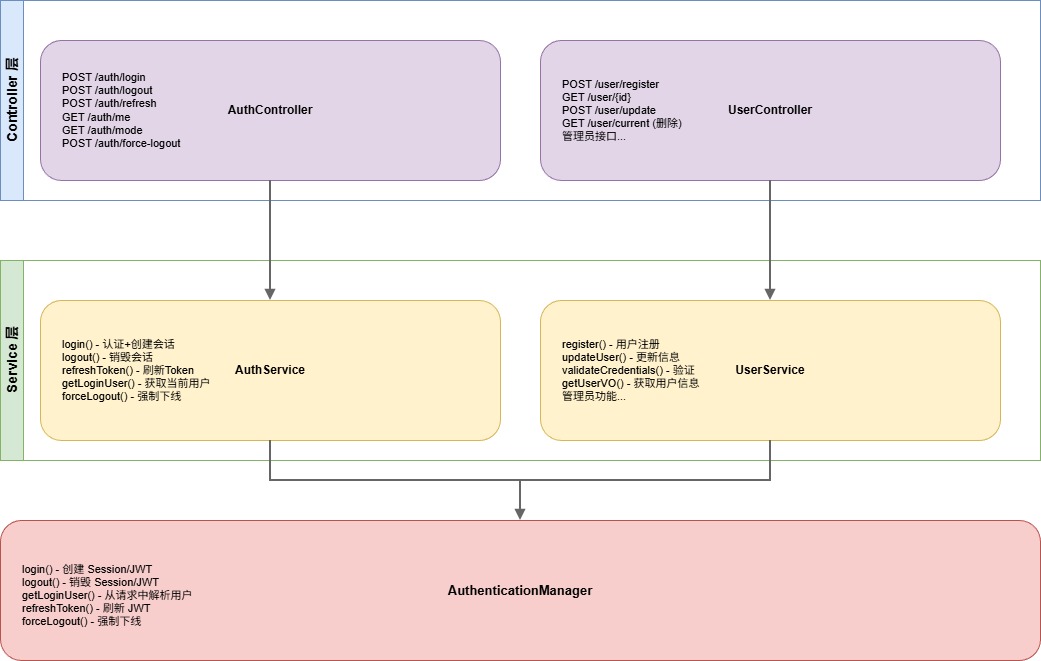
登录流程:
UserLoginDTO
     │
     ▼
AuthController.login()
     │
     ▼
AuthService.login()
     │
     ├──► UserService.validateCredentials() ──► 验证账号密码
     │                                              │
     │                                              ▼
     │                                         返回 User 实体
     │
     ├──► UserService.toLoginUserVO() ──► 构建 LoginUserVO
     │
     └──► AuthenticationManager.login() ──► 创建 Session/JWT
                                              │
                                              ▼
                                         返回 AuthResult
     │
     ▼
AuthResponseVO(用户信息 + Token)
五、总结对比
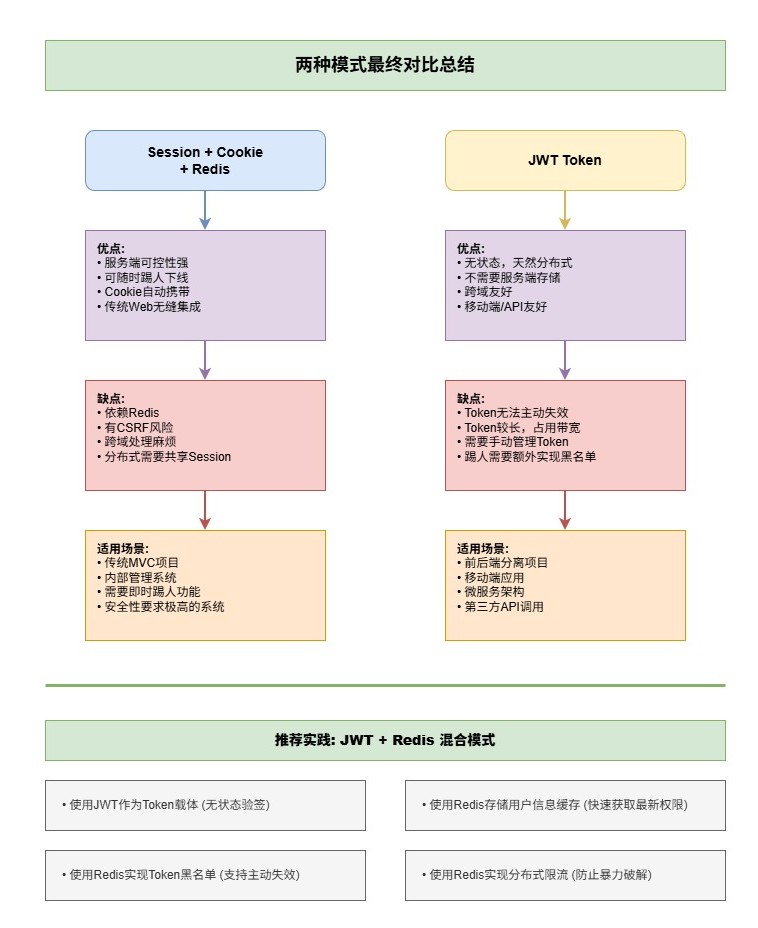
💬 评论