thrift
实战——游戏匹配服务
准备工作
安装thrift
安装依赖库
sudo yum install autoconf automake libtool flex bison pkgconfig gcc-c++ boost-devel libevent-devel zlib-devel python3-devel openssl-devel
下载并安装thrift
wget http://archive.apache.org/dist/thrift/0.16.0/thrift-0.16.0.tar.gz
解压缩并进入目录:
tar -xvzf thrift-0.16.0.tar.gz
cd thrift-0.16.0
配置并安装
./configure
make
sudo make install
验证安装
thrift --version
建立仓库
因为自己有服务器 就直接在自己服务器上做操作了 不用ac terminal
本地仓库
在用户目录建立文件夹 thrift_lesson
[root@iZ0jla2j0b9ocfhtozveqqZ ~]# mkdir thrift_lesson
[root@iZ0jla2j0b9ocfhtozveqqZ ~]# ls -l
总用量 52
-rw-r--r-- 1 root root 47916 7月  26 10:04 install.sh
drwxr-xr-x 2 root root  4096 10月 19 13:06 thrift_lesson
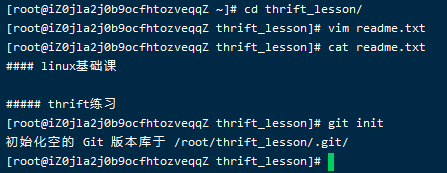
生成readme文件 并生成仓库
[root@iZ0jla2j0b9ocfhtozveqqZ ~]# cd thrift_lesson/
[root@iZ0jla2j0b9ocfhtozveqqZ thrift_lesson]# vim readme.md

#### linux基础课
##### thrift练习

[root@iZ0jla2j0b9ocfhtozveqqZ thrift_lesson]# git init
配置全局git信息 将readme持久化
[root@iZ0jla2j0b9ocfhtozveqqZ thrift_lesson]# git config --global user.name wei
[root@iZ0jla2j0b9ocfhtozveqqZ thrift_lesson]# git config --global user.email zv041118@163.com

[root@iZ0jla2j0b9ocfhtozveqqZ thrift_lesson]# git add .
[root@iZ0jla2j0b9ocfhtozveqqZ thrift_lesson]# git status
[root@iZ0jla2j0b9ocfhtozveqqZ thrift_lesson]# git commit -m "init repo"

远程仓库
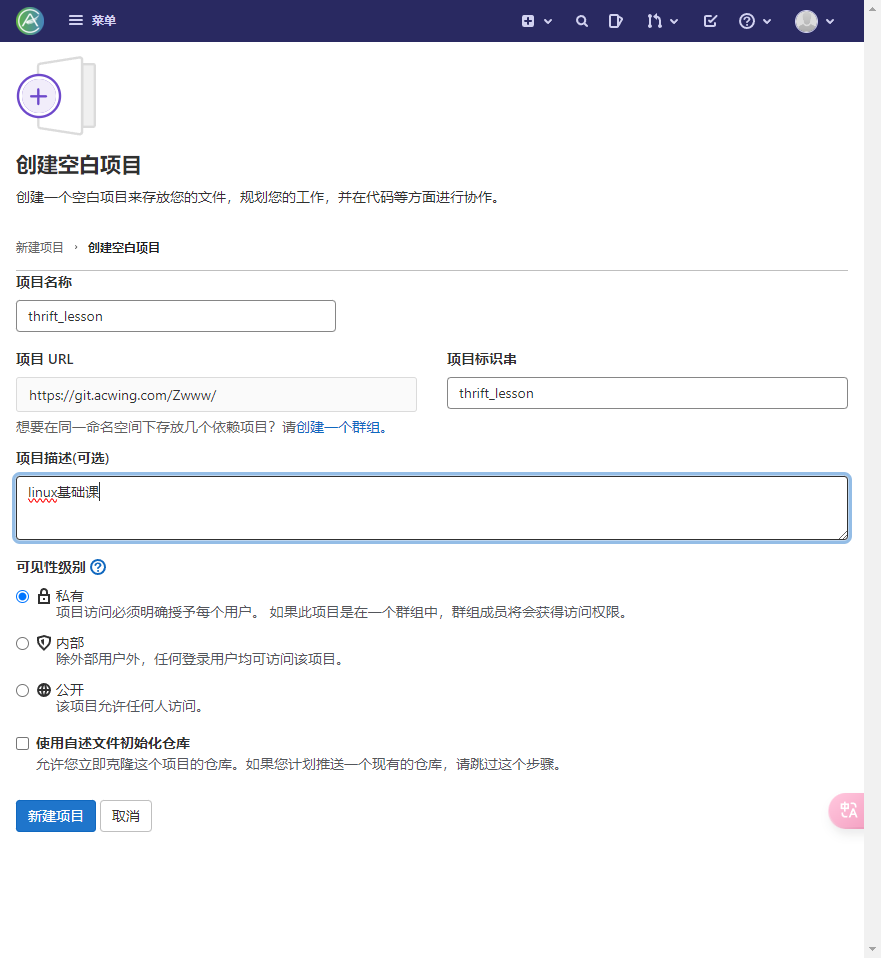
建立连接 将本地仓库连接到云端
[root@iZ0jla2j0b9ocfhtozveqqZ thrift_lesson]# git remote add origin git@git.acwing.com:Zwww/thrift_lesson.git
推送本地仓库到云端
推送是需要使用ssh连接的 在ac git上有个公钥 但云服务器尚未配置私钥 所以需要先进行配置 方法其实与本地win连接阿里云类似 在,ssh中配置config文件
[root@iZ0jla2j0b9ocfhtozveqqZ thrift_lesson]# cd ../.ssh

//将私钥文件上传到.ssh文件夹 设置私钥文件权限
[root@iZ0jla2j0b9ocfhtozveqqZ .ssh]# chmod 600 /root/.ssh/wei_01.pem

//加载私钥
eval $(ssh-agent -s) ssh-add /root/.ssh/wei_01.pem

[root@iZ0jla2j0b9ocfhtozveqqZ .ssh]# vim config
Host git.acwing
    HostName git.acwing.com
    User wei
    IdentityFile /root/.ssh/wei_01.pem

使用ssh -T 测试连接
[root@iZ0jla2j0b9ocfhtozveqqZ .ssh]# ssh -T git@git.acwing
Welcome to GitLab, @Zwww!
成功
推送分支到gitlab
[root@iZ0jla2j0b9ocfhtozveqqZ thrift_lesson]# git push -u origin master
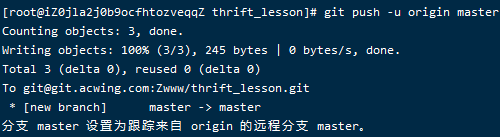
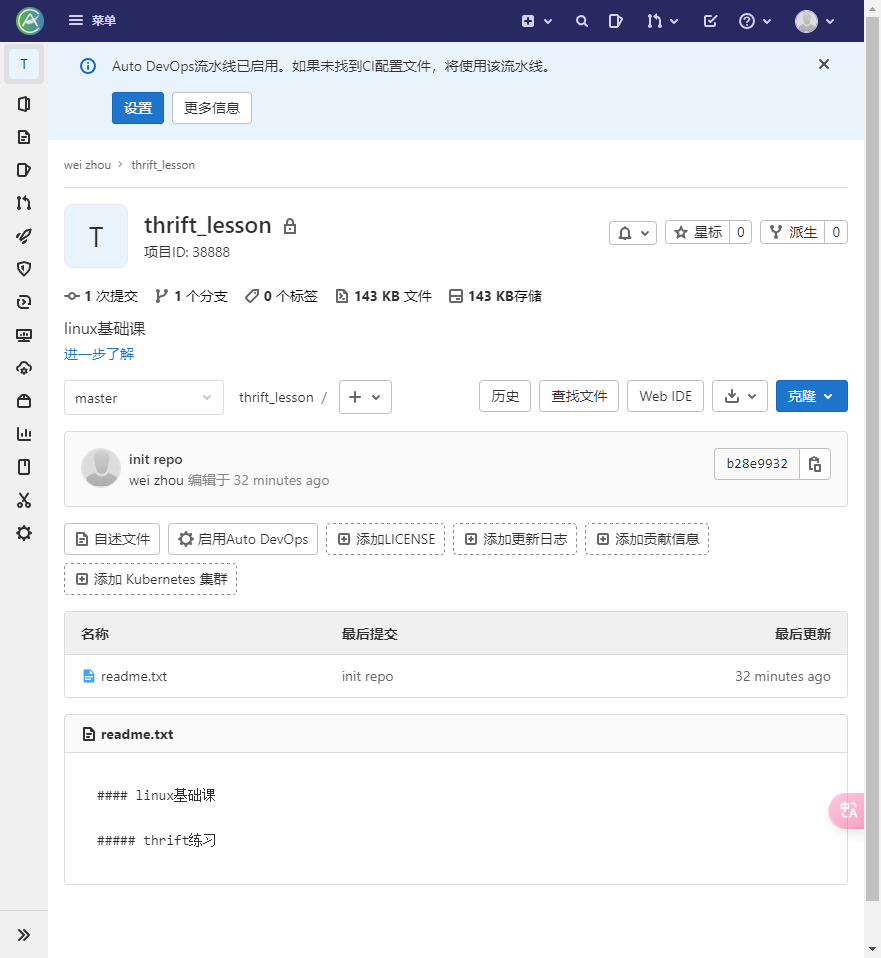
哦吼 项目id还是靓号
项目构建
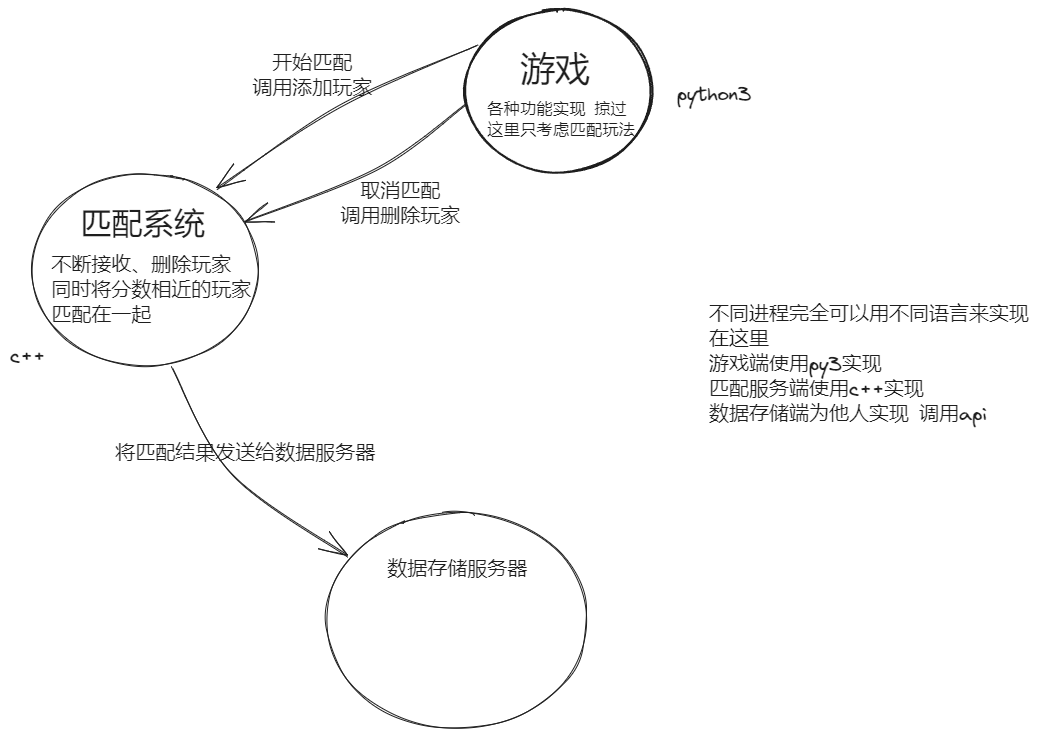
游戏和匹配实现在自己服务器上(课程是实现在ac terminal中)
数据存储y总已经实现在课程服务器上 端口9090
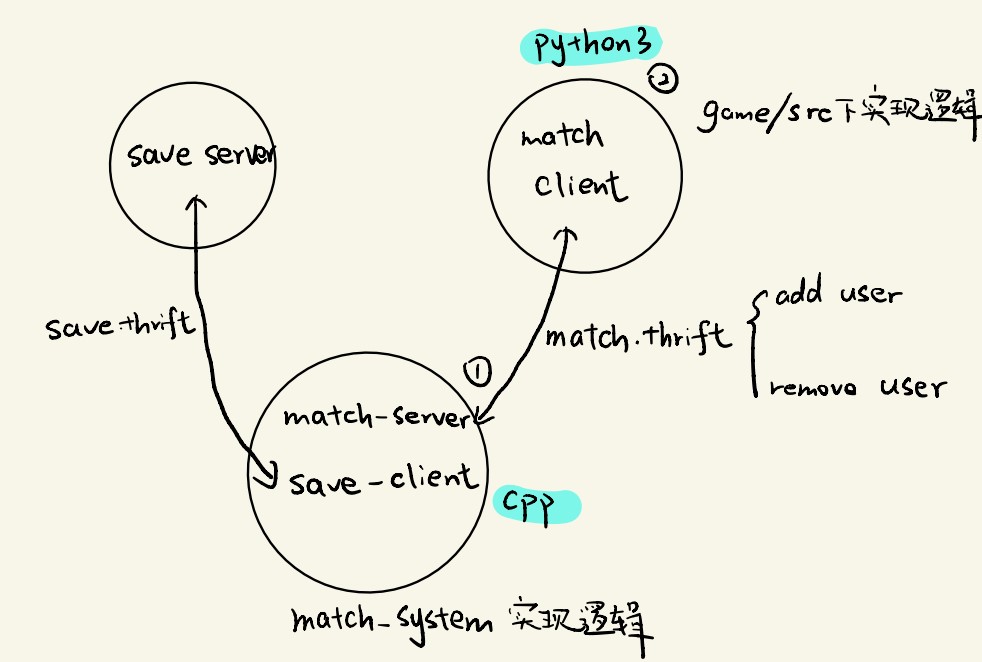
- 服务分为三部分:分别是game,match_system,save_server
- game为match_client端,通过match.thrift接口向match_system完成添加用户和删除用户的操作
- match_system由两部分组成,分别为match_server端和save_client端。match_server端负责接收match_client端的操作,将用户添加进匹配池,并且在匹配结束之后通过save.thrift接口将用户数据上传至另一个服务器
- save_server用于接收match_system上传的匹配成功的用户信息
真实应该是两者放在不同服务器上 但这里精简成 放在同一服务器的两个不同文件夹中
项目流程
- 构建match.thrift接口
- 通过match.thrift接口构建服务端和客户端
- 先将服务端和客户端跑通,能完成基本的连接通信
- 完成match.thrift的客户端需求
- 构建save.thrift接口
- 通过save.thrift接口构建服务端和客户端
- 将客户端业务添加到match_system当中,将save.thrift服务端完成(本项目save.thrift服务端已经完成)
- 根据业务需求完善match_system
项目文件夹
创建三个文件夹
-
match_system 匹配系统
-
game 游戏
-
thrift 所有的接口
[root@iZ0jla2j0b9ocfhtozveqqZ thrift_lesson]# mkdir match_system
[root@iZ0jla2j0b9ocfhtozveqqZ thrift_lesson]# mkdir game
[root@iZ0jla2j0b9ocfhtozveqqZ thrift_lesson]# mkdir thrift
thrift 接口
创建 match.thrift
# 命名空间
namespace cpp match_service

# 用户信息
struct User {
        1: i32 id,
        2: string name,
        3: i32 score
}

# match接口服务内容
service Match {
    i32 add_user(1: User user, 2: string info),

    i32 remove_user(1: User user, 2: string info),
}
与c语法类似 命名空间 类(结构体) 函数
有了接口后 如何实现具体结点
先实现服务端
match_system 匹配系统 服务端
由thrift接口生成服务端,进入match_system文件夹中(最好多创建一个src文件夹)在src文件夹下执行thrift官方文档中thrift -r --gen <language> <Thrift filename>直接生成服务端,生成的文件为gen.cpp将其改名为match_server,进入match_server文件夹查看Match_server.skeleton.cpp为服务端代码,将其copy到src目录下并重命名为main.cpp
打开main.cpp,先在函数后面加上返回值,并编译文件(在工程中一般先将文件编译成功再加具体的逻辑),cpp文件编译包括两步,编译和链接
创一个src文件夹(表示源文件)
[root@iZ0jla2j0b9ocfhtozveqqZ thrift_lesson]# cd match_system/
[root@iZ0jla2j0b9ocfhtozveqqZ match_system]# mkdir src
[root@iZ0jla2j0b9ocfhtozveqqZ match_system]# cd src/
查询官网 c++的接口如何实现
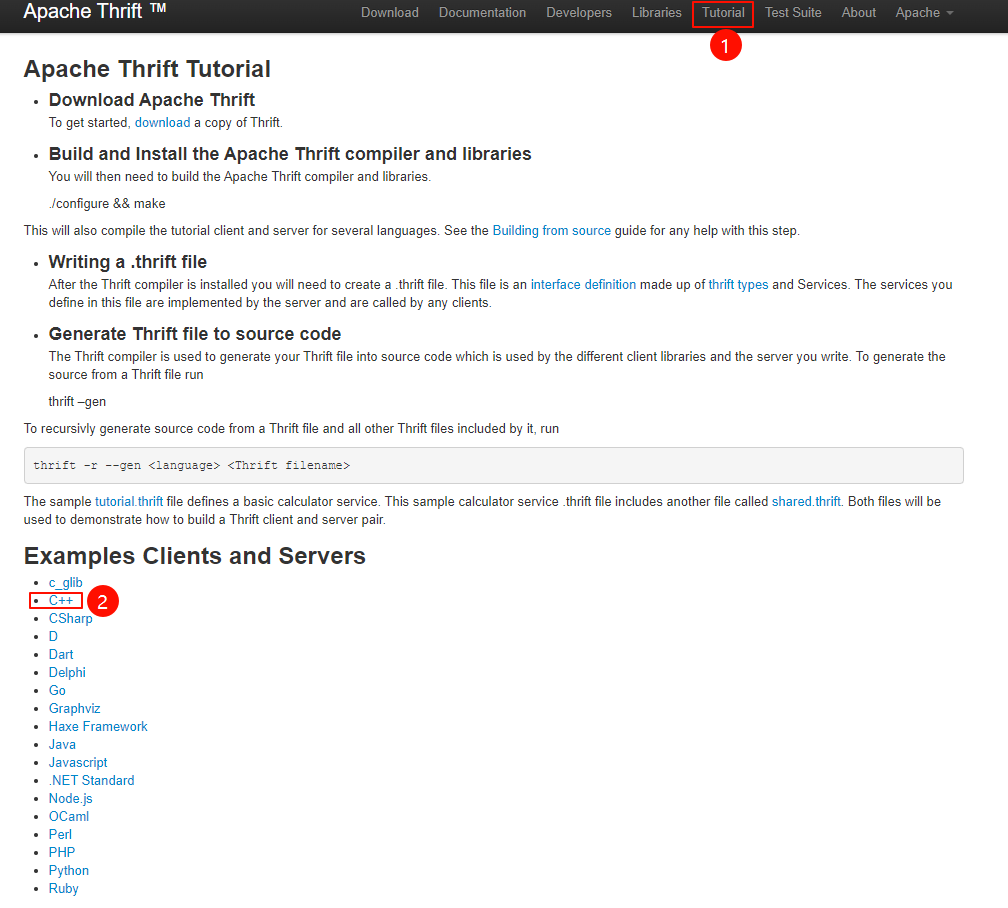
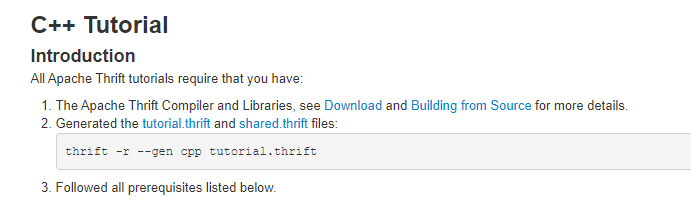
thrift -r --gen cpp tutorial.thrift
后接 前面接口的路径
[root@iZ0jla2j0b9ocfhtozveqqZ src]# thrift -r --gen cpp ../../thrift/match.thrift
即可发现当前文件夹多了一个gen-cpp
里面装了它帮我们实现好的代码
(定义好接口后 不需要自己实现代码 它会根据你选择的语言帮你实现代码)
但是具体的业务还是要自己写的
方便起见 把该文件夹名字改一下
[root@iZ0jla2j0b9ocfhtozveqqZ src]# mv gen-cpp/ match_server
将Match_server.skeleton.cpp复制到src目录 并重命名为main.cpp
[root@iZ0jla2j0b9ocfhtozveqqZ src]# mv /root/thrift_lesson/match_system/src/match_server/Match_server.skeleton.cpp main.cpp
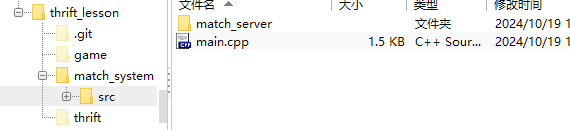
打开可以发现 它仅是做了一个框架 具体的业务逻辑是没实现的
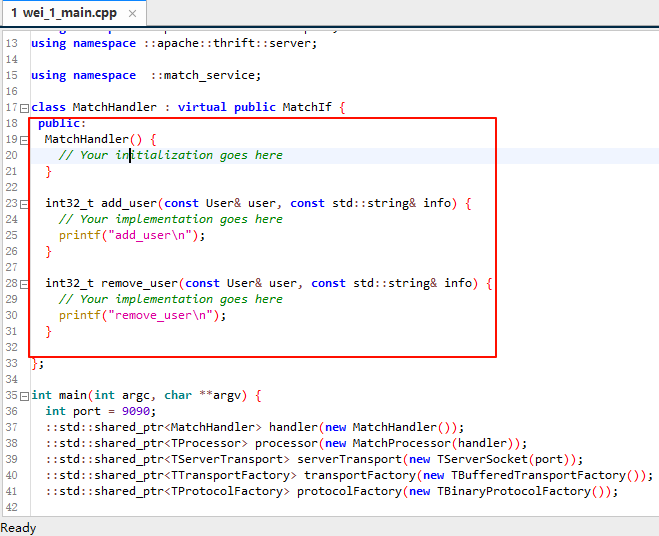
但我们也先不着急实现 先让编译通过 能跑通再说
给函数加上个return 0 让它能编译通过
另外注意 因为main.cpp是被移出来了 所有Match.h的引用要改变
并添加些提示语句
更改后如下:
// This autogenerated skeleton file illustrates how to build a server.
// You should copy it to another filename to avoid overwriting it.

#include "match_server/Match.h"
#include <thrift/protocol/TBinaryProtocol.h>
#include <thrift/server/TSimpleServer.h>
#include <thrift/transport/TServerSocket.h>
#include <thrift/transport/TBufferTransports.h>

using namespace ::apache::thrift;
using namespace ::apache::thrift::protocol;
using namespace ::apache::thrift::transport;
using namespace ::apache::thrift::server;

using namespace  ::match_service;

class MatchHandler : virtual public MatchIf {
 public:
  MatchHandler() {
    // Your initialization goes here
  }

  int32_t add_user(const User& user, const std::string& info) {
    // Your implementation goes here
    printf("add_user\n");
    return 0;
  }

  int32_t remove_user(const User& user, const std::string& info) {
    // Your implementation goes here
    printf("remove_user\n");
    return 0;
  }

};

int main(int argc, char **argv) {
  int port = 9090;
  ::std::shared_ptr<MatchHandler> handler(new MatchHandler());
  ::std::shared_ptr<TProcessor> processor(new MatchProcessor(handler));
  ::std::shared_ptr<TServerTransport> serverTransport(new TServerSocket(port));
  ::std::shared_ptr<TTransportFactory> transportFactory(new TBufferedTransportFactory());
  ::std::shared_ptr<TProtocolFactory> protocolFactory(new TBinaryProtocolFactory());

  TSimpleServer server(processor, serverTransport, transportFactory, protocolFactory);
  server.serve();
  return 0;
}
——tips:先编译跑通 再逐步往里添加模块
编译main和所有c++文件
- 编译
g++ -c <filename>.cpp - 链接
g++ *.o -o main -lthrift(加上动态链接库) ./main运行文件
编译:
[root@iZ0jla2j0b9ocfhtozveqqZ src]# g++ -std=c++11 -c main.cpp match_server/*.cpp
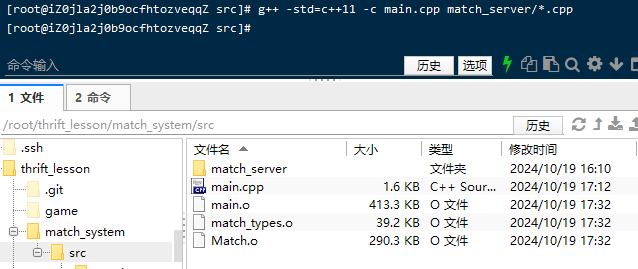
出现三个.o文件 将它们链接起来
链接:
[root@iZ0jla2j0b9ocfhtozveqqZ src]# g++ *.o -o main -lthrift
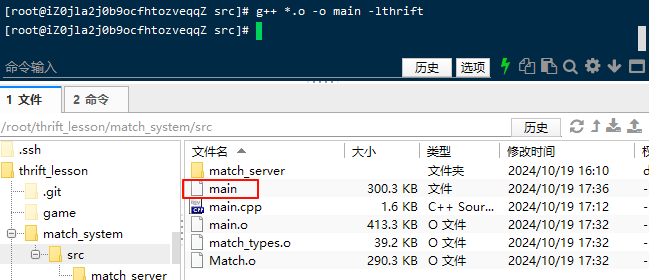
运行一下:

成功跑起来了
准备提交
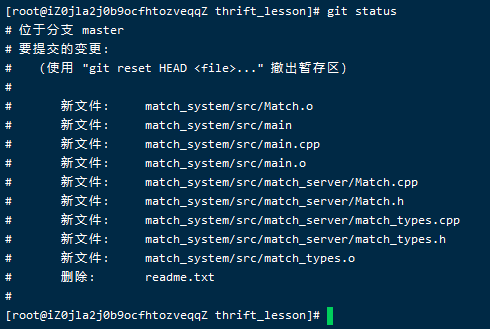
最好是把.0(可链接文件删掉) 他们不需要存在仓库中
git restore --stage *.o
或者直接干脆些 以后碰到.0直接不加入
在项目的根目录下创建或编辑 .gitignore 文件
# 忽略所有 .o 文件
*.o

# 忽略所有编译生成的二进制文件
*.exe
*.out
*.dll
*.so

# 忽略其他不需要提交的临时文件或目录
*.log
*.tmp
*.swp
这样 .gitignore 文件会确保 Git 自动忽略所有 .o 文件以及其他不需要提交的编译生成文件和临时文件。
将 .gitignore 文件添加到 Git 暂存区
在项目的根目录下执行以下命令来将 .gitignore 文件添加到 Git 暂存区:
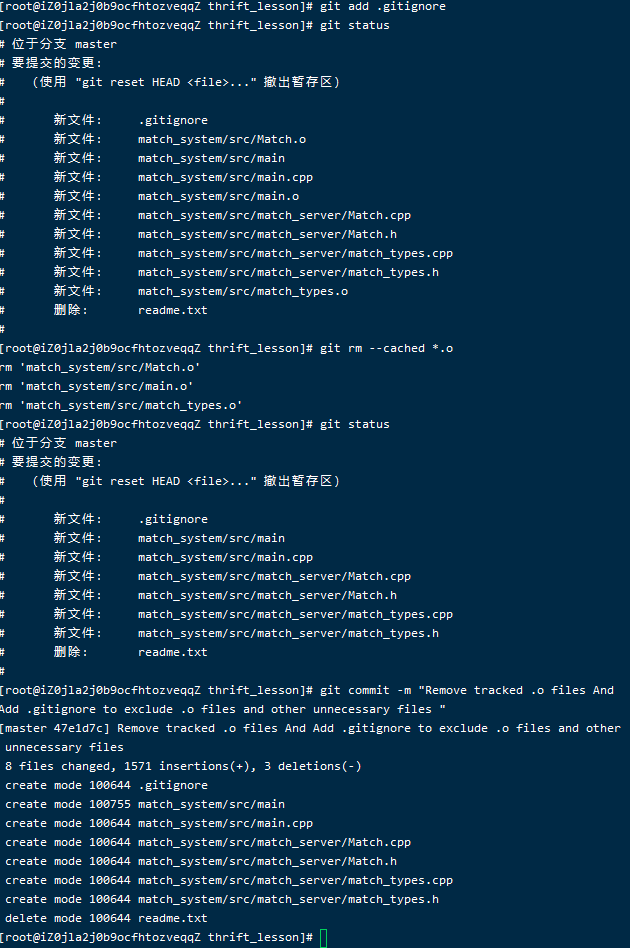
game 游戏 客户端
- 由thrift接口生成客户端,在game文件夹中创建src文件夹,执行
thrift -r --gen py tutorial.thrift生成gen.py将其改名为match_client,查看文件中有服务器端文件Match-remote将其删除,因为目前只需要生成客户端(注意:在cpp中生成客户端此文件必须删除,因为cpp编译文件中只能有一个main函数) - 在src目录下创建client.py,将官方文档中的client端代码复制到client.py中,注意修改头文件,执行
python3 <filename>看看编译成功。如果编译成功则在代码中加上用户信息并调用服务端的函数,先启动服务端的main.cpp,再运行client.py看看服务端和客户端是否连接成功。修改代码使其能够读取终端中输入用户,编译运行如成功运行则match客户端完成
同理 进入game文件夹 创src文件夹
然后去生成py代码
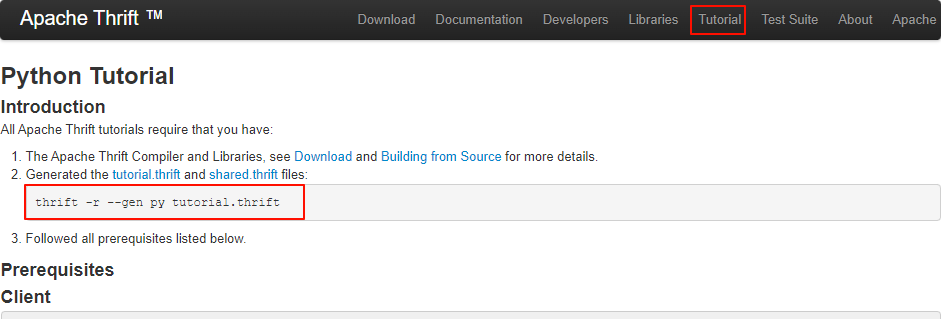
thrift -r --gen py ../../thrift/match.thrift
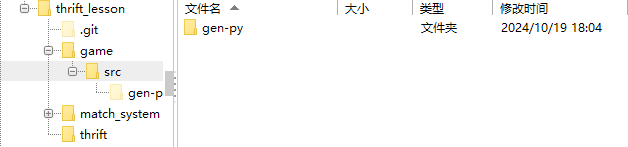
更名为match_client
mv gen-py/ match_client
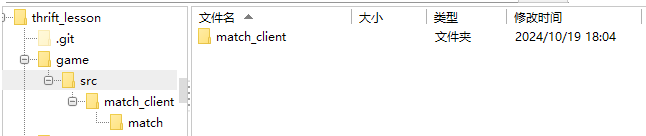
[root@iZ0jla2j0b9ocfhtozveqqZ thrift_lesson]# cd game/
[root@iZ0jla2j0b9ocfhtozveqqZ game]# mkdir src
[root@iZ0jla2j0b9ocfhtozveqqZ game]# cd src/
[root@iZ0jla2j0b9ocfhtozveqqZ src]# thrift -r --gen py ../../thrift/match.thrift
[root@iZ0jla2j0b9ocfhtozveqqZ src]# mv gen-py/ match_client
进入文件夹可以发现
存在一个可执行文件
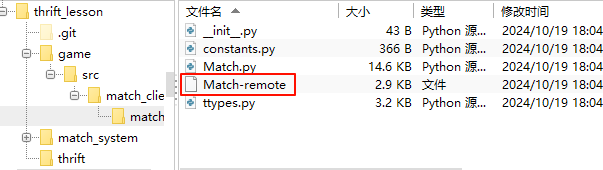
它是实现服务端用的 (相较于c 它不需要编译链接 )
但这里我们只需要实现客户端 而不是服务端 所以它没有用 可以删掉
[root@iZ0jla2j0b9ocfhtozveqqZ src]# cd match_client
[root@iZ0jla2j0b9ocfhtozveqqZ match_client]# cd match
[root@iZ0jla2j0b9ocfhtozveqqZ match]# rm Match-remote
[root@iZ0jla2j0b9ocfhtozveqqZ match]# rm Match-remote
rm:是否删除普通文件 "Match-remote"?y
客户端的实现 官网有例子 直接复制 改改
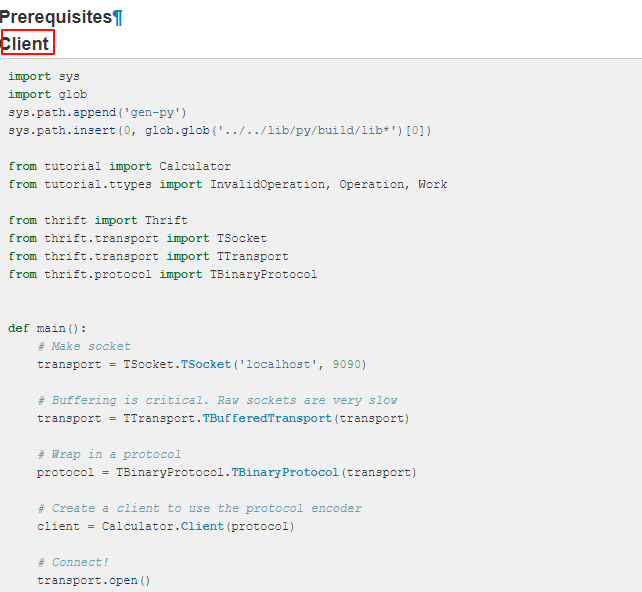
import sys
import glob
sys.path.append('gen-py')
sys.path.insert(0, glob.glob('../../lib/py/build/lib*')[0])

from tutorial import Calculator
from tutorial.ttypes import InvalidOperation, Operation, Work

from thrift import Thrift
from thrift.transport import TSocket
from thrift.transport import TTransport
from thrift.protocol import TBinaryProtocol

def main():
    # Make socket
    transport = TSocket.TSocket('localhost', 9090)

    # Buffering is critical. Raw sockets are very slow
    transport = TTransport.TBufferedTransport(transport)

    # Wrap in a protocol
    protocol = TBinaryProtocol.TBinaryProtocol(transport)

    # Create a client to use the protocol encoder
    client = Calculator.Client(protocol)

    # Connect!
    transport.open()

    client.ping()
    print('ping()')

    sum_ = client.add(1, 1)
    print('1+1=%d' % sum_)

    work = Work()

    work.op = Operation.DIVIDE
    work.num1 = 1
    work.num2 = 0

    try:
        quotient = client.calculate(1, work)
        print('Whoa? You know how to divide by zero?')
        print('FYI the answer is %d' % quotient)
    except InvalidOperation as e:
        print('InvalidOperation: %r' % e)

    work.op = Operation.SUBTRACT
    work.num1 = 15
    work.num2 = 10

    diff = client.calculate(1, work)
    print('15-10=%d' % diff)

    log = client.getStruct(1)
    print('Check log: %s' % log.value)

    # Close!
    transport.close()
在src目录创建 client.py
将代码粘进去
前四行是加入环境变量 没必要 删掉
引用地址因为文件路径 也要改变 引用match中的Match ttypes中的User
简单添加一行用户信息作为调试
修改后的代码如下:
from match_client.match import Match
from match_client.match.ttypes import User

from thrift import Thrift
from thrift.transport import TSocket
from thrift.transport import TTransport
from thrift.protocol import TBinaryProtocol

def main():
    # Make socket
    transport = TSocket.TSocket('localhost', 9090)

    # Buffering is critical. Raw sockets are very slow
    transport = TTransport.TBufferedTransport(transport)

    # Wrap in a protocol
    protocol = TBinaryProtocol.TBinaryProtocol(transport)

    # Create a client to use the protocol encoder
    client = Match.Client(protocol)

    # Connect!
    transport.open()

	user=User(1, 'zw', 1500)
	client.add_user(user,"")

    # Close!
    transport.close()

if __name__ == "__main__":
    main()
注意运行时需要将服务端跑起来才能有效果
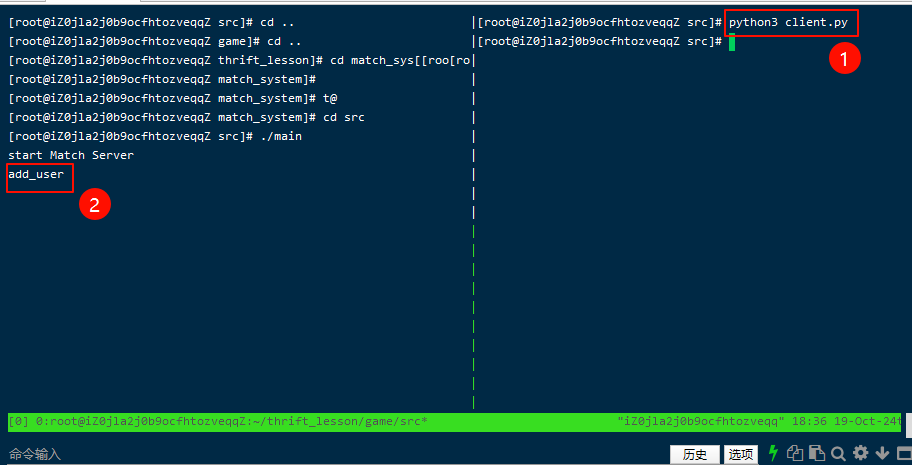
客户端执行后 发现服务端提示 成功添加
说明前后的交互成功了
(历史性的时刻 用py调用了c++的函数)
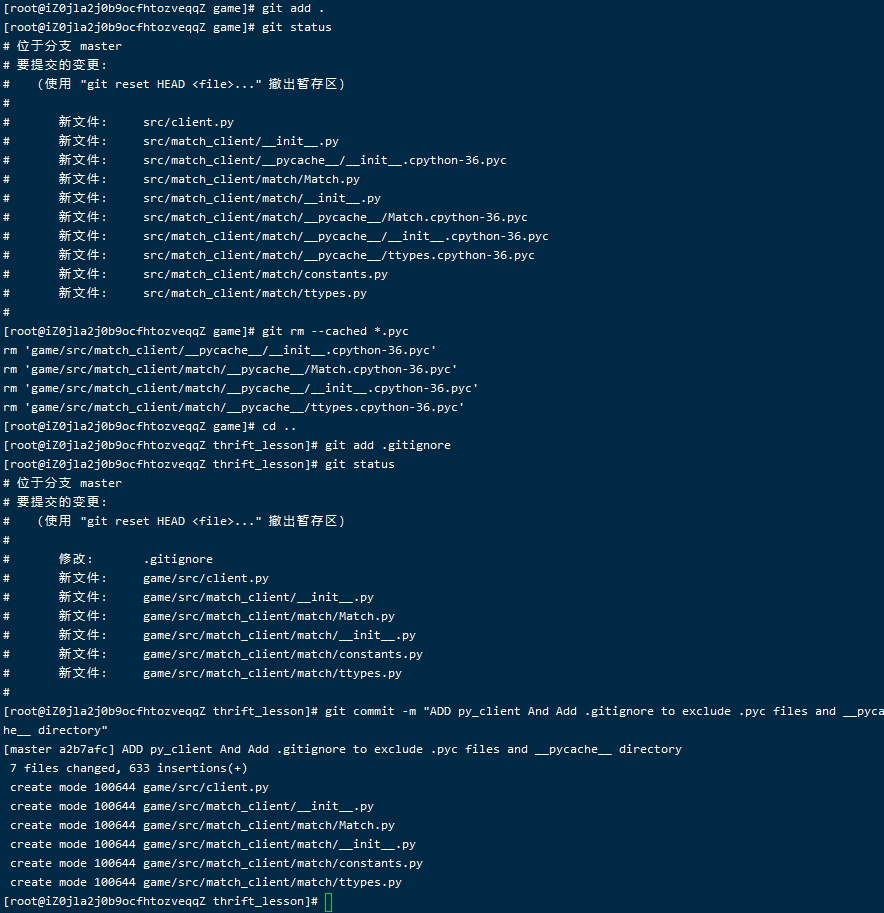
提交
添加入缓冲区 git add .
删除中间文件(pyc文件) git rm --cached *.pyc
将.gitignore修改成
# 忽略所有 .o 文件
*.o

# 忽略所有编译生成的二进制文件
*.exe
*.out
*.dll
*.so

# 忽略其他不需要提交的临时文件或目录
*.log
*.tmp
*.swp

# 忽略所有 .pyc 文件。
*.pyc
# 忽略 Python 编译后的缓存目录 __pycache__,这个目录通常包含 .pyc 文件。
__pycache__/
细化
前面只是简单做好连接
现在封装一下客户端
client
from match_client.match import Match
from match_client.match.ttypes import User

from thrift import Thrift
from thrift.transport import TSocket
from thrift.transport import TTransport
from thrift.protocol import TBinaryProtocol

from sys import stdin

def operate(op, user_id, username, score):
    # Make socket
    transport = TSocket.TSocket('localhost', 9090)

    # Buffering is critical. Raw sockets are very slow
    transport = TTransport.TBufferedTransport(transport)

    # Wrap in a protocol
    protocol = TBinaryProtocol.TBinaryProtocol(transport)

    # Create a client to use the protocol encoder
    client = Match.Client(protocol)

    # Connect!
    transport.open()

    user = User(user_id, username, score)

    if op == "add":
        client.add_user(user, "")
    elif op == "remove":
        client.remove_user(user, "")

    # Close!
    transport.close()

def main():
    for line in stdin:
        op, user_id, username, score = line.split(" ")
        operate(op, int(user_id), username, int(score))

if __name__ == "__main__":
    main()
等待输入 命令(添加or删除) 编号 姓名 分数 对应
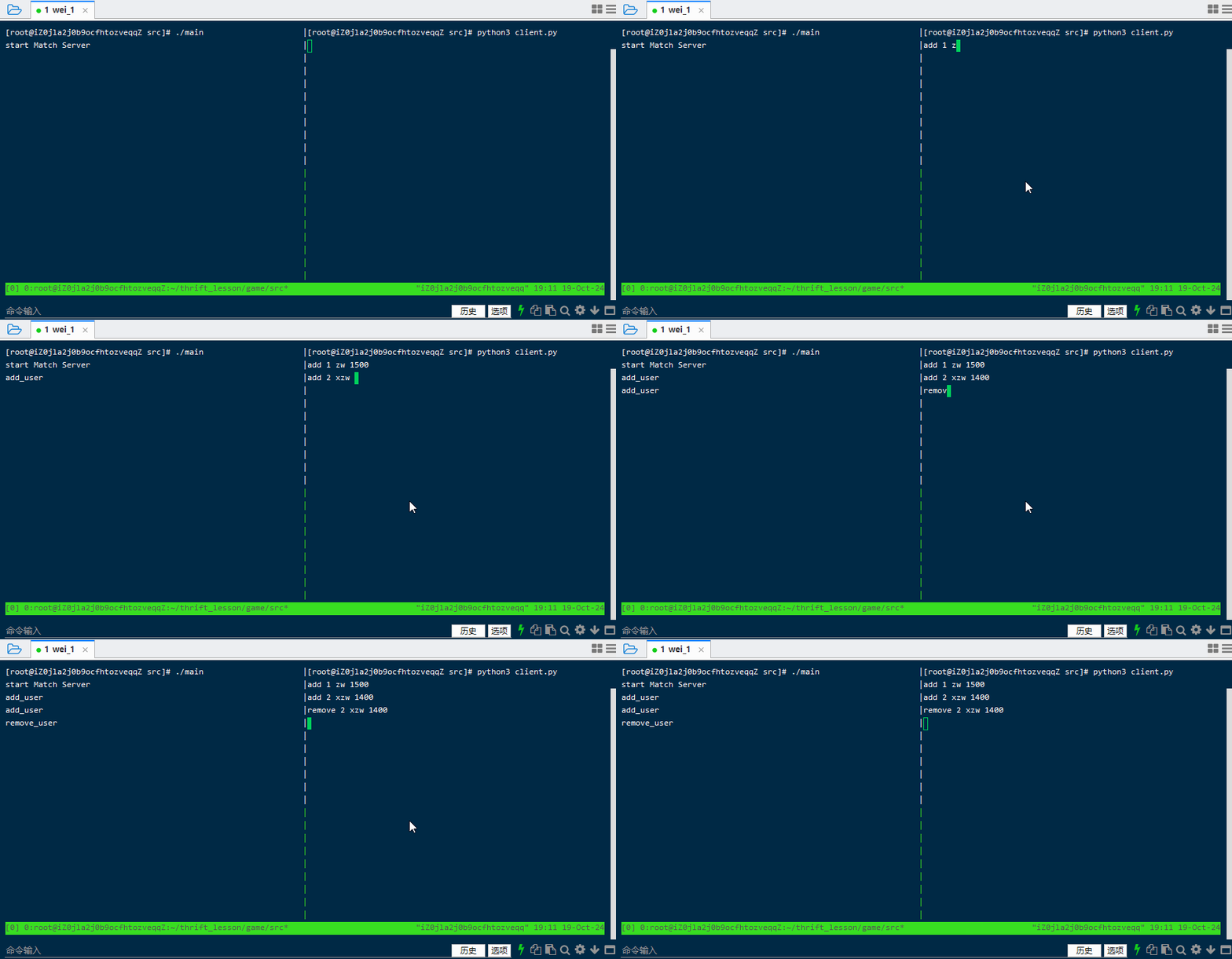
客户端就基本没问题了
对于这个项目可以发现 客户端加入服务端的逻辑解决了 但是如果添加重复的 删除不存在的 都是可以成功的 究其原因是因为 还没有数据库
后面就要对服务端的一系列逻辑做完善
server
基本逻辑实现
在这里需要考虑一个问题
服务端需要不断的添加删除用户 同时 还要不断的将这些在服务器中的用户 进行匹配 匹配完后 还要把这个对战信息传给另一个服务器
这是一个并行的过程 那么就需要使用多线程来完成
y总分析:
可以抽象成一个生产者消费者模型 add_user的过程就像是生产者 不断给系统提供资源 匹配的过程就像是消费者 不断的在消耗资源
需要着重解决的问题是 确保在匹配池满的时候 不再添加新用户 池枯竭的时候 不再继续读取用户来匹配 还要考虑到 相近水平匹配 特殊情况:水平差距较大 匹配时间过久 还是可能会匹配在一起 等等问题
在生产者和消费者之间 需要一个通信的媒介
一般来说可以用消息队列(一般语言都会有自带的实现 c++也有 但这里自己实现)
实现消息队列 用锁、pv原语
为什么需要用到这个东西 比如 如果user任务中 正在用到某个用户(可能是删除它) 而匹配任务也要用到 这一瞬间肯定是不能并行的 所以得加锁 确保在用某个资源时 其他进程不会进行争夺而产生冲突 我们定义一个锁mutex m 使用p(m)进行加锁 v(m)进行解锁 在这么一段时间内 就能确保该资源为自己独占
初步得出的代码如下
// This autogenerated skeleton file illustrates how to build a server.
// You should copy it to another filename to avoid overwriting it.

#include "match_server/Match.h"
#include <thrift/protocol/TBinaryProtocol.h>
#include <thrift/server/TSimpleServer.h>
#include <thrift/transport/TServerSocket.h>
#include <thrift/transport/TBufferTransports.h>

#include<iostream>

#include<thread> //要用到多线程
#include<mutex> //用锁来实现消息队列
#include<condition_variable>//条件变量 配合锁来实现消息队列(实际是对锁进行了一个封装)
#include<queue>

#include<vector> //用vector存储所有的玩家

using namespace ::apache::thrift;
using namespace ::apache::thrift::protocol;
using namespace ::apache::thrift::transport;
using namespace ::apache::thrift::server;

using namespace  ::match_service;
using namespace std;

//任务结构体
struct Task{
	User user; //用户信息
	string type;//操作类型 (add or remove)
};

//消息队列 保存任务 支持多线程访问
struct MessageQueue{
	queue<Task> q;//任务队列
	mutex m; //互斥锁 保护队列
	condition_variable cv;//条件变量 用于通知任务处理线程
}message_queue;

//线程池 匹配用户 保存匹配结果
class Pool {
public:
    void save_result(int a,int b){
        cout<<"Match Result"<<a<<b<<endl;
    }

    // 匹配用户
    void match() {
        // 当人数达到2就进行匹配 暂时不考虑能力和等待时间
        while (users.size() > 1) {
        	  auto a=users[0],b=users[1]; //直接从顶部拿出俩人匹配在一起
            users.erase(users.begin());
            users.erase(users.begin());

            save_result(a.id,b.id); // 保存匹配结果
          }
    }

    // 添加用户到匹配池
    void add(User user) {
        users.push_back(user);  // 添加用户到用户列表
    }

    // 从匹配池中移除用户
    void remove(User user) {
        for (uint32_t i = 0; i < users.size(); i++) {
            if (users[i].id == user.id) {
                users.erase(users.begin() + i);  // 移除用户
                break;
            }
        }
    }

private:
    vector<User> users;  // 保存用户
} pool;

class MatchHandler : virtual public MatchIf {
 public:
  MatchHandler() {
    // Your initialization goes here
  }

  int32_t add_user(const User& user, const std::string& info) {
    // Your implementation goes here
    printf("add_user\n");

    // 加锁并将任务添加到消息队列中
    //当变量消失时自动解锁 无需显式解锁 且能保证同时只有一个线程拥有锁
    unique_lock<mutex> lck(message_queue.m);
    message_queue.q.push({user, "add"});

    message_queue.cv.notify_all();  // 通知所有被条件变量卡住的线程

    return 0;
  }

  int32_t remove_user(const User& user, const std::string& info) {
    // Your implementation goes here
    printf("remove_user\n");

    // 加锁并将任务添加到消息队列中
    unique_lock<mutex> lck(message_queue.m);
    message_queue.q.push({user, "remove"});

    // 通知所有被条件变量卡住的线程
    //remove也需要通知 因为队列里放的是任务而不是用户 执行完remove后 消息队列就不为空了
    message_queue.cv.notify_all();

    return 0;
  }

};

//消费者模型
void consume_task(){
	//匹配过程 不停地消耗用户 写个死循环(需要单开线程)
	while(true){
	   //加锁
        unique_lock<mutex> lck(message_queue.m);

	   // 如果队列为空
        if (message_queue.q.empty()) {
        	  message_queue.cv.wait(lck); //消息队列无任务 无法进行匹配 线程卡住 等待被唤醒(有任务进来)
        }
        else {
            // 从队列中取出任务并处理
            auto task = message_queue.q.front();
            message_queue.q.pop();

            lck.unlock();//取出来之后就立刻解锁 如果等到执行完task再解锁的话 占用的时间就太长了 导致其他两个线程卡住

		  //do task
		  //用一个类似池的东西维护所有玩家
            if (task.type == "add")
                pool.add(task.user);  // 添加用户
            else if (task.type == "remove")
                pool.remove(task.user);  // 移除用户

            pool.match();
        }
    }
}

int main(int argc, char **argv) {
  int port = 9090;
  ::std::shared_ptr<MatchHandler> handler(new MatchHandler());
  ::std::shared_ptr<TProcessor> processor(new MatchProcessor(handler));
  ::std::shared_ptr<TServerTransport> serverTransport(new TServerSocket(port));
  ::std::shared_ptr<TTransportFactory> transportFactory(new TBufferedTransportFactory());
  ::std::shared_ptr<TProtocolFactory> protocolFactory(new TBinaryProtocolFactory());

  TSimpleServer server(processor, serverTransport, transportFactory, protocolFactory);
  cout<<"start Match Server"<<endl;

  //为消费者模型(匹配)单开线程 将函数名传进去即可
  thread matching_thread(consume_task);

  server.serve();
  return 0;
}
编译链接
由于用到了线程 在链接时还需要加上线程的动态链接命令 -pthread
确保没有编译时的缓存问题,可以先清理所有编译生成的 .o 文件,再重新编译
[root@iZ0jla2j0b9ocfhtozveqqZ src]# rm *.o
rm:是否删除普通文件 "main.o"?y
rm:是否删除普通文件 "Match.o"?y
rm:是否删除普通文件 "match_types.o"?y
[root@iZ0jla2j0b9ocfhtozveqqZ src]# g++ -std=c++11 -c main.cpp match_server/*.cpp match_server/match_types.cpp
[root@iZ0jla2j0b9ocfhtozveqqZ src]# g++ *.o -o main -pthread -lthrift -lstdc++
顺利实现
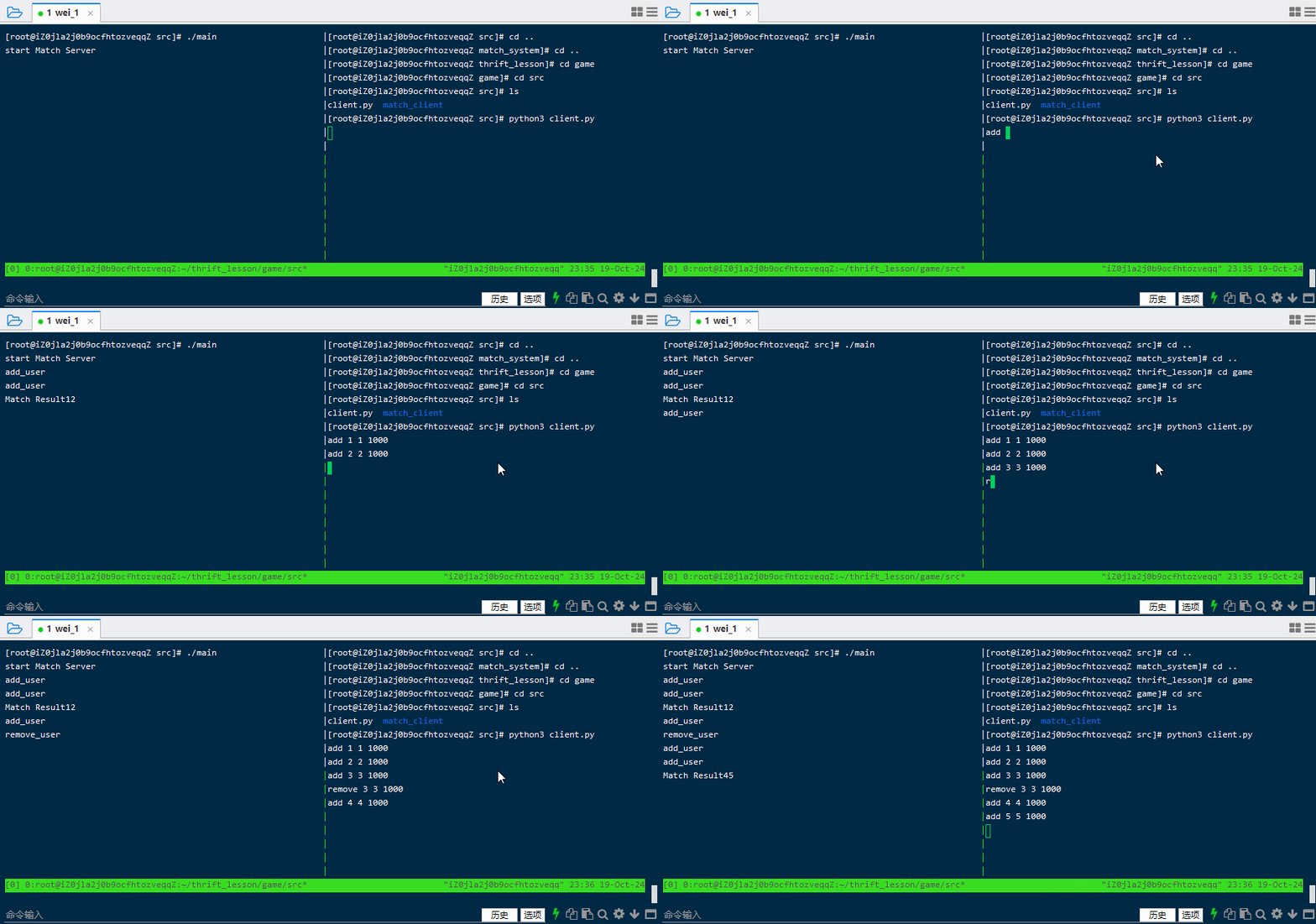
分析:
match_server:2.0版本
-
多线程thread:一个程序是一个进程,一个进程中至少有一个线程。如果只有一个线程,则第二个任务必须等到第一个任务结束后才能进行,如果使用多线程则在主线程执行任务的同时可以执行其他任务,而不需要等待。创建线程代价较小,但能有效提升cpu利用率。在本次项目中,我们需要输入用户信息和用户匹配是同时进行的,而不是输入用户信息结束才开始匹配,或匹配结束才能输入用户信息,所以我们需要开多线程编程。
-
生产者消费者模型:假如有两个线程A和B,A线程生产数据(类似本项目终端输入用户信息)并将信息加入缓冲区,B线程从缓冲区中取出数据进行操作(类似本项目中取出用户信息匹配),则A为生产者B为消费者。在多线程开发中,如果生产者生产数据的速度很快,而消费者消费数据的速度很慢,那么生产者就必须等待消费者消费完数据才能够继续生产数据,因为生产过多的数据可能会导致存储不足;同理如果消费者的速度大于生产者那么消费者就会经常处理等待状态,所以为了达到生产者和消费者生产数据和消费数据之间的平衡,那么就需要一个缓冲区用来存储生产者生产的数据,所以就引入了生产者-消费者模型。当缓冲区满的时候,生产者会进入休眠状态,当下次消费者开始消耗缓冲区的数据时,生产者才会被唤醒,开始往缓冲区中添加数据;当缓冲区空的时候,消费者也会进入休眠状态,直到生产者往缓冲区中添加数据时才会被唤醒
-- 在本项目头文件中加入
#include <thread>引入多线程 -
消息队列message_queue:在生产者消费者模型中我们提到了缓冲区,缓冲区的实现就是由队列来实现,当生产者生产数据后将信息入队,消费者获取信息后信息出队。消息队列提供了异步通信协议,也就是说,消息的发送者和接收者不需要同时与消息队列交互,消息会保存在队列中,直到接收者使用它
-- 在本项目中手动实现消息队列,在头文件中加入
#include <queue>,定义一个结构体将互斥锁mutex,队列queue和条件变量condition加入结构体即可 -
互斥锁mutex:保证共享数据操作的完整性,保证在任一时刻只能有一个线程访问对象。锁有两个操作。一个P操作(上锁),一个V操作(解锁)。P和V都是原子操作,就是在执行P和V操作时,不会被插队。锁一般使用信号量来实现的,mutex其实就是信号量=1。互斥量就是同一时间能够分给一个人,即S=1。S=10表示可以将信号量分给10个人来用。如果一共有20个人那么只能有10个人用,剩下10个人需要等待。
-- 在本项目中有两个操作添加用户和删除用户,信息都是存在消息队列当中,如果不上锁,这两个操作同时执行可能导致在消息队列当中信息错乱。在本项目头文件中加入
#include <mutex>引入互斥锁 -
条件变量condition_variable:条件变量一般和互斥锁搭配使用,条件变量用于在多线程环境中等待特定事件发生。
-- 在本项目中如果消息队列为空则等待,如果有添加用户和删除用户的操作则将消息队列唤醒
连接数据服务器
在thrift文件夹目录下新建save.thrift,在y总目录中将内容复制过来,在src目录下同样执行thrift -r --gen py tutorial.thrift生成gen.cpp文件将其改名为save.client,进入文件夹将里面的.skeleton.cpp删除
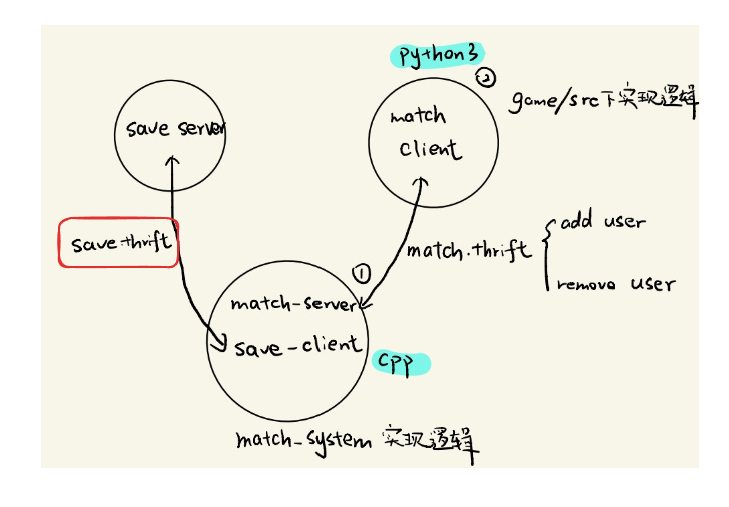
现在需要构建匹配系统与存储服务器的连接
save.thrift
在接口文件夹创建save.thrift
[root@iZ0jla2j0b9ocfhtozveqqZ thrift_lesson]# cd thrift
[root@iZ0jla2j0b9ocfhtozveqqZ thrift]# vim save.thrift
save.thrift
namespace cpp save_service

service Save {

    /**
     * username: myserver的名称
     * password: myserver的密码的md5sum的前8位
     * 用户名密码验证成功会返回0,验证失败会返回1
     * 验证成功后,结果会被保存到myserver:homework/lesson_6/result.txt中
     */
    i32 save_data(1: string username, 2: string password, 3: i32 player1_id, 4: i32 player2_id)
}
身份信息(来自dmy学长):
acs@132edbac7659:-S$ homework 4 getinfo
User: acs_5388
HostName: 123.57.47.211
Password: 6a1e6393

md5sum:43bf94467303e35f7a22f80630c4f1ad
前八位:43bf9446
match_system
进入match_system/src 再用命令构建接口
[root@iZ0jla2j0b9ocfhtozveqqZ thrift_lesson]# cd match_system/
[root@iZ0jla2j0b9ocfhtozveqqZ match_system]# cd src/
[root@iZ0jla2j0b9ocfhtozveqqZ src]# thrift -r --gen cpp ../../thrift/save.thrift
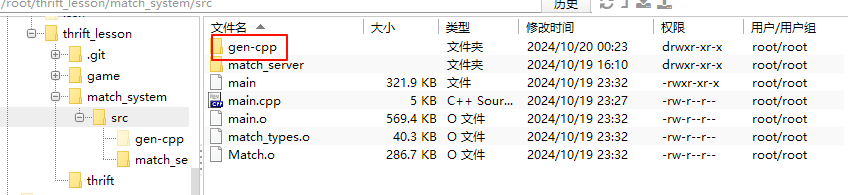
重命名为save_client 注意 现在这里反而成了客户端 因为是数据的发送方 数据存储服务器才是该功能的服务端
[root@iZ0jla2j0b9ocfhtozveqqZ src]# mv gen-cpp/ save_client
进入目录 把Save_server.skeleton.cpp删掉
这是一个构建服务端的代码 如果不删 就会出现两个main函数 出错
[root@iZ0jla2j0b9ocfhtozveqqZ src]# cd save_client/
[root@iZ0jla2j0b9ocfhtozveqqZ save_client]# rm Save_server.skeleton.cpp
rm:是否删除普通文件 "Save_server.skeleton.cpp"?y
将客户端代码添加到main.cpp当中
在main.cpp中实现save_client的功能,查看thrift官方文档
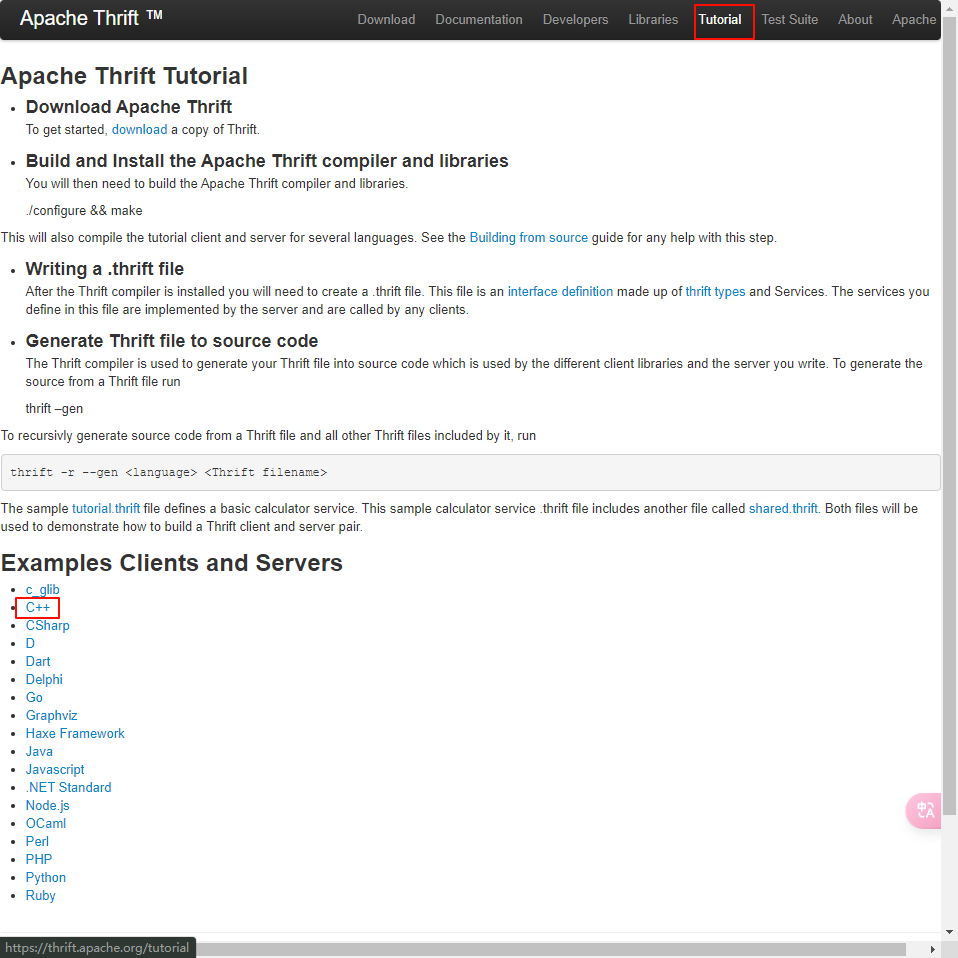
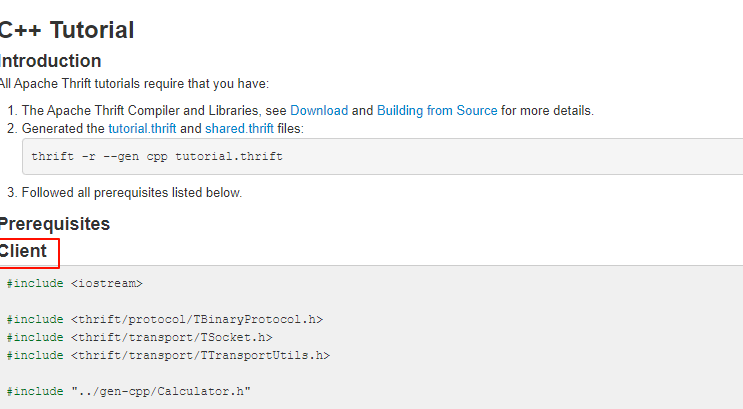
#include <iostream>

#include <thrift/protocol/TBinaryProtocol.h>
#include <thrift/transport/TSocket.h>
#include <thrift/transport/TTransportUtils.h>

#include "../gen-cpp/Calculator.h"

using namespace std;
using namespace apache::thrift;
using namespace apache::thrift::protocol;
using namespace apache::thrift::transport;

using namespace tutorial;
using namespace shared;

int main() {
  std::shared_ptr<TTransport> socket(new TSocket("localhost", 9090));
  std::shared_ptr<TTransport> transport(new TBufferedTransport(socket));
  std::shared_ptr<TProtocol> protocol(new TBinaryProtocol(transport));
  CalculatorClient client(protocol);

  try {
    transport->open();

    client.ping();
    cout << "ping()" << '\n';

    cout << "1 + 1 = " << client.add(1, 1) << '\n';

    Work work;
    work.op = Operation::DIVIDE;
    work.num1 = 1;
    work.num2 = 0;

    try {
      client.calculate(1, work);
      cout << "Whoa? We can divide by zero!" << '\n';
    } catch (InvalidOperation& io) {
      cout << "InvalidOperation: " << io.why << '\n';
      // or using generated operator<<: cout << io << '\n';
      // or by using std::exception native method what(): cout << io.what() << '\n';
    }

    work.op = Operation::SUBTRACT;
    work.num1 = 15;
    work.num2 = 10;
    int32_t diff = client.calculate(1, work);
    cout << "15 - 10 = " << diff << '\n';

    // Note that C++ uses return by reference for complex types to avoid
    // costly copy construction
    SharedStruct ss;
    client.getStruct(ss, 1);
    cout << "Received log: " << ss << '\n';

    transport->close();
  } catch (TException& tx) {
    cout << "ERROR: " << tx.what() << '\n';
  }
}
把这个示例结合入main.cpp当中去
编辑main.cpp
// This autogenerated skeleton file illustrates how to build a server.

// You should copy it to another filename to avoid overwriting it.

#include "match_server/Match.h"

#include "save_client/Save.h"//客户端新加代码

#include <thrift/protocol/TBinaryProtocol.h>

#include <thrift/server/TSimpleServer.h>

#include <thrift/transport/TServerSocket.h>

#include <thrift/transport/TBufferTransports.h>

#include <thrift/transport/TTransportUtils.h>//客户端新加代码

#include <thrift/transport/TSocket.h>//客户端新加代码

#include <thrift/concurrency/ThreadManager.h>//客户端新加代码

#include <thrift/concurrency/ThreadFactory.h>//客户端新加代码

#include <thrift/TToString.h>//客户端新加代码

#include <thrift/server/TThreadedServer.h>//客户端新加代码

#include<iostream>

#include<thread> //要用到多线程

#include<mutex> //用锁来实现消息队列

#include<condition_variable>//条件变量 配合锁来实现消息队列(实际是对锁进行了一个封装)

#include<queue>

#include<vector> //用vector存储所有的玩家

using namespace ::apache::thrift;

using namespace ::apache::thrift::protocol;

using namespace ::apache::thrift::transport;

using namespace ::apache::thrift::server;

using namespace  ::match_service;

using namespace ::save_service;//客户端新加代码

using namespace std;

//任务结构体

struct Task{

	User user; //用户信息

	string type;//操作类型 (add or remove)

};

//消息队列 保存任务 支持多线程访问

struct MessageQueue{

	queue<Task> q;//任务队列

	mutex m; //互斥锁 保护队列

	condition_variable cv;//条件变量 用于通知任务处理线程

}message_queue;

//线程池 匹配用户 保存匹配结果

class Pool {

public:

    void save_result(int a,int b){

        cout<<"Match Result"<<a<<" "<<b<<endl;

	   //* 客户端新加代码

        std::shared_ptr<TTransport> socket(new TSocket("123.57.47.211", 9090)); //数据存储服务器地址

        std::shared_ptr<TTransport> transport(new TBufferedTransport(socket));

        std::shared_ptr<TProtocol> protocol(new TBinaryProtocol(transport));

        SaveClient client(protocol);

        try {

            transport->open();

            int res = client.save_data("acs_5388", "43bf9446", a, b);//前面获得的账号和密码

            if(!res) puts("success");

            else puts("failed");

            transport->close();

        } catch (TException& tx) {

            cout << "ERROR: " << tx.what() << endl;

        }

        //客户端新加代码 *//

    }

    // 匹配用户

    void match() {

        // 当人数达到2就进行匹配 暂时不考虑能力和等待时间

        while (users.size() > 1) {

        	  auto a=users[0],b=users[1]; //直接从顶部拿出俩人匹配在一起

            users.erase(users.begin());

            users.erase(users.begin());

            save_result(a.id,b.id); // 保存匹配结果

          }

    }

    // 添加用户到匹配池

    void add(User user) {

        users.push_back(user);  // 添加用户到用户列表

    }

    // 从匹配池中移除用户

    void remove(User user) {

        for (uint32_t i = 0; i < users.size(); i++) {

            if (users[i].id == user.id) {

                users.erase(users.begin() + i);  // 移除用户

                break;

            }

        }

    }

private:

    vector<User> users;  // 保存用户

} pool;

class MatchHandler : virtual public MatchIf {

 public:

  MatchHandler() {

    // Your initialization goes here

  }

  int32_t add_user(const User& user, const std::string& info) {

    // Your implementation goes here

    printf("add_user\n");

    // 加锁并将任务添加到消息队列中

    //当变量消失时自动解锁 无需显式解锁 且能保证同时只有一个线程拥有锁

    unique_lock<mutex> lck(message_queue.m);

    message_queue.q.push({user, "add"});

    message_queue.cv.notify_all();  // 通知所有被条件变量卡住的线程

    return 0;

  }

  int32_t remove_user(const User& user, const std::string& info) {

    // Your implementation goes here

    printf("remove_user\n");

    // 加锁并将任务添加到消息队列中

    unique_lock<mutex> lck(message_queue.m);

    message_queue.q.push({user, "remove"});

    // 通知所有被条件变量卡住的线程

    //remove也需要通知 因为队列里放的是任务而不是用户 执行完remove后 消息队列就不为空了

    message_queue.cv.notify_all();

    return 0;

  }

};

//消费者模型

void consume_task(){

	//匹配过程 不停地消耗用户 写个死循环(需要单开线程)

	while(true){

	   //加锁

        unique_lock<mutex> lck(message_queue.m);

	   // 如果队列为空

        if (message_queue.q.empty()) {

        	  message_queue.cv.wait(lck); //消息队列无任务 无法进行匹配 线程卡住 等待被唤醒(有任务进来)

        }

        else {

            // 从队列中取出任务并处理

            auto task = message_queue.q.front();

            message_queue.q.pop();

            lck.unlock();//取出来之后就立刻解锁 如果等到执行完task再解锁的话 占用的时间就太长了 导致其他两个线程卡住

		  //do task

		  //用一个类似池的东西维护所有玩家

            if (task.type == "add")

                pool.add(task.user);  // 添加用户

            else if (task.type == "remove")

                pool.remove(task.user);  // 移除用户

            pool.match();

        }

    }

}

int main(int argc, char **argv) {

  int port = 9090;

  ::std::shared_ptr<MatchHandler> handler(new MatchHandler());

  ::std::shared_ptr<TProcessor> processor(new MatchProcessor(handler));

  ::std::shared_ptr<TServerTransport> serverTransport(new TServerSocket(port));

  ::std::shared_ptr<TTransportFactory> transportFactory(new TBufferedTransportFactory());

  ::std::shared_ptr<TProtocolFactory> protocolFactory(new TBinaryProtocolFactory());

  TSimpleServer server(processor, serverTransport, transportFactory, protocolFactory);

  cout<<"start Match Server"<<endl;

  //为消费者模型(匹配)单开线程 将函数名传进去即可

  thread matching_thread(consume_task);

  server.serve();

  return 0;

}
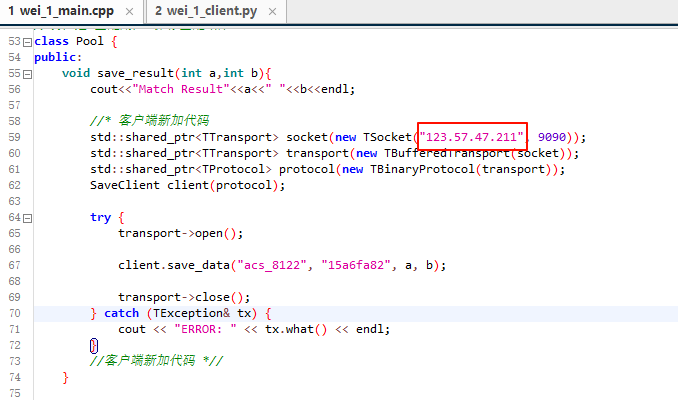
注意点:
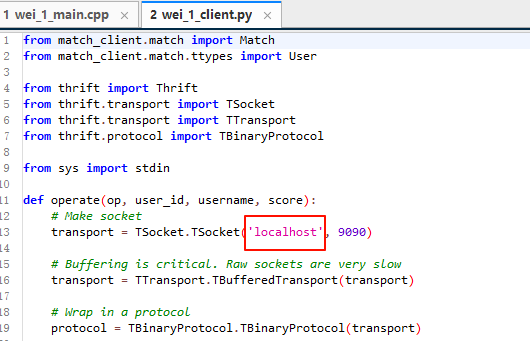
之前的匹配客户端 连接的是loaclhost 因为两个服务都是在我自己的云服务器上
现在是要将我的云服务器 连接到y总实现好的数据存储服务器上
此处应作修改
编译链接:
[root@iZ0jla2j0b9ocfhtozveqqZ src]# g++ -std=c++11 -c  save_client/*.cpp

[root@iZ0jla2j0b9ocfhtozveqqZ src]#  g++ *.o -o main -pthread -lthrift
[root@iZ0jla2j0b9ocfhtozveqqZ src]# g++ -std=c++11 -c main.cpp

[root@iZ0jla2j0b9ocfhtozveqqZ src]# g++ *.o -o main -pthread -lthrift -lstdc++
这里我无法验证是否存到了y总服务器 登入不上dmy的远程服务器
然后一开始连接可能都连不上 因为不是在acterminal中做的 身份验证无效
但代码是没问题的
掠过吧
升级匹配逻辑
到这里项目框架基本搭成
但可以发现有很多瑕疵
匹配逻辑过于简陋 什么同水平匹配 等待过久匹配基本都没实现
以后项目可能也是这样 先不管那么多 先写个能跑通的 具体功能后面再说 没必要妄想着上来就把所有的都做好
按分值来匹配
初步构思可优化点:
-
将分差小于50的匹配在一起
-
不要阻塞到有人进来才匹配 给个延时 等多久就检查并尝试匹配
修改后代码
// This autogenerated skeleton file illustrates how to build a server.

// You should copy it to another filename to avoid overwriting it.

#include "match_server/Match.h"

#include "save_client/Save.h"//客户端新加代码

#include <thrift/protocol/TBinaryProtocol.h>

#include <thrift/server/TSimpleServer.h>

#include <thrift/transport/TServerSocket.h>

#include <thrift/transport/TBufferTransports.h>

#include <thrift/transport/TTransportUtils.h>//客户端新加代码

#include <thrift/transport/TSocket.h>//客户端新加代码

#include <thrift/concurrency/ThreadManager.h>//客户端新加代码

#include <thrift/concurrency/ThreadFactory.h>//客户端新加代码

#include <thrift/TToString.h>//客户端新加代码

#include <thrift/server/TThreadedServer.h>//客户端新加代码

#include<iostream>

#include<thread> //要用到多线程

#include<mutex> //用锁来实现消息队列

#include<condition_variable>//条件变量 配合锁来实现消息队列(实际是对锁进行了一个封装)

#include<queue>

#include<vector> //用vector存储所有的玩家

#include <unistd.h>

using namespace ::apache::thrift;

using namespace ::apache::thrift::protocol;

using namespace ::apache::thrift::transport;

using namespace ::apache::thrift::server;

using namespace  ::match_service;

using namespace ::save_service;//客户端新加代码

using namespace std;

//任务结构体

struct Task{

	User user; //用户信息

	string type;//操作类型 (add or remove)

};

//消息队列 保存任务 支持多线程访问

struct MessageQueue{

	queue<Task> q;//任务队列

	mutex m; //互斥锁 保护队列

	condition_variable cv;//条件变量 用于通知任务处理线程

}message_queue;

//线程池 匹配用户 保存匹配结果

class Pool {

public:

    void save_result(int a,int b){

        cout<<"Match Result "<<a<<" "<<b<<endl;

	   //* 客户端新加代码

        std::shared_ptr<TTransport> socket(new TSocket("123.57.47.211", 9090)); //数据存储服务器地址

        std::shared_ptr<TTransport> transport(new TBufferedTransport(socket));

        std::shared_ptr<TProtocol> protocol(new TBinaryProtocol(transport));

        SaveClient client(protocol);

        try {

            transport->open();

            int res = client.save_data("acs_5388", "43bf9446", a, b);//前面获得的账号和密码

            if(!res) puts("success");

            else puts("failed");

            transport->close();

        } catch (TException& tx) {

            cout << "ERROR: " << tx.what() << endl;

        }

        //客户端新加代码 *//

    }

    // 匹配用户

    void match() {

    	/*

        // 当人数达到2就进行匹配 暂时不考虑能力和等待时间

        while (users.size() > 1) {

        	  auto a=users[0],b=users[1]; //直接从顶部拿出俩人匹配在一起

            users.erase(users.begin());

            users.erase(users.begin());

            save_result(a.id,b.id); // 保存匹配结果

          }

     */

	   //升级匹配逻辑

        while (users.size() > 1)

        {

        	   //按分值排序

             sort(users.begin(), users.end(), [&](const User &a, const User &b) {

                 return a.score < b.score;

             });

		   //找到两个分值不超过50的人进行匹配

             bool flag = true;

             for (uint32_t i = 1; i < users.size(); i ++ )

             {

                 auto a = users[i - 1], b = users[i];

                 if (b.score - a.score <= 50)

                 {

                     users.erase(users.begin() + i - 1, users.begin() + i + 1);

                     save_result(a.id, b.id);

                     flag = false;

                     break;

                 }

              }

              if (!flag) break;

         }

    }

    // 添加用户到匹配池

    void add(User user) {

        users.push_back(user);  // 添加用户到用户列表

    }

    // 从匹配池中移除用户

    void remove(User user) {

        for (uint32_t i = 0; i < users.size(); i++) {

            if (users[i].id == user.id) {

                users.erase(users.begin() + i);  // 移除用户

                break;

            }

        }

    }

private:

    vector<User> users;  // 保存用户

} pool;

class MatchHandler : virtual public MatchIf {

 public:

  MatchHandler() {

    // Your initialization goes here

  }

  int32_t add_user(const User& user, const std::string& info) {

    // Your implementation goes here

    printf("add_user\n");

    // 加锁并将任务添加到消息队列中

    //当变量消失时自动解锁 无需显式解锁 且能保证同时只有一个线程拥有锁

    unique_lock<mutex> lck(message_queue.m);

    message_queue.q.push({user, "add"});

    message_queue.cv.notify_all();  // 通知所有被条件变量卡住的线程

    return 0;

  }

  int32_t remove_user(const User& user, const std::string& info) {

    // Your implementation goes here

    printf("remove_user\n");

    // 加锁并将任务添加到消息队列中

    unique_lock<mutex> lck(message_queue.m);

    message_queue.q.push({user, "remove"});

    // 通知所有被条件变量卡住的线程

    //remove也需要通知 因为队列里放的是任务而不是用户 执行完remove后 消息队列就不为空了

    message_queue.cv.notify_all();

    return 0;

  }

};

//消费者模型

void consume_task(){

	//匹配过程 不停地消耗用户 写个死循环(需要单开线程)

	while(true){

	   //加锁

        unique_lock<mutex> lck(message_queue.m);

	   // 如果队列为空

        if (message_queue.q.empty()) {

        	  //message_queue.cv.wait(lck); //消息队列无任务 无法进行匹配 线程卡住 等待被唤醒(有任务进来)

		  //不再等待 而是间隔多久就检查并尝试匹配 防止阻塞

		  lck.unlock();

        	  pool.match();

        	  sleep(1);//间隔一秒就匹配一次

        }

        else {

            // 从队列中取出任务并处理

            auto task = message_queue.q.front();

            message_queue.q.pop();

            lck.unlock();//取出来之后就立刻解锁 如果等到执行完task再解锁的话 占用的时间就太长了 导致其他两个线程卡住

		  //do task

		  //用一个类似池的东西维护所有玩家

            if (task.type == "add")

                pool.add(task.user);  // 添加用户

            else if (task.type == "remove")

                pool.remove(task.user);  // 移除用户

            //pool.match();

        }

    }

}

int main(int argc, char **argv) {

  int port = 9090;

  ::std::shared_ptr<MatchHandler> handler(new MatchHandler());

  ::std::shared_ptr<TProcessor> processor(new MatchProcessor(handler));

  ::std::shared_ptr<TServerTransport> serverTransport(new TServerSocket(port));

  ::std::shared_ptr<TTransportFactory> transportFactory(new TBufferedTransportFactory());

  ::std::shared_ptr<TProtocolFactory> protocolFactory(new TBinaryProtocolFactory());

  TSimpleServer server(processor, serverTransport, transportFactory, protocolFactory);

  cout<<"start Match Server"<<endl;

  //为消费者模型(匹配)单开线程 将函数名传进去即可

  thread matching_thread(consume_task);

  server.serve();

  return 0;

}
多线程
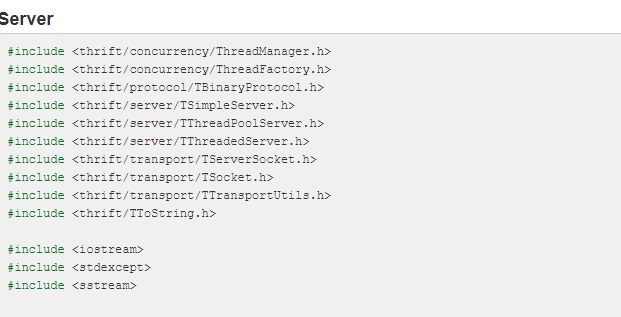
看官网文档 去”借鉴“ https://thrift.apache.org/tutorial/cpp.html
// This autogenerated skeleton file illustrates how to build a server.

// You should copy it to another filename to avoid overwriting it.

#include "match_server/Match.h"

#include "save_client/Save.h"//客户端新加代码

#include <thrift/concurrency/ThreadManager.h>//多线程新加代码

#include <thrift/concurrency/ThreadFactory.h>//多线程新加代码

#include <thrift/server/TThreadedServer.h>//多线程新加代码

#include <thrift/protocol/TBinaryProtocol.h>

#include <thrift/server/TSimpleServer.h>

#include <thrift/transport/TServerSocket.h>

#include <thrift/transport/TBufferTransports.h>

#include <thrift/transport/TTransportUtils.h>//客户端新加代码

#include <thrift/transport/TSocket.h>//客户端新加代码

#include <thrift/concurrency/ThreadManager.h>//客户端新加代码

#include <thrift/concurrency/ThreadFactory.h>//客户端新加代码

#include <thrift/TToString.h>//客户端新加代码

#include <thrift/server/TThreadedServer.h>//客户端新加代码

#include<iostream>

#include<thread> //要用到多线程

#include<mutex> //用锁来实现消息队列

#include<condition_variable>//条件变量 配合锁来实现消息队列(实际是对锁进行了一个封装)

#include<queue>

#include<vector> //用vector存储所有的玩家

#include <unistd.h>

using namespace ::apache::thrift;

using namespace ::apache::thrift::protocol;

using namespace ::apache::thrift::transport;

using namespace ::apache::thrift::server;

using namespace  ::match_service;

using namespace ::save_service;//客户端新加代码

using namespace std;

//任务结构体

struct Task{

	User user; //用户信息

	string type;//操作类型 (add or remove)

};

//消息队列 保存任务 支持多线程访问

struct MessageQueue{

	queue<Task> q;//任务队列

	mutex m; //互斥锁 保护队列

	condition_variable cv;//条件变量 用于通知任务处理线程

}message_queue;

//线程池 匹配用户 保存匹配结果

class Pool {

public:

    void save_result(int a,int b){

        cout<<"Match Result "<<a<<" "<<b<<endl;

	   //* 客户端新加代码

        std::shared_ptr<TTransport> socket(new TSocket("123.57.47.211", 9090)); //数据存储服务器地址

        std::shared_ptr<TTransport> transport(new TBufferedTransport(socket));

        std::shared_ptr<TProtocol> protocol(new TBinaryProtocol(transport));

        SaveClient client(protocol);

        try {

            transport->open();

            int res = client.save_data("acs_5388", "43bf9446", a, b);//前面获得的账号和密码

            if(!res) puts("success");

            else puts("failed");

            transport->close();

        } catch (TException& tx) {

            cout << "ERROR: " << tx.what() << endl;

        }

        //客户端新加代码 *//

    }

    // 匹配用户

    void match() {

    	/*

        // 当人数达到2就进行匹配 暂时不考虑能力和等待时间

        while (users.size() > 1) {

        	  auto a=users[0],b=users[1]; //直接从顶部拿出俩人匹配在一起

            users.erase(users.begin());

            users.erase(users.begin());

            save_result(a.id,b.id); // 保存匹配结果

          }

     */

	   //升级匹配逻辑

        while (users.size() > 1)

        {

        	   //按分值排序

             sort(users.begin(), users.end(), [&](const User &a, const User &b) {

                 return a.score < b.score;

             });

		   //找到两个分值不超过50的人进行匹配

             bool flag = true;

             for (uint32_t i = 1; i < users.size(); i ++ )

             {

                 auto a = users[i - 1], b = users[i];

                 if (b.score - a.score <= 50)

                 {

                     users.erase(users.begin() + i - 1, users.begin() + i + 1);

                     save_result(a.id, b.id);

                     flag = false;

                     break;

                 }

              }

              if (!flag) break;

         }

    }

    // 添加用户到匹配池

    void add(User user) {

        users.push_back(user);  // 添加用户到用户列表

    }

    // 从匹配池中移除用户

    void remove(User user) {

        for (uint32_t i = 0; i < users.size(); i++) {

            if (users[i].id == user.id) {

                users.erase(users.begin() + i);  // 移除用户

                break;

            }

        }

    }

private:

    vector<User> users;  // 保存用户

} pool;

class MatchHandler : virtual public MatchIf {

 public:

  MatchHandler() {

    // Your initialization goes here

  }

  int32_t add_user(const User& user, const std::string& info) {

    // Your implementation goes here

    printf("add_user\n");

    // 加锁并将任务添加到消息队列中

    //当变量消失时自动解锁 无需显式解锁 且能保证同时只有一个线程拥有锁

    unique_lock<mutex> lck(message_queue.m);

    message_queue.q.push({user, "add"});

    message_queue.cv.notify_all();  // 通知所有被条件变量卡住的线程

    return 0;

  }

  int32_t remove_user(const User& user, const std::string& info) {

    // Your implementation goes here

    printf("remove_user\n");

    // 加锁并将任务添加到消息队列中

    unique_lock<mutex> lck(message_queue.m);

    message_queue.q.push({user, "remove"});

    // 通知所有被条件变量卡住的线程

    //remove也需要通知 因为队列里放的是任务而不是用户 执行完remove后 消息队列就不为空了

    message_queue.cv.notify_all();

    return 0;

  }

};

class MatchCloneFactory : virtual public MatchIfFactory {

    public:

        ~MatchCloneFactory() override = default;

        MatchIf* getHandler(const ::apache::thrift::TConnectionInfo& connInfo) override

        {

            std::shared_ptr<TSocket> sock = std::dynamic_pointer_cast<TSocket>(connInfo.transport);

            /*cout << "Incoming connection\n";

            cout << "\tSocketInfo: "  << sock->getSocketInfo() << "\n";

            cout << "\tPeerHost: "    << sock->getPeerHost() << "\n";

            cout << "\tPeerAddress: " << sock->getPeerAddress() << "\n";

            cout << "\tPeerPort: "    << sock->getPeerPort() << "\n";*/

            return new MatchHandler;

        }

        void releaseHandler(MatchIf* handler) override {

            delete handler;

        }

};

//消费者模型

void consume_task(){

	//匹配过程 不停地消耗用户 写个死循环(需要单开线程)

	while(true){

	   //加锁

        unique_lock<mutex> lck(message_queue.m);

	   // 如果队列为空

        if (message_queue.q.empty()) {

        	  //message_queue.cv.wait(lck); //消息队列无任务 无法进行匹配 线程卡住 等待被唤醒(有任务进来)

		  //不再等待 而是间隔多久就检查并尝试匹配 防止阻塞

		  lck.unlock();

        	  pool.match();

        	  sleep(1);//间隔一秒就匹配一次

        }

        else {

            // 从队列中取出任务并处理

            auto task = message_queue.q.front();

            message_queue.q.pop();

            lck.unlock();//取出来之后就立刻解锁 如果等到执行完task再解锁的话 占用的时间就太长了 导致其他两个线程卡住

		  //do task

		  //用一个类似池的东西维护所有玩家

            if (task.type == "add")

                pool.add(task.user);  // 添加用户

            else if (task.type == "remove")

                pool.remove(task.user);  // 移除用户

            //pool.match();

        }

    }

}

int main(int argc, char **argv) {

  /*

  int port = 9090;

  ::std::shared_ptr<MatchHandler> handler(new MatchHandler());

  ::std::shared_ptr<TProcessor> processor(new MatchProcessor(handler));

  ::std::shared_ptr<TServerTransport> serverTransport(new TServerSocket(port));

  ::std::shared_ptr<TTransportFactory> transportFactory(new TBufferedTransportFactory());

  ::std::shared_ptr<TProtocolFactory> protocolFactory(new TBinaryProtocolFactory());

  TSimpleServer server(processor, serverTransport, transportFactory, protocolFactory);

  */

  TThreadedServer server(

       std::make_shared<MatchProcessorFactory>(std::make_shared<MatchCloneFactory>()),

       std::make_shared<TServerSocket>(9090), //port

       std::make_shared<TBufferedTransportFactory>(),

       std::make_shared<TBinaryProtocolFactory>()

  );

  cout<<"start Match Server"<<endl;

  //为消费者模型(匹配)单开线程 将函数名传进去即可

  thread matching_thread(consume_task);

  server.serve();

  return 0;

}
等待时间越长,阈值越大
如果实在匹配不到(差距小于50) 只能勉为其难把一些不该排一起的排一起
为每个人添加一个已等待时间
// This autogenerated skeleton file illustrates how to build a server.

// You should copy it to another filename to avoid overwriting it.

#include "match_server/Match.h"

#include "save_client/Save.h"//客户端新加代码

#include <thrift/concurrency/ThreadManager.h>//多线程新加代码

#include <thrift/concurrency/ThreadFactory.h>//多线程新加代码

#include <thrift/server/TThreadedServer.h>//多线程新加代码

#include <thrift/protocol/TBinaryProtocol.h>

#include <thrift/server/TSimpleServer.h>

#include <thrift/transport/TServerSocket.h>

#include <thrift/transport/TBufferTransports.h>

#include <thrift/transport/TTransportUtils.h>//客户端新加代码

#include <thrift/transport/TSocket.h>//客户端新加代码

#include <thrift/concurrency/ThreadManager.h>//客户端新加代码

#include <thrift/concurrency/ThreadFactory.h>//客户端新加代码

#include <thrift/TToString.h>//客户端新加代码

#include <thrift/server/TThreadedServer.h>//客户端新加代码

#include<iostream>

#include<thread> //要用到多线程

#include<mutex> //用锁来实现消息队列

#include<condition_variable>//条件变量 配合锁来实现消息队列(实际是对锁进行了一个封装)

#include<queue>

#include<vector> //用vector存储所有的玩家

#include <unistd.h>

using namespace ::apache::thrift;

using namespace ::apache::thrift::protocol;

using namespace ::apache::thrift::transport;

using namespace ::apache::thrift::server;

using namespace  ::match_service;

using namespace ::save_service;//客户端新加代码

using namespace std;

//任务结构体

struct Task{

	User user; //用户信息

	string type;//操作类型 (add or remove)

};

//消息队列 保存任务 支持多线程访问

struct MessageQueue{

	queue<Task> q;//任务队列

	mutex m; //互斥锁 保护队列

	condition_variable cv;//条件变量 用于通知任务处理线程

}message_queue;

//线程池 匹配用户 保存匹配结果

class Pool {

public:

    void save_result(int a,int b){

        cout<<"Match Result "<<a<<" "<<b<<endl;

	   //* 客户端新加代码

        std::shared_ptr<TTransport> socket(new TSocket("123.57.47.211", 9090)); //数据存储服务器地址

        std::shared_ptr<TTransport> transport(new TBufferedTransport(socket));

        std::shared_ptr<TProtocol> protocol(new TBinaryProtocol(transport));

        SaveClient client(protocol);

        try {

            transport->open();

            int res = client.save_data("acs_5388", "43bf9446", a, b);//前面获得的账号和密码

            if(!res) puts("success");

            else puts("failed");

            transport->close();

        } catch (TException& tx) {

            cout << "ERROR: " << tx.what() << endl;

        }

        //客户端新加代码 *//

    }

    bool check_match(uint32_t i, uint32_t j)

    {

        auto a = users[i], b = users[j];

        int dt = abs(a.score - b.score);

        int a_max_dif = wt[i] * 50;

        int b_max_dif = wt[j] * 50;

        return dt <= a_max_dif && dt <= b_max_dif;

    }

    // 匹配用户

    void match() {

    	/*

        // 当人数达到2就进行匹配 暂时不考虑能力和等待时间

        while (users.size() > 1) {

        	  auto a=users[0],b=users[1]; //直接从顶部拿出俩人匹配在一起

            users.erase(users.begin());

            users.erase(users.begin());

            save_result(a.id,b.id); // 保存匹配结果

          }

     */

     /*

	   //升级匹配逻辑

        while (users.size() > 1)

        {

        	   //按分值排序

             sort(users.begin(), users.end(), [&](const User &a, const User &b) {

                 return a.score < b.score;

             });

		   //找到两个分值不超过50的人进行匹配

             bool flag = true;

             for (uint32_t i = 1; i < users.size(); i ++ )

             {

                 auto a = users[i - 1], b = users[i];

                 if (b.score - a.score <= 50)

                 {

                     users.erase(users.begin() + i - 1, users.begin() + i + 1);

                     save_result(a.id, b.id);

                     flag = false;

                     break;

                 }

              }

              if (!flag) break;

         }

      */

       for (uint32_t i = 0; i < wt.size(); i ++)

           wt[i] ++;// 等待秒数+1

       while (users.size() > 1)

       {

            sort(users.begin(), users.end(), [&](const User &a, const User &b) {

                 return a.score < b.score;

            });

            bool flag = true;

            for (uint32_t i = 0; i < users.size(); i ++)

            {

                 for (uint32_t j = i + 1; j < users.size(); j ++)

                 {

                      auto a = users[i], b = users[j];

                      if (check_match(i, j))

                      {

                          users.erase(users.begin() + j);

                          users.erase(users.begin() + i);

                          wt.erase(wt.begin() + j);

                          wt.erase(wt.begin() + i);

                          save_result(a.id, b.id);

                          flag = false;

                          break;

                      }

                 }

                 if (!flag) break;

            }

            if (flag) break;

       }

    }

    // 添加用户到匹配池

    void add(User user) {

        users.push_back(user);  // 添加用户到用户列表

        wt.push_back(0);

    }

    // 从匹配池中移除用户

    void remove(User user) {

        for (uint32_t i = 0; i < users.size(); i++) {

            if (users[i].id == user.id) {

                users.erase(users.begin() + i);  // 移除用户

                wt.erase(wt.begin() + i);

                break;

            }

        }

    }

private:

    vector<User> users;  // 保存用户

    vector<int> wt;  // 等待时间, 单位:s

} pool;

class MatchHandler : virtual public MatchIf {

 public:

  MatchHandler() {

    // Your initialization goes here

  }

  int32_t add_user(const User& user, const std::string& info) {

    // Your implementation goes here

    printf("add_user\n");

    // 加锁并将任务添加到消息队列中

    //当变量消失时自动解锁 无需显式解锁 且能保证同时只有一个线程拥有锁

    unique_lock<mutex> lck(message_queue.m);

    message_queue.q.push({user, "add"});

    message_queue.cv.notify_all();  // 通知所有被条件变量卡住的线程

    return 0;

  }

  int32_t remove_user(const User& user, const std::string& info) {

    // Your implementation goes here

    printf("remove_user\n");

    // 加锁并将任务添加到消息队列中

    unique_lock<mutex> lck(message_queue.m);

    message_queue.q.push({user, "remove"});

    // 通知所有被条件变量卡住的线程

    //remove也需要通知 因为队列里放的是任务而不是用户 执行完remove后 消息队列就不为空了

    message_queue.cv.notify_all();

    return 0;

  }

};

//多线程新加代码

class MatchCloneFactory : virtual public MatchIfFactory {

    public:

        ~MatchCloneFactory() override = default;

        MatchIf* getHandler(const ::apache::thrift::TConnectionInfo& connInfo) override

        {

            std::shared_ptr<TSocket> sock = std::dynamic_pointer_cast<TSocket>(connInfo.transport);

            /*cout << "Incoming connection\n";

            cout << "\tSocketInfo: "  << sock->getSocketInfo() << "\n";

            cout << "\tPeerHost: "    << sock->getPeerHost() << "\n";

            cout << "\tPeerAddress: " << sock->getPeerAddress() << "\n";

            cout << "\tPeerPort: "    << sock->getPeerPort() << "\n";*/

            return new MatchHandler;

        }

        void releaseHandler(MatchIf* handler) override {

            delete handler;

        }

};

//消费者模型

void consume_task(){

	//匹配过程 不停地消耗用户 写个死循环(需要单开线程)

	while(true){

	   //加锁

        unique_lock<mutex> lck(message_queue.m);

	   // 如果队列为空

        if (message_queue.q.empty()) {

        	  //message_queue.cv.wait(lck); //消息队列无任务 无法进行匹配 线程卡住 等待被唤醒(有任务进来)

		  //不再等待 而是间隔多久就检查并尝试匹配 防止阻塞

		  lck.unlock();

        	  pool.match();

        	  sleep(1);//间隔一秒就匹配一次

        }

        else {

            // 从队列中取出任务并处理

            auto task = message_queue.q.front();

            message_queue.q.pop();

            lck.unlock();//取出来之后就立刻解锁 如果等到执行完task再解锁的话 占用的时间就太长了 导致其他两个线程卡住

		  //do task

		  //用一个类似池的东西维护所有玩家

            if (task.type == "add")

                pool.add(task.user);  // 添加用户

            else if (task.type == "remove")

                pool.remove(task.user);  // 移除用户

            //pool.match();

        }

    }

}

int main(int argc, char **argv) {

  /*

  int port = 9090;

  ::std::shared_ptr<MatchHandler> handler(new MatchHandler());

  ::std::shared_ptr<TProcessor> processor(new MatchProcessor(handler));

  ::std::shared_ptr<TServerTransport> serverTransport(new TServerSocket(port));

  ::std::shared_ptr<TTransportFactory> transportFactory(new TBufferedTransportFactory());

  ::std::shared_ptr<TProtocolFactory> protocolFactory(new TBinaryProtocolFactory());

  TSimpleServer server(processor, serverTransport, transportFactory, protocolFactory);

  */

  //多线程新加代码

  TThreadedServer server(

       std::make_shared<MatchProcessorFactory>(std::make_shared<MatchCloneFactory>()),

       std::make_shared<TServerSocket>(9090), //port

       std::make_shared<TBufferedTransportFactory>(),

       std::make_shared<TBinaryProtocolFactory>()

  );

  cout<<"start Match Server"<<endl;

  //为消费者模型(匹配)单开线程 将函数名传进去即可

  thread matching_thread(consume_task);

  server.serve();

  return 0;

}
完结
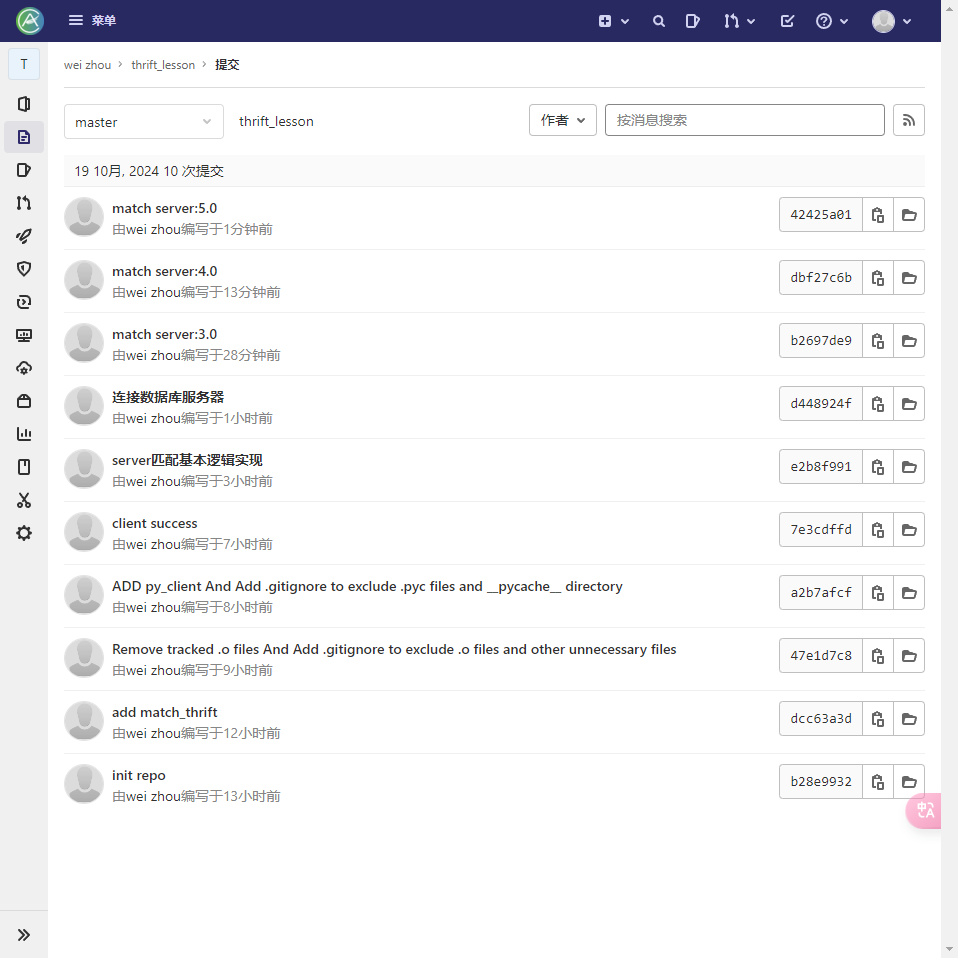
耗时13h,,,,
已经将该项目传在gitlab 现在项目做完了 再上传到github
在 GitHub 上创建一个新的仓库
进入项目文件夹(本地仓库)
二选一
1、替换现有的 origin 远程仓库为 GitHub 仓库
git remote set-url origin https://github.com/Userwei0418/thrift.git
- 保留现有的
origin(GitLab)并添加新的远程仓库
git remote add github https://github.com/Userwei0418/thrift.git
同样 在GitHub上添加公钥
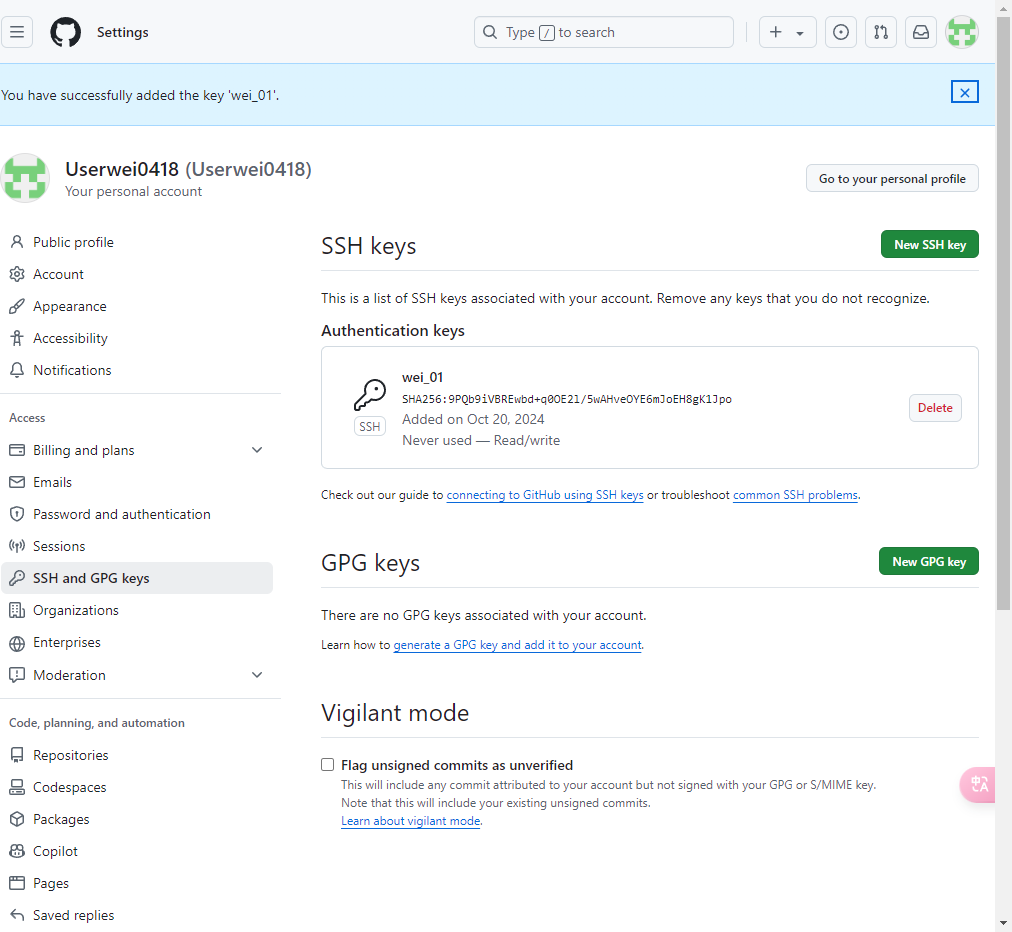
将 GitHub 远程仓库 URL 从 HTTPS 改为 SSH:
git remote set-url github git@github.com:Userwei0418/thrift.git
推送仓库
git push -u github master
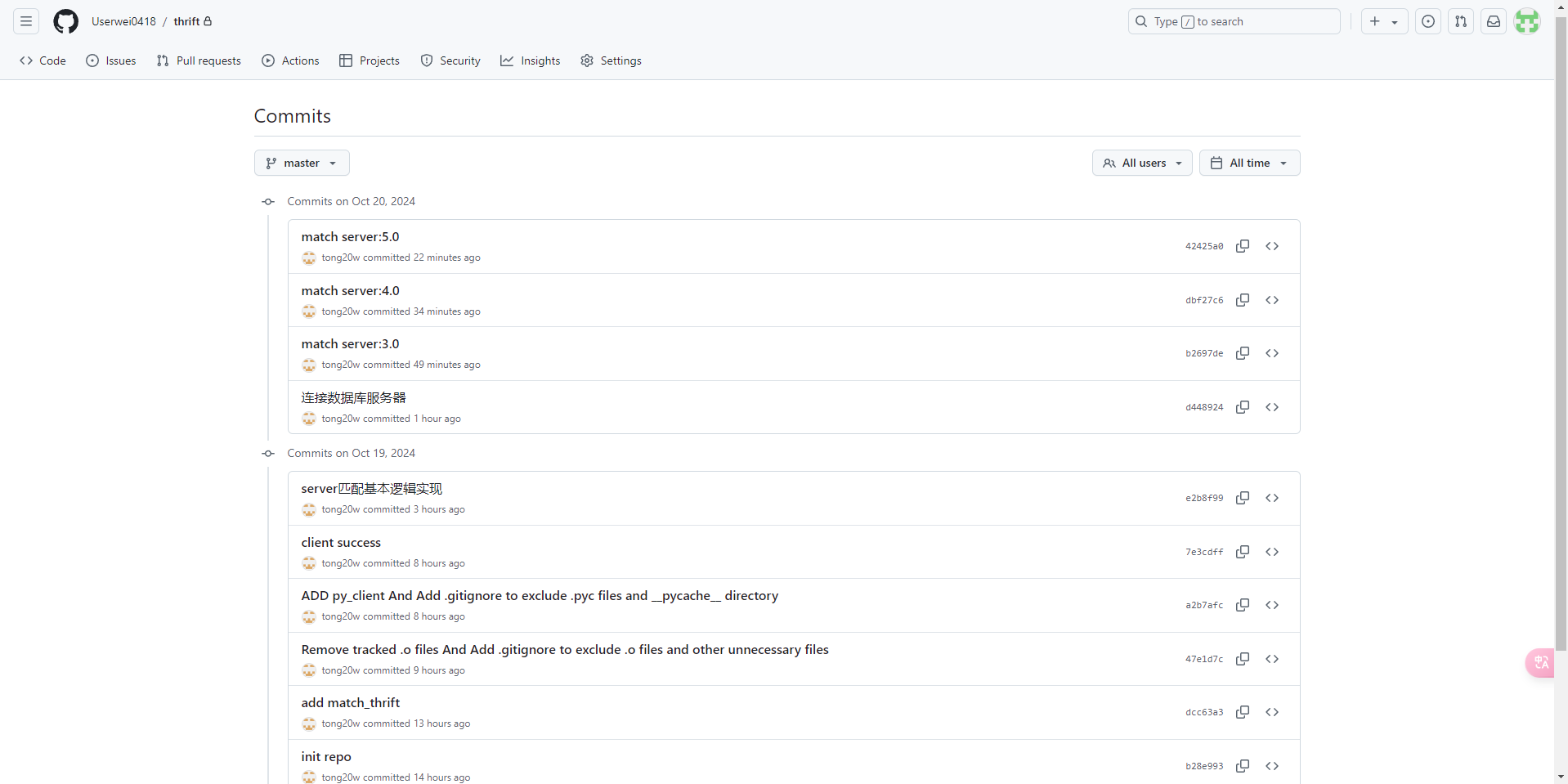
所有记录都会在
项目分区导航:scp传文件基本用法 ⬅️ | 24-thrift | ➡️ 管道、环境变量、常用命令
💬 评论