练手
开始真正动手——用最少的代码,搭一个能跑、能看到数据、能反复运行的职位爬虫。
用一个专门给爬虫练手的网站 quotes.toscrape.com(它的"职位版"是 realpython.github.io/fake-jobs)作为目标。 练手网站
这个站点是官方明确允许爬取的,结构和真实招聘网站非常像(列表页 → 详情页 → 字段抽取),非常适合作为我们的"第一只麻雀"。
学完这一讲,会清晰地感受到:项目里那些复杂的工程代码,不是天才设计出来的,而是一个最简单的爬虫,在不断遇到问题、不断打补丁的过程中"长大"的。
一、目标定义:我们要抓什么
在写任何一行代码之前,先问自己三个问题:
- 抓哪个网站? ——
https://realpython.github.io/fake-jobs/ - 要抓什么字段? —— 职位标题、公司名、地点、发布时间、详情页链接、职位描述
- 抓多少? —— 全站(这个练习站只有约 100 条)
这三个问题就是"产品需求"。真实项目里也是一样——先想清楚要什么,再决定怎么抓,顺序不能反。
二、第 0 步:用浏览器先"踩点"
这是初学者最容易跳过的一步,也是最关键的一步。
打开网址,按 F12 打开开发者工具,看三件事:
- Elements 面板:看 HTML 结构,找出"职位卡片"用的是什么标签和 class
- Network 面板:刷新页面,看数据是 HTML 直出还是接口加载
- 手动点一个职位:看详情页的 URL 规律和字段位置
通过踩点,我们会发现:
-
列表页:每张卡片是
<div class="card-content">,里面有标题、公司名、地点、详情链接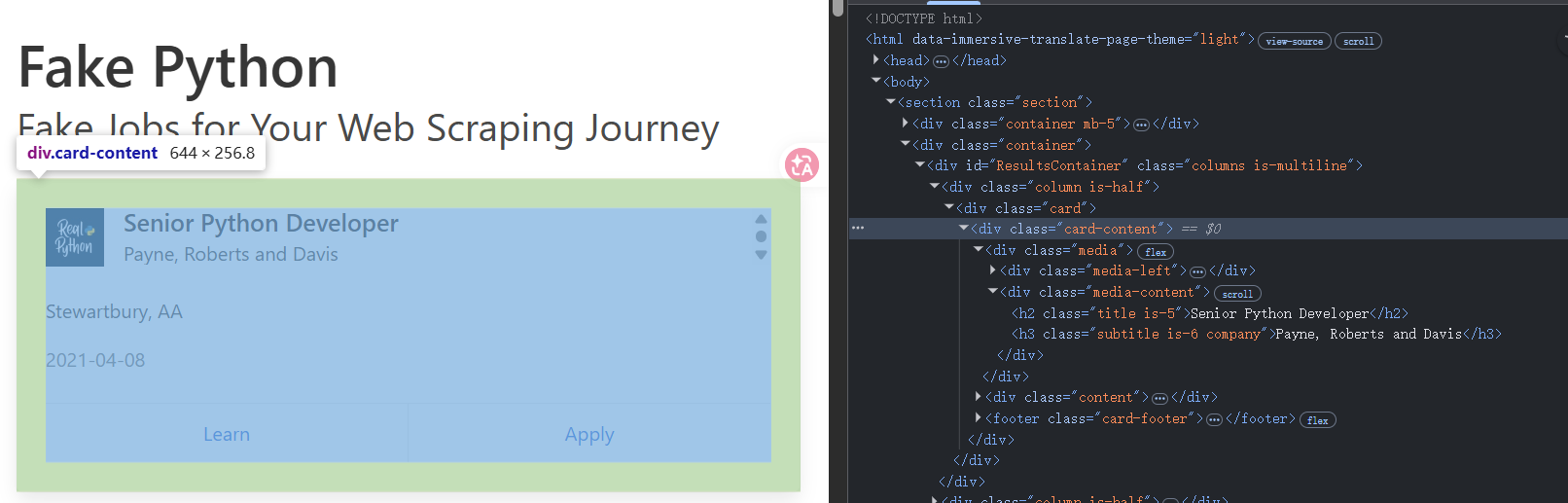
-
详情页:职位描述在
<div class="content">里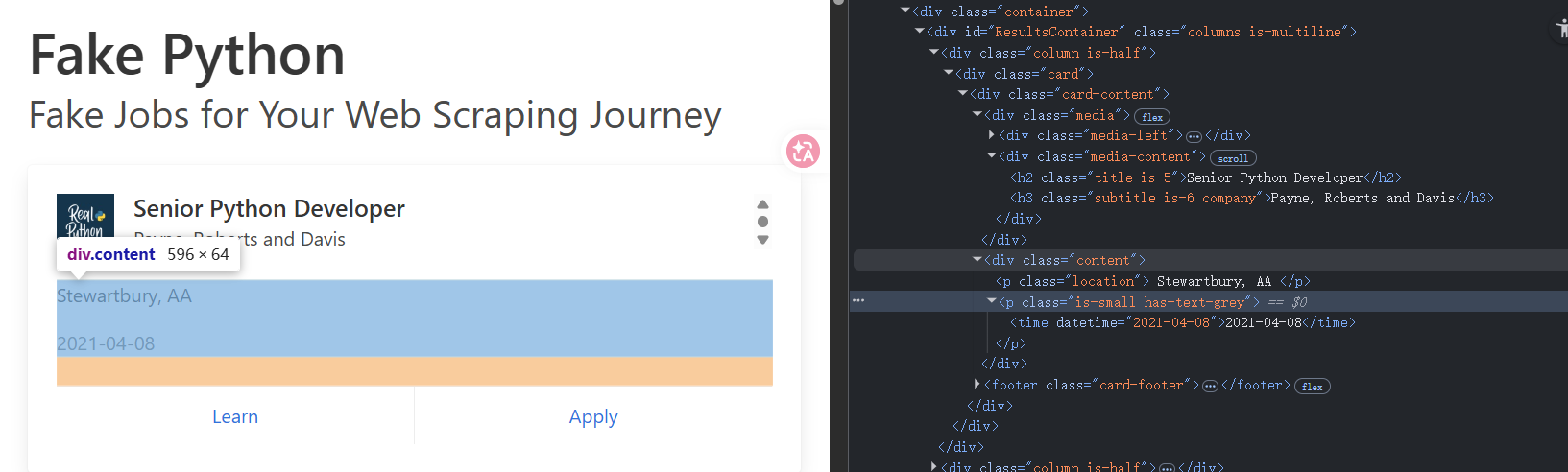
-
数据是服务端直接渲染到 HTML 的,不是接口加载——所以用
requests就够了,不需要 Playwright
这就是第 2 讲讲过的"采集通道选择":能用静态抓的,绝不上动态抓。
三、第一版:30 行代码,先把数据抓回来
import requests
from bs4 import BeautifulSoup

URL = "https://realpython.github.io/fake-jobs/"
headers = {"User-Agent": "Mozilla/5.0"}

resp = requests.get(URL, headers=headers, timeout=10)
soup = BeautifulSoup(resp.text, "lxml")

cards = soup.select("div.card-content")
print(f"找到 {len(cards)} 个职位")

for card in cards[:3]:
    title   = card.select_one("h2.title").get_text(strip=True)
    company = card.select_one("h3.company").get_text(strip=True)
    location = card.select_one("p.location").get_text(strip=True)

    # 方法1: 选择 footer 中的第二个 a 标签(Apply按钮)
    # apply_link = card.select_one("footer.card-footer a:last-child")

    # 方法2: 或者通过文本内容查找
    apply_link = card.find("a", string="Apply")

    if apply_link:
        link = apply_link["href"]
    else:
        link = "N/A"

    print(title, "|", company, "|", location)
    print("  详情页:", link)
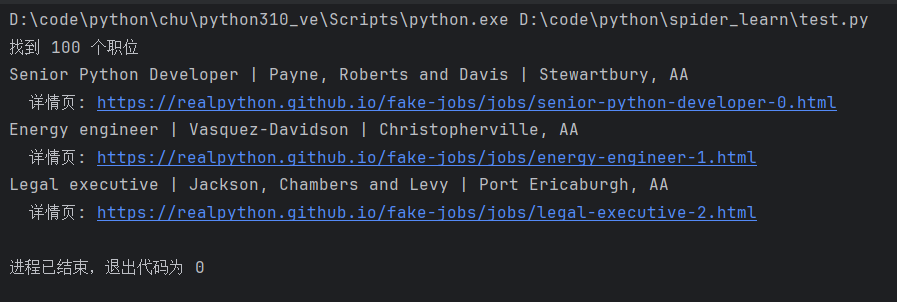
这就是一个最小的爬虫了。这一版用到的积木:
requests.get()—— 发请求BeautifulSoup—— 解析 HTMLselect/select_one—— 用 CSS 选择器抠数据
注意一个细节:我们加了 User-Agent。这就是第 3 讲讲的"伪装",虽然这个练习站不需要,但养成习惯。
四、第二版:加上详情页抓取
光有列表页字段不够,职位描述在详情页里。我们需要"两段式抓取"——列表页拿基础字段 + 详情页链接,再逐个打开详情页补充。
import requests
from bs4 import BeautifulSoup

headers = {"User-Agent": "Mozilla/5.0"}

def fetch_list():
    resp = requests.get("https://realpython.github.io/fake-jobs/", headers=headers, timeout=10)
    soup = BeautifulSoup(resp.text, "lxml")
    jobs = []
    for card in soup.select("div.card-content"):
        jobs.append({
            "title":    card.select_one("h2.title").get_text(strip=True),
            "company":  card.select_one("h3.company").get_text(strip=True),
            "location": card.select_one("p.location").get_text(strip=True),
            "link": card.find("a", string="Apply")["href"] if card.find("a", string="Apply") else None,
        })
    return jobs

def fetch_detail(url):
    resp = requests.get(url, headers=headers, timeout=10)
    soup = BeautifulSoup(resp.text, "lxml")
    desc_node = soup.select_one("div.content")
    return desc_node.get_text(strip=True) if desc_node else ""

jobs = fetch_list()
print(f"列表页抓到 {len(jobs)} 条")

# 先只测试前 3 条
for job in jobs[:3]:
    job["description"] = fetch_detail(job["link"])
    print(job["title"], "—— 描述:", job["description"])

这一版的关键变化:
- 把"抓列表"和"抓详情"拆成两个函数 —— 这就是项目里
__spider()和fetchDetail()分离的雏形。 - 先抓所有列表数据,再统一去抓详情 —— 职责分明,出错也容易定位。
项目映射: 猎聘的 spider_liepin.py 也是这种结构——onResponse 拿列表,__spider() 遍历每条职位再打开详情页补字段。只是它把"列表"换成了"接口监听",把"requests"换成了"Playwright"。
五、第三版:落盘 —— "先文件、后处理"
现在程序一关,数据就丢了。我们要把抓到的每条职位存成 JSON 文件。
import requests
from bs4 import BeautifulSoup
import os
import json

headers = {"User-Agent": "Mozilla/5.0"}

def fetch_list():
    resp = requests.get("https://realpython.github.io/fake-jobs/", headers=headers, timeout=10)
    soup = BeautifulSoup(resp.text, "lxml")
    jobs = []
    for card in soup.select("div.card-content"):
        jobs.append({
            "title":    card.select_one("h2.title").get_text(strip=True),
            "company":  card.select_one("h3.company").get_text(strip=True),
            "location": card.select_one("p.location").get_text(strip=True),
            "link": card.find("a", string="Apply")["href"] if card.find("a", string="Apply") else None,
        })
    return jobs

def fetch_detail(url):
    resp = requests.get(url, headers=headers, timeout=10)
    soup = BeautifulSoup(resp.text, "lxml")
    desc_node = soup.select_one("div.content")
    return desc_node.get_text(strip=True) if desc_node else ""

def save(job):
    # 用职位链接里的 ID 作为文件名,保证唯一
    job_id = job["link"].rstrip("/").split("/")[-1].replace(".html", "")
    path = f"data/jobs/{job_id}.json"
    with open(path, "w", encoding="utf-8") as f:
        json.dump(job, f, ensure_ascii=False, indent=2)
    return path

if __name__ == "__main__":
    # 创建保存目录
    os.makedirs("data/jobs", exist_ok=True)

    # 获取列表
    jobs = fetch_list()
    print(f"列表页抓到 {len(jobs)} 条")

    # 获取详情并保存(先测试前5条)
    for job in jobs[:5]:
        job["description"] = fetch_detail(job["link"])
        saved_to = save(job)
        print(f"{job['title']} - 已保存: {saved_to}")
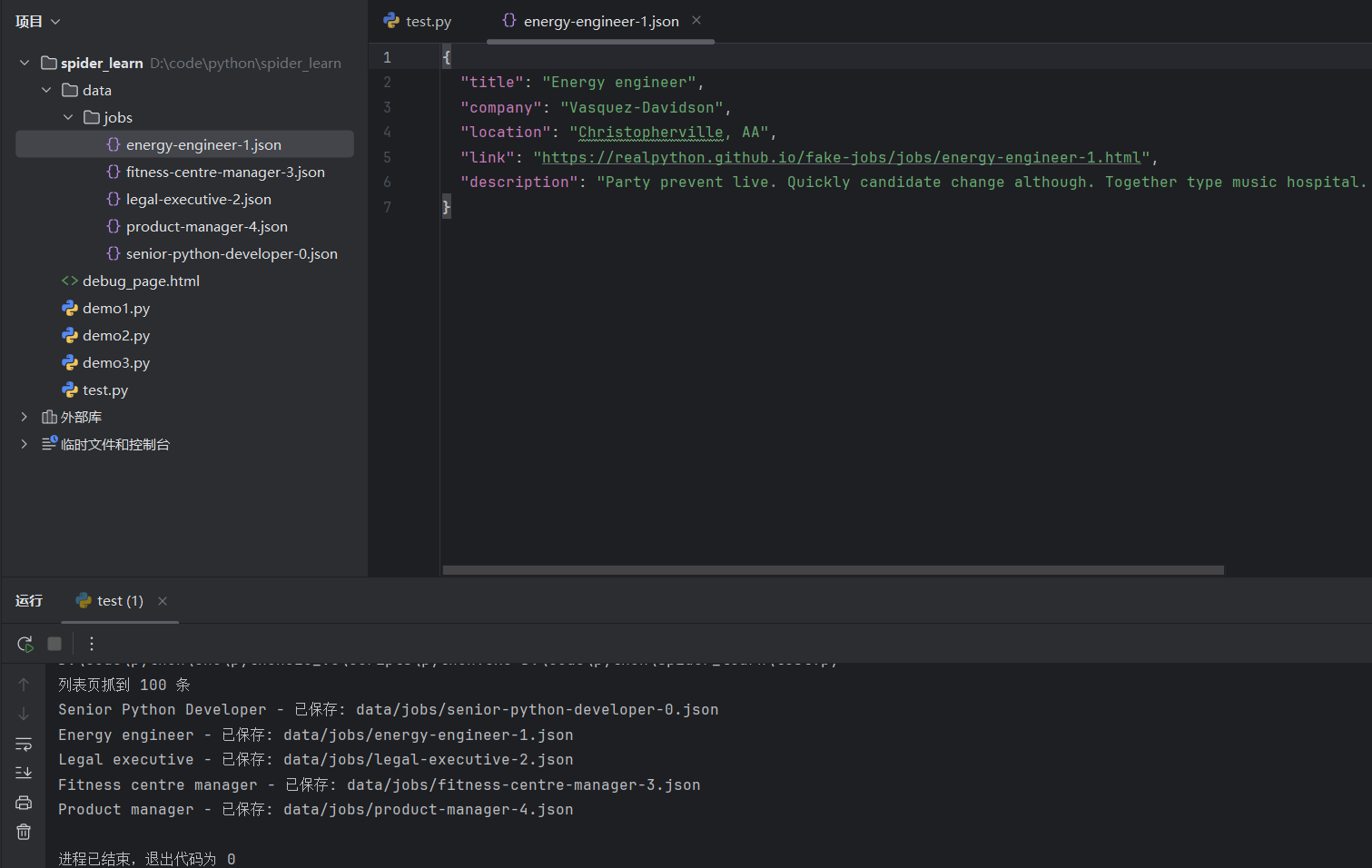
这一版做了什么:
- 每条职位独立存一个 JSON 文件
- 用 URL 里的 ID 作为文件名 —— 天然去重(同一个职位重抓会覆盖,不会产生重复文件)
项目映射: 这就是爬虫逻辑分析里反复强调的**"先文件、后接口"设计**。spider.py 的 savePath、com/、job/ 目录,本质就是这个思路的工程化版本。
为什么要这么做?
- 程序中途崩了,已经抓到的数据不会丢
- 想换字段抽取规则,不用重新抓网络,直接读本地 JSON 重跑
- 出问题了能**留下"案发现场"**给你排查
六、第四版:加去重 —— 不抓已经抓过的
如果一个职位已经抓过(本地有文件了),就跳过。
import requests
from bs4 import BeautifulSoup
import os
import json

headers = {"User-Agent": "Mozilla/5.0"}

def fetch_list():
    resp = requests.get("https://realpython.github.io/fake-jobs/", headers=headers, timeout=10)
    soup = BeautifulSoup(resp.text, "lxml")
    jobs = []
    for card in soup.select("div.card-content"):
        jobs.append({
            "title":    card.select_one("h2.title").get_text(strip=True),
            "company":  card.select_one("h3.company").get_text(strip=True),
            "location": card.select_one("p.location").get_text(strip=True),
            "link": card.find("a", string="Apply")["href"] if card.find("a", string="Apply") else None,
        })
    return jobs

def fetch_detail(url):
    resp = requests.get(url, headers=headers, timeout=10)
    soup = BeautifulSoup(resp.text, "lxml")
    desc_node = soup.select_one("div.content")
    return desc_node.get_text(strip=True) if desc_node else ""

def save(job):
    # 用职位链接里的 ID 作为文件名,保证唯一
    job_id = job["link"].rstrip("/").split("/")[-1].replace(".html", "")
    path = f"data/jobs/{job_id}.json"
    with open(path, "w", encoding="utf-8") as f:
        json.dump(job, f, ensure_ascii=False, indent=2)
    return path

def already_spider(job):
    """检查职位是否已经爬取过"""
    job_id = job["link"].rstrip("/").split("/")[-1].replace(".html", "")
    return os.path.exists(f"data/jobs/{job_id}.json")

if __name__ == "__main__":
    # 创建保存目录
    os.makedirs("data/jobs", exist_ok=True)

    # 获取列表
    jobs = fetch_list()
    print(f"列表页抓到 {len(jobs)} 条")

    # 获取详情并保存(带去重)
    for job in jobs:
        if already_spider(job):
            print("跳过已抓:", job["title"])
            continue
        job["description"] = fetch_detail(job["link"])
        saved_to = save(job)
        print(f"{job['title']} - 已保存: {saved_to}")
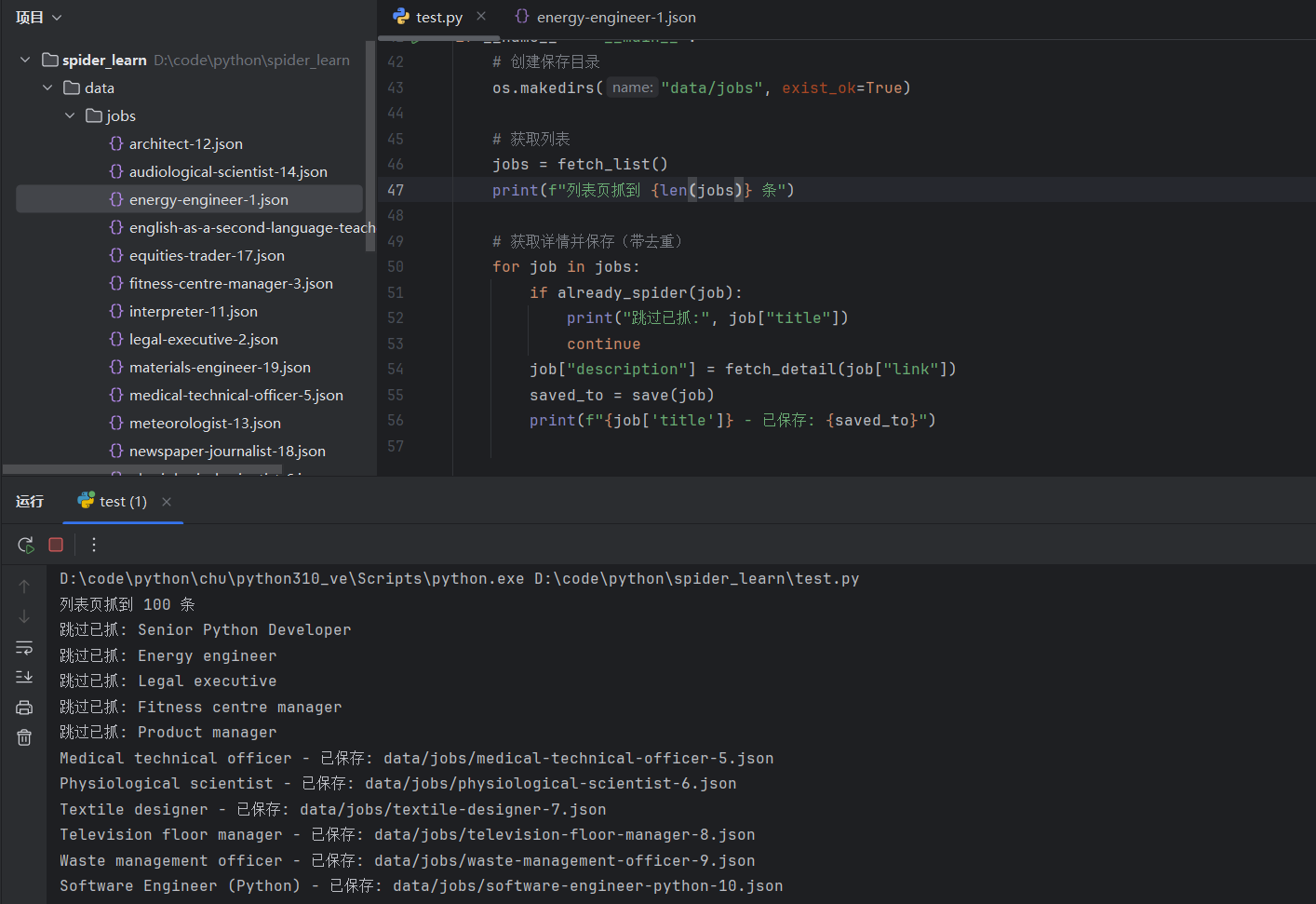
项目映射: 这就是 spider.py 里 isSpiderToday() 的最简版。猎聘项目把它升级成了四层去重——本地文件、当日已抓、数据库已存在、黑名单。但本质都是这一句 if already_spider(): continue。
七、第五版:加节奏控制 + 异常处理
现在要让爬虫像个有素质的客人,不要一秒钟敲服务器 100 下,也不要一遇到错误就崩溃。
import requests
from bs4 import BeautifulSoup
import os
import json
import time
import random

headers = {"User-Agent": "Mozilla/5.0"}

def fetch_list():
    resp = requests.get("https://realpython.github.io/fake-jobs/", headers=headers, timeout=10)
    soup = BeautifulSoup(resp.text, "lxml")
    jobs = []
    for card in soup.select("div.card-content"):
        jobs.append({
            "title":    card.select_one("h2.title").get_text(strip=True),
            "company":  card.select_one("h3.company").get_text(strip=True),
            "location": card.select_one("p.location").get_text(strip=True),
            "link": card.find("a", string="Apply")["href"] if card.find("a", string="Apply") else None,
        })
    return jobs

def fetch_detail_safe(url, max_retry=3):
    """带重试和异常处理的详情页抓取"""
    for i in range(max_retry):
        try:
            resp = requests.get(url, headers=headers, timeout=10)
            resp.raise_for_status()
            soup = BeautifulSoup(resp.text, "lxml")
            node = soup.select_one("div.content")
            return node.get_text(strip=True) if node else ""
        except Exception as e:
            print(f"  第 {i+1} 次失败: {e}")
            time.sleep(2 ** i)
    return None

def save(job):
    # 用职位链接里的 ID 作为文件名,保证唯一
    job_id = job["link"].rstrip("/").split("/")[-1].replace(".html", "")
    path = f"data/jobs/{job_id}.json"
    with open(path, "w", encoding="utf-8") as f:
        json.dump(job, f, ensure_ascii=False, indent=2)
    return path

def already_spider(job):
    """检查职位是否已经爬取过"""
    job_id = job["link"].rstrip("/").split("/")[-1].replace(".html", "")
    return os.path.exists(f"data/jobs/{job_id}.json")

if __name__ == "__main__":
    # 创建保存目录
    os.makedirs("data/jobs", exist_ok=True)

    # 获取列表
    jobs = fetch_list()
    print(f"列表页抓到 {len(jobs)} 条")

    # 获取详情并保存(带去重、异常处理、节奏控制)
    for job in jobs:
        if already_spider(job):
            print("跳过已抓:", job["title"])
            continue

        desc = fetch_detail_safe(job["link"])
        if desc is None:
            print("最终失败,跳过:", job["title"])
            continue

        job["description"] = desc
        saved_to = save(job)
        print(f"{job['title']} - 已保存: {saved_to}")

        # 随机休眠,控制请求节奏
        time.sleep(random.uniform(0.5, 1.5))
这一版的关键改进:
try/except + 重试—— 网络抖动不会让程序崩- 指数退避 —— 第一次失败等 1 秒,第二次等 2 秒,第三次等 4 秒,别一直死磕
- 随机休眠 —— 节奏不规律,更像真人
项目映射: spider_yupao_clean.py 里的"指数退避重试"用的就是同样思路;randomSleep() 是随机休眠的封装版。
八、第六版:加进度文件 —— 断点续跑
真实场景下,可能要抓几万条职位。中途网络断了、电脑重启了——总不能从头来一遍吧?
import requests
from bs4 import BeautifulSoup
import os
import json
import time
import random

headers = {"User-Agent": "Mozilla/5.0"}
PROGRESS_FILE = "data/progress.txt"

def fetch_list():
    resp = requests.get("https://realpython.github.io/fake-jobs/", headers=headers, timeout=10)
    soup = BeautifulSoup(resp.text, "lxml")
    jobs = []
    for card in soup.select("div.card-content"):
        jobs.append({
            "title":    card.select_one("h2.title").get_text(strip=True),
            "company":  card.select_one("h3.company").get_text(strip=True),
            "location": card.select_one("p.location").get_text(strip=True),
            "link": card.find("a", string="Apply")["href"] if card.find("a", string="Apply") else None,
        })
    return jobs

def fetch_detail_safe(url, max_retry=3):
    """带重试和异常处理的详情页抓取"""
    for i in range(max_retry):
        try:
            resp = requests.get(url, headers=headers, timeout=10)
            resp.raise_for_status()
            soup = BeautifulSoup(resp.text, "lxml")
            node = soup.select_one("div.content")
            return node.get_text(strip=True) if node else ""
        except Exception as e:
            print(f"  第 {i+1} 次失败: {e}")
            time.sleep(2 ** i)
    return None

def save(job):
    # 用职位链接里的 ID 作为文件名,保证唯一
    job_id = job["link"].rstrip("/").split("/")[-1].replace(".html", "")
    path = f"data/jobs/{job_id}.json"
    with open(path, "w", encoding="utf-8") as f:
        json.dump(job, f, ensure_ascii=False, indent=2)
    return path

def already_spider(job):
    """检查职位是否已经爬取过"""
    job_id = job["link"].rstrip("/").split("/")[-1].replace(".html", "")
    return os.path.exists(f"data/jobs/{job_id}.json")

def load_progress():
    """加载进度"""
    if os.path.exists(PROGRESS_FILE):
        return int(open(PROGRESS_FILE).read())
    return 0

def save_progress(idx):
    """保存进度"""
    with open(PROGRESS_FILE, "w") as f:
        f.write(str(idx))

if __name__ == "__main__":
    # 创建保存目录
    os.makedirs("data/jobs", exist_ok=True)

    # 获取列表
    jobs = fetch_list()
    print(f"列表页抓到 {len(jobs)} 条")

    # 加载进度,实现断点续跑
    start = load_progress()
    print(f"从第 {start} 条开始")

    # 获取详情并保存(带去重、异常处理、节奏控制、断点续跑)
    for idx, job in enumerate(jobs):
        if idx < start:
            continue

        if already_spider(job):
            print(f"[{idx+1}/{len(jobs)}] 跳过已抓: {job['title']}")
            save_progress(idx + 1)
            continue

        print(f"[{idx+1}/{len(jobs)}] 正在抓取: {job['title']}")
        desc = fetch_detail_safe(job["link"])
        if desc:
            job["description"] = desc
            saved_to = save(job)
            print(f"  已保存: {saved_to}")
        else:
            print(f"  最终失败,跳过")

        save_progress(idx + 1)
        time.sleep(random.uniform(0.5, 1.5))

    print("全部完成")
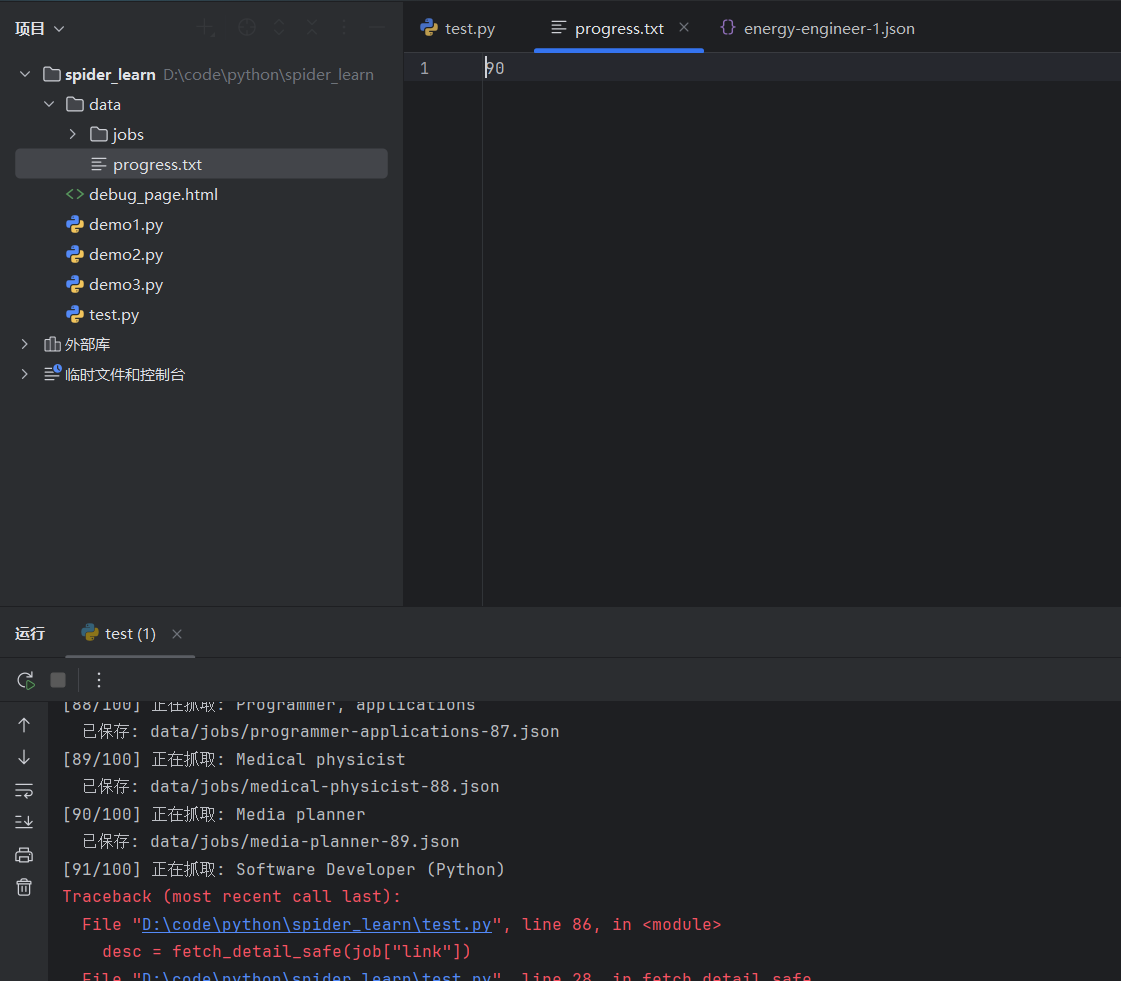
这一版的灵魂:
- 每抓完一条就把进度写进文件
- 重启后从进度文件读起点,接着上次跑
项目映射: 这就是猎聘公司版 spider_status_<ComId>.json 的最简形态。它做了更高级的事:不是记"抓到第几条",而是记"哪些条件组合已经抓完了",还做了备份/原子写入/格式兼容——但底层思路是一模一样的。
九、最终版完整代码
把所有积木拼到一起,这就是一个生产级别的最小爬虫:
"""
生产级别的最小爬虫模板
功能:列表页 + 详情页爬取,支持去重、断点续跑、异常处理、节奏控制
"""
import requests
from bs4 import BeautifulSoup
import os
import json
import time
import random

# ==================== 配置区 ====================
# HTTP请求头,模拟浏览器访问
headers = {"User-Agent": "Mozilla/5.0"}
# 进度记录文件路径,用于断点续跑
PROGRESS_FILE = "data/progress.txt"

# ==================== 数据抓取函数 ====================
def fetch_list():
    """
    抓取列表页,提取所有职位的基本信息

    Returns:
        list: 包含职位信息的字典列表,每个字典包含 title, company, location, link
    """
    # 发送GET请求获取列表页HTML
    resp = requests.get("https://realpython.github.io/fake-jobs/", headers=headers, timeout=10)
    # 使用lxml解析器解析HTML(速度快,容错性好)
    soup = BeautifulSoup(resp.text, "lxml")

    jobs = []
    # 遍历所有职位卡片(CSS选择器:div.card-content)
    for card in soup.select("div.card-content"):
        jobs.append({
            # 提取职位名称,strip=True去除首尾空白
            "title": card.select_one("h2.title").get_text(strip=True),
            # 提取公司名称
            "company": card.select_one("h3.company").get_text(strip=True),
            # 提取工作地点
            "location": card.select_one("p.location").get_text(strip=True),
            # 提取详情页链接(查找文本为"Apply"的<a>标签)
            "link": card.find("a", string="Apply")["href"] if card.find("a", string="Apply") else None,
        })
    return jobs

def fetch_detail_safe(url, max_retry=3):
    """
    安全地抓取详情页内容,带重试机制和异常处理

    Args:
        url (str): 详情页URL
        max_retry (int): 最大重试次数,默认3次

    Returns:
        str or None: 详情文本内容,如果三次都失败则返回None
    """
    # 重试循环
    for i in range(max_retry):
        try:
            # 发送GET请求
            resp = requests.get(url, headers=headers, timeout=10)
            # 检查HTTP状态码,如果不是200会抛出异常
            resp.raise_for_status()

            # 解析HTML并提取详情内容
            soup = BeautifulSoup(resp.text, "lxml")
            node = soup.select_one("div.content")
            # 如果找到内容节点则返回文本,否则返回空字符串
            return node.get_text(strip=True) if node else ""

        except Exception as e:
            # 捕获所有异常(网络错误、超时、解析错误等)
            print(f"  第 {i+1} 次失败: {e}")
            # 指数退避策略:第1次等1秒,第2次等2秒,第3次等4秒
            time.sleep(2 ** i)

    # 三次重试都失败,返回None表示彻底失败
    return None

# ==================== 数据存储函数 ====================
def save(job):
    """
    将职位数据保存为JSON文件

    Args:
        job (dict): 职位信息字典

    Returns:
        str: 保存的文件路径
    """
    # 从URL中提取唯一ID作为文件名(例如:senior-python-developer-0)
    job_id = job["link"].rstrip("/").split("/")[-1].replace(".html", "")
    path = f"data/jobs/{job_id}.json"

    # 写入JSON文件,ensure_ascii=False保证中文正常显示,indent=2美化格式
    with open(path, "w", encoding="utf-8") as f:
        json.dump(job, f, ensure_ascii=False, indent=2)
    return path

def already_spider(job):
    """
    检查职位是否已经爬取过(通过判断JSON文件是否存在)

    Args:
        job (dict): 职位信息字典

    Returns:
        bool: True表示已爬取,False表示未爬取
    """
    job_id = job["link"].rstrip("/").split("/")[-1].replace(".html", "")
    return os.path.exists(f"data/jobs/{job_id}.json")

# ==================== 进度管理函数 ====================
def load_progress():
    """
    加载上次的爬取进度(用于断点续跑)

    Returns:
        int: 已处理的职位索引,如果是首次运行则返回0
    """
    if os.path.exists(PROGRESS_FILE):
        return int(open(PROGRESS_FILE).read())
    return 0

def save_progress(idx):
    """
    保存当前爬取进度

    Args:
        idx (int): 当前处理到的职位索引
    """
    with open(PROGRESS_FILE, "w") as f:
        f.write(str(idx))

# ==================== 主程序入口 ====================
if __name__ == "__main__":
    # 创建数据保存目录,exist_ok=True避免目录已存在时报错
    os.makedirs("data/jobs", exist_ok=True)

    # ---- 第1步:抓取列表页 ----
    jobs = fetch_list()
    print(f"列表页抓到 {len(jobs)} 条")

    # ---- 第2步:加载进度,实现断点续跑 ----
    start = load_progress()
    print(f"从第 {start} 条开始")

    # ---- 第3步:遍历职位,抓取详情并保存 ----
    for idx, job in enumerate(jobs):
        # 跳过已处理的职位(断点续跑)
        if idx < start:
            continue

        # 跳过已爬取的职位(去重)
        if already_spider(job):
            print(f"[{idx+1}/{len(jobs)}] 跳过已抓: {job['title']}")
            save_progress(idx + 1)  # 更新进度
            continue

        # 打印当前进度
        print(f"[{idx+1}/{len(jobs)}] 正在抓取: {job['title']}")

        # 抓取详情页(带重试机制)
        desc = fetch_detail_safe(job["link"])
        if desc:
            # 成功获取详情,添加到数据中并保存
            job["description"] = desc
            saved_to = save(job)
            print(f"  已保存: {saved_to}")
        else:
            # 三次重试都失败,跳过该职位
            print(f"  最终失败,跳过")

        # 每处理完一个职位就更新进度(保证断点续跑的准确性)
        save_progress(idx + 1)

        # 随机休眠0.5-1.5秒,控制请求频率,避免被反爬
        time.sleep(random.uniform(0.5, 1.5))

    print("全部完成")
| 能力 | 实现位置 | 项目里对应什么 |
|---|---|---|
| 发请求 | requests.get + headers |
spider.py 的浏览器初始化 |
| 解析 | BeautifulSoup.select |
猎聘的 DOM 详情抽取 |
| 列表 / 详情分离 | fetch_list / fetch_detail |
__spider / 详情 popup |
| 落盘 | save() 写 JSON |
savePath 下的 job/ 目录 |
| 去重 | already_spider() |
isSpiderToday() |
| 异常 + 重试 | 指数退避 | spider_yupao_clean.py 同款 |
| 节奏控制 | 随机休眠 | randomSleep() |
| 断点续跑 | progress.txt |
spider_status_<ComId>.json |
十、核心收获
回头看,会发现一件很重要的事:
这 70 行代码不是一开始就这么写的,而是一步步"被问题逼出来的":
- 没数据 → 写
fetch_list - 字段不全 → 写
fetch_detail - 怕丢数据 → 加落盘
- 不想重复抓 → 加去重
- 网络会抖 → 加重试
- 一秒打 100 次怕被封 → 加休眠
- 中途断了不想重来 → 加进度文件
项目里那些成千上万行的脚本,本质上经历的就是同样的演化路径——只是它们面对的问题更复杂(动态渲染、反爬、代理、风控),所以每个积木都被升级到了"重武器版"。
理解了这一点,看任何爬虫源码都不会再害怕——它再复杂,也无非是在解决某个具体问题,而那个问题往往就藏在某句注释或某个函数名里。
当 requests 不够用时 —— 进入动态网页与浏览器自动化
组内导航:⬅️ 当 requests 不够用时——进入动态网页与浏览器自动化 | 🏠 00-爬虫课程六讲 | ➡️ 练手网站
💬 评论