bot代码执行 排行榜页面
Bot代码的执行(botrunningsystem)
- 添加依赖:
<dependency>
    <groupId>org.jooq</groupId>
    <artifactId>joor-java-8</artifactId>
    <version>0.9.14</version>
</dependency>
- 配置
restTemplate与security:
@Configuration
public class RestTemplateConfig {
    @Bean
    public RestTemplate getRestTemplate() {
        return new RestTemplate();
    }
}
@Configuration
@EnableWebSecurity
public class SecurityConfig extends WebSecurityConfigurerAdapter {
    @Override
    protected void configure(HttpSecurity http) throws Exception {
        http.csrf().disable()
                .sessionManagement().sessionCreationPolicy(SessionCreationPolicy.STATELESS)
                .and()
                .authorizeRequests()
                .antMatchers("/bot/add/").hasIpAddress("127.0.0.1")
                .antMatchers(HttpMethod.OPTIONS).permitAll()
                .anyRequest().authenticated();
    }
}
每次后端(backend)会调用bot/add/接口往bots队列中添加Bot:
public void addBot(Integer userId, String botCode, String input) {
    lock.lock();
    try {
        bots.add(new Bot(userId, botCode, input));
        // 当 bot 添加结束,需要唤起其他线程进行消费
        condition.signalAll();
    } finally {
        lock.unlock();
    }
}
botPool的核心代码(这里相当于手动实现了一个消息队列):
private void consume(Bot bot) {
    Consumer consumer = new Consumer();
    consumer.startTimeout(2000, bot);
}

@Override
public void run() {
    while (true) {
        lock.lock();
        if (bots.isEmpty()) {
            try {
                // 当队列中没有等待消费的Bot时,让线程等待,当有新添加的Bot时,会被condition.signalAll();唤醒
                condition.await();
            } catch (InterruptedException e) {
                e.printStackTrace();
                break;
            } finally {
                lock.unlock();
            }
        } else {
            Bot bot = bots.poll();
            lock.unlock();
            // consume 可能会执行几秒钟,需要先解锁
            consume(bot);
        }
    }
}
而在Consumer中,需要控制每个Bot的执行时间:
public void startTimeout(long timeout, Bot bot) {
    this.bot = bot;
    this.start();
    try {
        this.join(timeout);
    } catch (InterruptedException e) {
        e.printStackTrace();
    } finally {
        // 最多等待 timeout 秒,然后中断
        this.interrupt();
    }
}
Consumer中的核心代码:
@Override
public void run() {
    UUID uuid = UUID.randomUUID();
    String uid = uuid.toString().substring(0, 8);
    // 需要保障每次的类名不一样,否则只编译一次
    Supplier<Integer> botInterface = Reflect.compile(
            "com.kob.botrunningsystem.utils.Bot" + uid,
            addUid(bot.getBotCode(), uid)
    ).create().get();
    // 将输入写入文件以便后续扩展(后期可以在docker中运行,就需要从文件中读取输入)
    File file = new File("input.txt");
    try (PrintWriter fout = new PrintWriter(file)) {
        fout.println(bot.getInput());
        fout.flush();
    } catch (FileNotFoundException e) {
        throw new RuntimeException(e);
    }
    // 执行Bot代码,获取结果
    Integer direction = botInterface.get();
    // 将Bot执行结果返回
    MultiValueMap<String, String> data = new LinkedMultiValueMap<>();
    data.add("userId", bot.getUserId().toString());
    data.add("direction", direction.toString());

    restTemplate.postForObject(RECEIVE_BOT_MOVE_URL, data, String.class);
}
传递bot信息
- 传递路径:
前端选择人或Bot开始匹配 ->3000服务websocket中startMatching函数 ->匹配系统添加玩家 ->匹配池添加玩家(Player类添加botId信息), 进行匹配 ->匹配成功, 发送信息添加BotId ->3000服务接收匹配系统传递的数据, 调用startGame(添加botId参数) ->Game类中添加相应玩家的bot信息, 在nextStep中判断是人工操作还是机器人操作向BotRunning服务发送信息
添加BotRunning服务
- 设计:
- Bot池:
单独的线程, 存储3000服务发送的bot信息, 使用自制消息队列控制池中bot- run方法中循环方式:
只有当队列不为空时, 去执行相应方法, 其他时间阻塞; 使用Condition进行控制
- run方法中循环方式:
- Consumer:
单独的线程, 用来执行Bot代码 - Controller + Service :
提供相应的接口添加Bot信息
- Bot池:
- Bot池:
生产者消费者模型, 在对bot的操作时需要加锁, 因为涉及多个线程- addBot方法:
提供给外界添加任务的方法- condition.signalAll(): 当有任务进来时, 唤醒所有线程即当前阻塞的BOT_POOL, 会自己释放锁
- consume:
消费bot, 即开启线程去执行Bot代码 - run方法:
- 池为空时:
condition.await(), 释放当前锁, 阻塞当前线程; 异常需要手动释放锁 - 不为空:
拿出bot并进行消费, consume; 先释放锁再去消费, 因为执行代码比较耗时
- 池为空时:
- addBot方法:
- Consumer:
执行代码, 单独开启线程- startTimeout(timeout, bot):
设置代码执行最长时间对线程进行控制, 当超出时间或者执行完毕中断当前线程- 进来开启线程this.start(), 设置bot信息
- 如何进行控制:
join(timeout)方法: 线程执行完毕或timeout时间后, 执行join后面的代码(this.interrpt())
- run方法:
执行代码- Reflect.compile("package name", "code").create.get(); :
需要保证类名不一致, 即在类名后添加随机Id - 生成的实例去执行接口响应的方法:
nextMove(当前局面), 将返回值发送给3000服务
- Reflect.compile("package name", "code").create.get(); :
- startTimeout(timeout, bot):
- 3000服务接收下一步信息
- 我们已经中断了从前端获取输入进行移动, 需要重新调用之前进行移动的方法
game.setNextStepA(direction);
- 我们已经中断了从前端获取输入进行移动, 需要重新调用之前进行移动的方法
游戏完整的流程
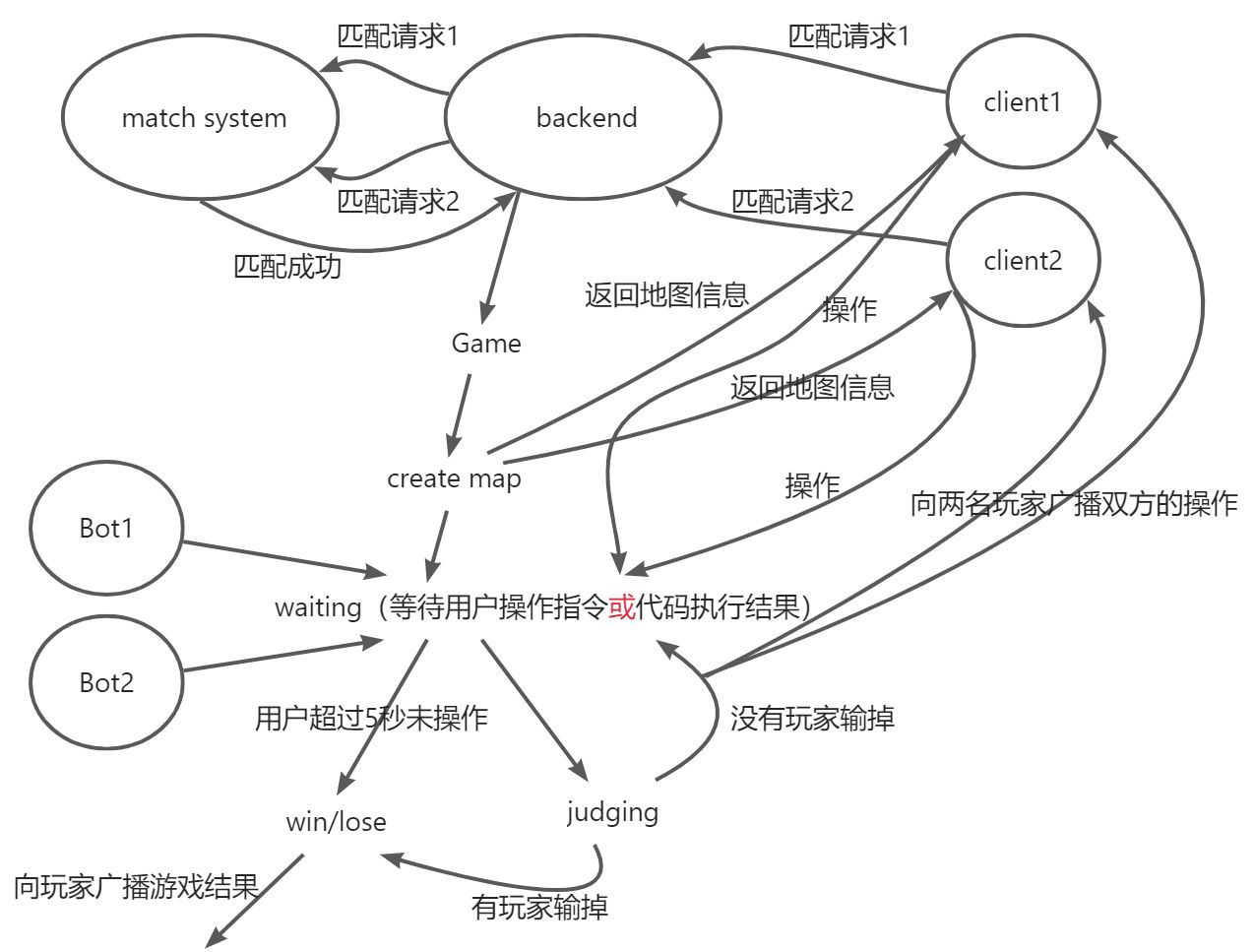
- client1, client2点击开始匹配
- 3000服务通过websocket接受玩家信息, 发送给matching服务
- matching服务匹配池接收3000服务发送的玩家信息, 通过相应的策略匹配两名玩家, 发送给3000服务
- 3000服务接收对战玩家信息, 开启游戏startGame
- startGame创建Game线程(创建地图即相关信息), 通过nextStep获取输入
- nextStep
- 用户手动输入
- 判断输入合法性
- 合法: 发送信息给前端, 继续获取下一步输入
- 不合法: 结束游戏, 判断输赢
- 判断输入合法性
- Bot执行
- 发送bot信息给BotRunning服务
- BotRunning服务通过BOT_POOL接收bot信息进行处理
- Consumer消费bot, 生成下一步走向
- 发送给3000服务
- 判断输入合法性
- 合法: 发送信息给前端, 继续获取下一步输入
- 不合法: 结束游戏, 判断输赢
- 判断输入合法性
- 用户手动输入
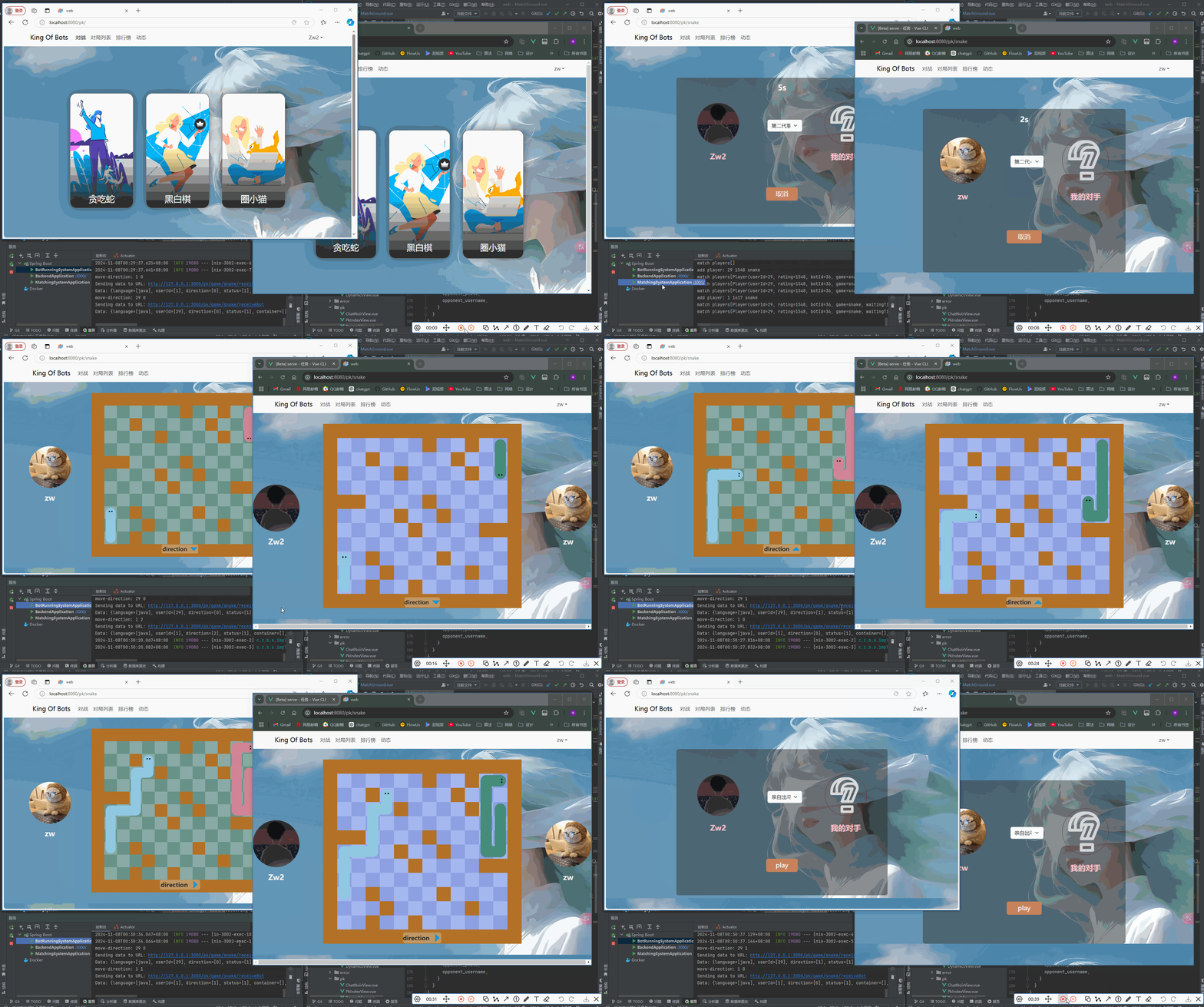
排行榜页面以及查漏补缺
https://git.acwing.com/Zwww/kob/-/commit/0ce3c2435887b9add751cc4ba594aa90ed4f2824
项目分区导航: bot界面 增删改查 ⬅️ | 07-bot代码执行 排行榜页面 | ➡️ 微服务-匹配逻辑细化
💬 评论