优雅配置管理方案
我觉得这种方式挺不错的 使用环境占位符 然后编写一个.env 部署时指定.env、再指定prod启动 在代码中统一使用AppProperties管理 其他地方注入AppProperties 实现优雅的管理 修改仅需在.env集中修改
核心思路
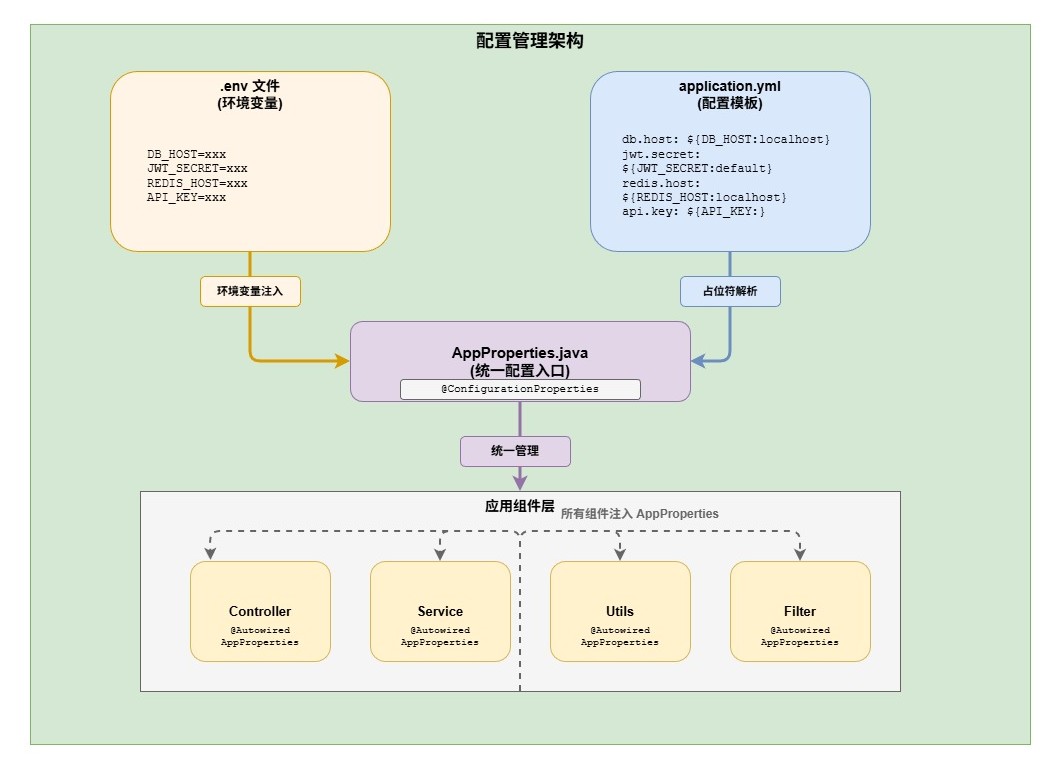
.env 文件模板
.env.example
# =====================================================
# .env.example - 环境变量模板(提交到 Git)
# =====================================================
# 使用方式:
# 1. 复制此文件:cp .env.example .env.prod
# 2. 填写实际配置值
# 3. 启动:source .env.prod && java -jar app.jar --spring.profiles.active=prod

# ---------- 环境标识 ----------
SPRING_PROFILES_ACTIVE=prod

# ---------- 数据库配置 ----------
DB_HOST=localhost
DB_PORT=3306
DB_NAME=your_database
DB_USERNAME=root
DB_PASSWORD=your_password

# ---------- Redis 配置 ----------
REDIS_HOST=localhost
REDIS_PORT=6379
REDIS_PASSWORD=
REDIS_DATABASE=0

# ---------- 应用安全配置 ----------
JWT_SECRET=your-jwt-secret-key-at-least-32-characters-long

# ---------- CORS 配置 ----------
CORS_ORIGINS=httpswww.example.com,httpsadmin.example.com

# ---------- 可选配置 ----------
# SERVER_PORT=8080
# LOG_LEVEL=INFO
.env.dev
# =====================================================
# .env.dev - 开发环境
# =====================================================

SPRING_PROFILES_ACTIVE=dev

APP_NAME=ZwwwSpringBootBaseTemplate
APP_VERSION=1.0.0
APP_DEBUG=true

SERVER_PORT=8080

DB_HOST=localhost
DB_PORT=3306
DB_NAME=zwwwspringbootbasetemplate
DB_USERNAME=root
DB_PASSWORD=zw200495

REDIS_HOST=localhost
REDIS_PORT=6379
REDIS_PASSWORD=
REDIS_DATABASE=0

APP_JWT_SECRET=dev-jwt-secret-for-local-development-only-simple-key
APP_JWT_EXPIRATION=86400

APP_FILE_MAX_SIZE=10485760
APP_FILE_ALLOWED_FORMATS=jpg,jpeg,png,gif,webp,pdf
APP_FILE_UPLOAD_PATH=D:/uploads/dev

APP_USER_MAX_PASSWORD_RETRY=5
APP_USER_MAX_LOGIN_DEVICE=5
APP_USER_LOCK_MINUTES=15

APP_CORS_ORIGINS=http://localhost:5173,http://localhost:3000

KNIFE4J_ENABLE=true
.env.prod
# =====================================================
# .env.prod - 生产环境配置
# =====================================================

# ============ Spring Profile ============
SPRING_PROFILES_ACTIVE=prod

# ============ 应用信息 ============
APP_NAME=ZwwwSpringBootBaseTemplate-Prod
APP_VERSION=1.0.0
SERVER_PORT=8080

# ============ 数据库配置 ============
DB_HOST=prod-mysql.example.com
DB_PORT=3306
DB_NAME=prod_database
DB_USERNAME=prod_db_user
DB_PASSWORD=super_secure_database_password_here_min_16_chars

# ============ Redis 配置 ============
REDIS_HOST=prod-redis.example.com
REDIS_PORT=6379
REDIS_PASSWORD=redis_secure_password_here_min_16_chars
REDIS_DATABASE=0

# ============ JWT 配置 ============
APP_JWT_SECRET=production_jwt_secret_must_be_very_long_and_secure_at_least_256_bits
APP_JWT_EXPIRATION=604800

# ============ 文件上传配置 ============
APP_FILE_MAX_SIZE=10485760
APP_FILE_ALLOWED_FORMATS=jpg,jpeg,png,gif,webp,pdf
APP_FILE_UPLOAD_PATH=/var/data/uploads

# ============ 用户配置 ============
APP_USER_MAX_PASSWORD_RETRY=3
APP_USER_MAX_LOGIN_DEVICE=3
APP_USER_LOCK_MINUTES=60

# ============ CORS 配置 ============
APP_CORS_ORIGINS=https://www.example.com,https://admin.example.com

# ============ 文档配置 ============
KNIFE4J_ENABLE=false
.env.prod.local
# =====================================================
# .env.prod.local - 本地模拟生产环境
# =====================================================

SPRING_PROFILES_ACTIVE=prod

APP_NAME=ZwwwSpringBootBaseTemplate-Prod
APP_VERSION=1.0.0
APP_DEBUG=false

SERVER_PORT=8080

DB_HOST=localhost
DB_PORT=3306
DB_NAME=zwwwspringbootbasetemplate
DB_USERNAME=root
DB_PASSWORD=zw200495

REDIS_HOST=localhost
REDIS_PORT=6379
REDIS_PASSWORD=
REDIS_DATABASE=1

APP_JWT_SECRET=prod_test_jwt_secret_must_be_very_long_and_secure_at_least_256_bits
APP_JWT_EXPIRATION=604800

APP_FILE_MAX_SIZE=10485760
APP_FILE_ALLOWED_FORMATS=jpg,jpeg,png,gif,webp,pdf
APP_FILE_UPLOAD_PATH=D:/uploads/prod

APP_USER_MAX_PASSWORD_RETRY=3
APP_USER_MAX_LOGIN_DEVICE=3
APP_USER_LOCK_MINUTES=60

APP_CORS_ORIGINS=http://localhost:5173,http://localhost:3000

KNIFE4J_ENABLE=true
YAML 配置
application.yml
# =====================================================
# application.yml - 主配置文件
# =====================================================

server:
  port: ${SERVER_PORT:8080}
  servlet:
    context-path: /api
  tomcat:
    max-http-form-post-size: 100MB
    max-swallow-size: -1

spring:
  application:
    name: ${APP_NAME:ZwwwSpringBootBaseTemplate}

  profiles:
    active: ${SPRING_PROFILES_ACTIVE:dev}

  datasource:
    driver-class-name: com.mysql.cj.jdbc.Driver
    url: jdbc:mysql://${DB_HOST:localhost}:${DB_PORT:3306}/${DB_NAME:zwwwspringbootbasetemplate}?useSSL=false&serverTimezone=Asia/Shanghai&allowPublicKeyRetrieval=true
    username: ${DB_USERNAME:root}
    password: ${DB_PASSWORD:}

  servlet:
    multipart:
      enabled: true
      max-file-size: 10MB
      max-request-size: 50MB

  redis:
    host: ${REDIS_HOST:localhost}
    port: ${REDIS_PORT:6379}
    password: ${REDIS_PASSWORD:}
    database: ${REDIS_DATABASE:0}
    timeout: 3000ms
    lettuce:
      pool:
        max-active: 8
        max-idle: 8
        min-idle: 0
        max-wait: -1ms

  cache:
    type: redis
    redis:
      time-to-live: 300s
      cache-null-values: true

  session:
    store-type: redis
    redis:
      namespace: ${spring.application.name}:session
      flush-mode: on_save
    timeout: 86400s

mybatis-plus:
  configuration:
    map-underscore-to-camel-case: true
    default-enum-type-handler: org.apache.ibatis.type.EnumOrdinalTypeHandler
  global-config:
    db-config:
      logic-delete-field: isDeleted
      logic-delete-value: 1
      logic-not-delete-value: 0

knife4j:
  enable: ${KNIFE4J_ENABLE:true}

# 自定义应用配置
app:
  name: ${APP_NAME:ZwwwSpringBootBaseTemplate}
  version: ${APP_VERSION:1.0.0}
  debug: ${APP_DEBUG:false}

  jwt:
    secret: ${APP_JWT_SECRET:default-dev-secret-please-change-in-production}
    expiration: ${APP_JWT_EXPIRATION:604800}
    token-prefix: "Bearer "
    header-name: Authorization

  file:
    max-size: ${APP_FILE_MAX_SIZE:10485760}
    allowed-formats: ${APP_FILE_ALLOWED_FORMATS:jpg,jpeg,png,gif,webp,pdf}
    upload-path: ${APP_FILE_UPLOAD_PATH:/uploads}

  user:
    max-password-retry: ${APP_USER_MAX_PASSWORD_RETRY:5}
    max-login-device: ${APP_USER_MAX_LOGIN_DEVICE:3}
    lock-minutes: ${APP_USER_LOCK_MINUTES:30}

cors:
  allowed-origins: ${APP_CORS_ORIGINS:http://localhost:5173,http://localhost:3000}

logging:
  level:
    root: INFO
    com.zwnsyw.zwwwspringbootbasetemplate: DEBUG
  pattern:
    console: "%d{yyyy-MM-dd HH:mm:ss} [%thread] %-5level %logger{36} - %msg%n"
application-dev.yml
# =====================================================
# application-dev.yml - 开发环境配置
# =====================================================

mybatis-plus:
  configuration:
    log-impl: org.apache.ibatis.logging.stdout.StdOutImpl

knife4j:
  enable: true

logging:
  level:
    com.zwnsyw: DEBUG
application-prod.yml
# =====================================================
# application-prod.yml - 生产环境配置
# =====================================================

spring:
  datasource:
    hikari:
      maximum-pool-size: 20
      minimum-idle: 5

mybatis-plus:
  configuration:
    log-impl: org.apache.ibatis.logging.nologging.NoLoggingImpl

knife4j:
  enable: false

logging:
  level:
    root: WARN
    com.zwnsyw: INFO
完善的 AppProperties
package com.zwnsyw.zwwwspringbootbasetemplate.config;

import lombok.Data;
import org.springframework.boot.context.properties.ConfigurationProperties;
import org.springframework.stereotype.Component;
import org.springframework.validation.annotation.Validated;

import javax.validation.constraints.Min;
import javax.validation.constraints.NotBlank;

/**
 * 应用配置属性 - 统一配置入口
 *
 * ==================== 使用说明 ====================
 *
 * 本类采用三层配置管理机制:
 * 1. application.yml - 主配置文件(所有环境通用的默认值)
 * 2. application-{profile}.yml - 环境特定配置(dev/test/prod)
 * 3. .env.{profile} - 环境变量文件(敏感信息,不提交 Git)
 *
 * ==================== 加载顺序 ====================
 *
 * 1. application.yml 中的默认值被加载
 * 2. application-{spring.profiles.active}.yml 覆盖默认值
 * 3. 系统环境变量或 .env 文件中的值最终覆盖以上配置
 *
 * 示例:
 * - 在 application.yml 中定义: app.name: default-name
 * - 在 application-dev.yml 中覆盖: app.name: dev-name
 * - 在 .env.dev 中注入: APP_NAME=local-dev-name
 *
 * ==================== 注入方式 ====================
 *
 * 1. 字段注入(简单场景):
 *    @Autowired
 *    private AppProperties appProperties;
 *
 * 2. 构造器注入(推荐,便于测试):
 *    public MyService(AppProperties appProperties) {
 *        this.appProperties = appProperties;
 *    }
 *
 * 3. 方法参数注入:
 *    public void myMethod(@Qualifier("appProperties") AppProperties config) { }
 *
 * ==================== 环境变量映射 ====================
 *
 * YAML 配置 -> 环境变量(Spring 会自动转换):
 * - app.name -> APP_NAME
 * - app.jwt.secret -> APP_JWT_SECRET
 * - app.jwt.expiration -> APP_JWT_EXPIRATION
 * - app.file.max-size -> APP_FILE_MAX_SIZE
 *
 * 注:在 .env 文件中使用大写 + 下划线格式
 *
 * ==================== 配置文件检查列表 ====================
 *
 * ✓ application.yml - 主配置,包含所有默认值
 * ✓ application-dev.yml - 开发环境覆盖
 * ✓ application-test.yml - 测试环境覆盖
 * ✓ application-prod.yml - 生产环境覆盖(关键值从环境变量读取)
 * ✓ .env.dev - 开发本地环境变量(.gitignore)
 * ✓ .env.test - 测试环境变量(.gitignore)
 * ✓ .env.prod - 生产环境变量(不提交,服务器手动创建)
 *
 * ==================== 使用示例 ====================
 *
 * @RestController
 * public class UserController {
 *     private final AppProperties appProperties;
 *
 *     public UserController(AppProperties appProperties) {
 *         this.appProperties = appProperties;
 *     }
 *
 *     @PostMapping("/login")
 *     public ResponseEntity<?> login(@RequestBody LoginRequest request) {
 *         // 获取 JWT 配置并生成 Token
 *         String jwtSecret = appProperties.getJwt().getSecret();
 *         long expirationMs = appProperties.getJwt().getExpirationMs();
 *         return ResponseEntity.ok(generateToken(request.getUsername(), jwtSecret, expirationMs));
 *     }
 *
 *     @PostMapping("/upload")
 *     public ResponseEntity<?> uploadFile(@RequestParam("file") MultipartFile file) {
 *         // 获取文件配置
 *         long maxSize = appProperties.getFile().getMaxSize();
 *         String[] formats = appProperties.getFile().getAllowedFormatArray();
 *
 *         if (file.getSize() > maxSize) {
 *             return ResponseEntity.badRequest()
 *                 .body("文件大小超过限制: " + appProperties.getFile().getMaxSizeMB() + "MB");
 *         }
 *         return ResponseEntity.ok("上传成功");
 *     }
 * }
 *
 * @Service
 * public class AuthService {
 *     private final AppProperties appProperties;
 *
 *     public AuthService(AppProperties appProperties) {
 *         this.appProperties = appProperties;
 *     }
 *
 *     // 判断环境
 *     public void initializeSystem() {
 *         if (appProperties.isProduction()) {
 *             logger.info("生产环境启动");
 *         } else if (appProperties.isDebug()) {
 *             logger.info("开发环境启动,调试模式已启用");
 *         }
 *     }
 *
 *     // 密码重试锁定
 *     public void validatePasswordRetry(String userId) {
 *         int maxRetry = appProperties.getUser().getMaxPasswordRetry();
 *         // 业务逻辑...
 *     }
 * }
 *
 * @Configuration
 * public class CorsConfig implements WebMvcConfigurer {
 *     private final AppProperties appProperties;
 *
 *     public CorsConfig(AppProperties appProperties) {
 *         this.appProperties = appProperties;
 *     }
 *
 *     @Override
 *     public void addCorsMappings(CorsRegistry registry) {
 *         // 从配置中读取允许的源
 *         String[] allowedOrigins = appProperties.getCors().getAllowedOriginsArray();
 *         registry.addMapping("/**")
 *             .allowedOrigins(allowedOrigins)
 *             .allowedMethods("*")
 *             .allowedHeaders("*");
 *     }
 * }
 */
@Data
@Component
@Validated
@ConfigurationProperties(prefix = "app")
public class AppProperties {

    /** 应用名称 */
    @NotBlank(message = "应用名称不能为空")
    private String name;

    /** 应用版本 */
    private String version = "1.0.0";

    /** 是否开启调试模式(仅用于标识,实际由 spring.profiles.active 决定) */
    private boolean debug = false;

    /** JWT 配置 */
    private JwtConfig jwt = new JwtConfig();

    /** 文件上传配置 */
    private FileConfig file = new FileConfig();

    /** 用户相关配置 */
    private UserConfig user = new UserConfig();

    /** CORS 配置 */
    private CorsConfig cors = new CorsConfig();

    // ==================== 内部配置类 ====================

    /**
     * JWT 配置
     * 来源: application.yml + application-{profile}.yml + .env.{profile}
     */
    @Data
    public static class JwtConfig {
        /** JWT 密钥 - 生产环境必须从 .env.prod 注入,不要使用默认值 */
        @NotBlank(message = "JWT密钥不能为空")
        private String secret;

        /** 过期时间(秒),默认7天 */
        @Min(value = 60, message = "JWT过期时间不能少于60秒")
        private long expiration = 604800;

        /** Token 前缀,默认 Bearer */
        private String tokenPrefix = "Bearer ";

        /** Authorization Header 名称,默认 Authorization */
        private String headerName = "Authorization";

        /** 获取过期时间(毫秒)- 方便在代码中使用 */
        public long getExpirationMs() {
            return expiration * 1000;
        }
    }

    /**
     * 文件上传配置
     * 来源: application.yml + application-{profile}.yml
     */
    @Data
    public static class FileConfig {
        /** 最大文件大小(字节),默认10MB */
        private long maxSize = 10485760;

        /** 允许的文件格式(逗号分隔) */
        private String allowedFormats = "jpg,jpeg,png,gif,webp,pdf";

        /** 上传路径 */
        private String uploadPath = "/uploads";

        /** 获取允许的格式列表(数组形式,便于校验) */
        public String[] getAllowedFormatArray() {
            return allowedFormats.split(",");
        }

        /** 获取最大文件大小(MB)- 方便在错误提示中使用 */
        public long getMaxSizeMB() {
            return maxSize / (1024 * 1024);
        }
    }

    /**
     * 用户相关配置
     * 来源: application.yml + application-{profile}.yml
     */
    @Data
    public static class UserConfig {
        /** 密码最大重试次数,超过后锁定账户 */
        private int maxPasswordRetry = 5;

        /** 最大同时登录设备数 */
        private int maxLoginDevice = 3;

        /** 账户锁定时间(分钟) */
        private int lockMinutes = 30;
    }

    /**
     * CORS 跨域配置
     * 来源: cors.allowed-origins(在 application.yml 中定义)
     * 注:虽然放在 app 下,但实际配置在 cors 节点,需要手动读取
     */
    @Data
    public static class CorsConfig {
        /** 允许的源(逗号分隔) */
        private String allowedOrigins = "http://localhost:5173,http://localhost:3000";

        /** 获取允许的源列表(数组形式) */
        public String[] getAllowedOriginsArray() {
            if (allowedOrigins == null || allowedOrigins.isEmpty()) {
                return new String[]{"*"};
            }
            return allowedOrigins.split(",");
        }
    }

    // ==================== 便捷方法 ====================

    /** 是否为生产环境 */
    public boolean isProduction() {
        return !debug;
    }

    /** 是否为开发环境 */
    public boolean isDevelopment() {
        return debug;
    }
}
Contoller测试输出配置
package com.zwnsyw.zwwwspringbootbasetemplate.controller;

import com.zwnsyw.zwwwspringbootbasetemplate.config.AppProperties;
import lombok.extern.slf4j.Slf4j;
import org.springframework.beans.factory.annotation.Autowired;
import org.springframework.beans.factory.annotation.Value;
import org.springframework.context.annotation.Profile;
import org.springframework.core.env.Environment;
import org.springframework.http.ResponseEntity;
import org.springframework.web.bind.annotation.GetMapping;
import org.springframework.web.bind.annotation.RequestMapping;
import org.springframework.web.bind.annotation.RestController;

import java.time.LocalDateTime;
import java.time.format.DateTimeFormatter;
import java.util.Arrays;
import java.util.LinkedHashMap;
import java.util.Map;

/**
 * 配置信息展示控制器
 * <p>
 * 用于查看当前运行环境和配置信息
 * 注意:生产环境应考虑禁用或添加权限控制
 * </p>
 */
@Profile("!prod")
@RestController
@RequestMapping("/config")
@Slf4j
public class ConfigController {

    @Autowired
    private AppProperties appProperties;

    @Autowired
    private Environment environment;

    @Value("${spring.profiles.active:default}")
    private String activeProfile;

    @Value("${server.port:8080}")
    private String serverPort;

    @Value("${spring.datasource.url:未配置}")
    private String datasourceUrl;

    /**
     * 显示完整配置信息
     * GET /api/config/show
     */
    @GetMapping("/show")
    public ResponseEntity<Map<String, Object>> getConfig() {
        Map<String, Object> result = new LinkedHashMap<>();

        // ==================== 环境信息 ====================
        Map<String, Object> envInfo = new LinkedHashMap<>();
        envInfo.put("activeProfile", activeProfile);
        envInfo.put("activeProfiles", Arrays.asList(environment.getActiveProfiles()));
        envInfo.put("isDebugMode", appProperties.isDebug());
        envInfo.put("isProduction", appProperties.isProduction());
        envInfo.put("isDevelopment", appProperties.isDevelopment());
        envInfo.put("serverPort", serverPort);
        envInfo.put("javaVersion", System.getProperty("java.version"));
        envInfo.put("osName", System.getProperty("os.name"));
        envInfo.put("queryTime", LocalDateTime.now().format(DateTimeFormatter.ofPattern("yyyy-MM-dd HH:mm:ss")));
        result.put("environment", envInfo);

        // ==================== 应用基本信息 ====================
        Map<String, Object> appInfo = new LinkedHashMap<>();
        appInfo.put("name", appProperties.getName());
        appInfo.put("version", appProperties.getVersion());
        result.put("application", appInfo);

        // ==================== JWT 配置 ====================
        Map<String, Object> jwtConfig = new LinkedHashMap<>();
        jwtConfig.put("secret", maskSecret(appProperties.getJwt().getSecret()));
        jwtConfig.put("expirationSeconds", appProperties.getJwt().getExpiration());
        jwtConfig.put("expirationMs", appProperties.getJwt().getExpirationMs());
        jwtConfig.put("expirationHuman", formatDuration(appProperties.getJwt().getExpiration()));
        jwtConfig.put("tokenPrefix", appProperties.getJwt().getTokenPrefix());
        jwtConfig.put("headerName", appProperties.getJwt().getHeaderName());
        result.put("jwt", jwtConfig);

        // ==================== 文件上传配置 ====================
        Map<String, Object> fileConfig = new LinkedHashMap<>();
        fileConfig.put("maxSizeBytes", appProperties.getFile().getMaxSize());
        fileConfig.put("maxSizeMB", appProperties.getFile().getMaxSizeMB() + " MB");
        fileConfig.put("allowedFormats", appProperties.getFile().getAllowedFormats());
        fileConfig.put("allowedFormatList", Arrays.asList(appProperties.getFile().getAllowedFormatArray()));
        fileConfig.put("uploadPath", appProperties.getFile().getUploadPath());
        result.put("file", fileConfig);

        // ==================== 用户配置 ====================
        Map<String, Object> userConfig = new LinkedHashMap<>();
        userConfig.put("maxPasswordRetry", appProperties.getUser().getMaxPasswordRetry());
        userConfig.put("maxLoginDevice", appProperties.getUser().getMaxLoginDevice());
        userConfig.put("lockMinutes", appProperties.getUser().getLockMinutes());
        result.put("user", userConfig);

        // ==================== CORS 配置 ====================
        Map<String, Object> corsConfig = new LinkedHashMap<>();
        corsConfig.put("allowedOrigins", appProperties.getCors().getAllowedOrigins());
        corsConfig.put("allowedOriginList", Arrays.asList(appProperties.getCors().getAllowedOriginsArray()));
        result.put("cors", corsConfig);

        // ==================== 数据源信息(脱敏) ====================
        Map<String, Object> dbInfo = new LinkedHashMap<>();
        dbInfo.put("url", maskDatabaseUrl(datasourceUrl));
        result.put("datasource", dbInfo);

        return ResponseEntity.ok(result);
    }

    /**
     * 简要信息(适合健康检查)
     * GET /api/config/info
     */
    @GetMapping("/info")
    public ResponseEntity<Map<String, Object>> getBasicInfo() {
        Map<String, Object> info = new LinkedHashMap<>();
        info.put("app", appProperties.getName());
        info.put("version", appProperties.getVersion());
        info.put("profile", activeProfile);
        info.put("debug", appProperties.isDebug());
        info.put("time", LocalDateTime.now().format(DateTimeFormatter.ISO_LOCAL_DATE_TIME));
        return ResponseEntity.ok(info);
    }

    /**
     * 环境判断接口
     * GET /api/config/env
     */
    @GetMapping("/env")
    public ResponseEntity<Map<String, Object>> getEnvironment() {
        Map<String, Object> env = new LinkedHashMap<>();
        env.put("profile", activeProfile);
        env.put("isDev", "dev".equalsIgnoreCase(activeProfile));
        env.put("isTest", "test".equalsIgnoreCase(activeProfile));
        env.put("isProd", "prod".equalsIgnoreCase(activeProfile));
        env.put("isDebugMode", appProperties.isDebug());
        return ResponseEntity.ok(env);
    }

    // ==================== 工具方法 ====================

    /**
     * 脱敏密钥(只显示前4位和后4位)
     */
    private String maskSecret(String secret) {
        if (secret == null || secret.length() < 10) {
            return "***";
        }
        return secret.substring(0, 4) + "****" + secret.substring(secret.length() - 4);
    }

    /**
     * 脱敏数据库URL(隐藏密码部分)
     */
    private String maskDatabaseUrl(String url) {
        if (url == null) {
            return "未配置";
        }
        // 移除可能包含的密码参数
        return url.replaceAll("password=[^&]*", "password=***")
                .replaceAll("://[^:]+:[^@]+@", "://***:***@");
    }

    /**
     * 格式化时间为可读格式
     */
    private String formatDuration(long seconds) {
        if (seconds < 60) {
            return seconds + " 秒";
        } else if (seconds < 3600) {
            return (seconds / 60) + " 分钟";
        } else if (seconds < 86400) {
            return (seconds / 3600) + " 小时";
        } else {
            return (seconds / 86400) + " 天";
        }
    }
}
在代码中统一使用
// ==================== Service 中使用 ====================
@Service
public class AuthService {

    private final AppProperties appProperties;

    // 构造器注入(推荐)
    public AuthService(AppProperties appProperties) {
        this.appProperties = appProperties;
    }

    public String generateToken(Long userId) {
        AppProperties.JwtConfig jwt = appProperties.getJwt();

        return Jwts.builder()
                .setSubject(String.valueOf(userId))
                .setIssuedAt(new Date())
                .setExpiration(new Date(System.currentTimeMillis() + jwt.getExpirationMs()))
                .signWith(Keys.hmacShaKeyFor(jwt.getSecret().getBytes()))
                .compact();
    }
}

// ==================== Controller 中使用 ====================
@RestController
@RequestMapping("/api")
public class InfoController {

    @Autowired
    private AppProperties appProperties;

    @GetMapping("/info")
    public Map<String, Object> getAppInfo() {
        return Map.of(
            "name", appProperties.getName(),
            "version", appProperties.getVersion(),
            "debug", appProperties.isDebug()
        );
    }
}

// ==================== Filter 中使用 ====================
@Component
public class JwtAuthFilter extends OncePerRequestFilter {

    @Autowired
    private AppProperties appProperties;

    @Override
    protected void doFilterInternal(HttpServletRequest request,
                                    HttpServletResponse response,
                                    FilterChain chain) {
        String header = request.getHeader(appProperties.getJwt().getHeaderName());
        String prefix = appProperties.getJwt().getTokenPrefix();

        if (header != null && header.startsWith(prefix)) {
            String token = header.substring(prefix.length());
            // 验证 token...
        }
        chain.doFilter(request, response);
    }
}

// ==================== 工具类中使用 ====================
@Component
public class FileUtils {

    private final AppProperties appProperties;

    public FileUtils(AppProperties appProperties) {
        this.appProperties = appProperties;
    }

    public void validateFile(MultipartFile file) {
        AppProperties.FileConfig config = appProperties.getFile();

        if (file.getSize() > config.getMaxSize()) {
            throw new BusinessException("文件大小不能超过 " + config.getMaxSizeMB() + "MB");
        }

        // 检查格式...
    }
}
部署脚本
start-dev.bat
@echo off
chcp 65001 >nul
echo ========================================
echo   加载 .env.dev 环境变量
echo ========================================

REM 检查 .env.dev 文件是否存在
if not exist .env.dev (
    echo [错误] .env.dev 文件不存在!
    pause
    exit /b 1
)

REM 逐行读取并设置环境变量(跳过注释和空行)
for /f "usebackq eol=# tokens=1,* delims==" %%a in (".env.dev") do (
    if not "%%a"=="" (
        if not "%%b"=="" (
            echo 设置: %%a=%%b
            set "%%a=%%b"
        )
    )
)

echo.
echo ========================================
echo   启动 Spring Boot 应用
echo ========================================
echo.
echo 提示: 按 Ctrl+C 可停止应用
echo.

REM 启动应用(移除 call,直接运行保持窗口)
mvn spring-boot:run -Dspring-boot.run.profiles=dev

REM 无论成功失败都暂停
echo.
echo ========================================
if errorlevel 1 (
    echo [错误] 应用异常退出!
) else (
    echo [信息] 应用已停止
)
echo ========================================
pause
start-prod.bat
@echo off
chcp 65001 >nul
echo ========================================
echo   加载 .env.prod.local 环境变量
echo   【本地模拟生产环境】
echo ========================================

REM 检查文件是否存在
if not exist .env.prod.local (
    echo [错误] .env.prod.local 文件不存在!
    echo 请复制 .env.prod 并修改为本地配置
    pause
    exit /b 1
)

REM 加载环境变量
for /f "usebackq eol=# tokens=1,* delims==" %%a in (".env.prod.local") do (
    if not "%%a"=="" (
        if not "%%b"=="" (
            echo 设置: %%a=%%b
            set "%%a=%%b"
        )
    )
)

echo.
echo ========================================
echo   启动 Spring Boot 应用 [PROD 模式]
echo ========================================
echo.
echo [警告] 当前为生产模式配置!
echo.

mvn spring-boot:run -Dspring-boot.run.profiles=prod

echo.
echo ========================================
if errorlevel 1 (
    echo [错误] 应用异常退出!
) else (
    echo [信息] 应用已停止
)
echo ========================================
pause
.gitignore 配置
# 编译输出文件
*.class
*.jar
*.war
*.ear

# Maven 和 Gradle 的构建目录
/build/
/target/

# 忽略 IntelliJ IDEA 文件
/.idea/
/*.iml

# 忽略 VS Code 工作区文件
.vscode/

# 忽略 Eclipse 的项目文件
.project
.classpath
.settings/

# 忽略 MacOS 系统生成的文件
.DS_Store

# 忽略 Windows 系统生成的文件
Thumbs.db
ehthumbs.db
desktop.ini

# 忽略日志文件
*.log

# 忽略临时文件
*.tmp
*.swp

# 忽略 Java 的缓存目录
*.class
*.jar

# 忽略环境配置文件
*.env

# 忽略 Gradle 的缓存文件
.gradle/
/build/

# 忽略 Maven 的输出文件
/target/

# 忽略 IntelliJ IDEA 文件
.idea/
*.iws
*.iml

# 忽略 NetBeans 文件
/nbproject/private/
/build/
/nbbuild/
/dist/
/nbdist/
/.nb-gradle/

# 忽略 JRebel 重载缓存
.rebel/

# 忽略 JetBrains IDE 编译生成文件
/out/

# 忽略构建脚本生成的二进制文件
*.exe
*.dll
*.so
*.out

# 忽略其他不需要提交的临时文件
*.pid
*.pid.lock


# 环境配置文件(包含敏感信息,不提交)
.env
.env.local
.env.dev
.env.prod
.env.prod.local
.env*.local

# 日志
logs/
*.log
总结
┌─────────────────────────────────────────────────────────────────┐
│                     方案优势                                     │
├─────────────────────────────────────────────────────────────────┤
│                                                                 │
│  ✓ 敏感信息安全     .env 不提交 Git,各环境独立管理              │
│  ✓ 配置集中管理     修改只需改 .env,无需改代码                  │
│  ✓ 代码整洁         统一通过 AppProperties 访问配置              │
│  ✓ 类型安全         配置有类型、有默认值、有校验                  │
│  ✓ IDE 友好         有代码提示,重构方便                         │
│  ✓ 部署简单         source .env && java -jar app.jar            │
│  ✓ 环境隔离         dev/test/prod 配置完全独立                   │
│                                                                 │
└─────────────────────────────────────────────────────────────────┘
这套方案非常适合中小型项目,简单实用又不失规范!
项目分区导航:⬅️ 02-SpringBoot MVC 分层最佳实践 | 03-优雅配置管理方案 | ➡️ 04-多环境配置详解
💬 评论