接口文档
概念
什么是接口文档?
写接口信息的文档。
每个接口的信息包括:
- 请求参数
- 响应参数
- 错误码
- 接口地址
- 接口名称
- 请求类型
- 请求格式
- 备注
谁用接口文档?
答:一般是后端或者负责人来提供,后端和前端都要使用。
为什么需要接口文档?
- 有个书面内容(背书或者归档),便于大家参考和查阅,便于 沉淀和维护 ,拒绝口口相传
- 接口文档便于前端和后端开发对接,前后端联调的 介质 。后端 => 接口文档 <= 前端
- 好的接口文档支持在线调试、在线测试,可以作为工具提高我们的开发测试效率
怎么做接口文档?
- 手写:比如腾讯文档、Markdown 笔记
- 自动化接口文档生成:自动根据项目代码生成完整的文档或在线调试的网页。Swagger、Postman(侧重接口管理)(国外);apifox、apipost、eolink(国产)
使用 Knife4j
-
引入依赖(Swagger 或 Knife4j:https://doc.xiaominfo.com/knife4j/documentation/get_start.html)
<a href="/vault/2-Learning/05-%E9%A1%B9%E7%9B%AE/07-%E5%AE%9E%E6%88%98%E9%A1%B9%E7%9B%AE/01-%E8%AF%BE%E7%A8%8B%E5%A4%8D%E5%88%BB/02-%E4%BC%99%E4%BC%B4%E5%8C%B9%E9%85%8D%E7%B3%BB%E7%BB%9F/10-swagger-knife4j">swagger/knife4j</a>
      <dependency>
               <groupId>com.github.xiaoymin</groupId>
               <artifactId>knife4j-spring-boot-starter</artifactId>
               <version>2.0.7</version>
      </dependency>
-
自定义 Swagger 配置类
定义需要生成接口文档的代码位置(Controller)
千万注意:线上环境不要把接口暴露出去!!!可以通过在 SwaggerConfig 配置文件开头加上
@Profile({"dev", "test"})限定配置仅在部分环境开启
   package com.zwnsyw.backend.config;

   import org.springframework.context.annotation.Bean;

   import org.springframework.context.annotation.Configuration;

   import org.springframework.context.annotation.Profile;

   import springfox.documentation.builders.ApiInfoBuilder;

   import springfox.documentation.builders.PathSelectors;

   import springfox.documentation.builders.RequestHandlerSelectors;

   import springfox.documentation.service.ApiInfo;

   import springfox.documentation.service.Contact;

   import springfox.documentation.spi.DocumentationType;

   import springfox.documentation.spring.web.plugins.Docket;

   import springfox.documentation.swagger2.annotations.EnableSwagger2WebMvc;

   /**

    * 自定义swagger接口文档的配置

    *

    * @author Zwww

    */

   @Configuration

   @EnableSwagger2WebMvc

   @Profile({"dev", "test"})

   public class SwaggerConfig {

       @Bean(value = "defaultApi2")

       public Docket defaultApi2() {

           return new Docket(DocumentationType.SWAGGER_2)

                   .apiInfo(apiInfo())

                   .select()

                   // 这里一定要标注你控制器的位置

                   .apis(RequestHandlerSelectors.basePackage("com.zwnsyw.backend.controller"))

                   .paths(PathSelectors.any())

                   .build();

       }

       /**

        * api 信息

        * @return

        */

       private ApiInfo apiInfo() {

           return new ApiInfoBuilder()

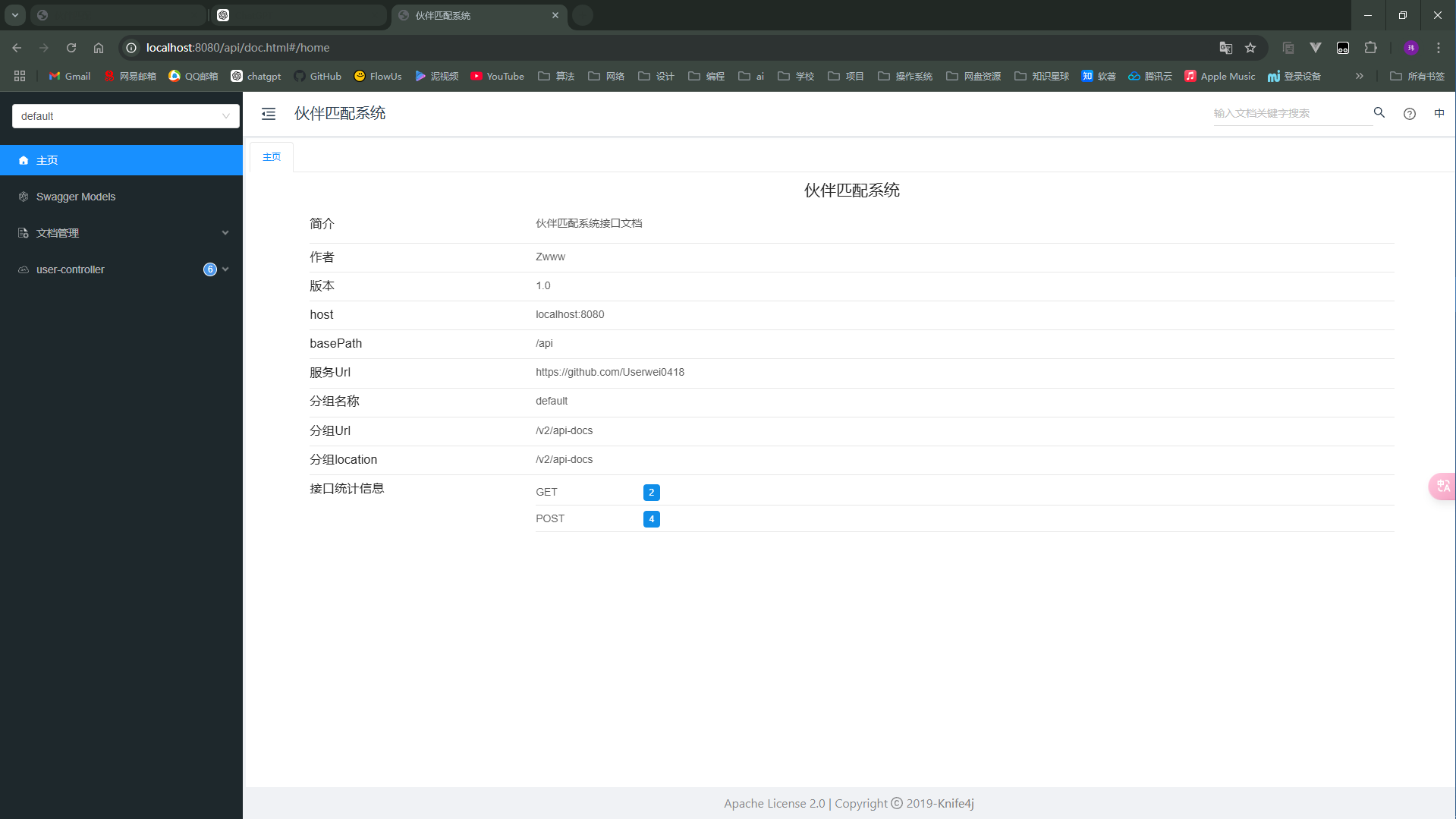
                   .title("伙伴匹配系统")

                   .description("伙伴匹配系统接口文档")

                   .termsOfServiceUrl("https://github.com/Userwei0418")

                   .contact(new Contact("Zwww","https://github.com/Userwei0418","2446796988@qq.com"))

                   .version("1.0")

                   .build();

       }

   }
- application.yml设置
   spring:
     profiles:

       active: dev
     mvc:
       pathmatch:
         matching-strategy: ANT_PATH_MATCHER
完整:
   spring:

     profiles:

       active: dev

     application:

       name: bankend

     datasource:

       url: jdbc:mariadb://localhost:3306/friendmarry?useSSL=false&serverTimezone=UTC&allowPublicKeyRetrieval=true

       username: root

       password: zw200495

       driver-class-name: org.mariadb.jdbc.Driver

     # session 失效时间

     session:

       timeout: 86400

     mvc:

       pathmatch:

         matching-strategy: ANT_PATH_MATCHER

   server:

     port: 8080

     servlet:

       context-path: /api

   mybatis-plus:

     configuration:

       #    关闭驼峰与下划线映射

       map-underscore-to-camel-case: false

     global-config:

       db-config:

         logic-delete-field: isDelete # 全局逻辑删除的实体字段名(since 3.3.0,配置后可以忽略不配置步骤2)

         logic-delete-value: 1 # 逻辑已删除值(默认为 1)

         logic-not-delete-value: 0 # 逻辑未删除值(默认为 0)
-
启动
-
拓展:可以通过在 controller 方法上添加 [@Api、@ApiImplicitParam(name ](/Api、@ApiImplicitParam(name ) = "name",value = "姓名",required = true) [@ApiOperation(value ](/ApiOperation(value ) = "向客人问好") 等注解来自定义生成的接口描述信息
项目分区导航:⬅️ 08-前言 | 09-接口文档 | ➡️ 10-swagger-knife4j
💬 评论