Spring AI构建MCP服务端实战
实战目标
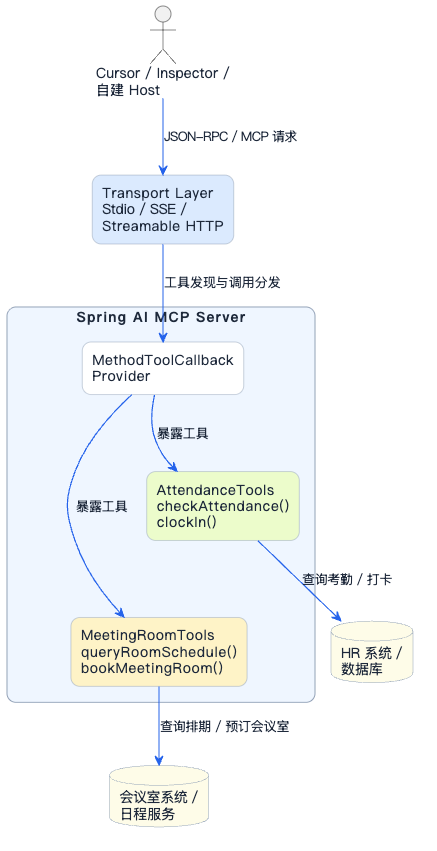
这一篇我们动手搭建一个真实可用的MCP Server。为了让示例更有实际意义,我们以"智能办公助手"为场景,开发以下工具:
| 工具名称 | 功能描述 |
|---|---|
| checkAttendance | 查询员工考勤记录 |
| bookMeetingRoom | 预订会议室 |
| queryRoomSchedule | 查询会议室排期 |
我们会分别用Stdio、SSE、Streamable HTTP三种模式来部署这个Server,让你对比体会它们的差异。
技术栈选择
Spring AI从1.0版本开始提供MCP Server的Boot Starter,主要有三个:
| Starter | 传输模式 | 适用场景 |
|---|---|---|
| spring-ai-starter-mcp-server | Stdio | 本地工具,Claude Desktop/Cursor插件 |
| spring-ai-starter-mcp-server-webmvc | Streamable HTTP | 远程服务,基于Spring MVC |
| spring-ai-starter-mcp-server-webflux | Streamable HTTP | 远程服务,基于响应式WebFlux |
本文使用webmvc版本演示(用得最多),Stdio模式只需换依赖和配置即可。
示例中项目地址
- 项目模块:
ai-example-spring-ai-office-mcp-server
Maven依赖
<?xml version="1.0" encoding="UTF-8"?>
<project xmlns="http://maven.apache.org/POM/4.0.0"
         xmlns:xsi="http://www.w3.org/2001/XMLSchema-instance"
         xsi:schemaLocation="http://maven.apache.org/POM/4.0.0
         https://maven.apache.org/xsd/maven-4.0.0.xsd">
    <!-- 其他部分省略... -->

        <!-- Spring AI MCP Server (WebMVC版本,支持HTTP) -->
        <dependency>
            <groupId>org.springframework.ai</groupId>
            <artifactId>spring-ai-starter-mcp-server-webmvc</artifactId>
            <version>${spring-ai.version}</version>
        </dependency>

    <!-- 其他部分省略... -->
</project>
开发工具类
考勤查询工具
@Service
public class AttendanceTools {

    /**
     * 查询员工考勤记录
     * 大模型会根据description判断何时使用此工具
     */
    @Tool(description = "查询员工的考勤记录,包括出勤天数、迟到次数、早退次数、请假天数。" +
                        "当用户询问考勤、打卡、出勤等相关问题时使用此工具。")
    public String checkAttendance(
            @ToolParam(description = "员工工号,如E10086") String employeeId,
            @ToolParam(description = "查询月份,格式YYYY-MM,如2025-03") String month) {

        // 实际项目中这里调用HR系统API
        // 这里用模拟数据演示
        return String.format("""
            {
                "employeeId": "%s",
                "month": "%s",
                "workDays": 22,
                "actualDays": 21,
                "lateTimes": 2,
                "earlyLeaveTimes": 0,
                "leaveDays": 1,
                "overtimeHours": 8.5
            }
            """, employeeId, month);
    }

    /**
     * 员工签到打卡
     */
    @Tool(description = "员工进行签到打卡操作。当用户说要打卡、签到时使用此工具。")
    public String clockIn(
            @ToolParam(description = "员工工号") String employeeId,
            @ToolParam(description = "打卡类型:IN表示上班签到,OUT表示下班签退") String type) {

        String currentTime = java.time.LocalDateTime.now()
                .format(java.time.format.DateTimeFormatter.ofPattern("yyyy-MM-dd HH:mm:ss"));

        String status = "IN".equalsIgnoreCase(type) ? "上班签到" : "下班签退";

        return String.format("""
            {
                "success": true,
                "employeeId": "%s",
                "clockType": "%s",
                "clockTime": "%s",
                "message": "%s成功"
            }
            """, employeeId, type, currentTime, status);
    }
}
会议室管理工具
@Service
public class MeetingRoomTools {

    /**
     * 查询会议室排期
     */
    @Tool(description = "查询指定会议室在某天的预订情况和空闲时段。" +
                        "当用户想知道会议室是否有空、什么时候可以用时,使用此工具。")
    public String queryRoomSchedule(
            @ToolParam(description = "会议室编号,如A301、B502") String roomId,
            @ToolParam(description = "查询日期,格式YYYY-MM-DD") String date) {

        // 模拟返回会议室排期
        return String.format("""
            {
                "roomId": "%s",
                "roomName": "第%s会议室",
                "date": "%s",
                "capacity": 10,
                "bookedSlots": [
                    {"start": "09:00", "end": "10:30", "subject": "产品需求评审", "organizer": "张经理"},
                    {"start": "14:00", "end": "15:00", "subject": "技术方案讨论", "organizer": "李工"}
                ],
                "availableSlots": [
                    {"start": "10:30", "end": "12:00"},
                    {"start": "13:00", "end": "14:00"},
                    {"start": "15:00", "end": "18:00"}
                ]
            }
            """, roomId, roomId, date);
    }

    /**
     * 预订会议室
     */
    @Tool(description = "预订会议室。当用户说要订会议室、约会议室时使用此工具。")
    public String bookMeetingRoom(
            @ToolParam(description = "会议室编号") String roomId,
            @ToolParam(description = "预订日期,格式YYYY-MM-DD") String date,
            @ToolParam(description = "开始时间,格式HH:mm") String startTime,
            @ToolParam(description = "结束时间,格式HH:mm") String endTime,
            @ToolParam(description = "会议主题") String subject,
            @ToolParam(description = "预订人姓名") String organizer) {

        // 模拟预订成功
        String bookingId = "BK" + System.currentTimeMillis();

        return String.format("""
            {
                "success": true,
                "bookingId": "%s",
                "roomId": "%s",
                "date": "%s",
                "timeSlot": "%s - %s",
                "subject": "%s",
                "organizer": "%s",
                "message": "会议室预订成功"
            }
            """, bookingId, roomId, date, startTime, endTime, subject, organizer);
    }

    /**
     * 取消会议室预订
     */
    @Tool(description = "取消已预订的会议室。当用户说要取消会议、退订会议室时使用此工具。")
    public String cancelBooking(
            @ToolParam(description = "预订单号") String bookingId) {

        return String.format("""
            {
                "success": true,
                "bookingId": "%s",
                "message": "预订已取消"
            }
            """, bookingId);
    }
}
注册工具到MCP Server
@Configuration
public class McpServerConfig {

    /**
     * 注册考勤工具
     */
    @Bean
    public ToolCallbackProvider attendanceToolProvider(AttendanceTools attendanceTools) {
        return MethodToolCallbackProvider.builder()
                .toolObjects(attendanceTools)
                .build();
    }

    /**
     * 注册会议室工具
     */
    @Bean
    public ToolCallbackProvider meetingRoomToolProvider(MeetingRoomTools meetingRoomTools) {
        return MethodToolCallbackProvider.builder()
                .toolObjects(meetingRoomTools)
                .build();
    }
}
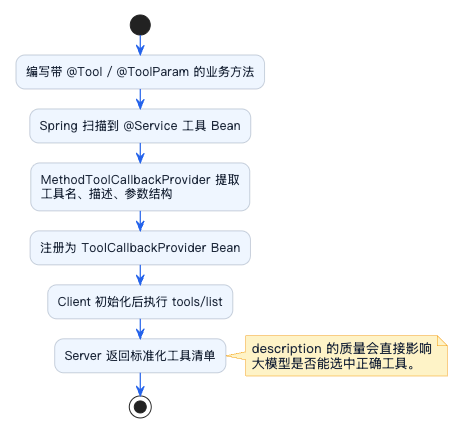
MethodToolCallbackProvider会自动扫描工具类中的@Tool注解方法,提取方法名作为工具名、description作为工具描述、方法参数和@ToolParam作为参数定义。
description的质量直接决定大模型能否正确选中这个工具。描述要说清楚"什么情况下使用",而不只是"这个工具做什么"。例如加上"当用户询问考勤、打卡、出勤等相关问题时使用此工具"这样的触发条件描述效果更好。
启动类
@SpringBootApplication
public class ExampleSpringAiOfficeMcpServerApplication {

    public static void main(String[] args) {
        SpringApplication.run(ExampleSpringAiOfficeMcpServerApplication.class, args);
    }

}
配置三种传输模式
Streamable HTTP模式(推荐)
这是远程部署的推荐方式:
server:
  port: 7090

spring:
  ai:
    mcp:
      server:
        name: office-tools-server
        version: 1.0.0
        type: SYNC
        protocol: STREAMABLE
        streamable-http:
          mcp-endpoint: /mcp
          keep-alive-interval: 30s
配置说明:
| 配置项 | 说明 |
|---|---|
| server.port | HTTP服务端口 |
| spring.ai.mcp.server.name | Server名称,Client连接时可见 |
| spring.ai.mcp.server.version | Server版本号 |
| spring.ai.mcp.server.type | 执行模式,SYNC同步/ASYNC异步 |
| spring.ai.mcp.server.protocol | 传输协议,STREAMABLE表示Streamable HTTP |
| streamable-http.mcp-endpoint | MCP服务端点路径 |
| streamable-http.keep-alive-interval | 心跳间隔,保持连接活跃 |
启动后,MCP服务地址为:http://localhost:7090/mcp
SSE模式(了解即可)
如果需要兼容老版本Client:
server:
  port: 7090

spring:
  ai:
    mcp:
      server:
        name: office-tools-server
        version: 1.0.0
        type: SYNC
        sse-endpoint: /sse
        sse-message-endpoint: /messages
SSE模式有两个端点:
/sse:Client建立长连接监听消息/messages:Client发送请求
Stdio模式
Stdio模式需要换依赖:
<!-- 把webmvc换成这个 -->
<dependency>
    <groupId>org.springframework.ai</groupId>
    <artifactId>spring-ai-starter-mcp-server</artifactId>
    <version>${spring-ai.version}</version>
</dependency>
配置文件也要调整:
spring:
  main:
    web-application-type: none  # 关闭Web容器
    banner-mode: off            # 关闭Banner,避免干扰通信
  ai:
    mcp:
      server:
        name: office-tools-server
        version: 1.0.0
        type: SYNC
        stdio: true

# 关闭所有日志输出到控制台
logging:
  level:
    root: OFF
  file:
    name: ./logs/mcp-server.log  # 日志写入文件
重要提示:Stdio模式下,stdout是MCP通信通道,任何非协议内容(日志、Banner)都会导致通信失败。必须关闭控制台输出。
Stdio 模式以 stdout 作为 MCP 通信通道。任何写入 stdout 的非 JSON-RPC 内容(Spring Banner、日志、
System.out.println)都会破坏协议帧,导致 Client 报 JSON 解析错误。必须设置banner-mode: off和logging.level.root: OFF,日志改为写入文件。
打包后的使用方式:
# 打包
mvn clean package -DskipTests

# Client配置里这样引用
java -jar ai-example-spring-ai-office-mcp-server-0.0.1-SNAPSHOT.jar
测试验证
使用MCP Inspector测试
MCP官方提供了一个可视化调试工具——MCP Inspector。
安装和启动:
# 需要Node.js环境
npx @modelcontextprotocol/inspector@latest
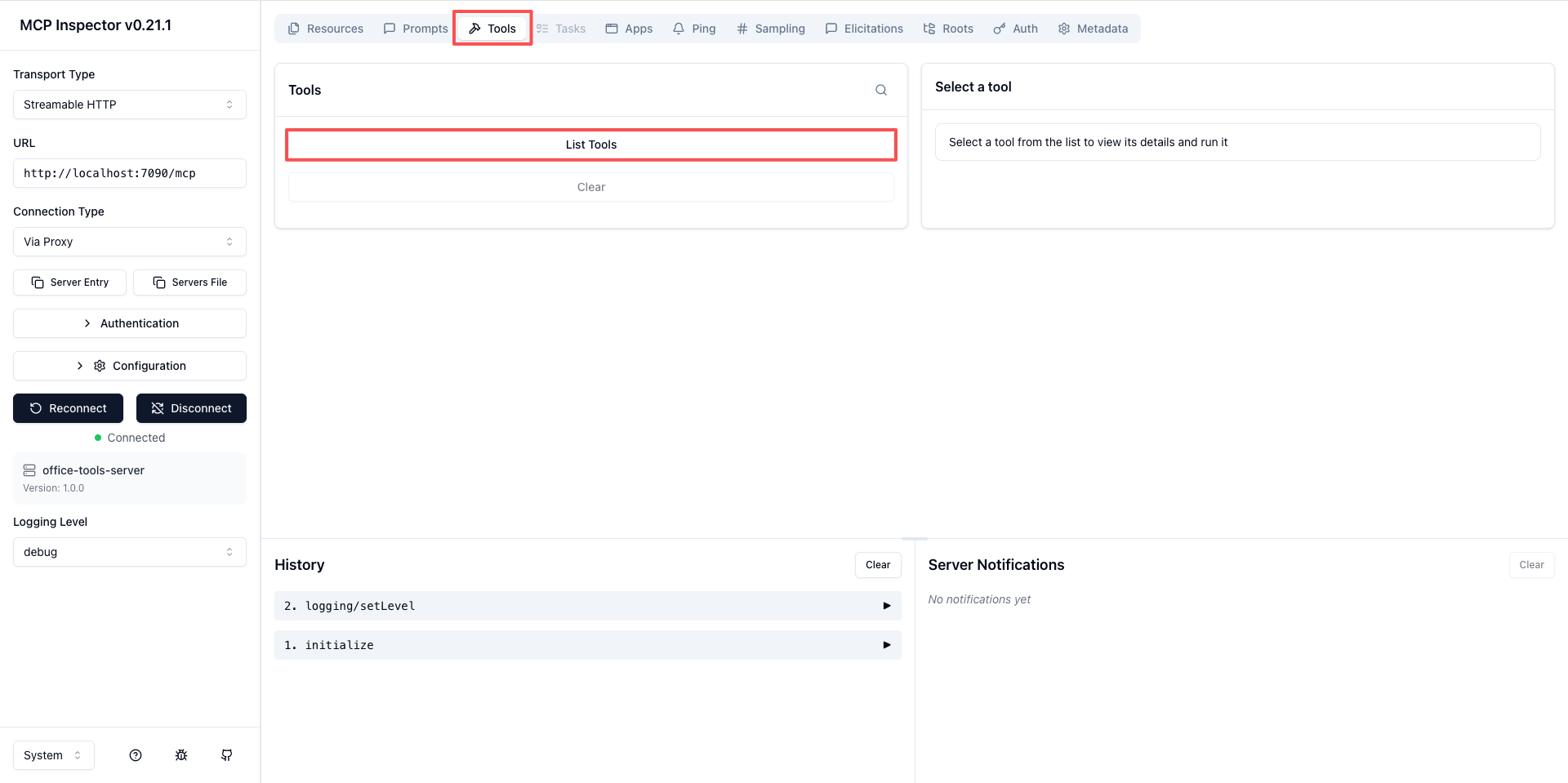
启动后访问 http://localhost:6274,会看到一个Web界面。
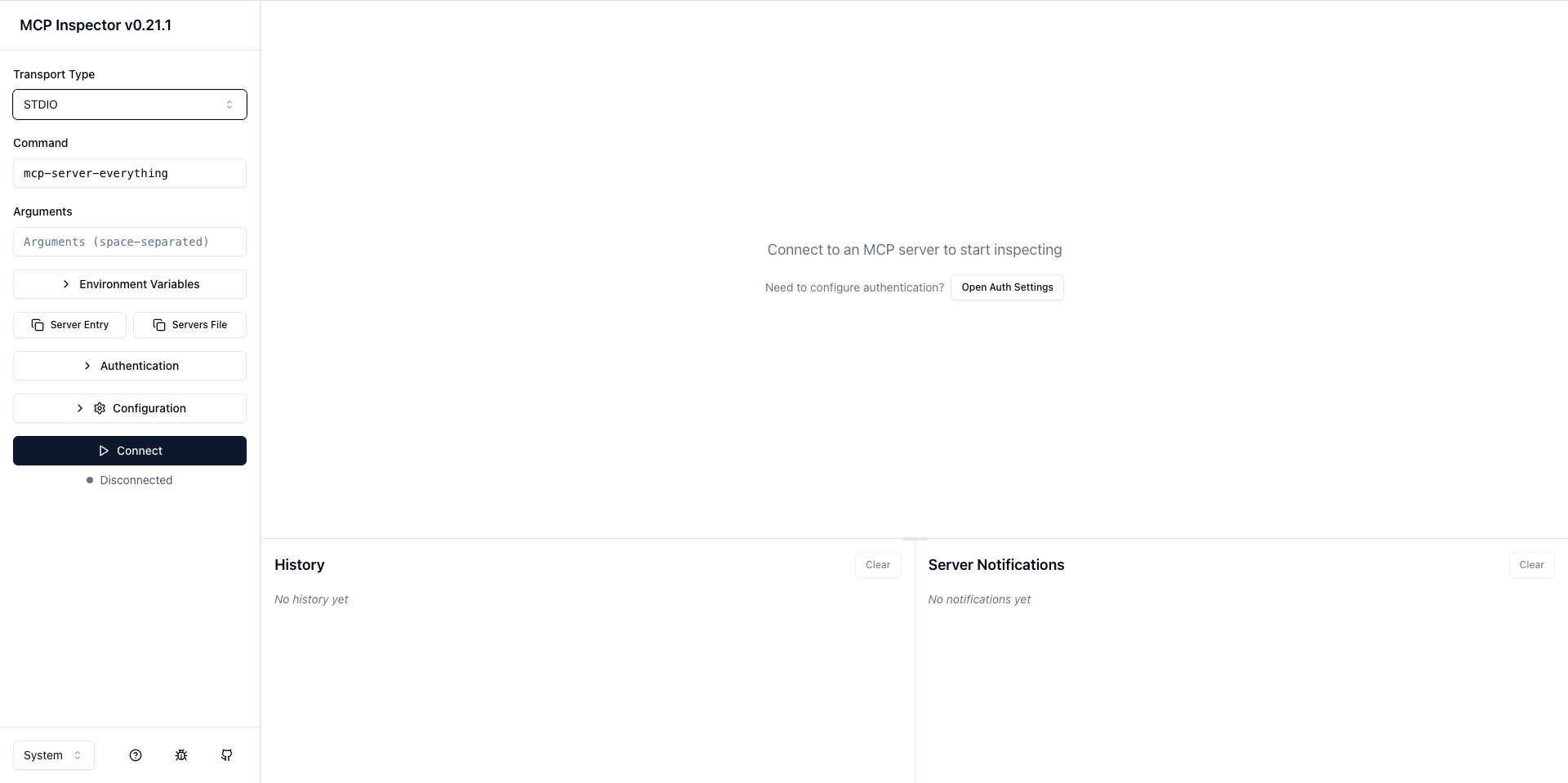
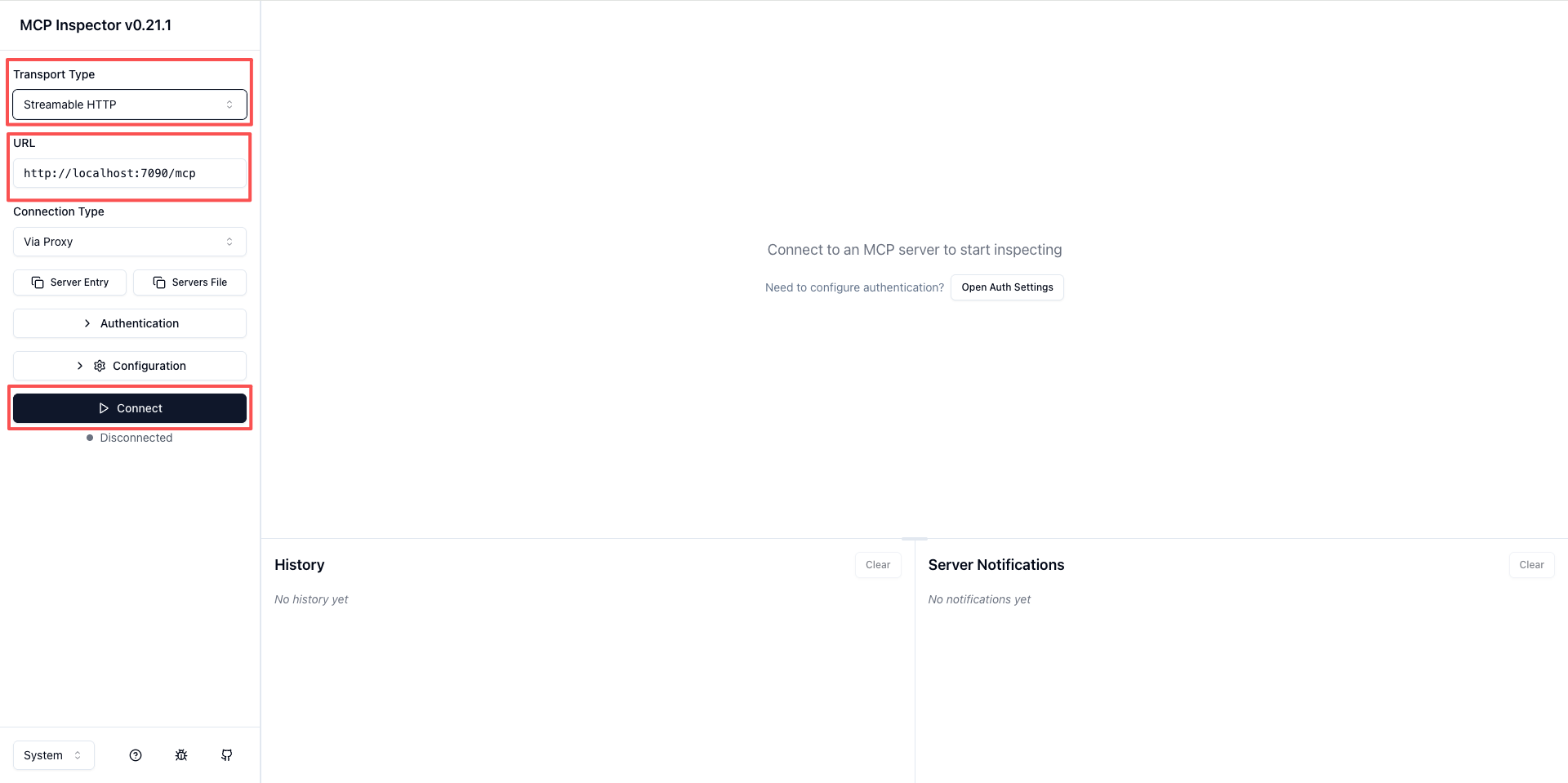
测试Streamable HTTP模式:
- Transport Type选择"Streamable"
- URL填入:
http://localhost:7090/mcp - 点击Connect
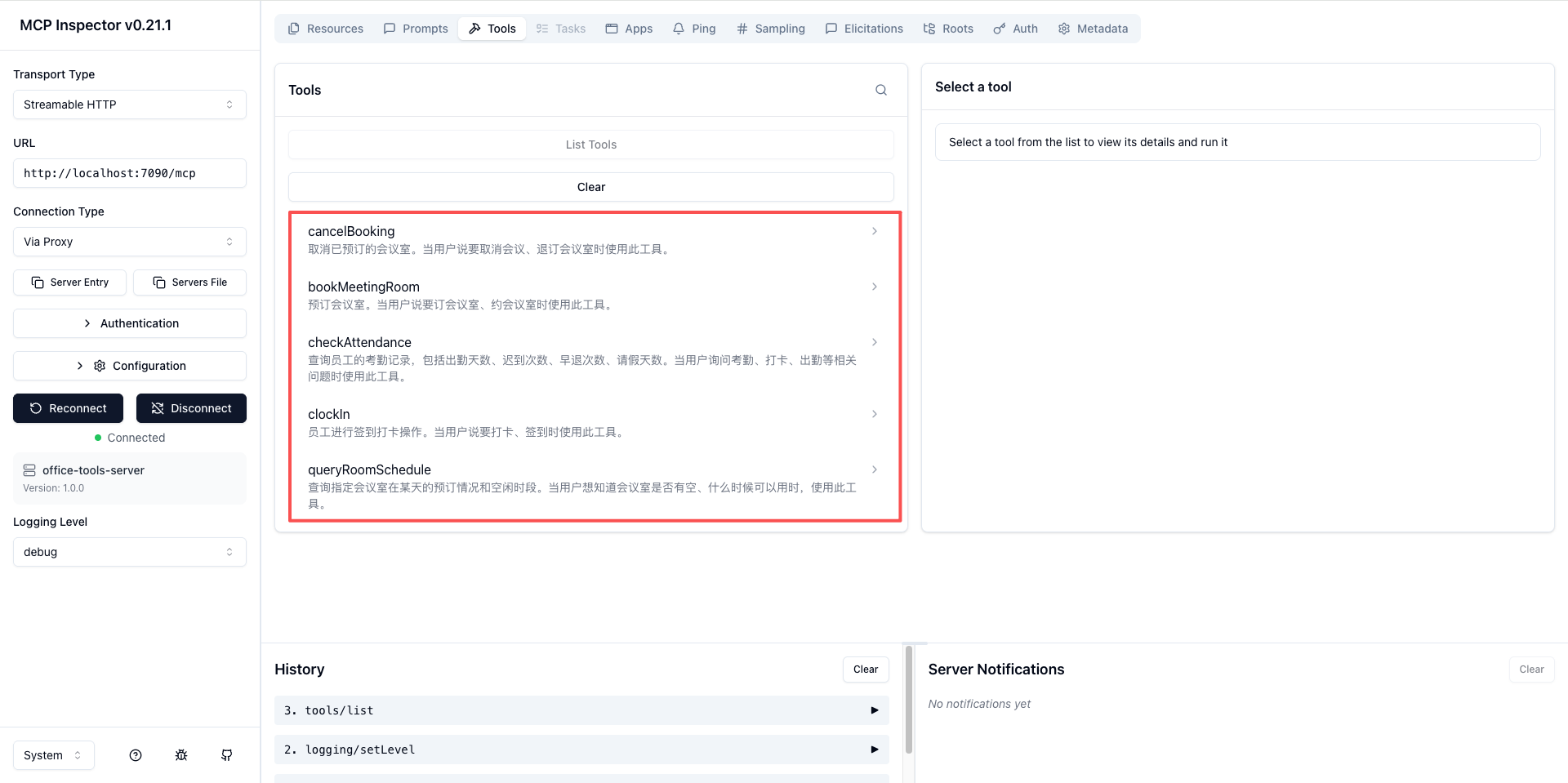
连接成功后,点击Tools标签页,可以看到我们注册的所有工具。
选择一个工具,填入参数,点击Run Tool即可测试。
测试Stdio模式:
- Transport Type选择"Stdio"
- Command填入Java路径
- Args填入:
-jar /path/to/office-mcp-server-1.0.0.jar
使用Cursor/Cline测试
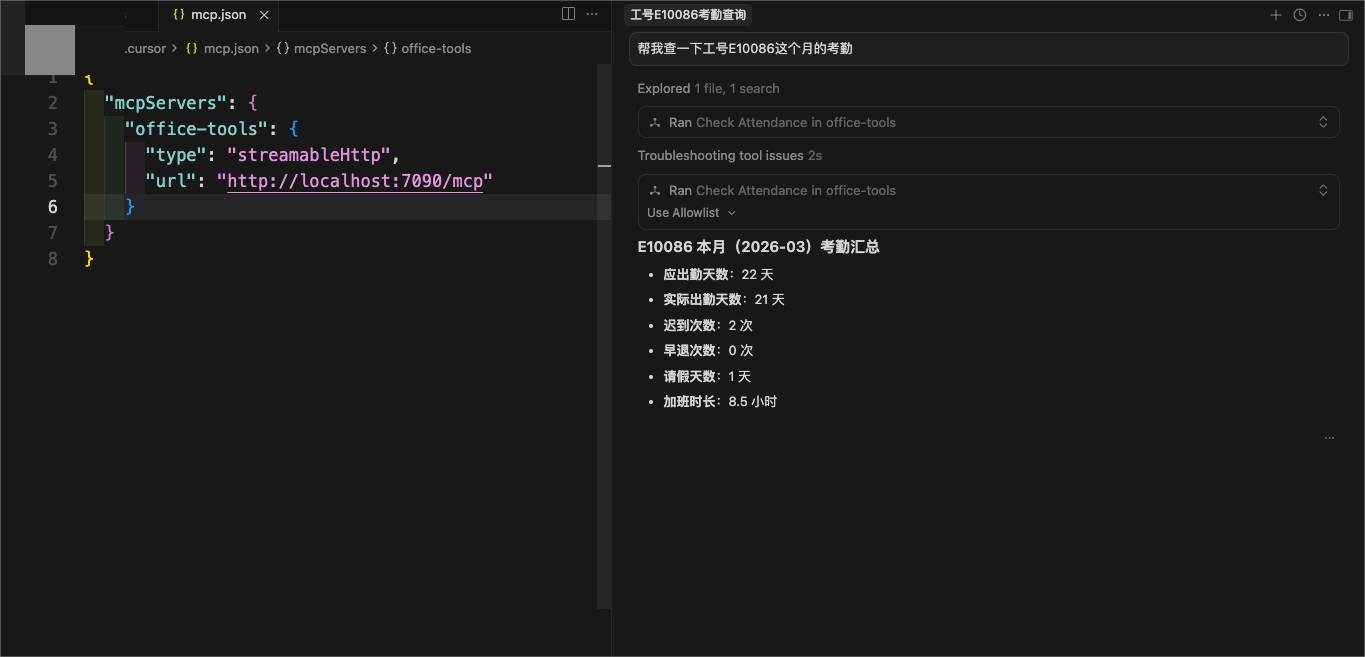
在Cursor的MCP配置中添加:
 {
  "mcpServers": {
    "office-tools": {
      "type": "streamableHttp",
      "url": "http://localhost:7090/mcp"
    }
  }
}
配置成功后,在Cursor中对话:
用户:帮我查一下工号E10086这个月的考勤
Cursor会自动调用checkAttendance工具并返回结果。
进阶:复杂参数处理
上面的例子参数都是简单的String类型。实际项目中,经常需要处理复杂的对象参数。
使用POJO作为参数
定义请求对象:
package com.example.office.model;

import org.springframework.ai.tool.annotation.ToolParam;

public class BookingRequest {

    @ToolParam(description = "会议室编号")
    private String roomId;

    @ToolParam(description = "预订日期,格式YYYY-MM-DD")
    private String date;

    @ToolParam(description = "开始时间,格式HH:mm")
    private String startTime;

    @ToolParam(description = "结束时间,格式HH:mm")
    private String endTime;

    @ToolParam(description = "会议主题")
    private String subject;

    @ToolParam(description = "参会人员列表")
    private List<String> attendees;

    // getter/setter省略
}
工具方法改为:
@Tool(description = "预订会议室,支持指定参会人员")
public String bookMeetingRoomAdvanced(BookingRequest request) {
    // 处理逻辑
    return "预订成功";
}
这样大模型在调用时,会根据@ToolParam的描述来填充各个字段。
当工具参数超过 3 个时,推荐将参数封装成 POJO,并为每个字段加上
@ToolParam描述。这比写多个平铺参数更清晰,大模型也更容易理解整体语义。返回值同样可以用 POJO,框架会自动序列化成 JSON。
使用POJO作为返回值
返回值也可以是对象,框架会自动序列化成JSON:
@Tool(description = "查询会议室信息")
public RoomInfo getRoomInfo(String roomId) {
    RoomInfo info = new RoomInfo();
    info.setRoomId(roomId);
    info.setCapacity(10);
    info.setFacilities(Arrays.asList("投影仪", "白板", "视频会议设备"));
    return info;
}
常见问题排查
问题一:Stdio模式连接失败
现象:Client报JSON解析错误
原因:控制台有非JSON内容输出
解决:
- 确保
banner-mode: off - 确保
logging.level.root: OFF - 检查代码里有没有
System.out.println
问题二:工具没有被注册
现象:Client连接成功但看不到工具
原因:工具类没有被Spring扫描到,或者@Tool注解漏写
解决:
- 确保工具类有
@Service或@Component注解 - 确保工具方法有
@Tool注解 - 确保
McpServerConfig中注册了工具Provider
问题三:Streamable HTTP返回404
现象:访问/mcp返回404
原因:配置的endpoint路径和实际访问的不一致
解决:检查streamable-http.mcp-endpoint配置,确保访问路径正确
问题四:中文乱码
现象:返回的中文显示为乱码
原因:字符编码不是UTF-8
解决:添加配置
server:
  servlet:
    encoding:
      charset: UTF-8
      force: true
      enabled: true
小结
这一篇我们完成了MCP Server的实战开发:
- 项目搭建:使用Spring AI的MCP Server Starter
- 工具开发:用
@Tool和@ToolParam注解定义工具 - 工具注册:通过
MethodToolCallbackProvider注册到MCP Server - 三种模式配置:Streamable HTTP(推荐)、SSE、Stdio
- 测试验证:使用MCP Inspector和Cursor测试
记住几个关键点:
- 远程部署用Streamable HTTP
- 本地插件用Stdio
- Stdio模式必须关闭控制台输出
- 工具的description要写清楚,这是大模型判断的依据
三种模式的 Starter 选择
- Stdio 本地工具:
spring-ai-starter-mcp-server - 远程服务(Spring MVC):
spring-ai-starter-mcp-server-webmvc - 远程服务(响应式):
spring-ai-starter-mcp-server-webflux
切换模式只需换依赖和修改配置,工具代码完全不变。
下一篇我们来看MCP Client端的开发,学习如何在自己的应用中集成MCP工具能力。
企业级项目导航:⬅️ 04-Spring AI MCP客户端开发指南 | 05-Spring AI构建MCP服务端实战 | ➡️ 06-三种传输模式全面解读
💬 评论