结构节点提取的四阶段流水线
上一篇讲到 TikaDocumentParserService.parse() 完成了文本提取和清洗。按照 parse() 的执行顺序,接下来就是 structureNodeExtractor.extract()——它负责从清洗后的纯文本中提取出文档的结构节点(标题、列表、步骤等)。
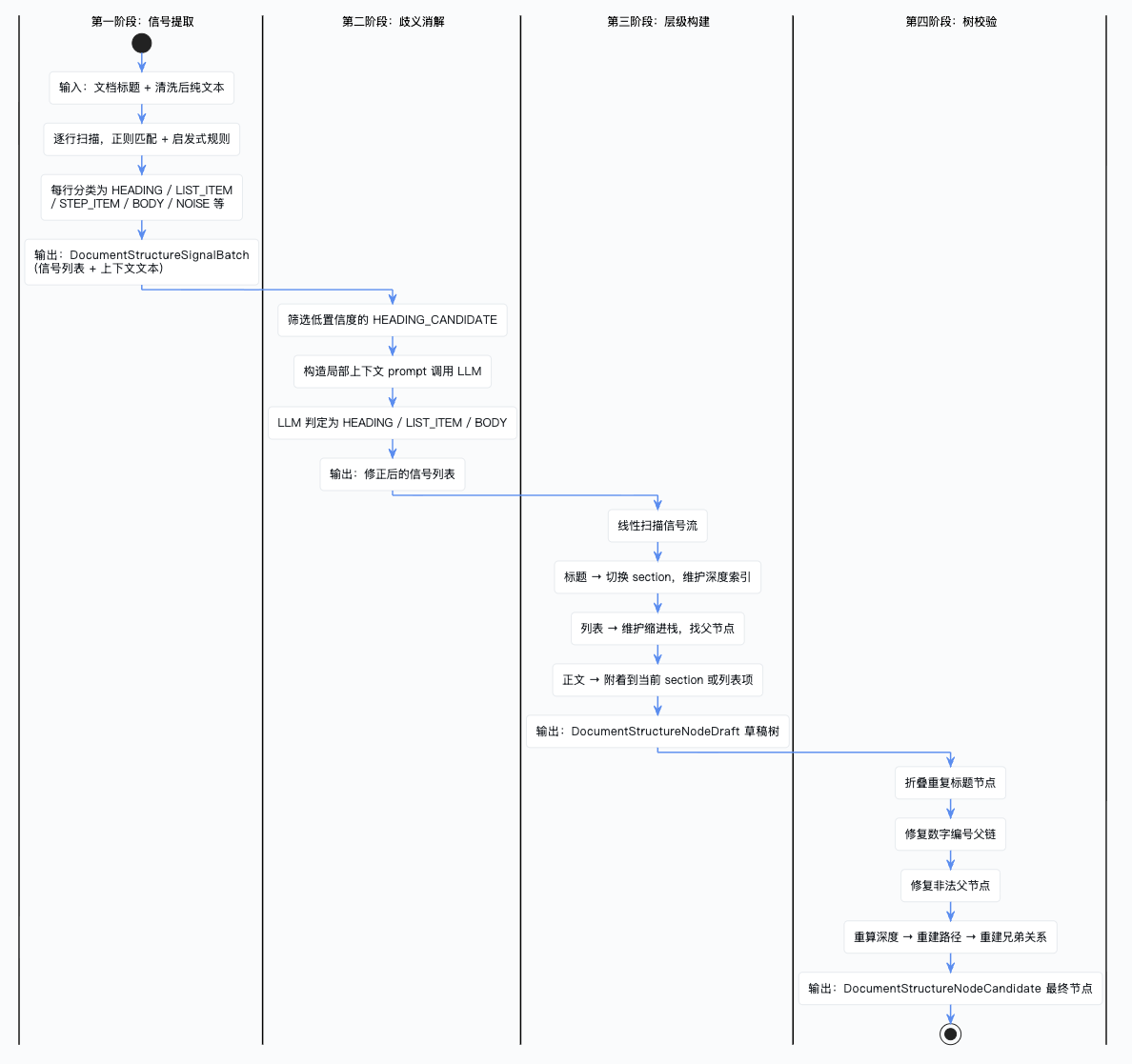
这个方法内部是一条相当复杂的四阶段流水线,我们这篇单独拆开来讲。
四阶段流水线总览
先看一张总览图:
总入口:DocumentStructureNodeExtractor
/**
 * 文档结构节点提取器。
 * <p>
 * 这是整条结构解析流水线的总入口,负责把“文档标题 + 解析后的纯文本”
 * 逐步转换成可落库的结构节点候选列表。
 * </p>
 * <p>
 * 内部固定采用四阶段流水线:
 * 1. 信号提取:逐行识别标题、列表、步骤、正文、噪声等结构信号;
 * 2. 歧义消解:对低置信度候选行做二次判定;
 * 3. 层级构建:把扁平信号组装成带父子关系的 draft 树;
 * 4. 树校验:修复路径、层级和兄弟关系,生成最终节点。
 * </p>
 */
@AllArgsConstructor
@Component
public class DocumentStructureNodeExtractor {

    /** 第一阶段:信号提取器,负责将文本逐行扫描并识别出标题、列表、正文等结构信号 */
    private final DocumentStructureSignalExtractor signalExtractor;
    /** 第二阶段:歧义消解器,对低置信度的信号借助 LLM 进行二次判定 */
    private final DocumentStructureAmbiguityResolver ambiguityResolver;
    /** 第三阶段:层级解析器,将扁平的信号列表组装成带有父子关系的草稿树 */
    private final DocumentStructureHierarchyResolver hierarchyResolver;
    /** 第四阶段:树校验器,修复无效父节点、重算深度、重建路径,输出最终候选节点 */
    private final DocumentStructureTreeValidator treeValidator;

    /**
     * 文档结构提取的总入口方法。
     * <p>
     * 这个方法本身不承载复杂规则判断,它更像一个“编排器”:
     * 负责把标题和正文送入四阶段流水线,并保证每一阶段的输出都成为下一阶段的输入。
     * </p>
     * <p>
     * 其中有两个特别重要的边界语义:
     * 1. 如果正文为空,不进入任何复杂规则,直接返回一个只有 DOCUMENT 根节点的结果;
     * 2. 如果正文非空,哪怕后续没有抽出任何显式标题,也会在树构建阶段保留根节点,
     *    从而保证下游始终面对的是一棵合法结构树,而不是空列表。
     * </p>
     *
     * @param documentTitle 文档标题,可为空;为空时统一兜底为“文档”
     * @param parsedText 解析后的纯文本正文
     * @return 结构化节点候选列表,供后续结构节点落库、导航索引和图谱投影复用
     */
    public List<DocumentStructureNodeCandidate> extract(String documentTitle, String parsedText) {
        // 对标题和文本做空值保护和去除首尾空白
        String normalizedTitle = StrUtil.blankToDefault(documentTitle, "文档").trim();
        String normalizedText = StrUtil.blankToDefault(parsedText, "").trim();

        // 如果正文为空,说明当前文档没有任何可供解析的结构内容;
        // 此时直接返回一个根节点,既能保持数据结构稳定,也能让下游明确知道“文档存在但无结构”。
        if (normalizedText.isBlank()) {
            return List.of(new DocumentStructureNodeCandidate(
                1,
                DocumentStructureNodeTypeEnum.DOCUMENT.getCode(),
                null,
                0,
                0,
                0,
                "",
                normalizedTitle,
                normalizedTitle,
                "/document",
                "",
                "",
                null
            ));
        }

        // 第一阶段:信号提取 —— 逐行扫描文本,识别标题、列表、噪声等结构信号
        DocumentStructureSignalBatch signalBatch = signalExtractor.extract(normalizedTitle, normalizedText);
        // 从信号批次中取出原始信号列表(防御性空值处理)
        List<DocumentStructureSignal> rawSignals = signalBatch == null ? List.of() : signalBatch.signals();
        // 从信号批次中取出所有行的规范化文本,供歧义消解时作为上下文窗口使用
        List<String> allLines = signalBatch == null ? List.of() : signalBatch.contextLines();

        // 第二阶段:歧义消解 —— 对“像标题又像列表”的候选行做二次判定,
        // 目的是减少误把列表当标题、或误把标题当正文的情况。
        List<DocumentStructureSignal> resolvedSignals = ambiguityResolver.resolve(normalizedTitle, allLines, rawSignals);

        // 第三阶段:层级构建 —— 将扁平信号列表组装为带有父子关系的草稿节点树。
        List<DocumentStructureNodeDraft> drafts = hierarchyResolver.resolve(normalizedTitle, resolvedSignals);

        // 第四阶段:树校验与构建 —— 修复层级异常、重算深度、重建路径,输出最终候选节点。
        return treeValidator.validateAndBuild(normalizedTitle, drafts);
    }
}
这个类本身不承载复杂逻辑,更像一个"编排器"——把四个阶段串起来,每一阶段的输出作为下一阶段的输入。
第一阶段:信号提取(SignalExtractor)
这是整条流水线中代码量最大的一个阶段。DocumentStructureSignalExtractor 的职责是:逐行扫描文档纯文本,通过正则模式匹配和启发式规则,把每一行分类为标题、列表项、步骤、表格行、引用、正文、噪声等结构信号。
正则模式定义
先看它定义了哪些正则模式:
/** 匹配 Markdown 标题,如 "## 概述",捕获 # 号数量(层级)和标题文本 */
private static final Pattern MARKDOWN_HEADING_PATTERN =
    Pattern.compile("^(#{1,6})\\s+(.+)$");
/** 匹配多级数字编号标题,如 "1.2.3 配置说明",捕获编号和标题文本 */
private static final Pattern DECIMAL_HEADING_PATTERN =
    Pattern.compile("^(\\d+(?:\\.\\d+)+)\\s*[、.]?\\s*(.+)$");
/** 匹配单级数字编号行,如 "1、概述" 或 "2. 安装",可能是标题也可能是列表项 */
private static final Pattern SINGLE_LEVEL_DIGIT_PATTERN =
    Pattern.compile("^(\\d+)\\s*[、.]\\s*(.+)$");
/** 匹配中文章节标题,如 "第一章 绪论"、"第三节 方法" */
private static final Pattern CHAPTER_PATTERN =
    Pattern.compile("^(第([一二三四五六七八九十百\\d]+)[章节条部分])\\s*(.+)$");
/** 匹配附录标题,如 "附录A 术语表" */
private static final Pattern APPENDIX_PATTERN =
    Pattern.compile("^(附录\\s*([A-Za-z一二三四五六七八九十百\\d]+))(?:\\s+(.+))?$");
/** 匹配中文大纲编号,如 "一、项目背景"、"三、实施方案" */
private static final Pattern CHINESE_OUTLINE_PATTERN =
    Pattern.compile("^([一二三四五六七八九十百]+)[、.]\\s*(.+)$");
/** 匹配显式步骤标记,如 "第一步:安装" 或 "步骤2:配置" */
private static final Pattern EXPLICIT_STEP_PATTERN =
    Pattern.compile("^(?:第\\s*([0-9一二三四五六七八九十百]+)\\s*步|步骤\\s*([0-9一二三四五六七八九十百]+))\\s*[::、.]?\\s*(.+)$");
/** 匹配无序列表项,如 "- 项目一"、"* 项目二"、"• 项目三" */
private static final Pattern BULLET_PATTERN =
    Pattern.compile("^([-*+•])\\s+(.+)$");
/** 匹配页码噪声行,如 "第 3 页"、"Page 5"、"3 / 10" */
private static final Pattern PAGE_NOISE_PATTERN =
    Pattern.compile("^(?:第\\s*\\d+\\s*页|Page\\s*\\d+|\\d+\\s*/\\s*\\d+)$",
        Pattern.CASE_INSENSITIVE);
/** 匹配版权声明噪声行 */
private static final Pattern COPYRIGHT_NOISE_PATTERN =
    Pattern.compile(".*(?:版权所有|未经授权|内部使用|copyright|all rights reserved|保密).*",
        Pattern.CASE_INSENSITIVE);
这些正则覆盖了中英文文档中常见的各种结构标记。
extract 入口方法
/**
 * 信号提取的入口方法。
 * 将文档纯文本拆分为逻辑行,逐行进行结构信号分类,返回信号批次。
 *
 * @param documentTitle 文档标题,用于去重和噪声检测
 * @param parsedText    文档解析后的纯文本
 * @return 信号批次,包含所有行的规范化文本列表和对应的结构信号列表
 */
public DocumentStructureSignalBatch extract(String documentTitle, String parsedText) {
    // 对标题做空值保护和去除首尾空白
    String normalizedTitle = safeText(documentTitle);
    // 将原始文本按换行符拆分,并处理行内步骤边界,生成逻辑行列表
    List<DocumentStructureLogicalLine> logicalLines = buildLogicalLines(parsedText);
    // 统计每行规范化文本的出现频次,用于检测重复的页眉/页脚噪声
    Map<String, Integer> lineFrequency = buildLineFrequency(logicalLines);
    // 预分配信号列表容量(逻辑行数 + 1 个文档标题信号)
    List<DocumentStructureSignal> signals = new ArrayList<>(logicalLines.size() + 1);

    // 如果文档标题非空,先插入一个 DOCUMENT_TITLE 类型的信号作为根信号(行号为 0)
    if (StrUtil.isNotBlank(normalizedTitle)) {
        signals.add(DocumentStructureSignal.builder()
            .lineNo(0)
            .rawText(normalizedTitle)
            .normalizedText(normalizedTitle)
            .kind(DocumentStructureSignalKind.DOCUMENT_TITLE)
            .title(normalizedTitle)
            .levelHint(0)
            .confidence(1.0D)
            .build());
    }

    // 遍历每一个逻辑行,构建上下文(前后非空行),然后进行分类
    for (int index = 0; index < logicalLines.size(); index++) {
        DocumentStructureLogicalLine logicalLine = logicalLines.get(index);
        // 构建当前行的上下文信息:前一个非空行、后一个非空行、前后是否有空行
        LineContext context = buildContext(logicalLines, index);
        // 对当前行进行分类,生成对应的结构信号
        signals.add(classify(normalizedTitle, logicalLine, context, lineFrequency));
    }

    // 提取所有逻辑行的规范化文本,作为后续歧义消解阶段的上下文窗口
    List<String> contextLines = logicalLines.stream()
        .map(DocumentStructureLogicalLine::normalizedText)
        .toList();
    return new DocumentStructureSignalBatch(contextLines, signals);
}
入口方法做了三件事:先把文本拆成逻辑行,然后统计行频次(用于噪声检测),最后逐行调用 classify() 进行分类。我们先看这三个前置步骤,再看核心的 classify。
buildLogicalLines:构建逻辑行
/**
 * 将原始纯文本拆成"逻辑行"列表。
 * <p>
 * 这里之所以不直接把按换行切出来的物理行原样往下传,是因为一条物理行里可能内联写了多个步骤,
 * 例如"步骤1:下载 步骤2:安装"。如果不先拆开,后续分类器就只能把整行当成一个信号,
 * 会让步骤识别和层级解析都变得不准确。
 * </p>
 * <p>
 * 最终每个 DocumentStructureLogicalLine 都会携带:
 * 逻辑行号、原始物理行号、物理行内的片段序号、缩进级别、原始片段文本、规范化文本。
 * 这些信息后面会被上下文构建、列表层级恢复和兄弟关系排序复用。
 * </p>
 */
private List<DocumentStructureLogicalLine> buildLogicalLines(String parsedText) {
    String[] rawLines = StrUtil.blankToDefault(parsedText, "").split("\n", -1);
    List<DocumentStructureLogicalLine> logicalLines = new ArrayList<>(rawLines.length);
    int logicalLineNo = 1;
    for (int index = 0; index < rawLines.length; index++) {
        String rawLine = StrUtil.blankToDefault(rawLines[index], "");
        // 先尝试按"行内显式步骤边界"拆分;拆分后的一条物理行可能生成多条逻辑行。
        List<String> segments = splitInlineSegments(rawLine);
        if (segments.isEmpty()) {
            // 空物理行也保留下来,因为"前后是否有空行"是标题判定的重要上下文特征。
            logicalLines.add(new DocumentStructureLogicalLine(
                logicalLineNo++, index + 1, 1, 0, rawLine, safeText(rawLine)));
            continue;
        }
        for (int segmentIndex = 0; segmentIndex < segments.size(); segmentIndex++) {
            String segment = segments.get(segmentIndex);
            // 每个片段单独计算缩进级别,后续列表层级恢复会用到这个值。
            logicalLines.add(new DocumentStructureLogicalLine(
                logicalLineNo++, index + 1, segmentIndex + 1,
                countIndentLevel(segment), segment, safeText(segment)));
        }
    }
    return logicalLines;
}
这里有个细节值得注意:splitInlineSegments() 会用零宽前瞻正则检测行内的步骤边界(如"步骤1:下载 步骤2:安装"),把一条物理行拆成多条逻辑行。空行也会保留,因为"前后是否有空行"是后面标题判定的重要上下文特征。
buildLineFrequency:统计行频次
/**
 * 统计每条规范化逻辑行在文档中出现的次数。
 * <p>
 * 这一步主要服务于"重复噪声识别":
 * 如果某一短行在全文中频繁重复出现,它更可能是页眉、页脚、版本尾注或版权提示,
 * 而不是正常正文或标题。
 * </p>
 */
private Map<String, Integer> buildLineFrequency(
        List<DocumentStructureLogicalLine> logicalLines) {
    Map<String, Integer> frequency = new LinkedHashMap<>();
    for (DocumentStructureLogicalLine logicalLine : logicalLines) {
        if (logicalLine == null || StrUtil.isBlank(logicalLine.normalizedText())) {
            continue;
        }
        // 只按 normalizedText 计数,避免同一行因为前后空格差异被算成不同内容。
        frequency.merge(logicalLine.normalizedText(), 1, Integer::sum);
    }
    return frequency;
}
频次表后面会被 isRepeatedNoise() 使用——如果某行出现 3 次以上且长度不超过 120 字符,大概率是页眉页脚之类的噪声。
buildContext:构建行上下文
/**
 * 为当前逻辑行构造局部上下文。
 * <p>
 * 这里会向前找到最近一个非空行,向后找到最近一个非空行,
 * 同时记录当前行前后是否跨过空行。
 * 这些上下文信息会直接影响:
 * 1. 纯文本标题判定;
 * 2. 单级编号是否更像列表项;
 * 3. 上一行是否在引入一个列表。
 * </p>
 */
private LineContext buildContext(List<DocumentStructureLogicalLine> logicalLines,
                                int currentIndex) {
    DocumentStructureLogicalLine previousNonBlank = null;
    boolean blankBefore = false;
    for (int index = currentIndex - 1; index >= 0; index--) {
        DocumentStructureLogicalLine candidate = logicalLines.get(index);
        if (StrUtil.isBlank(candidate.normalizedText())) {
            // 只要中间跨过空行,就记住"前面有空行",后面标题判定会依赖它。
            blankBefore = true;
            continue;
        }
        previousNonBlank = candidate;
        break;
    }
    DocumentStructureLogicalLine nextNonBlank = null;
    boolean blankAfter = false;
    for (int index = currentIndex + 1; index < logicalLines.size(); index++) {
        DocumentStructureLogicalLine candidate = logicalLines.get(index);
        if (StrUtil.isBlank(candidate.normalizedText())) {
            blankAfter = true;
            continue;
        }
        nextNonBlank = candidate;
        break;
    }
    return new LineContext(previousNonBlank, nextNonBlank, blankBefore, blankAfter);
}
LineContext 是一个 record,包含四个字段:前一个非空行、后一个非空行、前面是否有空行、后面是否有空行。这些信息在后面的 looksLikePlainHeading()、isNeighborSequence()、previousIntroducesList() 中都会用到。
classify:核心分类方法
这是整个信号提取阶段最核心的方法——按优先级从高到低依次尝试 15 种匹配规则,一旦命中就立即返回:
/**
 * 核心分类方法 —— 对单个逻辑行进行结构信号分类。
 * 按照优先级从高到低依次尝试匹配:空行 → 噪声 → Markdown标题 → 显式步骤 → 中文章节 →
 * 附录 → 多级数字编号 → 表格行 → 引用 → 复选框 → 无序列表 → 单级数字编号 → 中文大纲 → 兜底分类。
 * 一旦匹配成功立即返回,不再继续后续匹配。
 *
 * @param documentTitle 文档标题,用于检测重复标题噪声
 * @param logicalLine   当前待分类的逻辑行
 * @param context       当前行的上下文(前后非空行、前后是否有空行)
 * @param lineFrequency 行文本出现频次表,用于检测重复页眉/页脚
 * @return 分类后的结构信号
 */
private DocumentStructureSignal classify(String documentTitle,
                                         DocumentStructureLogicalLine logicalLine,
                                         LineContext context,
                                         Map<String, Integer> lineFrequency) {
    int lineNo = logicalLine.lineNo();
    String rawText = logicalLine.rawText();
    String normalized = logicalLine.normalizedText();

    // ========== 1. 空行检测 ==========
    if (normalized.isBlank()) {
        return signal(lineNo, rawText, normalized, logicalLine.indentLevel(), DocumentStructureSignalKind.BLANK, "", "", 0, null, List.of(), 1.0D);
    }

    // ========== 2. 重复噪声检测(页眉/页脚/版权声明等在文档中多次出现的行)==========
    if (isRepeatedNoise(documentTitle, normalized, lineFrequency.getOrDefault(normalized, 0))) {
        return signal(lineNo, rawText, normalized, logicalLine.indentLevel(), DocumentStructureSignalKind.NOISE, "", "", 0, null,
            List.of("repeated-running-header-or-footer"), 0.99D);
    }

    // ========== 3. 页码噪声检测(如 "第3页"、"Page 5"、"3/10")==========
    if (PAGE_NOISE_PATTERN.matcher(normalized).matches()) {
        return signal(lineNo, rawText, normalized, logicalLine.indentLevel(), DocumentStructureSignalKind.NOISE, "", "", 0, null,
            List.of("page-noise"), 0.98D);
    }

    // ========== 4. Markdown 标题匹配(如 "## 概述")==========
    Matcher markdown = MARKDOWN_HEADING_PATTERN.matcher(normalized);
    if (markdown.matches()) {
        String title = markdown.group(2).trim();
        // 如果标题内容与文档标题相同,视为重复标题噪声而非有效标题
        if (sameDocumentTitle(documentTitle, title)) {
            return signal(lineNo, rawText, normalized, logicalLine.indentLevel(), DocumentStructureSignalKind.NOISE, "", title, 0, null,
                List.of("duplicate-document-title"), 0.99D);
        }
        // # 号数量即为标题层级,同时尝试从标题文本中提取编号(如 "## 1.2 配置" 中的 "1.2")
        DocumentStructureSignal signal = signal(lineNo, rawText, normalized, logicalLine.indentLevel(), DocumentStructureSignalKind.HEADING,
            extractCode(title), title, markdown.group(1).length(), null, List.of("markdown-heading"), 0.98D);
        // 从编号中解析出数字路径(如 "1.2" → [1, 2]),用于后续层级构建
        signal.setNumericPath(extractNumericPath(signal.getNodeCode()));
        return signal;
    }

    // ========== 5. 显式步骤匹配(如 "第一步:安装" 或 "步骤2:配置")==========
    Matcher explicitStep = EXPLICIT_STEP_PATTERN.matcher(normalized);
    if (explicitStep.matches()) {
        // 从两个捕获组中取非空的那个作为步骤序号,转换为整数
        Integer itemIndex = parseLooseNumber(StrUtil.blankToDefault(explicitStep.group(1), explicitStep.group(2)));
        return signal(lineNo, rawText, normalized, logicalLine.indentLevel(), DocumentStructureSignalKind.STEP_ITEM, "", explicitStep.group(3).trim(), null, itemIndex,
            List.of("explicit-step"), 0.96D);
    }

    // ========== 6. 中文章节标题匹配(如 "第一章 绪论"、"第三节 方法")==========
    Matcher chapter = CHAPTER_PATTERN.matcher(normalized);
    if (chapter.matches()) {
        // 章节编号部分,如 "第一章"
        String code = chapter.group(1).trim();
        // 标题文本部分,如 "绪论"
        String title = chapter.group(3).trim();
        // 与文档标题重复时标记为噪声
        if (sameDocumentTitle(documentTitle, title)) {
            return signal(lineNo, rawText, normalized, logicalLine.indentLevel(), DocumentStructureSignalKind.NOISE, code, title, 0, null,
                List.of("duplicate-document-title"), 0.99D);
        }
        // 章节标题固定为深度 1(顶级标题)
        DocumentStructureSignal signal = signal(lineNo, rawText, normalized, logicalLine.indentLevel(), DocumentStructureSignalKind.HEADING,
            code, title, 1, null, List.of("chapter-heading"), 0.96D);
        // 将中文数字章节号转换为整数,设置数字路径(如 "第三章" → [3])
        Integer chapterNo = parseLooseNumber(chapter.group(2));
        if (chapterNo != null && chapterNo > 0) {
            signal.setNumericPath(List.of(chapterNo));
        }
        return signal;
    }

    // ========== 7. 附录标题匹配(如 "附录A 术语表")==========
    Matcher appendix = APPENDIX_PATTERN.matcher(normalized);
    if (appendix.matches()) {
        // 附录编号,如 "附录A"
        String code = appendix.group(1).trim();
        // 附录标题可选,为空时使用编号本身作为标题
        String title = StrUtil.blankToDefault(appendix.group(3), code).trim();
        return signal(lineNo, rawText, normalized, logicalLine.indentLevel(), DocumentStructureSignalKind.HEADING,
            code, title, 1, null, List.of("appendix-heading"), 0.92D);
    }

    // ========== 8. 多级数字编号标题匹配(如 "1.2.3 配置说明")==========
    Matcher decimal = DECIMAL_HEADING_PATTERN.matcher(normalized);
    if (decimal.matches()) {
        // 编号部分,如 "1.2.3"
        String code = decimal.group(1).trim();
        // 标题文本部分
        String title = decimal.group(2).trim();
        // 层级由编号的段数决定(如 "1.2.3" → 3 级)
        DocumentStructureSignal signal = signal(lineNo, rawText, normalized, logicalLine.indentLevel(), DocumentStructureSignalKind.HEADING,
            code, title, Math.max(1, code.split("\\.").length), null, List.of("decimal-heading"), 0.95D);
        // 解析数字路径(如 "1.2.3" → [1, 2, 3])
        signal.setNumericPath(extractNumericPath(code));
        return signal;
    }

    // ========== 9. 表格行检测(以 | 开头结尾、包含 Tab、或多个 | 分隔)==========
    if (isTableRow(normalized)) {
        return signal(lineNo, rawText, normalized, logicalLine.indentLevel(), DocumentStructureSignalKind.TABLE_ROW, "", normalized, null, null,
            List.of("table-row"), 0.90D);
    }

    // ========== 10. 引用行检测(以 > 开头的 Markdown 引用)==========
    if (normalized.startsWith(">")) {
        return signal(lineNo, rawText, normalized, logicalLine.indentLevel(), DocumentStructureSignalKind.QUOTE, "", normalized, null, null,
            List.of("quote"), 0.88D);
    }

    // ========== 11. 复选框列表项匹配(如 "[ ] 待办" 或 "[x] 已完成")==========
    Matcher checkbox = CHECKBOX_PATTERN.matcher(normalized);
    if (checkbox.matches()) {
        return signal(lineNo, rawText, normalized, logicalLine.indentLevel(), DocumentStructureSignalKind.LIST_ITEM, "", checkbox.group(1).trim(), null, null,
            List.of("checkbox-list"), 0.92D);
    }

    // ========== 12. 无序列表项匹配(如 "- 项目一"、"* 项目二")==========
    Matcher bullet = BULLET_PATTERN.matcher(normalized);
    if (bullet.matches()) {
        return signal(lineNo, rawText, normalized, logicalLine.indentLevel(), DocumentStructureSignalKind.LIST_ITEM, "", bullet.group(2).trim(), null, null,
            List.of("bullet-list"), 0.90D);
    }

    // ========== 13. 单级阿拉伯数字编号匹配(如 "1、概述" 或 "2. 安装")==========
    // 这类行存在歧义:可能是标题(如 "1、项目背景"),也可能是列表项(如 "1、苹果")
    Matcher singleDigit = SINGLE_LEVEL_DIGIT_PATTERN.matcher(normalized);
    if (singleDigit.matches()) {
        String title = singleDigit.group(2).trim();
        // 将编号文本转换为整数序号
        Integer itemIndex = parseLooseNumber(singleDigit.group(1));
        // 检查前后行是否构成连续序列(如 1、2、3),如果是则更倾向于列表项
        boolean sequential = isNeighborSequence(itemIndex, OrderedMarkerFamily.ARABIC_SINGLE, context);
        // 检查前一行是否以冒号结尾(引导列表的标志,如 "包含以下内容:")
        boolean introducedByLeadIn = previousIntroducesList(context.previousNonBlank());
        // 综合判断:非连续序列、非引导列表、且文本看起来像标题 → 标记为候选标题
        boolean headingLike = !sequential
            && !introducedByLeadIn
            && looksLikePlainHeading(title, context);
        DocumentStructureSignal signal = signal(
            lineNo,
            rawText,
            normalized,
            logicalLine.indentLevel(),
            // 候选标题使用 HEADING_CANDIDATE(低置信度),后续由歧义消解阶段二次判定
            headingLike ? DocumentStructureSignalKind.HEADING_CANDIDATE : DocumentStructureSignalKind.LIST_ITEM,
            singleDigit.group(1).trim(),
            title,
            headingLike ? 1 : null,
            itemIndex,
            // 记录分类原因,便于调试和歧义消解参考
            List.of(headingLike ? "single-digit-ambiguous-heading"
                : sequential ? "single-digit-sequence-list" : "single-digit-list"),
            // 候选标题置信度较低(0.62),确定的列表项置信度较高
            headingLike ? 0.62D : sequential || introducedByLeadIn ? 0.93D : 0.88D
        );
        // 如果判定为候选标题,设置数字路径用于后续层级构建
        if (headingLike && itemIndex != null && itemIndex > 0) {
            signal.setNumericPath(List.of(itemIndex));
        }
        return signal;
    }

    // ========== 14. 中文大纲编号匹配(如 "一、项目背景"、"三、实施方案")==========
    // 与单级数字编号类似,也存在标题/列表项的歧义
    Matcher chineseOutline = CHINESE_OUTLINE_PATTERN.matcher(normalized);
    if (chineseOutline.matches()) {
        String title = chineseOutline.group(2).trim();
        // 将中文数字转换为整数序号
        Integer index = parseLooseNumber(chineseOutline.group(1));
        // 检查前后行是否构成中文大纲的连续序列(如 一、二、三)
        boolean sequential = isNeighborSequence(index, OrderedMarkerFamily.CHINESE_OUTLINE, context);
        // 检查前一行是否为引导列表的行
        boolean introducedByLeadIn = previousIntroducesList(context.previousNonBlank());
        // 综合判断是否更像标题
        boolean headingLike = !sequential
            && !introducedByLeadIn
            && looksLikePlainHeading(title, context);
        DocumentStructureSignal signal = signal(
            lineNo,
            rawText,
            normalized,
            logicalLine.indentLevel(),
            headingLike ? DocumentStructureSignalKind.HEADING_CANDIDATE : DocumentStructureSignalKind.LIST_ITEM,
            chineseOutline.group(1).trim(),
            title,
            headingLike ? 1 : null,
            index,
            List.of(headingLike ? "chinese-outline-ambiguous-heading"
                : sequential ? "chinese-outline-sequence-list" : "chinese-outline-list"),
            headingLike ? 0.60D : sequential || introducedByLeadIn ? 0.92D : 0.86D
        );
        if (headingLike && index != null && index > 0) {
            signal.setNumericPath(List.of(index));
        }
        return signal;
    }

    // ========== 15. 兜底分类:使用 DocumentLineClassifier 做最后尝试 ==========
    DocumentLineClassifier.LineClassification fallback = documentLineClassifier.classify(normalized);
    // 如果行分类器未识别为标题,但启发式规则认为像标题(短文本、前后有空行、无句末标点)
    if (!fallback.isHeading() && looksLikePlainHeading(normalized, context)) {
        // 标记为候选标题,置信度最低(0.58),交由歧义消解阶段最终裁定
        return signal(lineNo, rawText, normalized, logicalLine.indentLevel(), DocumentStructureSignalKind.HEADING_CANDIDATE,
            "", normalized, inferPlainHeadingLevel(context), null, List.of("plain-heading-candidate"), 0.58D);
    }
    // 所有模式均未匹配,归类为普通正文
    return signal(lineNo, rawText, normalized, logicalLine.indentLevel(), DocumentStructureSignalKind.BODY,
        "", normalized, null, null, List.of("body"), 1.0D);
}
信号类型一览
每行最终会被分类为以下信号类型之一:
DOCUMENT_TITLE:文档标题(行号 0 的虚拟信号)HEADING:确定的标题(Markdown 标题、中文章节、多级数字编号等)HEADING_CANDIDATE:疑似标题(低置信度,需要歧义消解阶段二次判定)STEP_ITEM:显式步骤项(如"第一步:安装")LIST_ITEM:列表项(无序列表、有序列表、复选框等)TABLE_ROW:表格行QUOTE:引用行BODY:普通正文BLANK:空行NOISE:噪声行(页码、页眉页脚、版权声明等)
最容易出歧义的两种匹配
在 15 种匹配规则中,最有意思的是单级阿拉伯数字编号和中文大纲编号——它们天然存在歧义。比如 1、项目背景 到底是标题还是列表项?
// ========== 13. 单级阿拉伯数字编号匹配(如 "1、概述" 或 "2. 安装")==========
Matcher singleDigit = SINGLE_LEVEL_DIGIT_PATTERN.matcher(normalized);
if (singleDigit.matches()) {
    String title = singleDigit.group(2).trim();
    Integer itemIndex = parseLooseNumber(singleDigit.group(1));
    // 检查前后行是否构成连续序列(如 1、2、3),如果是则更倾向于列表项
    boolean sequential = isNeighborSequence(itemIndex,
        OrderedMarkerFamily.ARABIC_SINGLE, context);
    // 检查前一行是否以冒号结尾(引导列表的标志)
    boolean introducedByLeadIn = previousIntroducesList(context.previousNonBlank());
    // 综合判断:非连续序列、非引导列表、且文本看起来像标题 → 候选标题
    boolean headingLike = !sequential
        && !introducedByLeadIn
        && looksLikePlainHeading(title, context);
    DocumentStructureSignal signal = signal(
        lineNo, rawText, normalized, logicalLine.indentLevel(),
        // 候选标题使用 HEADING_CANDIDATE(低置信度),后续由歧义消解阶段二次判定
        headingLike ? DocumentStructureSignalKind.HEADING_CANDIDATE
                    : DocumentStructureSignalKind.LIST_ITEM,
        singleDigit.group(1).trim(), title,
        headingLike ? 1 : null, itemIndex,
        List.of(headingLike ? "single-digit-ambiguous-heading"
            : sequential ? "single-digit-sequence-list" : "single-digit-list"),
        // 候选标题置信度较低(0.62),确定的列表项置信度较高
        headingLike ? 0.62D : sequential || introducedByLeadIn ? 0.93D : 0.88D
    );
    if (headingLike && itemIndex != null && itemIndex > 0) {
        signal.setNumericPath(List.of(itemIndex));
    }
    return signal;
}
判断逻辑的核心思路是:
- 如果前后行构成连续序列(1、2、3...),大概率是列表项
- 如果前一行以冒号结尾(如"包含以下内容:"),大概率是列表项
- 如果都不是,再用
looksLikePlainHeading()做启发式判断——文本短、前后有空行、不以句末标点结尾 → 更像标题
但即使判断为"像标题",也只标记为 HEADING_CANDIDATE(置信度 0.62),而不是直接定性为 HEADING。最终裁定交给第二阶段的歧义消解器。
上面这段歧义判断代码里调用了好几个辅助方法,我们逐个看一下。
sameDocumentTitle:文档标题重复检测
 /**
 * 判断某一行文本是否与文档标题本质相同。
 * <p>
 * 用于识别这种常见情况:
 * 文档名叫"部署手册",正文第一行又重复写了一遍"部署手册"。
 * 这种行不应再被当成一个真实 section 节点,否则会多出一层无意义标题。
 * </p>
 */
private boolean sameDocumentTitle(String documentTitle, String candidate) {
    String left = normalizeComparableTitle(documentTitle);
    String right = normalizeComparableTitle(candidate);
    return StrUtil.isNotBlank(left) && left.equals(right);
}
比较之前会先做标准化处理:去掉 Markdown # 前缀、去掉文件扩展名后缀、去掉所有空格、转小写。这样 ## 部署手册 和 部署手册.pdf 都能被识别为同一个标题。
isNeighborSequence:邻居序列检测
textjavascripttypescriptcsshtmlbashjsonmarkdownpythonjavaccpprubygorustphpsqlyaml Copy
                /**
 * 判断当前编号是否与前后相邻编号形成有序序列。
 * <p>
 * 这是区分"标题"与"列表项"的关键特征之一:
 * 如果当前是 2,前面是 1 或后面是 3,那么它更像有序列表项;
 * 如果找不到相邻序列证据,则它更有机会被当作标题候选。
 * </p>
 */
private boolean isNeighborSequence(Integer itemIndex,
                                   OrderedMarkerFamily family,
                                   LineContext context) {
    if (itemIndex == null || family == null) { return false; }
    // 只要前一个是 N-1 或后一个是 N+1,就认为当前编号处于一个连续序列中。
    return isSequenceNeighbor(context.previousNonBlank(), itemIndex, family, -1)
        || isSequenceNeighbor(context.nextNonBlank(), itemIndex, family, 1);
}
举个例子:如果当前行是 2、安装依赖,前一行是 1、下载源码,那 isNeighborSequence 返回 true,当前行就会被判定为列表项而不是标题。这个方法支持两种编号族:ARABIC_SINGLE(阿拉伯数字)和 CHINESE_OUTLINE(中文大纲)。
previousIntroducesList:列表引导行检测
/**
 * 判断上一条非空行是否在"引出一个列表"。
 * <p>
 * 典型特征是以中文或英文冒号结尾,例如"包含以下内容:"。
 * 如果当前编号行前面正好出现这种引导句,那么当前行更可能是列表项,而不是章节标题。
 * </p>
 */
private boolean previousIntroducesList(DocumentStructureLogicalLine previousNonBlank) {
    if (previousNonBlank == null) { return false; }
    String previous = safeText(previousNonBlank.normalizedText());
    return previous.endsWith(":") || previous.endsWith(":");
}
逻辑很简单:如果上一行以冒号结尾(如"系统要求如下:"),那后面跟着的编号行大概率是列表项。
parseLooseNumber:宽松数字解析
textjavascripttypescriptcsshtmlbashjsonmarkdownpythonjavaccpprubygorustphpsqlyaml Copy
                /**
 * 宽松解析数字编号。
 * <p>
 * 这里既支持阿拉伯数字,也支持常见中文数字表达,
 * 例如:"3" → 3、"十" → 10、"十二" → 12、"二十" → 20、"二十三" → 23
 * </p>
 * <p>
 * 它主要用于章节编号、步骤编号、中文大纲编号的统一数值化,
 * 让后续邻居序列判断和 numericPath 计算都能在整数层面进行。
 * </p>
 */
private Integer parseLooseNumber(String text) {
    String normalized = safeText(text);
    if (normalized.isBlank()) { return null; }
    // 纯数字时直接走最简单路径。
    if (normalized.chars().allMatch(Character::isDigit)) {
        return Integer.parseInt(normalized);
    }
    Map<Character, Integer> digitMap = Map.of(
        '一', 1, '二', 2, '三', 3, '四', 4, '五', 5,
        '六', 6, '七', 7, '八', 8, '九', 9
    );
    // 下面按最常见的中文十位表达做有限支持,覆盖结构编号里高频出现的形式。
    if ("十".equals(normalized)) { return 10; }
    if (normalized.startsWith("十") && normalized.length() == 2) {
        return 10 + digitMap.getOrDefault(normalized.charAt(1), 0);
    }
    if (normalized.endsWith("十") && normalized.length() == 2) {
        return digitMap.getOrDefault(normalized.charAt(0), 0) * 10;
    }
    if (normalized.contains("十") && normalized.length() == 3) {
        return digitMap.getOrDefault(normalized.charAt(0), 0) * 10
            + digitMap.getOrDefault(normalized.charAt(2), 0);
    }
    // 兜底处理"单个中文数字"。
    return digitMap.get(normalized.charAt(0));
}
这个方法在整个信号提取阶段被大量使用——步骤编号、章节编号、中文大纲编号、邻居序列判断都要先把文本编号转成整数。它覆盖了 1~99 范围内的中文数字表达,对于文档结构编号来说完全够用。
DocumentLineClassifier.classify:兜底行分类器
在 classify 方法的第 15 步(兜底分类)中,如果前面所有正则都没命中,会调用 DocumentLineClassifier 做最后一次尝试:
/**
 * 对单行文本做轻量级结构分类。
 * <p>
 * 判定顺序遵循“高确定性规则优先,模糊规则后置”的原则:
 * Markdown 标题、附录、显式步骤、中文章节、多级数字编号等模式优先;
 * 单级数字编号和中文大纲这种有歧义的模式,则进一步看内容是否像标题;
 * 都不命中时回退成 BODY。
 * </p>
 */
public LineClassification classify(String line) {
    String normalized = safeText(line);
    if (normalized.isBlank()) {
        return new LineClassification(LineKind.BODY, 0, normalized, normalized);
    }

    Matcher markdownMatcher = MARKDOWN_HEADING_PATTERN.matcher(normalized);
    if (markdownMatcher.matches()) {
        // Markdown 标题是最明确的 heading 形态,# 数量直接对应层级。
        int level = markdownMatcher.group(1).length();
        return heading(level, markdownMatcher.group(2).trim(), normalized);
    }

    Matcher appendixMatcher = APPENDIX_PATTERN.matcher(normalized);
    if (appendixMatcher.matches()) {
        // 附录天然视为一级标题。
        return heading(1, normalized, normalized);
    }

    Matcher explicitStepMatcher = EXPLICIT_STEP_PATTERN.matcher(normalized);
    if (explicitStepMatcher.matches()) {
        // “步骤1 / 第一步” 这类模式优先视为列表项或步骤项,而不是章节标题。
        return listItem(normalized);
    }

    Matcher chapterMatcher = CHINESE_CHAPTER_PATTERN.matcher(normalized);
    if (chapterMatcher.matches()) {
        // 中文章节标题通常是较高层级标题,这里先统一给出 heading 判定。
        return heading(2, normalized, normalized);
    }

    Matcher multiLevelDigitMatcher = MULTI_LEVEL_DIGIT_HEADING_PATTERN.matcher(normalized);
    if (multiLevelDigitMatcher.matches()) {
        // 1.2 / 2.3.4 这种多级编号,大概率就是标题层级结构。
        String prefix = multiLevelDigitMatcher.group(1);
        return heading(prefix.split("\\.").length, normalized, normalized);
    }

    Matcher chineseOutlineMatcher = CHINESE_OUTLINE_PATTERN.matcher(normalized);
    if (chineseOutlineMatcher.matches()) {
        String content = chineseOutlineMatcher.group(2).trim();
        // “一、xxx” 既可能是标题也可能是列表项,因此只做一层启发式判断。
        if (looksLikeHeadingContent(content)) {
            return heading(1, normalized, normalized);
        }
        return listItem(normalized);
    }

    Matcher singleLevelDigitMatcher = SINGLE_LEVEL_DIGIT_LINE_PATTERN.matcher(normalized);
    if (singleLevelDigitMatcher.matches()) {
        String content = singleLevelDigitMatcher.group(2).trim();
        // “1、xxx / 2. xxx” 同样存在标题/列表歧义,借助内容形态做轻量判断。
        if (looksLikeHeadingContent(content)) {
            return heading(1, normalized, normalized);
        }
        return listItem(normalized);
    }

    if (normalized.startsWith("- ")
        || normalized.startsWith("* ")
        || normalized.startsWith("+ ")
        || normalized.startsWith("- [")
        || normalized.startsWith("* [")
        || normalized.startsWith("+ [")) {
        // 常见无序列表和任务列表标记,统一视为列表项。
        return listItem(normalized);
    }

    // 其余情况统一作为正文。
    return new LineClassification(LineKind.BODY, 0, normalized, normalized);
}
DocumentLineClassifier 和 DocumentStructureSignalExtractor 的区别在于:它不依赖上下文(前后行、行频次),只看当前这一行的文本形态做判断。所以它更像一个"轻量级兜底分类器"——在主分类器的 15 条规则都没命中时,再用它做最后一次尝试。
它内部的 looksLikeHeadingContent() 也是一个启发式判断:文本不超过 24 个字符、不以句末标点结尾、不包含中文逗号/分号/句号/冒号,就认为更像标题内容。
looksLikePlainHeading:启发式标题判断
 private boolean looksLikePlainHeading(String text, LineContext context) {
    String normalized = safeText(text);
    if (text.isBlank()) { return false; }
    // 超过配置的最大纯标题字符数,不太可能是标题
    if (normalized.length() > properties.getStructureParsing().getMaxPlainHeadingChars()) {
        return false;
    }
    // 以句末标点结尾的更像是正文句子而非标题
    if (endsWithSentencePunctuation(normalized)) { return false; }
    // 包含 URL 的行不太可能是标题
    if (normalized.contains("http://") || normalized.contains("https://")) { return false; }
    // 以 | 开头或结尾的行更像是表格行
    if (normalized.startsWith("|") || normalized.endsWith("|")) { return false; }
    // 仅由重复的 -、=、_ 组成的行是分隔线
    if (normalized.matches("^[\\-=_]{3,}$")) { return false; }
    // 标题的关键特征:前面或后面有空行(与正文隔开)
    boolean isolated = context.blankBefore() || context.blankAfter();
    // 标题后面应该有实际内容
    boolean nextLooksContent = context.nextNonBlank() != null
        && StrUtil.isNotBlank(context.nextNonBlank().normalizedText())
        && !context.nextNonBlank().normalizedText().matches("^[:\\-\\s|]+$");
    // 标题通常是名词短语,不包含中文逗号、分号、句号、冒号等
    boolean nounLike = !normalized.contains(",") && !normalized.contains(";")
        && !normalized.contains("。") && !normalized.contains(":");
    // 三个条件同时满足才判定为疑似标题
    return isolated && nextLooksContent && nounLike;
}
这个方法用了一系列排除法:太长的不是、有句末标点的不是、有 URL 的不是、有中文标点的不是……最后剩下的"短文本 + 前后有空行 + 后面有内容 + 像名词短语"才算疑似标题。
第二阶段:歧义消解(AmbiguityResolver)
第一阶段产出的信号里,最容易出错的就是那些 HEADING_CANDIDATE——它们置信度低,到底是标题还是列表项,规则很难 100% 判准。这时候就请 LLM 来帮忙做二次判定。
public List<DocumentStructureSignal> resolve(String documentTitle,
                                             List<String> allLines,
                                             List<DocumentStructureSignal> sourceSignals) {
    if (sourceSignals == null || sourceSignals.isEmpty()) { return List.of(); }
    // 只在配置开启且模型可用时生效
    if (!Boolean.TRUE.equals(properties.getStructureParsing()
            .getLlmDisambiguationEnabled())) {
        return sourceSignals;
    }
    ChatModel chatModel = chatModelProvider.getIfAvailable();
    if (chatModel == null) { return sourceSignals; }

    // 只挑出真正模糊、值得交给 LLM 看一眼的信号
    List<DocumentStructureSignal> ambiguousSignals = sourceSignals.stream()
        .filter(signal -> signal != null
            && signal.isAmbiguous()
            && signal.getConfidence() >= properties.getStructureParsing()
                .getAmbiguityConfidenceFloor()
            && signal.getConfidence() <= properties.getStructureParsing()
                .getAmbiguityConfidenceCeil())
        .limit(Math.max(1, properties.getStructureParsing()
            .getMaxAmbiguousSignalsPerCall()))
        .toList();
    if (ambiguousSignals.isEmpty()) { return sourceSignals; }

    try {
        // prompt 中只放局部上下文窗口,避免模型被整篇文档无关内容干扰
        String prompt = buildPrompt(documentTitle, ambiguousSignals, allLines);
        String content = ChatClient.builder(chatModel).build()
            .prompt().user(prompt).call().content();
        List<DisambiguationResult> results = parse(content);
        // ... 将 LLM 结果合并回原始信号列表 ...
    }
    catch (Exception exception) {
        // 判歧失败时只回退,不阻断主链
        log.warn("结构歧义判定失败,回退到规则结果: {}", exception.getMessage());
        return sourceSignals;
    }
}
歧义消解的设计约束
这个阶段有意做了很强的约束:
- 只在配置开启 + 模型可用时才生效,否则直接跳过
- 只处理置信度落在指定区间内的模糊信号,不是所有信号都丢给 LLM
- 有数量上限,不会一次性发太多候选行
- 失败时静默回退到规则结果,不阻断主链
目的是让 LLM 只承担"判边界"的工作,而不是接管整套结构解析。
buildPrompt:构造判歧 prompt
这里把提示词抽到外部的 StringTemplate 模板文件中,通过 PromptTemplateService 统一渲染。先看两个模板文件,再看 Java 代码怎么调用它们。
主模板:document-structure-ambiguity.st
这个模板定义了发给 LLM 的完整 prompt 框架,包含角色设定、输出格式要求、判歧规则,以及两个占位符 <documentTitle> 和 <candidateBlocks>:
你是文档结构判歧助手。
你的任务是判断若干低置信度文本行,在当前上下文中更像:
- HEADING:章节/小节标题
- LIST_ITEM:普通列表项
- BODY:普通正文

请严格返回 JSON 数组,不要附加解释:
[
  {
    "line_no": 12,
    "resolved_kind": "HEADING | LIST_ITEM | BODY",
    "level_hint": 1
  }
]

规则:
1. 只有在非常像章节标题时才输出 HEADING。
2. 连续出现的编号项、步骤项、清单项优先判断为 LIST_ITEM。
3. 表格说明行、引用行、解释性句子优先判断为 BODY。
4. level_hint 只有 resolved_kind=HEADING 时才填写;没有把握时填 null。
5. 不要脑补目录结构,只依据提供的局部上下文判断。

文档标题:
<documentTitle>

<candidateBlocks>
候选行模板:document-structure-ambiguity-candidate.st
每个低置信度候选行会用这个模板渲染成一个独立的文本块,包含行号、上下文窗口、初始分类结果等信息:
### 候选行 <lineNo>
<contextLines>
初始判断:<initialKind>
初始标题:<initialTitle>
初始编码:<initialCode>
Java 侧的调用代码
buildPrompt 本身变得非常简洁——只负责把文档标题和候选行文本块传给主模板:
 /**
 * 构造发给 LLM 的判歧 prompt。
 * <p>
 * 通过 PromptTemplateService 渲染外部 .st 模板文件,
 * 而不是在代码里硬编码提示词文本。这样修改提示词只需要改模板文件,
 * 不用动 Java 代码,也不用重新编译。
 * </p>
 *
 * @param documentTitle    文档标题,会填充到模板的 documentTitle 占位符
 * @param ambiguousSignals 需要 LLM 判歧的低置信度信号列表
 * @param allLines         文档所有行的规范化文本,用于截取候选行的上下文窗口
 * @return 渲染后的完整 prompt 文本
 */
private String buildPrompt(String documentTitle,
                           List<DocumentStructureSignal> ambiguousSignals,
                           List<String> allLines) {
    // 调用 PromptTemplateService 渲染主模板 document-structure-ambiguity.st,
    // 传入两个变量:documentTitle(文档标题)和 candidateBlocks(所有候选行拼接后的文本块)
    return promptTemplateService.render(PromptTemplateNames.DOCUMENT_STRUCTURE_AMBIGUITY, Map.of(
        "documentTitle", StrUtil.blankToDefault(documentTitle, "未命名文档"),
        "candidateBlocks", buildCandidateBlocks(ambiguousSignals, allLines)
    ));
}
候选行文本块的构建逻辑被拆到了 buildCandidateBlocks 方法中:
textjavascripttypescriptcsshtmlbashjsonmarkdownpythonjavaccpprubygorustphpsqlyaml Copy
                /**
 * 为每个低置信度候选行构建带上下文窗口的文本块。
 * <p>
 * 每个候选行会截取前后 N 行作为局部上下文(N 由配置项 contextWindowLines 控制),
 * 然后用 document-structure-ambiguity-candidate.st 模板渲染成一段文本。
 * 最终所有候选行的文本块拼接在一起,填充到主模板的 candidateBlocks 占位符中。
 * </p>
 *
 * @param ambiguousSignals 需要判歧的候选信号列表
 * @param allLines         文档所有行的规范化文本
 * @return 所有候选行文本块拼接后的字符串
 */
private String buildCandidateBlocks(List<DocumentStructureSignal> ambiguousSignals,
                                    List<String> allLines) {
    StringBuilder builder = new StringBuilder();
    // 防御性处理:allLines 为 null 时用空列表兜底
    List<String> safeLines = allLines == null ? List.of() : allLines;
    // 从配置中读取上下文窗口大小(候选行前后各取多少行),最小为 1
    int contextWindow = Math.max(1, properties.getStructureParsing().getContextWindowLines());

    for (DocumentStructureSignal signal : ambiguousSignals) {
        if (signal == null) {
            continue;
        }
        // 计算当前候选行在 allLines 中的索引(行号从 1 开始,索引从 0 开始)
        int currentIndex = Math.max(0, signal.getLineNo() - 1);
        // 计算上下文窗口的起止索引,确保不越界
        int start = Math.max(0, currentIndex - contextWindow);
        int end = Math.min(safeLines.size() - 1, currentIndex + contextWindow);

        // 构建上下文行文本:候选行本身用 ">> " 前缀高亮,其余行用 "   " 缩进对齐
        StringBuilder contextBuilder = new StringBuilder();
        for (int index = start; index <= end; index++) {
            contextBuilder.append(index + 1 == signal.getLineNo() ? ">> " : "   ")
                .append(index + 1)
                .append(": ")
                .append(StrUtil.blankToDefault(safeLines.get(index), ""))
                .append('\n');
        }

        // 用候选行模板渲染单个候选行的文本块,填入行号、上下文、初始分类等变量
        builder.append(promptTemplateService.render(
            PromptTemplateNames.DOCUMENT_STRUCTURE_AMBIGUITY_CANDIDATE, Map.of(
                "lineNo", signal.getLineNo(),
                "contextLines", contextBuilder.toString().stripTrailing(),
                "initialKind", signal.getKind() == null ? "" : signal.getKind().name(),
                "initialTitle", StrUtil.blankToDefault(signal.getTitle(), ""),
                "initialCode", StrUtil.blankToDefault(signal.getNodeCode(), "")
            ))).append("\n\n");
    }
    return builder.toString().trim();
}
prompt 的设计思路没有变:只给 LLM 看候选行周围的局部上下文窗口,不是整篇文档,既减少 token 消耗,又避免模型被无关内容干扰。变化在于实现方式——提示词文本从 Java 代码中剥离到了 .st 模板文件,通过 PromptTemplateService 统一加载和渲染。这样做的好处是:
- 修改提示词不用改代码:调整措辞、增删规则只需要编辑
.st文件,不用重新编译部署 - 提示词和业务逻辑分离:Java 代码只关心"传什么变量",模板文件只关心"怎么组织 prompt"
- 统一管理:所有提示词模板都放在
resources/prompt/目录下,通过PromptTemplateNames常量类引用,方便查找和维护
第三阶段:层级构建(DocumentStructureHierarchyResolver)
经过前两个阶段,我们拿到了一份"每行都有明确信号类型"的扁平列表。第三阶段要做的事情是:把这些扁平信号组装成一棵带父子关系的草稿树。
/**
 * 将信号列表解析成结构草稿树。
 * <p>
 * 处理方式是一次线性扫描:
 * 标题会切换当前 section,
 * 列表会维护缩进栈,
 * 正文/表格/引用则附着到当前 section 或当前列表项。
 * </p>
 */
public List<DocumentStructureNodeDraft> resolve(String documentTitle,
                                                List<DocumentStructureSignal> signals) {
    List<DocumentStructureNodeDraft> drafts = new ArrayList<>();
    // 所有文档都从根节点开始,后续 section/list/body 都挂在它下面。
    DocumentStructureNodeDraft root = new DocumentStructureNodeDraft();
    root.setNodeNo(1);
    root.setLineNo(0);
    root.setNodeType(DocumentStructureNodeTypeEnum.DOCUMENT.getCode());
    root.setParentNodeNo(null);
    root.setDepth(0);
    root.setNodeCode("");
    root.setTitle(StrUtil.blankToDefault(documentTitle, "文档"));
    root.setAnchorText(StrUtil.blankToDefault(documentTitle, "文档"));
    root.setCanonicalPath("/document");
    root.setSectionPath("");
    root.setSourceFamily("document");
    root.setConfidence(1.0D);
    drafts.add(root);

    int nextNodeNo = 2;
    DocumentStructureNodeDraft currentSection = root;
    DocumentStructureNodeDraft currentListItem = null;
    // listStack 用于维护当前列表嵌套关系,主要依据缩进层级。
    Deque<ListContext> listStack = new ArrayDeque<>();
    // 这两个索引表帮助数字标题恢复更合理的父子关系。
    Map<Integer, Integer> latestHeadingByDepth = new LinkedHashMap<>();
    Map<String, Integer> latestHeadingByNumericPath = new LinkedHashMap<>();

    for (DocumentStructureSignal signal : signals) {
        if (signal == null || signal.getLineNo() == 0) {
            continue;
        }
        switch (signal.getKind()) {
            case BLANK -> {
                // 空行会打断列表上下文,但不会结束当前 section。
                currentListItem = null;
                listStack.clear();
            }
            case NOISE -> {
            }
            case TABLE_ROW, QUOTE, BODY -> {
                // 正文类信号不新建节点,而是附着到当前上下文。
                appendBody(signal, currentSection, currentListItem, root, drafts);
            }
            case STEP_ITEM, LIST_ITEM -> {
                // 列表/步骤会新建 list-like 节点,并根据缩进找到父节点。
                DocumentStructureNodeDraft listParent = resolveListParent(signal, currentSection == null ? root : currentSection, listStack, root);
                DocumentStructureNodeDraft listNode = buildListNode(signal, nextNodeNo++, listParent);
                drafts.add(listNode);
                currentListItem = listNode;
                registerListContext(signal, listNode, listStack);
                if (currentSection != null) {
                    currentSection.appendLine(signal.getNormalizedText());
                }
            }
            case HEADING, HEADING_CANDIDATE -> {
                // 标题会切换当前 section,并清空当前列表上下文。
                DocumentStructureNodeDraft headingNode = buildHeadingNode(
                    signal,
                    nextNodeNo++,
                    drafts,
                    latestHeadingByDepth,
                    latestHeadingByNumericPath
                );
                drafts.add(headingNode);
                currentSection = headingNode;
                currentListItem = null;
                listStack.clear();
            }
            default -> appendBody(signal, currentSection, currentListItem, root, drafts);
        }
    }

    drafts.sort(Comparator.comparing(DocumentStructureNodeDraft::getNodeNo));
    return drafts;
}
整个方法是一次线性扫描,维护着几个关键的"当前上下文":
currentSection:当前所在的章节节点,遇到新标题就切换currentListItem:当前所在的列表项节点,遇到空行就清空listStack:列表嵌套的缩进栈,用于处理多级列表的父子关系latestHeadingByDepth/latestHeadingByNumericPath:标题索引表,用于恢复数字编号标题的父子关系
标题深度推断
标题节点的深度推断是层级构建中最关键的逻辑:
private int resolveHeadingDepth(DocumentStructureSignal signal,
                                List<DocumentStructureNodeDraft> drafts,
                                Map<Integer, Integer> latestHeadingByDepth,
                                Map<String, Integer> latestHeadingByNumericPath) {
    String family = resolveHeadingFamily(signal);
    List<Integer> numericPath = signal.getNumericPath() == null
        ? List.of() : signal.getNumericPath();
    if ("markdown".equals(family)) {
        // Markdown 直接用 # 号数量作为层级
        return Math.max(1, safeLevel(signal.getLevelHint(), 1));
    }
    if ("chapter".equals(family) || "appendix".equals(family)) {
        // 中文章节和附录强制视为一级标题
        return 1;
    }
    if ("decimal".equals(family)) {
        // 多级数字编号优先依赖 numericPath 恢复层级
        if (numericPath.size() <= 1) { return 1; }
        // 先找直接上级编号(如 1.2 的父级是 1)
        Integer parentNodeNo = latestHeadingByNumericPath.get(
            numericKey(numericPath.subList(0, numericPath.size() - 1)));
        if (parentNodeNo != null) {
            DocumentStructureNodeDraft parent = findByNodeNo(drafts, parentNodeNo);
            if (parent != null) { return parent.getDepth() + 1; }
        }
        // 找不到直接上级,退到同章节点
        Integer chapterParent = latestHeadingByNumericPath.get(
            numericKey(List.of(numericPath.get(0))));
        if (chapterParent != null) {
            DocumentStructureNodeDraft parent = findByNodeNo(drafts, chapterParent);
            if (parent != null) { return parent.getDepth() + 1; }
        }
        // 都找不到,用编号段数作为层级
        return numericPath.size();
    }
    return Math.max(1, safeLevel(signal.getLevelHint(), 1));
}
不同来源的标题用不同策略推断深度:
- Markdown:
#号数量就是层级 - 中文章节 / 附录:固定为 1 级
- 多级数字编号(如 1.2.3):先找已有的父级编号节点,找到了就
父级深度 + 1;找不到就用编号段数
正文附着逻辑
private void appendBody(DocumentStructureSignal signal,
                        DocumentStructureNodeDraft currentSection,
                        DocumentStructureNodeDraft currentListItem,
                        DocumentStructureNodeDraft root,
                        List<DocumentStructureNodeDraft> drafts) {
    String line = signal == null ? "" : signal.getNormalizedText();
    if (StrUtil.isBlank(line)) { return; }
    // 如果当前在列表项内部,正文优先归属列表项
    DocumentStructureNodeDraft target = currentListItem != null
        ? currentListItem : (currentSection == null ? root : currentSection);
    target.appendLine(line);
    // 同时为了保留 section 级大语义内容,也会同步追加到当前 section
    if (currentListItem != null && currentSection != null
        && !Objects.equals(currentSection.getNodeNo(), currentListItem.getNodeNo())) {
        currentSection.appendLine(line);
    }
}
正文不会新建节点,而是"附着"到当前上下文。如果当前在列表项里,正文归属列表项;同时也会追加到所在的 section,保证 section 级别的内容是完整的。
第四阶段:树校验(DocumentStructureTreeValidator)
层级构建阶段产出的 draft 已经有了初步的树形关系,但仍然可能存在一些问题:重复标题节点、编号父链断裂、父节点缺失、section 被错挂在列表节点下面等。第四阶段就是做最终收口,输出稳定的、可落库的候选节点。
textjavascripttypescriptcsshtmlbashjsonmarkdownpythonjavaccpprubygorustphpsqlyaml Copy
                public List<DocumentStructureNodeCandidate> validateAndBuild(String documentTitle,
                                                             List<DocumentStructureNodeDraft> drafts) {
    if (drafts == null || drafts.isEmpty()) { return List.of(); }
    Map<Integer, DocumentStructureNodeDraft> draftMap = new LinkedHashMap<>();
    for (DocumentStructureNodeDraft draft : drafts) {
        if (draft != null && draft.getNodeNo() != null) {
            draftMap.put(draft.getNodeNo(), draft);
        }
    }

    // 下面这些步骤共同把"草稿树"收敛成最终结构树。
    collapseSyntheticTitleSection(documentTitle, draftMap);  // 1. 折叠重复标题
    repairNumberedHierarchy(draftMap);                       // 2. 修复数字编号父链
    repairInvalidParents(draftMap);                          // 3. 修复非法父节点
    recomputeDepths(draftMap);                               // 4. 重算深度
    rebuildPaths(documentTitle, draftMap);                    // 5. 重建路径
    rebuildSiblingLinks(draftMap);                            // 6. 重建兄弟关系

    return draftMap.values().stream()
        .sorted(Comparator.comparingInt(DocumentStructureNodeDraft::getNodeNo))
        .map(this::toCandidate)
        .toList();
}
处理顺序很关键
这六个步骤的执行顺序不能随意调换:必须先折叠重复标题、修复父链,然后才能安全地重算深度、重建路径和兄弟关系。如果顺序反了,后面的步骤会基于错误的父子关系计算出错误的结果。
我们逐个看这六个步骤。
步骤一:折叠重复标题
 /**
 * 折叠与文档标题重复的伪一级标题。
 */
private void collapseSyntheticTitleSection(String documentTitle,
                                           Map<Integer, DocumentStructureNodeDraft> draftMap) {
    String normalizedTitle = normalizeComparableTitle(documentTitle);
    if (normalizedTitle.isBlank()) {
        return;
    }
    Integer duplicateNodeNo = null;
    for (DocumentStructureNodeDraft draft : draftMap.values()) {
        if (draft == null
            || draft.getNodeNo() == null
            || draft.getNodeNo() == 1
            || !draft.isSection()
            || !Objects.equals(draft.getParentNodeNo(), 1)
            || StrUtil.isNotBlank(draft.getNodeCode())) {
            continue;
        }
        if (normalizedTitle.equals(normalizeComparableTitle(draft.getTitle()))) {
            duplicateNodeNo = draft.getNodeNo();
            break;
        }
    }
    if (duplicateNodeNo == null) {
        return;
    }
    // 把重复标题的子节点全部挂到根节点下,然后删除重复标题本身
    for (DocumentStructureNodeDraft draft : draftMap.values()) {
        if (draft != null && Objects.equals(draft.getParentNodeNo(), duplicateNodeNo)) {
            draft.setParentNodeNo(1);
        }
    }
    draftMap.remove(duplicateNodeNo);
}
有些文档的正文里会重复出现一次文档标题(比如 PDF 提取出来的第一行就是标题),这会导致树里出现一个多余的一级 section。这一步就是找到这种重复标题,把它的子节点提升到根节点下,然后删掉它。
步骤二:修复数字编号父链
/**
 * 根据 numericPath 修复数字编号 section 的父链。
 */
private void repairNumberedHierarchy(Map<Integer, DocumentStructureNodeDraft> draftMap) {
    Map<String, Integer> numericPathMap = new LinkedHashMap<>();
    for (DocumentStructureNodeDraft draft : draftMap.values()) {
        if (draft == null || !draft.isSection()) { continue; }
        String key = numericKey(draft.getNumericPath());
        if (StrUtil.isNotBlank(key)) {
            numericPathMap.putIfAbsent(key, draft.getNodeNo());
        }
    }

    for (DocumentStructureNodeDraft draft : draftMap.values()) {
        if (draft == null || !draft.isSection()) { continue; }
        List<Integer> numericPath = draft.getNumericPath();
        if (numericPath == null || numericPath.isEmpty()) { continue; }
        if (numericPath.size() == 1) {
            // 一级编号(如 "1")直接挂到根节点
            draft.setParentNodeNo(1);
            continue;
        }
        // 多级编号(如 "1.2.3")先找直接上级("1.2")
        String directParentKey = numericKey(
            numericPath.subList(0, numericPath.size() - 1));
        Integer directParent = numericPathMap.get(directParentKey);
        if (directParent != null) {
            draft.setParentNodeNo(directParent);
            continue;
        }
        // 找不到直接上级,退到同章节点("1")
        String chapterParentKey = numericKey(List.of(numericPath.get(0)));
        Integer chapterParent = numericPathMap.get(chapterParentKey);
        if (chapterParent != null) {
            draft.setParentNodeNo(chapterParent);
        }
    }
}
比如文档里有 1.1、1.2、1.2.1 这样的编号标题,层级构建阶段可能因为扫描顺序的原因没有正确建立父子关系。这一步通过 numericPath 索引表重新修复:1.2.1 的父级应该是 1.2,1.2 的父级应该是 1。
步骤三到六:修复 + 重算 + 重建
/**
 * 修复非法父节点关系。
 * 例如父节点不存在,或者 section 被错误挂在 list-like 节点下面。
 */
private void repairInvalidParents(Map<Integer, DocumentStructureNodeDraft> draftMap) {
    for (DocumentStructureNodeDraft draft : draftMap.values()) {
        if (draft == null || draft.getNodeNo() == 1) { continue; }
        DocumentStructureNodeDraft parent = draft.getParentNodeNo() == null
            ? null : draftMap.get(draft.getParentNodeNo());
        if (parent == null) {
            draft.setParentNodeNo(1);  // 父节点不存在,挂到根节点
            continue;
        }
        if (draft.isSection() && parent.isListLike()) {
            // section 不应该挂在列表项下面,提升到列表项的父节点
            draft.setParentNodeNo(
                parent.getParentNodeNo() == null ? 1 : parent.getParentNodeNo());
        }
    }
}

/**
 * 基于最终 parentNodeNo 重新计算 depth。
 */
private void recomputeDepths(Map<Integer, DocumentStructureNodeDraft> draftMap) {
    DocumentStructureNodeDraft root = draftMap.get(1);
    if (root == null) { return; }
    root.setDepth(0);
    List<DocumentStructureNodeDraft> ordered = draftMap.values().stream()
        .sorted(Comparator.comparingInt(DocumentStructureNodeDraft::getNodeNo)).toList();
    for (DocumentStructureNodeDraft draft : ordered) {
        if (draft == null || draft.getNodeNo() == 1) { continue; }
        DocumentStructureNodeDraft parent = draftMap.get(draft.getParentNodeNo());
        draft.setDepth(parent == null ? 1 : parent.getDepth() + 1);
    }
}
rebuildPaths 会为每个节点重建两种路径:
canonicalPath:机器定位用的路径,如/document/1.2/1.2.1sectionPath:人类可读的章节链,如第一章 绪论 > 1.1 背景
rebuildSiblingLinks 会在同一父节点下的子节点之间建立前后兄弟关系(prevSiblingNodeNo / nextSiblingNodeNo)。
最终输出
六个步骤全部完成后,把 draft 转成最终的 DocumentStructureNodeCandidate:
textjavascripttypescriptcsshtmlbashjsonmarkdownpythonjavaccpprubygorustphpsqlyaml Copy
                private DocumentStructureNodeCandidate toCandidate(DocumentStructureNodeDraft draft) {
    return new DocumentStructureNodeCandidate(
        draft.getNodeNo(),
        draft.getNodeType(),
        draft.getParentNodeNo(),
        normalizeSibling(draft.getPrevSiblingNodeNo()),
        normalizeSibling(draft.getNextSiblingNodeNo()),
        draft.getDepth(),
        draft.getNodeCode(),
        draft.getTitle(),
        draft.getAnchorText(),
        draft.getCanonicalPath(),
        draft.getSectionPath(),
        draft.contentText(),
        draft.getItemIndex()
    );
}
DocumentStructureNodeCandidate 字段说明
最终输出的每个节点包含:
nodeNo:节点编号nodeType:节点类型(DOCUMENT / SECTION / LIST_ITEM / STEP)parentNodeNo/prevSiblingNodeNo/nextSiblingNodeNo:父节点和前后兄弟depth:在树中的深度(根节点为 0)nodeCode:编号部分(如 "1.2.3"、"第一章")title/anchorText:标题文本和锚点文本canonicalPath/sectionPath:机器路径和人类可读路径contentText:该节点下聚合的正文内容itemIndex:列表项序号
小结
整个结构节点提取流水线可以概括为:
逐行正则匹配 → 低置信度行交给 LLM 判歧 → 扁平信号组装成草稿树 → 修复父链/重算深度/重建路径 → 输出最终节点
四个阶段各司其职:第一阶段追求"宁可多标不可漏标",第二阶段用 LLM 修正最容易误判的边界,第三阶段把扁平信号变成树,第四阶段做最终的质量兜底。这样设计的好处是每个阶段都可以独立调试和优化,不会互相耦合。
提取出来的结构节点会被 DocumentStructureNodeService.replaceDocumentNodes() 写入数据库,后续用于导航索引、结构图投影,以及策略推荐阶段判断"是否适合结构切块"。
下一篇我们来看策略推荐——系统是怎么根据解析结果自动生成 Parent/Child 切块方案的。
企业级项目导航:⬅️ 06-知识库系统的入口工程 | 07-结构节点提取的四阶段流水线 | ➡️ 08-切块策略落库
💬 评论