自适应瀑布流下拉加载游标查询
游标查询
游标查询是一种数据库查询方式,它允许逐行处理查询结果集,而不是一次性将所有数据加载到内存中。这种方式特别适合处理大数据量的场景,能够有效减少内存占用和提升性能。
游标查询的特点
逐行处理:游标可以像指针一样指向结果集中的某一行,支持逐行读取或操作。
分批加载:通过游标,可以按需加载数据,避免一次性加载过多数据导致性能问题。
状态保持:游标会维护当前的位置,方便后续继续读取未处理的数据。
游标查询的应用场景
大数据量分页:传统分页(如 LIMIT 和 OFFSET)在数据量较大时性能较差,因为每次查询都需要跳过前面的记录。而游标查询可以通过保存上一次查询的状态,直接从上次结束的地方继续加载。
动态加载:如瀑布流、无限滚动等场景,用户下拉加载更多内容时,后端需要返回与之前不重复的数据。
游标查询的工作原理
假设我们有一个图片表 images,字段包括 id 和 created_at,我们需要实现一个瀑布流加载功能:
初始请求:
用户首次访问时,后端查询最新的几条数据(如前 10 条)。
返回这些数据的同时,记录最后一条数据的关键信息(如 id 或 created_at),作为游标的起点。
后续请求:
用户下拉加载更多时,前端将上次返回的游标值(如最后一条数据的 id 或 created_at)传递给后端。
后端根据游标值,查询比该值更旧的数据,并返回新的结果集。
-- 初始请求:获取最新的 10 条数据
SELECT id, created_at, url FROM images ORDER BY created_at DESC LIMIT 10;

-- 后续请求:根据游标值加载更多数据
SELECT id, created_at, url
FROM images
WHERE created_at < '上次返回的最后一条数据的时间'
ORDER BY created_at DESC
LIMIT 10;
游标查询的优点
高效性:避免了传统分页中使用 OFFSET 导致的性能下降问题。
无重复数据:通过游标值确保每次加载的数据不会重复。
灵活性:适用于动态加载、实时更新等场景。
游标查询的注意事项
唯一性:游标字段(如 id 或 created_at)必须是唯一的,或者结合其他字段确保唯一性。
排序稳定性:查询时需要明确的排序规则(如 ORDER BY),否则可能导致数据顺序混乱。
并发问题:如果数据频繁更新,可能会出现游标失效的情况,需要设计合理的锁机制或版本控制。
后端
本质是添加了一个id>cursor 或 id<cursor的条件限制 以过滤已经查过的数据 防止重复数据显示
允许使用分类 标签 关键字 进行查询
cursor记录当前展示的最后一张图片的id
每次允许查12张图片 这里可以仍然使用分页
一个小细节 每次多查一个数据 用于判断是否为最后一页
由于cursor以id为索引 所以排序规则仅允许使用id
至于升序还是降序可以选择
dto
 package com.zwnsyw.yunpicturebackend.model.dto.PictureRequest;

import com.baomidou.mybatisplus.extension.plugins.pagination.Page;
import lombok.Data;

import javax.validation.constraints.*;
import java.io.Serializable;
import java.util.List;

@Data
public class PictureCursorRequest implements Serializable {
    /**
     * id
     */
    private Long id;

    /**
     * 分类
     */
    private String category;

    /**
     * 标签
     */
    private List<String> tags;

    /**
     * 搜索关键字
     */
    @Size(max = 30, message = "搜索关键字长度不能超过30")
    private String searchText;

    /**
     * 游标ID
     */
    private String cursor;

    /**
     * 每页数量
     */
    @NotNull(message = "pageSize 不能为空")
    @Min(value = 1, message = "pageSize 至少为 1")
    @Max(value = 20, message = "pageSize 最大为 20")
    private int pageSize = 12;

    /**
     * 页面数据(每次多查一条数据 以判断是否是最后一页)
     */
    private Page page = new Page(1, pageSize + 1);

    /**
     * 排序字段
     */
    @NotNull(message = "sortField 不能为空")
    @Pattern(regexp = "^(id)$",
            message = "sortField字段值不合法,允许的值为 id")
    private String sortField;

    /**
     * 排序方式
     */
    @NotNull(message = "sortOrder 不能为空")
    @Pattern(regexp = "^(ascend|descend)$",
            message = "sortOrder字段值不合法,允许的值为 ascend|descend")
    private String sortOrder;

    private static final long serialVersionUID = 1L;
}
controller
    /**
     * 游标查询获取图片列表(供用户使用)
     */
    @PostMapping("/listByCursor")
    @PreAuthorizeRole("USER")
    public BaseResponse<PictureCursorResponse> listPicturesByCursor(
            @RequestBody @Valid PictureCursorRequest pictureCursorRequest) {

        PictureCursorResponse pictureCursorResponse = pictureService.listPicturesByCursor(pictureCursorRequest);

        return ResultUtils.success(pictureCursorResponse);
    }
service
 /**
     * 获取图片列表
     *
     * @param pictureCursorRequest 图片查询请求
     * @return 图片列表
     */
    PictureCursorResponse listPicturesByCursor(@Valid PictureCursorRequest pictureCursorRequest);
serviceimpl
cursor记录当前返回的最后一个数据id 下次查询传入该id 查询大于该id的数据 queryWrapper.gt("id", cursor);
如果记录下一数据id 查询大于等于该id的数据 queryWrapper.ge("id", cursor); 会导致循环链表无限循环的bug
如果已经是最后一个数据 那么下个位置是0 再调用又从头开始了
简单方法是用一个isLast字段记录是否为最后一个数据 在前端请求前判断是否需要进行请求
private void isContainsTags(QueryWrapper<Picture> queryWrapper, List<String> tags2) {
        List<String> tags = tags2;
        if (CollUtil.isNotEmpty(tags)) {
            for (String tag : tags) {
                if (!isValidTag(tag)) {
                    throw new IllegalArgumentException("Invalid tag: " + tag);
                }
            }

            queryWrapper.and(qw -> {
                for (String tag : tags) {
                    String jsonArrayStr = JSONUtil.toJsonStr(Collections.singletonList(tag));
                    qw.or().apply("JSON_CONTAINS(tags, {0})", jsonArrayStr);
                }
            });
        }
    }

    @Override
    public PictureCursorResponse listPicturesByCursor(PictureCursorRequest pictureCursorRequest) {

        QueryWrapper<Picture> queryWrapper = new QueryWrapper<>();

        // 处理基本查询条件
        queryWrapper.eq(StrUtil.isNotBlank(pictureCursorRequest.getCategory()), "category", pictureCursorRequest.getCategory());
        String searchText = pictureCursorRequest.getSearchText();
        if (StrUtil.isNotBlank(searchText)) {
            queryWrapper.and(qw -> qw.like("name", searchText).or().like("introduction", searchText));
        }
        isContainsTags(queryWrapper, pictureCursorRequest.getTags());

        // 处理游标条件
        String cursor = pictureCursorRequest.getCursor();
        if (cursor == null || cursor.isEmpty()) {
            cursor = "0"; // 初始游标设为0,兼容升序/降序
        }
        boolean isAsc = "ascend".equals(pictureCursorRequest.getSortOrder());

        // 根据排序方向选择gt或lt
        if (isAsc) {
            queryWrapper.gt("id", cursor);
        } else {
            queryWrapper.lt("id", cursor);
        }

        // 设置排序
        queryWrapper.orderByAsc("id");
        if (!isAsc) {
            queryWrapper.orderByDesc("id");
        }

        // 分页设置(pageSize + 1)
        int pageSize = pictureCursorRequest.getPageSize();
        Page pagePlus = new Page<>(1, pageSize + 1);
        Page<Picture> page = this.page(pagePlus, queryWrapper);

        // 判断是否最后一页
        boolean isLast = page.getRecords().size() <= pageSize;

        // 提取数据
        List<Picture> pictures = page.getRecords();
        if (!isLast) {
            pictures.remove(pictures.size() - 1); // 去除多查的一条
        }

        // 计算新游标
        String newCursor = isLast ? "0" : String.valueOf(pictures.get(pictures.size() - 1).getId());

        // 用户信息预加载
        Set<Long> userIdSet = pictures.stream()
                .map(Picture::getUserId)
                .filter(Objects::nonNull)
                .collect(Collectors.toSet());
        Map<Long, User> userMap = userIdSet.isEmpty()
                ? Collections.emptyMap()
                : userService.listByIds(userIdSet).stream()
                .collect(Collectors.toMap(User::getId, user -> user));

        // 转换为VO
        List<PictureVO> pictureVOs = pictures.stream()
                .map(p -> {
                    PictureVO vo = PictureVO.fromPicture(p);
                    User user = userMap.get(p.getUserId());
                    vo.setUser(user != null ? userService.convertToLoginUserVO(user) : null);
                    return vo;
                })
                .collect(Collectors.toList());

        // 构建响应
        return buildResponse(newCursor, isLast, pictureVOs);
    }

    private PictureCursorResponse buildResponse(String newCursor, boolean isLast, List<PictureVO> pictureVOs) {
        PictureCursorResponse response = new PictureCursorResponse();
        response.setCursor(newCursor);
        response.setRecords(pictureVOs);
        response.setLast(isLast);
        return response;
    }
vo
package com.zwnsyw.yunpicturebackend.model.vo;

import lombok.Data;

import java.util.List;

@Data
public class PictureCursorResponse {

    /**
     * 游标
     */
    private String cursor;

    /**
     * 是否为最后一个数据
     */
    private boolean isLast = false;

    /**
     * 图片列表
     */
    private List<PictureVO> records;

}
遗留问题:
默认cursor为0 实际只能应对升序的情况 如果是降序 cursor应该初始化为什么?不太好确定
前端
使用https://github.com/heikaimu/vue3-waterfall-plugin?tab=readme-ov-file组件 实现瀑布流
瀑布流原理参考https://juejin.cn/user/2964720076469133/posts大佬的文章
<template>
  <div id="homePage">
    <h1>{{ msg }}</h1>
    <!-- 搜索框 -->
    <div class="search-bar">
      <a-input-search
        v-model:value="searchParams.searchText"
        placeholder="从海量图片中搜索"
        enter-button="搜索"
        size="large"
        @search="doSearch"
      />
    </div>
    <!-- 分类和标签筛选 -->
    <a-tabs v-model:active-key="selectedCategory" @change="doSearch">
      <a-tab-pane key="all" tab="全部" />
      <a-tab-pane v-for="category in categoryList" :tab="category" :key="category" />
    </a-tabs>
    <div class="tag-bar">
      <span style="margin-right: 8px">标签:</span>
      <a-space :size="[0, 8]" wrap>
        <a-checkable-tag
          v-for="(tag, index) in tagList"
          :key="tag"
          v-model:checked="selectedTagList[index]"
          @change="doSearch"
        >
          {{ tag }}
        </a-checkable-tag>
      </a-space>
    </div>

    <!-- 图片列表 -->
    <div class="waterfall-container">
      <Waterfall
        :list="dataList"
        :row-key="'id'"
        :img-selector="'url'"
        :breakpoints="breakpoints"
        :gutter="10"
        :has-around-gutter="true"
        :posDuration="300"
        :animation-effect="'fadeIn'"
        :lazyload="true"
        :load-props="loadProps"
        :cross-origin="false"
        :delay="300"
      >
        <template #default="{ item, url, index }">
          <div class="card-container" @click="doClickPicture(item)">
            <div class="card-image-wrapper">
              <LazyImg
                :url="getFullImageUrl(url)"
                class="lazy-img"
                :style="{
                  '--width': item.picWidth,
                  '--height': item.picHeight,
                }"
                @error="handleImageError"
              />
              <div class="image-overlay">
                <div class="overlay-content">
                  <h3>{{ item.name || '无标题' }}</h3>
                  <p>{{ item.introduction || '无介绍' }}</p>
                </div>
              </div>
            </div>
          </div>
        </template>
      </Waterfall>
    </div>

    <div class="load-more-btn" v-if="!loading && hasMore">
      <a-button @click="loadMore" :disabled="loading || !hasMore"> 加载更多</a-button>
    </div>
  </div>
</template>


import { onMounted, reactive, ref, watch } from 'vue'
import {
  listPictureTagCategoryUsingGet,
  listPicturesByCursorUsingPost,
} from '@/api/pictureController.ts'
import { message } from 'ant-design-vue'
import { useRouter, useRoute } from 'vue-router'
import { Waterfall, LazyImg } from 'vue-waterfall-plugin-next'
import 'vue-waterfall-plugin-next/dist/style.css'
import load from '@/assets/images/loding.gif'
import error from '@/assets/images/error.png'

const msg = 'Zwww云图库 海量图片免费存取~'

const dataList = ref<API.PictureVO[]>([])
const loading = ref(true)
const hasMore = ref(true)

const searchParams = reactive<API.PictureCursorRequest>({
  pageSize: 12,
  sortField: 'id',
  sortOrder: 'ascend',
  cursor: '',
  tags: [] as string[],
})

const categoryList = ref<string[]>([])
const selectedCategory = ref<string>('all')
const tagList = ref<string[]>([])
const selectedTagList = ref<boolean[]>([])
const router = useRouter()
const route = useRoute()

const breakpoints = {
  1200: { rowPerView: 4 },
  800: { rowPerView: 3 },
  500: { rowPerView: 2 },
}

let isFetching = false
const fetchData = async () => {
  if (isFetching) return
  try {
    isFetching = true
    loading.value = true
    const params = {
      ...searchParams,
      category: selectedCategory.value !== 'all' ? selectedCategory.value : undefined,
      tags: selectedTagList.value
        .map((selected, index) => (selected ? tagList.value[index] : null))
        .filter(Boolean as any) as string[],
    }
    const res = await listPicturesByCursorUsingPost(params)
    if (res.data.code === 0 && res.data.data) {
      dataList.value.push(...(res.data.data.records || []))
      searchParams.cursor = res.data.data.cursor ?? ''
      hasMore.value = !res.data.data.last
    } else {
      message.error('获取数据失败,' + res.data.message)
    }
  } catch (error) {
    message.error('网络请求失败,请稍后再试')
  } finally {
    isFetching = false
    loading.value = false
  }
}

onMounted(async () => {
  const query = route.query;
  searchParams.pageSize = parseInt(query.pageSize as string) || 12;
  searchParams.searchText = (query.searchText as string) || '';

  await getTagCategoryOptions();

  let initialCategory = (query.category as string) || 'all';
  if (initialCategory !== 'all' && !categoryList.value.includes(initialCategory)) {
    selectedCategory.value = 'all';
  } else {
    selectedCategory.value = initialCategory;
  }

  doSearch(); // 触发首次数据加载
});

const getTagCategoryOptions = async () => {
  try {
    const res = await listPictureTagCategoryUsingGet();
    if (res.data.code === 0 && res.data.data) {
      tagList.value = res.data.data.tagList ?? [];
      categoryList.value = res.data.data.categoryList ?? [];

      const tagsQuery = (route.query.tags as string)?.split(',') || [];
      selectedTagList.value = tagList.value.map(tag => tagsQuery.includes(tag));
    }
  } catch (error) {
    message.error('网络请求失败,请稍后再试');
  }
};

const updateUrlQuery = () => {
  const tags = selectedTagList.value
    .map((selected, index) => (selected ? tagList.value[index] : null))
    .filter(Boolean)
  router.replace({
    query: {
      cursor: searchParams.cursor,
      pageSize: searchParams.pageSize,
      searchText: searchParams.searchText,
      category: selectedCategory.value,
      tags: tags.join(','),
    },
  })
}

const doSearch = () => {
  searchParams.cursor = ''
  dataList.value = []
  updateUrlQuery()
  fetchData()
}

watch(
  () => ({
    searchText: searchParams.searchText,
    category: selectedCategory.value,
    tags: selectedTagList.value,
  }),
  ({ category, tags }, oldVal) => {
    if (
      category === oldVal.category &&
      JSON.stringify(tags) === JSON.stringify(oldVal.tags)
    ) {
      return;
    }

    updateUrlQuery();
    fetchData();
  },
  { deep: true, immediate: false }
);

const doClickPicture = (picture: API.PictureVO) => {
  router.push({ path: `/picture/${picture.id}` })
}

const getFullImageUrl = (url: string) => {
  return `${import.meta.env.VITE_COS_HOST}/${url}`
}

// 自定义懒加载配置
const loadProps = {
  load,
  error,
  ratioCalculator: (width: number, height: number) => {
    const minRatio = 16 / 9
    const maxRatio = 4 / 3
    return Math.min(Math.max(width / height, minRatio), maxRatio)
  },
}

// 图片加载失败处理
const handleImageError = (event: Event) => {
  const img = event.target as HTMLImageElement
  img.src = error
}

const loadMore = () => {
  fetchData()
}


#homePage {
  margin-bottom: 16px;
}

#homePage .search-bar {
  max-width: 480px;
  margin: 0 auto 16px;
}

#homePage .tag-bar {
  margin-bottom: 16px;
}

#homePage .load-more-btn {
  text-align: center;
  margin: 24px 0;
}

.waterfall-container {
  padding: 20px;
}

.card-container {
  position: relative;
  width: 100%;
  max-width: 300px;
  margin: 10px;
  border-radius: 8px;
  overflow: hidden;
  box-shadow: 0 4px 6px rgba(0, 0, 0, 0.1);
  transition: transform 0.3s ease;
}

.card-image-wrapper {
  position: relative;
  cursor: pointer;
}

.animate__animated {
  animation-fill-mode: both;
  animation-duration: 1s;
}

.card-container:hover .lazy-img {
  transform: scale(1.1);
}

.image-overlay {
  position: absolute;
  top: 0;
  left: 0;
  width: 100%;
  height: 100%;
  background: rgba(0, 0, 0, 0.6);
  opacity: 0;
  transition: opacity 0.3s ease;
  display: flex;
  align-items: center;
  justify-content: center;
}

.card-container:hover .image-overlay {
  opacity: 1;
}

.overlay-content {
  text-align: center;
  color: white;
  padding: 20px;
}

.overlay-content h3 {
  margin: 0 0 10px;
  font-size: 18px;
}

.overlay-content p {
  margin: 0;
  font-size: 14px;
}

.lazy-img {
  width: 100%;
  height: 200px;
  object-fit: cover;
  transition: transform 0.3s ease;
}

.lazy-img[lazy='loading'] {
  padding: 5em 0;
  width: 48px;
}

.lazy-img[lazy='loaded'] {
  width: 100%;
}

.lazy-img[lazy='error'] {
  padding: 5em 0;
  width: 48px;
}
遗留问题:
瀑布流本质是 宽度由页面计算大小 决定展示多少列 每列的宽度其实是固定的 而错落有致的效果实际上是因为
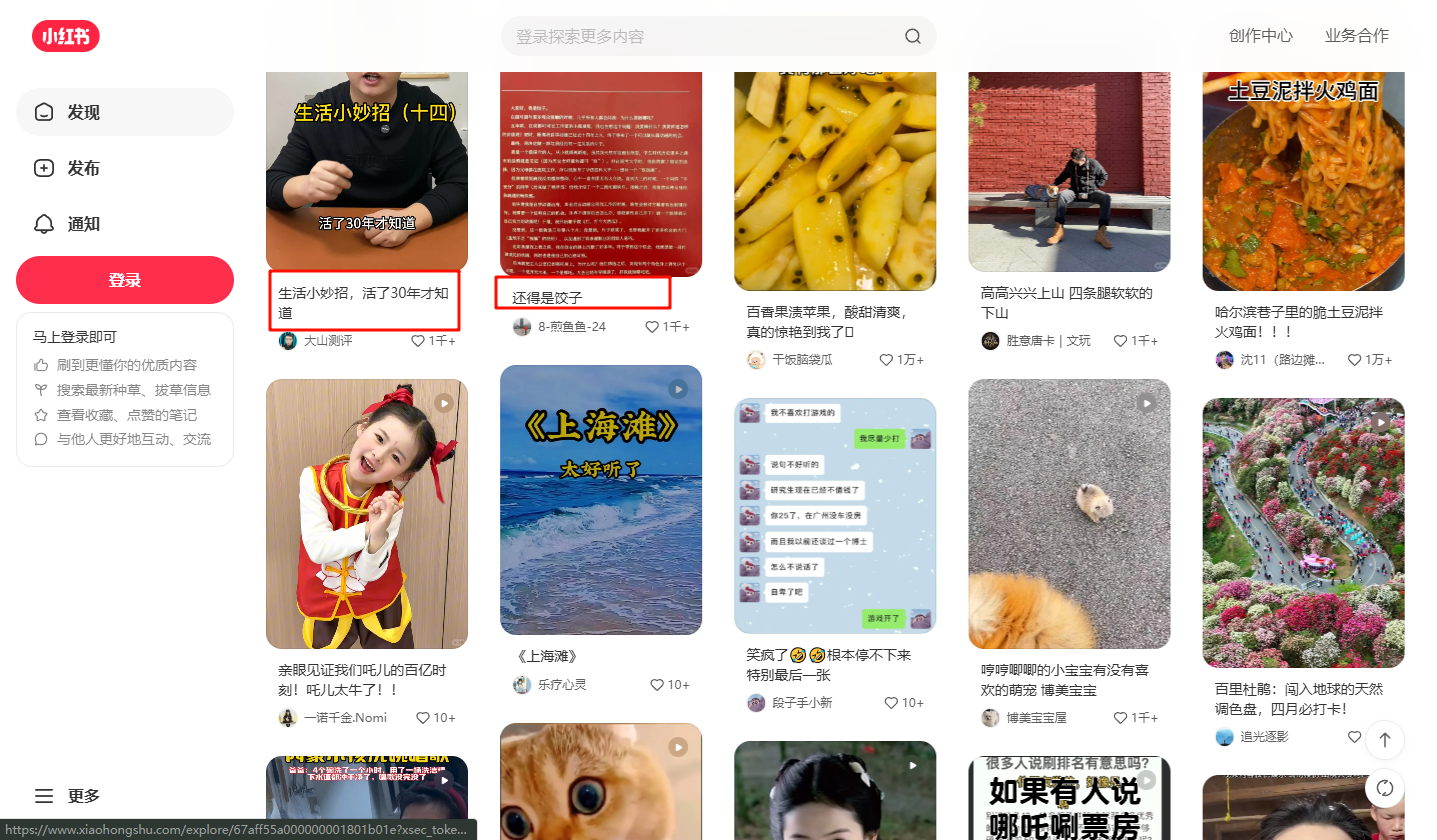
介绍文本的长度(一行或两行)决定每个卡片高度不一致
多个不一致之后 导致多个列之间不是死板的整齐划一 给人带来错落有致的美感
列宽固定:每列的宽度是固定的,但列的数量会根据屏幕宽度动态调整。
高度自适应:每个图片的高度根据其内容自动调整,导致不同列的高度不一致。
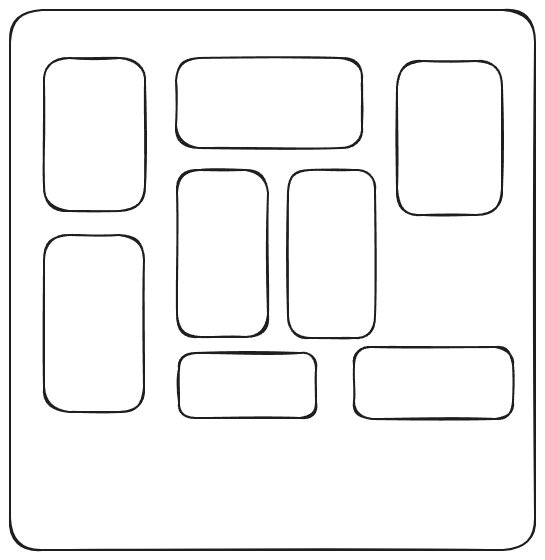
填充算法:当新元素加入时,选择当前高度最短的那一列进行填充,从而形成错落有致的效果。
很难实现这种既保持宽度一致 又不缩放宽图 见缝插针布局的效果
另外 当前实现版本为 图片显示完全后 点击加载 而非触底自动加载 后续再实现
done
<template>

  <div id="homePage" ref="containerRef">

    <h1>{{ msg }}</h1>

    <!-- 搜索框 -->

    <div class="search-bar">

      <a-input-search

        v-model:value="searchParams.searchText"

        placeholder="从海量图片中搜索"

        enter-button="搜索"

        size="large"

        @search="doSearch"

      />

    </div>

    <!-- 分类和标签筛选 -->

    <a-tabs v-model:active-key="selectedCategory" @change="doSearch">

      <a-tab-pane key="all" tab="全部" />

      <a-tab-pane v-for="category in categoryList" :tab="category" :key="category" />

    </a-tabs>

    <div class="tag-bar">

      <span style="margin-right: 8px">标签:</span>

      <a-space :size="[0, 8]" wrap>

        <a-checkable-tag

          v-for="(tag, index) in tagList"

          :key="tag"

          v-model:checked="selectedTagList[index]"

          @change="doSearch"

        >

          {{ tag }}

        </a-checkable-tag>

      </a-space>

    </div>

    <!-- 图片列表 -->

    <div class="waterfall-container">

      <Waterfall

        :list="dataList"

        :row-key="'id'"

        :img-selector="'url'"

        :breakpoints="breakpoints"

        :gutter="10"

        :has-around-gutter="true"

        :posDuration="300"

        :animation-effect="'fadeIn'"

        :lazyload="true"

        :load-props="loadProps"

        :cross-origin="false"

        :delay="300"

      >

        <template #default="{ item, url, index }">

          <div class="card-container" @click="doClickPicture(item)">

            <div class="card-image-wrapper">

              <LazyImg

                :url="getFullImageUrl(url)"

                class="lazy-img"

                :style="{

                  '--width': item.picWidth,

                  '--height': item.picHeight,

                }"

                @error="handleImageError"

              />

              <div class="image-overlay">

                <div class="overlay-content">

                  <h3>{{ item.name || '无标题' }}</h3>

                  <p :ref="(el) => setRef(el, index)" class="description" :title="item.introduction">{{ item.introduction || '无介绍' }}</p>

                </div>

              </div>

            </div>

<!--            <div class="card-footer">-->

<!--              <div class="user-info">-->

<!--                <img :src="api/images/WxO1pXBJW8RI/item.user.userAvatar" alt="User Avatar" class="user-avatar">-->

<!--                <span class="username">{{ item.user.userName}}</span>-->

<!--              </div>-->

<!--              <p :ref="(el) => setRef(el, index)" class="description" :title="item.introduction">{{ item.introduction || '无介绍' }}</p>-->

<!--            </div>-->

          </div>

        </template>

      </Waterfall>

    </div>

    <div v-if="loading && hasMore" class="loading-more-data">

      加载中...

    </div>

    <div v-if="!hasMore && !loading" class="no-more-data">

      没有更多数据了~

    </div>

  </div>

</template>


import { nextTick, onBeforeUnmount, onMounted, reactive, ref, watch } from 'vue'

import {

  listPictureTagCategoryUsingGet,

  listPicturesByCursorUsingPost,

} from '@/api/pictureController.ts'

import { message } from 'ant-design-vue'

import { useRouter, useRoute } from 'vue-router'

import { Waterfall, LazyImg } from 'vue-waterfall-plugin-next'

import 'vue-waterfall-plugin-next/dist/style.css'

import load from '@/assets/images/loding.gif'

import error from '@/assets/images/error.png'

const msg = 'Zwww云图库 海量图片免费存取~'

const dataList = ref<API.PictureVO[]>([])

const loading = ref(true)

const hasMore = ref(true)

const searchParams = reactive<API.PictureCursorRequest>({

  pageSize: 24,

  sortField: 'id',

  sortOrder: 'ascend',

  cursor: '',

  tags: [] as string[],

})

const categoryList = ref<string[]>([])

const selectedCategory = ref<string>('all')

const tagList = ref<string[]>([])

const selectedTagList = ref<boolean[]>([])

const router = useRouter()

const route = useRoute()

const containerRef = ref<HTMLDivElement | null>(null)

const descriptionRefs = ref<HTMLElement[]>([]);

const setRef = (el: HTMLElement | null, index: number) => {

  if (el) {

    descriptionRefs.value[index] = el;

  }

};

const handleScroll = () => {

  if (loading.value || !hasMore.value) return

  const container = document.documentElement

  const scrollTop = container.scrollTop

  const scrollHeight = container.scrollHeight

  const clientHeight = container.clientHeight

  console.log(`scrollTop: ${scrollTop}, scrollHeight: ${scrollHeight}, clientHeight: ${clientHeight}`)

  if (scrollTop + clientHeight >= scrollHeight - 100) {

    console.log('触发加载')

    fetchData()

  }

}

onMounted(async () => {

  const query = route.query

  searchParams.pageSize = parseInt(query.pageSize as string) || 24

  searchParams.searchText = (query.searchText as string) || ''

  await getTagCategoryOptions()

  let initialCategory = (query.category as string) || 'all'

  if (initialCategory !== 'all' && !categoryList.value.includes(initialCategory)) {

    selectedCategory.value = 'all'

  } else {

    selectedCategory.value = initialCategory

  }

  nextTick(() => {

    descriptionRefs.value.forEach((descriptionRef) => {

      if (descriptionRef) {

        const lines = Math.ceil(descriptionRef.scrollHeight / parseInt(getComputedStyle(descriptionRef).lineHeight));

        if (lines > 2) {

          descriptionRef.style.webkitLineClamp = '2';

        }

      }

    });

  });

  doSearch() // 触发首次数据加载

  window.addEventListener('scroll', handleScroll) // 监听窗口滚动事件

})

// 组件卸载时移除事件监听

onBeforeUnmount(() => {

  window.removeEventListener('scroll', handleScroll)

})

let isFetching = false

const fetchData = async () => {

  if (isFetching) return

  try {

    isFetching = true

    loading.value = true

    const params = {

      ...searchParams,

      category: selectedCategory.value !== 'all' ? selectedCategory.value : undefined,

      tags: selectedTagList.value

        .map((selected, index) => (selected ? tagList.value[index] : null))

        .filter(Boolean as any) as string[],

    }

    const res = await listPicturesByCursorUsingPost(params)

    if (res.data.code === 0 && res.data.data) {

      dataList.value.push(...(res.data.data.records || []))

      searchParams.cursor = res.data.data.cursor ?? ''

      hasMore.value = !res.data.data.last

    } else {

      message.error('获取数据失败,' + res.data.message)

    }

  } catch (error) {

    message.error('网络请求失败,请稍后再试')

  } finally {

    isFetching = false

    loading.value = false

  }

}

const getTagCategoryOptions = async () => {

  try {

    const res = await listPictureTagCategoryUsingGet()

    if (res.data.code === 0 && res.data.data) {

      tagList.value = res.data.data.tagList ?? []

      categoryList.value = res.data.data.categoryList ?? []

      const tagsQuery = (route.query.tags as string)?.split(',') || []

      selectedTagList.value = tagList.value.map((tag) => tagsQuery.includes(tag))

    }

  } catch (error) {

    message.error('网络请求失败,请稍后再试')

  }

}

const updateUrlQuery = () => {

  const tags = selectedTagList.value

    .map((selected, index) => (selected ? tagList.value[index] : null))

    .filter(Boolean)

  router.replace({

    query: {

      cursor: searchParams.cursor,

      pageSize: searchParams.pageSize,

      searchText: searchParams.searchText,

      category: selectedCategory.value,

      tags: tags.join(','),

    },

  })

}

const doSearch = () => {

  searchParams.cursor = ''

  dataList.value = []

  updateUrlQuery()

  fetchData()

}

watch(

  () => ({

    searchText: searchParams.searchText,

    category: selectedCategory.value,

    tags: selectedTagList.value,

  }),

  ({ category, tags }, oldVal) => {

    if (category === oldVal.category && JSON.stringify(tags) === JSON.stringify(oldVal.tags)) {

      return

    }

    updateUrlQuery()

    fetchData()

  },

  { deep: true, immediate: false },

)

const doClickPicture = (picture: API.PictureVO) => {

  router.push({ path: `/picture/${picture.id}` })

}

const getFullImageUrl = (url: string) => {

  return `${import.meta.env.VITE_COS_HOST}/${url}`

}

const breakpoints = {

  1200: { rowPerView: 4 },

  800: { rowPerView: 3 },

  500: { rowPerView: 2 },

}

// 自定义懒加载配置

const loadProps = {

  load,

  error,

  ratioCalculator: (width: number, height: number) => {

    const minRatio = 16 / 9

    const maxRatio = 4 / 3

    return Math.min(Math.max(width / height, minRatio), maxRatio)

  },

}

// 图片加载失败处理

const handleImageError = (event: Event) => {

  const img = event.target as HTMLImageElement

  img.src = error

}


#homePage {

  overflow-y: visible;

  margin-bottom: 16px;

}

#homePage .search-bar {

  max-width: 480px;

  margin: 0 auto 16px;

}

#homePage .tag-bar {

  margin-bottom: 16px;

}

#homePage .load-more-btn {

  text-align: center;

  margin: 24px 0;

}

.waterfall-container {

  padding: 20px;

}

.card-container {

  position: relative;

  width: 100%;

  max-width: 300px;

  margin: 10px;

  border-radius: 8px;

  overflow: hidden;

  box-shadow: 0 4px 6px rgba(0, 0, 0, 0.1);

  transition: transform 0.3s ease;

}

.card-image-wrapper {

  position: relative;

  cursor: pointer;

  z-index: 1;

}

.animate__animated {

  animation-fill-mode: both;

  animation-duration: 1s;

}

.card-container:hover .lazy-img {

  transform: scale(1.1);

}

.image-overlay {

  position: absolute;

  top: 0;

  left: 0;

  width: 100%;

  height: 100%;

  background: rgba(0, 0, 0, 0.6);

  opacity: 0;

  transition: opacity 0.3s ease;

  display: flex;

  align-items: center;

  justify-content: center;

  z-index: 2;

}

.card-container:hover .image-overlay {

  opacity: 1;

}

.card-footer {

  display: flex;

  flex-direction: column;

  align-items: flex-start;

  padding: 10px;

  background-color: #f8f9fa;

  border-top: 1px solid #e9ecef;

  z-index: 3;

  position: relative;

}

.user-info {

  display: flex;

  align-items: center;

  margin-bottom: 5px;

}

.user-avatar {

  width: 30px;

  height: 30px;

  border-radius: 50%;

  margin-right: 10px;

}

.username {

  font-weight: bold;

}

.description {

  color: #6c757d;

  display: -webkit-box;

  -webkit-box-orient: vertical;

  overflow: hidden;

  -webkit-line-clamp: 2;

}

.overlay-content {

  text-align: center;

  color: white;

  padding: 20px;

}

.overlay-content h3 {

  margin: 0 0 10px;

  font-size: 18px;

}

.overlay-content p {

  margin: 0;

  font-size: 14px;

}

.lazy-img {

  width: 100%;

  height: 200px;

  object-fit: cover;

  transition: transform 0.3s ease;

}

.lazy-img[lazy='loading'] {

  padding: 5em 0;

  width: 48px;

}

.lazy-img[lazy='loaded'] {

  width: 100%;

}

.lazy-img[lazy='error'] {

  padding: 5em 0;

  width: 48px;

}

.loading-more-data {

  text-align: center;

  color: #666;

}

.no-more-data {

  text-align: center;

  color: #999;

}
💬 评论