策略推荐与方案持久化
上一篇走完了解析结果统计和异步收尾工作,任务阶段已经推进到了 STRATEGY_ROUTE。现在进入 handleParseRoute 的最后一段:拿到解析结果和结构节点之后,系统要自动推荐一套切块策略,然后把方案写进数据库。
策略推荐决策流程
先看一张决策流程图,理解整个推荐逻辑的走向:
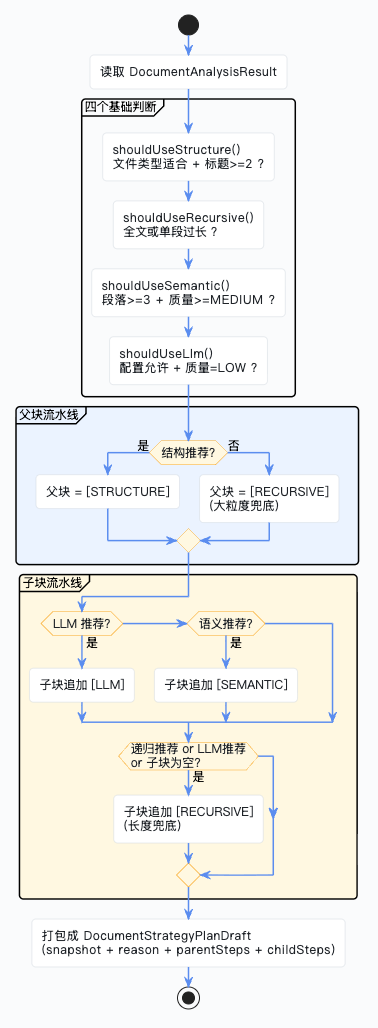
recommendStrategy:策略推荐核心方法
这个方法在 DocumentStrategyServiceImpl 里,它不执行切块,而是回答一个更上游的问题:"对于这份文档,后续索引构建时应该采用怎样的 Parent/Child 切块流水线?"
四个基础判断
@Override
public DocumentStrategyPlanDraft recommendStrategy(SuperAgentDocument document,
                                                   DocumentAnalysisResult analysisResult) {

    List<String> reasonList = new ArrayList<>();
    // fileType 会参与结构切块判断,因为并不是所有文件格式都天然适合结构识别。
    DocumentFileTypeEnum fileType = DocumentFileTypeEnum.getRc(document.getFileType());

    // 这四个布尔判断是后续整套推荐的"基础事实层"。
    // 它们并不直接生成步骤,而是回答"这份文档在切块上有哪些客观特征和风险"。
    boolean structureRecommended = shouldUseStructure(fileType, analysisResult);
    boolean recursiveRecommended = shouldUseRecursive(analysisResult);
    boolean semanticRecommended = shouldUseSemantic(analysisResult);
    boolean llmRecommended = shouldUseLlm(analysisResult);
我们逐个看这四个判断方法:
/**
 * 判断是否适合使用结构切块。
 * <p>
 * 只有在文件类型本身适合结构识别,且结构等级或标题数量达到一定阈值时才推荐。
 * </p>
 */
private boolean shouldUseStructure(DocumentFileTypeEnum fileType,
                                   DocumentAnalysisResult analysisResult) {
    boolean suitableType = fileType == DocumentFileTypeEnum.PDF
        || fileType == DocumentFileTypeEnum.DOC
        || fileType == DocumentFileTypeEnum.DOCX
        || fileType == DocumentFileTypeEnum.MD
        || fileType == DocumentFileTypeEnum.HTML;
    return suitableType && (analysisResult.getStructureLevel()
        >= DocumentStructureLevelEnum.MEDIUM.getCode()
        || analysisResult.getHeadingCount() >= 2);
}
结构切块需要同时满足两个条件:文件类型适合(PDF/DOC/DOCX/MD/HTML,TXT 不行)+ 结构信号足够(结构等级 >= MEDIUM 或标题 >= 2 个)。
/**
 * 判断是否需要递归分块。
 * <p>
 * 当全文或单段过长时,需要用递归分块控制 chunk 长度。
 * </p>
 */
private boolean shouldUseRecursive(DocumentAnalysisResult analysisResult) {
    return analysisResult.getCharCount() >= properties.getChunk().getRecursiveMaxChars()
        || analysisResult.getMaxParagraphLength() >= properties.getChunk().getRecursiveMaxChars();
}

/**
 * 判断是否适合使用语义分块。
 */
private boolean shouldUseSemantic(DocumentAnalysisResult analysisResult) {
    return analysisResult.getCharCount() >= properties.getChunk().getSemanticMinChars()
        && analysisResult.getParagraphCount() >= 3
        && analysisResult.getContentQualityLevel()
            >= DocumentContentQualityLevelEnum.MEDIUM.getCode();
}

/**
 * 判断是否需要启用 LLM 智能切块。
 * <p>
 * 这里只在配置允许、文本质量偏低且长度达到一定规模时才推荐,
 * 避免把 LLM 用在收益不明显的小文本上。
 * </p>
 */
private boolean shouldUseLlm(DocumentAnalysisResult analysisResult) {
    return Boolean.TRUE.equals(properties.getChunk().getRecommendLlmWhenLowQuality())
        && analysisResult.getContentQualityLevel()
            .equals(DocumentContentQualityLevelEnum.LOW.getCode())
        && analysisResult.getCharCount() >= properties.getChunk().getSemanticMinChars();
}
四个判断的总结:
| 判断 | 条件 | 含义 |
|---|---|---|
| 结构切块 | 文件类型适合 + 标题 >= 2 | 文档有清晰的章节结构 |
| 递归分块 | 全文或单段超过阈值 | 文本太长,需要控制 chunk 大小 |
| 语义分块 | 文本够长 + 段落 >= 3 + 质量 >= MEDIUM | 主题边界明确,适合按语义拆分 |
| LLM 切块 | 配置允许 + 质量 = LOW + 文本够长 | 质量差,需要大模型智能增强 |
父块流水线决策
List<Integer> parentStrategyTypes = new ArrayList<>();
Map<Integer, String> parentReasonMap = new LinkedHashMap<>();
if (structureRecommended) {
    // 父块更偏向保留"章节级别"的大语义单元,所以只要结构信号明显,就优先保留天然章节边界。
    parentStrategyTypes.add(DocumentStrategyTypeEnum.STRUCTURE.getCode());
    parentReasonMap.put(DocumentStrategyTypeEnum.STRUCTURE.getCode(),
        "检测到文档具有较明显的标题或章节结构,父块优先保留天然章节边界。");
    reasonList.add("父块流水线优先采用基于文档结构切块,保留回答阶段需要的大语义单元。");
}
else {
    // 如果结构信号不足,继续强行做结构切块往往只会切出不稳定的边界,
    // 因此父块退回到大粒度递归分块,用长度控制来保证"至少有稳定的大块可用"。
    parentStrategyTypes.add(DocumentStrategyTypeEnum.RECURSIVE.getCode());
    parentReasonMap.put(DocumentStrategyTypeEnum.RECURSIVE.getCode(),
        "未识别出稳定结构时,父块先使用较大粒度的递归分块作为稳定回答单元。");
    reasonList.add("父块流水线未命中明显结构信号,默认使用较大粒度递归分块作为回答单元。");
}
为什么要区分 Parent 和 Child?
Parent-Child 是一种双层切块架构:
- 父块(Parent):大语义单元,保留完整的章节上下文,用于回答阶段——当模型需要生成答案时,读的是父块
- 子块(Child):小检索单元,边界更精确,用于召回阶段——当系统需要从向量库里找相关内容时,搜的是子块
两者目标不同,所以不能用同一套切块规则。
父块的决策很简单:有结构就用结构切块,没结构就用递归分块兜底。
子块流水线决策
List<Integer> childStrategyTypes = new ArrayList<>();
Map<Integer, String> childReasonMap = new LinkedHashMap<>();
if (llmRecommended) {
    // 子块更偏向召回单元,文本质量差时最怕把噪声、断句错误、结构混乱直接带进向量库;
    // 因此如果满足 LLM 条件,优先用 LLM 先做一次更智能的边界增强。
    childStrategyTypes.add(DocumentStrategyTypeEnum.LLM.getCode());
    childReasonMap.put(DocumentStrategyTypeEnum.LLM.getCode(),
        "文档质量偏低或结构识别不稳定,子块先使用大模型智能切块增强复杂场景。");
    reasonList.add("子块流水线追加大模型智能切块,处理低质量或结构不稳定文本。");
}
else if (semanticRecommended) {
    // 如果文本质量尚可、段落足够丰富,就让子块优先按主题边界拆分,
    // 这样做出的检索块通常比纯长度切分更适合召回。
    childStrategyTypes.add(DocumentStrategyTypeEnum.SEMANTIC.getCode());
    childReasonMap.put(DocumentStrategyTypeEnum.SEMANTIC.getCode(),
        "文本主题边界相对明确,子块先使用语义分块优化召回边界。");
    reasonList.add("子块流水线优先采用语义分块,优化召回边界和主题完整性。");
}

if (recursiveRecommended || llmRecommended || childStrategyTypes.isEmpty()) {
    // 递归分块在子块流水线里承担"长度约束兜底"的角色:
    // 1. 文本本来就很长,需要控制 chunk 大小;
    // 2. 前面加了 LLM 后,仍然需要一个长度兜底步骤;
    // 3. 如果语义/LLM 都没命中,递归分块至少能保证产出稳定的检索块。
    childStrategyTypes.add(DocumentStrategyTypeEnum.RECURSIVE.getCode());
    childReasonMap.put(DocumentStrategyTypeEnum.RECURSIVE.getCode(),
        "文档整体较长、存在超长段落,或需要在增强切块后追加长度兜底。");
    reasonList.add("子块流水线追加递归分块,控制召回单元长度并作为兜底。");
}
子块的决策稍微复杂一些,是一个优先级链:
- 质量差 → 先上 LLM 智能切块
- 质量还行、段落丰富 → 用语义切块
- 不管前面选了什么,只要文本够长、或者用了 LLM、或者前面啥都没选 → 追加递归分块做长度兜底
所以子块流水线可能是单步的(只有 RECURSIVE),也可能是两步的(LLM + RECURSIVE 或 SEMANTIC + RECURSIVE)。
打包成策略草案
// 这里把"推荐出的策略类型"转成真正可落库展示的步骤草案,
// 包含 pipelineType、role、reason 等信息。
List<DocumentStrategyStepDraft> parentSteps = buildDraftSteps(
    DocumentStrategyPipelineTypeEnum.PARENT, parentStrategyTypes, parentReasonMap);
List<DocumentStrategyStepDraft> childSteps = buildDraftSteps(
    DocumentStrategyPipelineTypeEnum.CHILD, childStrategyTypes, childReasonMap);

// strategySnapshot 是后续任务日志、方案展示和异步索引构建都会复用的一份紧凑快照表示。
String strategySnapshot = buildCombinedStrategySnapshot(parentSteps, childSteps);
return new DocumentStrategyPlanDraft(strategySnapshot,
    String.join(";", reasonList), parentSteps, childSteps);
buildDraftSteps() 把策略类型列表转成步骤草案:
/**
 * 按顺序构造某条流水线的步骤草案。
 * <p>
 * 这个方法不是简单地把“策略类型整数列表”复制出来,而是把推荐结果提升成
 * 一组后续可展示、可落库、可执行的 {@link DocumentStrategyStepDraft}。
 * </p>
 * <p>
 * 每个 step draft 至少要补齐四类信息:
 * 1. pipelineType:说明该步骤属于父块流水线还是子块流水线;
 * 2. strategyType:说明执行的是结构切块、递归分块、语义分块还是 LLM 分块;
 * 3. strategyRole:说明该步骤在整条流水线中的职责,例如 PRIMARY、FALLBACK、OPTIMIZE、ENHANCE;
 * 4. recommendReason:说明系统为什么把这个步骤放进当前流水线,供前端展示和日志追踪使用。
 * </p>
 * <p>
 * 之所以单独抽成一个 helper,是因为 {@link #recommendStrategy(SuperAgentDocument, DocumentAnalysisResult)}
 * 在确定“父块应该有哪些策略类型、子块应该有哪些策略类型”之后,
 * 还需要把这种“类型级结论”转换成真正能落成方案步骤的结构化对象。
 * 这一步正是由这里完成的。
 * </p>
 */
private List<DocumentStrategyStepDraft> buildDraftSteps(DocumentStrategyPipelineTypeEnum pipelineType,
                                                        List<Integer> strategyTypes,
                                                        Map<Integer, String> reasonMap) {
    List<DocumentStrategyStepDraft> draftList = new ArrayList<>();
    for (int index = 0; index < strategyTypes.size(); index++) {
        Integer strategyType = strategyTypes.get(index);
        // index 不只是循环下标,它还决定了这个步骤在流水线中的顺序,
        // 同时也会影响 resolveRole 的结果,例如第一个步骤通常是 PRIMARY,
        // 而后续的递归步骤更可能被标为 FALLBACK。
        draftList.add(new DocumentStrategyStepDraft(
            pipelineType.getCode(),
            strategyType,
            // role 不是固定写死的,而是由“步骤所在顺序 + 策略类型”共同决定。
            resolveRole(index, strategyType),
            // 这里生成的是系统自动推荐出来的方案草稿,因此 sourceType 固定为 SYSTEM_RECOMMEND。
            DocumentStrategySourceTypeEnum.SYSTEM_RECOMMEND.getCode(),
            // 推荐原因优先使用调用方已经为当前策略准备好的解释文本;
            // 如果没有命中,则退回到一个通用说明,避免前端展示空理由。
            reasonMap.getOrDefault(strategyType, "系统为当前流水线生成的推荐步骤。")
        ));
    }
    return draftList;
}
最终返回的 DocumentStrategyPlanDraft 包含四个东西:
strategySnapshot:紧凑的快照字符串,格式如PARENT:1;CHILD:4,2recommendReason:所有推荐理由拼接成的文本parentSteps:父块流水线的步骤草案列表childSteps:子块流水线的步骤草案列表
回到 handleParseRoute:方案持久化
拿到策略草案之后,handleParseRoute 要把它写进数据库。
创建策略方案主记录
// 根据文档类型、结构质量、正文长度、段落特征等信息生成推荐策略草案。
DocumentStrategyPlanDraft planDraft = strategyService.recommendStrategy(
    document, analysisResult);
Long planId = uidGenerator.getUid();
int planVersion = getNextPlanVersion(documentId);

// 推荐策略先落成一条 plan 主记录,表示"系统给当前文档建议采用这套切块方案"。
SuperAgentDocumentStrategyPlan plan = new SuperAgentDocumentStrategyPlan();
plan.setId(planId);
plan.setDocumentId(documentId);
plan.setPlanVersion(planVersion);
plan.setPlanSource(DocumentPlanSourceEnum.SYSTEM_RECOMMEND.getCode());
plan.setPlanStatus(DocumentPlanStatusEnum.WAIT_CONFIRM.getCode());
plan.setStrategyCount(planDraft.getParentSteps().size()
    + planDraft.getChildSteps().size());
plan.setStrategySnapshot(planDraft.getStrategySnapshot());
plan.setRecommendReason(planDraft.getRecommendReason());
plan.setStatus(BusinessStatus.YES.getCode());
planMapper.insert(plan);
方案主记录的关键字段:
planSource = SYSTEM_RECOMMEND:标记这是系统自动推荐的,不是用户手动调整的planStatus = WAIT_CONFIRM:方案还需要用户确认才能执行,不会自动进入索引构建strategySnapshot:快照字符串,方便后续快速展示和比对
写入策略步骤
// 父块步骤与子块步骤分别写入策略步骤表,
// 后续确认方案和执行索引构建时会基于这些步骤推进。
for (int index = 0; index < planDraft.getParentSteps().size(); index++) {
    DocumentStrategyStepDraft draft = planDraft.getParentSteps().get(index);
    SuperAgentDocumentStrategyStep step = new SuperAgentDocumentStrategyStep();
    step.setId(uidGenerator.getUid());
    step.setPlanId(planId);
    step.setDocumentId(documentId);
    step.setPipelineType(draft.getPipelineType());
    step.setStepNo(index + 1);
    step.setStrategyType(draft.getStrategyType());
    step.setStrategyRole(draft.getStrategyRole());
    step.setSourceType(draft.getSourceType());
    step.setExecuteStatus(
        DocumentStrategyExecuteStatusEnum.WAIT_EXECUTE.getCode());
    step.setRecommendReason(draft.getRecommendReason());
    step.setStatus(BusinessStatus.YES.getCode());
    stepMapper.insert(step);
}
for (int index = 0; index < planDraft.getChildSteps().size(); index++) {
    DocumentStrategyStepDraft draft = planDraft.getChildSteps().get(index);
    SuperAgentDocumentStrategyStep step = new SuperAgentDocumentStrategyStep();
    step.setId(uidGenerator.getUid());
    step.setPlanId(planId);
    step.setDocumentId(documentId);
    step.setPipelineType(draft.getPipelineType());
    step.setStepNo(index + 1);
    step.setStrategyType(draft.getStrategyType());
    step.setStrategyRole(draft.getStrategyRole());
    step.setSourceType(draft.getSourceType());
    step.setExecuteStatus(
        DocumentStrategyExecuteStatusEnum.WAIT_EXECUTE.getCode());
    step.setRecommendReason(draft.getRecommendReason());
    step.setStatus(BusinessStatus.YES.getCode());
    stepMapper.insert(step);
}
父块步骤和子块步骤分别循环写入,每个步骤的 executeStatus 都初始化为 WAIT_EXECUTE,等后续索引构建时才会真正执行。
更新文档主表 + 任务成功收尾
// 到这里,文档已经完成内容解析并拿到了推荐策略,
// 因此可以把主表状态切成"解析成功 + 已推荐策略"。
document.setParseStatus(DocumentParseStatusEnum.PARSE_SUCCESS.getCode());
document.setStrategyStatus(DocumentStrategyStatusEnum.RECOMMENDED.getCode());
document.setCharCount(analysisResult.getCharCount());
document.setTokenCount(analysisResult.getTokenCount());
document.setStructureLevel(analysisResult.getStructureLevel());
document.setContentQualityLevel(analysisResult.getContentQualityLevel());
document.setParseTextPath(parseTextPath);
document.setParseErrorMsg(null);
document.setCurrentPlanId(planId);
document.setLastParseTaskId(taskId);
document.setStructureNodeCount(structureNodeCount);
documentMapper.updateById(document);

// 最后把任务按成功态收尾,并记录"系统已生成推荐策略"的阶段日志。
finishTaskSuccess(task, DocumentTaskStageEnum.STRATEGY_ROUTE.getCode(), startTime);
taskLogService.saveLog(taskId, documentId,
    DocumentTaskStageEnum.STRATEGY_ROUTE.getCode(),
    DocumentTaskEventTypeEnum.RECOMMEND_STRATEGY.getCode(),
    DocumentLogLevelEnum.INFO.getCode(),
    DocumentOperatorTypeEnum.SYSTEM.getCode(),
    null,
    "系统已生成推荐策略。",
    detail("planId", planId,
        "strategySnapshot", planDraft.getStrategySnapshot(),
        "parentStepCount", planDraft.getParentSteps().size(),
        "childStepCount", planDraft.getChildSteps().size(),
        "structureNodeCount", structureNodeCount,
        "recommendReason", planDraft.getRecommendReason()));
这里更新了文档主表的一大堆字段:
- parseStatus → PARSE_SUCCESS:解析成功
- strategyStatus → RECOMMENDED:策略已推荐,等待用户确认
charCount/tokenCount:从解析结果回填parseTextPath:解析后纯文本在 MinIO 的路径currentPlanId:当前生效的推荐方案 IDparseErrorMsg → null:清空错误信息(如果之前有失败记录的话)
finishTaskSuccess() 是一个通用的任务成功收尾方法:
/**
 * 把任务按成功态收尾,统一写入完成时间、耗时,并清空错误字段。
 */
private void finishTaskSuccess(SuperAgentDocumentTask task, Integer stage, Date startTime) {
    Date finishTime = new Date();
    task.setTaskStatus(DocumentTaskStatusEnum.SUCCESS.getCode());
    task.setCurrentStage(stage);
    task.setFinishTime(finishTime);
    task.setCostMillis(finishTime.getTime() - startTime.getTime());
    task.setErrorCode(null);
    task.setErrorMsg(null);
    taskMapper.updateById(task);
}
异常处理:解析失败的收尾
如果上面任何一步抛了异常,就会进入 catch 块:
catch (Exception exception) {
    log.error("异步解析文档失败,documentId={}, taskId={}", documentId, taskId, exception);

    // 一旦异步解析链失败,文档主表要明确标记为解析失败,并保留错误信息供前端和日志查看。
    document.setParseStatus(DocumentParseStatusEnum.PARSE_FAILED.getCode());
    document.setParseErrorMsg(exception.getMessage());
    documentMapper.updateById(document);

    // 任务本身也同步转为失败态,并追加一条错误日志,把失败停留在哪个阶段明确记录下来。
    failTask(task, startTime, exception, DocumentTaskStageEnum.CONTENT_PARSE.getCode());
    taskLogService.saveLog(taskId, documentId,
        DocumentTaskStageEnum.CONTENT_PARSE.getCode(),
        DocumentTaskEventTypeEnum.FAILED.getCode(),
        DocumentLogLevelEnum.ERROR.getCode(),
        DocumentOperatorTypeEnum.SYSTEM.getCode(),
        null,
        "文档解析失败。",
            detail("error", exception.getMessage()));
}
失败时做三件事:
- 文档主表标记为
PARSE_FAILED,并把错误信息写进parseErrorMsg - 任务标记为
FAILED,记录耗时和错误信息 - 写一条 ERROR 级别的任务日志
failTask() 方法:
 /**
 * 把任务按失败态收尾,统一写入完成时间、耗时和错误信息。
 */
private void failTask(SuperAgentDocumentTask task, Date startTime,
                      Exception exception, Integer currentStage) {
    Date finishTime = new Date();
    task.setTaskStatus(DocumentTaskStatusEnum.FAILED.getCode());
    task.setCurrentStage(currentStage);
    task.setFinishTime(finishTime);
    task.setCostMillis(finishTime.getTime() - startTime.getTime());
    task.setErrorCode("TASK_FAILED");
    task.setErrorMsg(exception.getMessage());
    taskMapper.updateById(task);
}
关于重试
注意这里没有自动重试机制。如果解析失败了,任务就直接标记为 FAILED,不会自动重新消费。重试依赖外部的 Kafka 重试机制或者人工触发重新上传。
任务状态流转总结
用一张图来总结整个 handleParseRoute 中任务和文档状态的变化:
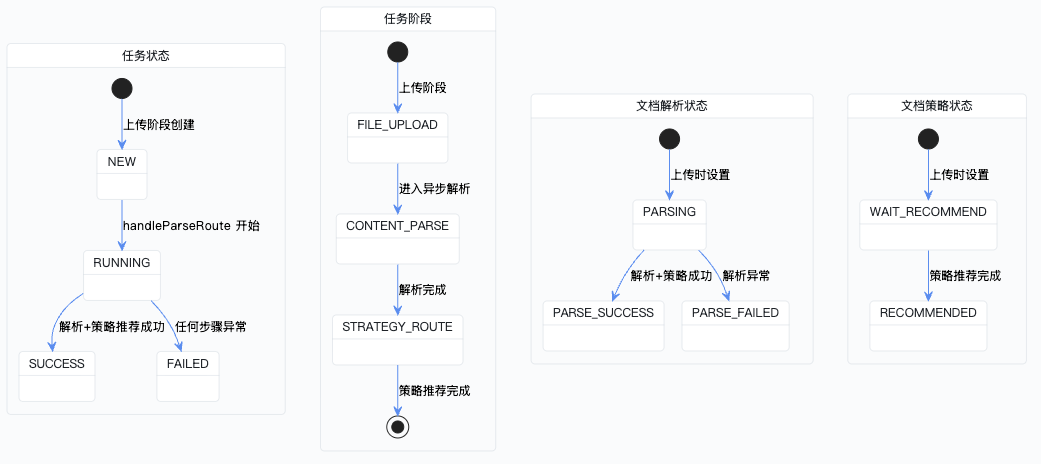
小结
整个 handleParseRoute 的后半段可以概括为:
调用策略服务 → 四个基础判断 → 决定 Parent/Child 流水线 → 方案主记录入库 → 步骤入库 → 更新文档状态 → 任务成功收尾
到这里,一份文档就从"刚上传"走到了"解析完成 + 拿到推荐策略"的状态。接下来用户可以在前端查看推荐方案、调整策略,确认之后再触发索引构建——那就是另一条异步链路的事情了。
企业级项目导航:⬅️ 09-白话讲解 | 10-策略推荐与方案持久化 | ➡️ 11-统计打分收口打包同步落库
💬 评论