消息中心
分析
后端完成某些工作后 给前端发送一些东西 前端如何即时收到?
最简单的方法就是 每隔几秒查询一下消息 如果有未读 就红点标记 这种方式简单直接 有个高大上的名字——轮询
如何让后端主动推送给前端呢
基本的http是不好做到的 因为都是一问一答的单向通信 要实现双向通信可能就得涉及到scp等通信协议了
先实现最简单的 轮询方式 后面再对采用何种技术优化性能进行讨论
业务实现
业务逻辑大概为 提供一张消息表
包含 接收用户ID 标题 内容 类型 是否已读 创建时间等字段
提供以下几个接口
用户打开消息界面 根据用户id查询属于他的通知展示在页面上(查询接口byuserid)
用户点击(阅读)邮件 修改邮件状态为已读(修改接口 update isread)
用户可以手动删除已读信件 并且使用定时任务提供自动清理信件(每天凌晨执行 清理创建时间+30天的已读信件) (删除接口 delete)
查询是否需要采取分页?信件在自动清理的策略下 一般来说不会堆积很多 直接list是否可行?
接下来是服务端 在激活vip、图片审批完成后 新增一条消息进入数据库 并且使用sse推送给用户 这里需要一个新增接口 以及sse服务集成
库表设计
-- 消息通知
CREATE TABLE if not exists message (
    id BIGINT PRIMARY KEY AUTO_INCREMENT,
    userId BIGINT NOT NULL COMMENT '接收用户ID',
    title VARCHAR(255) NOT NULL COMMENT '标题',
    content TEXT NOT NULL COMMENT '内容',
    type INT NOT NULL COMMENT '消息类型(0-审核通知,1-系统通知,2-其他通知)',
    isRead TINYINT DEFAULT 0 COMMENT '是否已读(0-未读,1-已读)',
    createTime DATETIME NOT NULL COMMENT '创建时间',
    KEY `idx_user_id` (`userId`, `createTime`, `isRead`) -- 优化按用户ID、时间范围、已读状态查询
) comment '消息' collate = utf8mb4_unicode_ci;
实体层
enum
package com.zwnsyw.yunpicturebackend.model.enums.MessageEnums;

import cn.hutool.core.util.ObjUtil;
import lombok.Getter;

@Getter
public enum MessageTypeEnum {
    REVIEW_MESSAGE("审核通知", 0),
    SYSTEM_MESSAGE("系统通知", 1),
    OTHER_MESSAGE("其他通知", 2);

    private final String text;
    private final int value;

    MessageTypeEnum(String text, int value) {
        this.text = text;
        this.value = value;
    }

    public static MessageTypeEnum getEnumByValue(Integer value) {
        if (ObjUtil.isEmpty(value)) {
            return null;
        }
        for (MessageTypeEnum type : values()) {
            if (type.value == value) {
                return type;
            }
        }
        return null;
    }
}
domain
package com.zwnsyw.yunpicturebackend.model.entity;

import com.baomidou.mybatisplus.annotation.IdType;
import com.baomidou.mybatisplus.annotation.TableId;
import com.baomidou.mybatisplus.annotation.TableName;
import lombok.Data;

import java.util.Date;

@TableName(value ="message")
@Data
public class Message {
    /**
     * 信息ID
     */
    @TableId(type = IdType.AUTO)
    private Long id;

    /**
     * 接收用户ID
     */
    private Long userId;

    /**
     * 标题
     */
    private String title;

    /**
     * 内容
     */
    private String content;

    /**
     * 消息类型(0-审核通知,1-系统通知,2-其他通知)
     */
    private Integer type;

    /**
     * 是否已读(0-未读,1-已读)
     */
    private Integer isRead;

    /**
     * 创建时间
     */
    private Date createTime;

    @Override
    public boolean equals(Object that) {
        if (this == that) {
            return true;
        }
        if (that == null) {
            return false;
        }
        if (getClass() != that.getClass()) {
            return false;
        }
        Message other = (Message) that;
        return (this.getId() == null ? other.getId() == null : this.getId().equals(other.getId()))
            && (this.getUserId() == null ? other.getUserId() == null : this.getUserId().equals(other.getUserId()))
            && (this.getTitle() == null ? other.getTitle() == null : this.getTitle().equals(other.getTitle()))
            && (this.getContent() == null ? other.getContent() == null : this.getContent().equals(other.getContent()))
            && (this.getType() == null ? other.getType() == null : this.getType().equals(other.getType()))
            && (this.getIsRead() == null ? other.getIsRead() == null : this.getIsRead().equals(other.getIsRead()))
            && (this.getCreateTime() == null ? other.getCreateTime() == null : this.getCreateTime().equals(other.getCreateTime()));
    }

    @Override
    public int hashCode() {
        final int prime = 31;
        int result = 1;
        result = prime * result + ((getId() == null) ? 0 : getId().hashCode());
        result = prime * result + ((getUserId() == null) ? 0 : getUserId().hashCode());
        result = prime * result + ((getTitle() == null) ? 0 : getTitle().hashCode());
        result = prime * result + ((getContent() == null) ? 0 : getContent().hashCode());
        result = prime * result + ((getType() == null) ? 0 : getType().hashCode());
        result = prime * result + ((getIsRead() == null) ? 0 : getIsRead().hashCode());
        result = prime * result + ((getCreateTime() == null) ? 0 : getCreateTime().hashCode());
        return result;
    }

    @Override
    public String toString() {
        String sb = getClass().getSimpleName() +
                " [" +
                "Hash = " + hashCode() +
                ", id=" + id +
                ", userId=" + userId +
                ", title=" + title +
                ", content=" + content +
                ", type=" + type +
                ", isRead=" + isRead +
                ", createTime=" + createTime +
                "]";
        return sb;
    }
}
mapper
由MybatisX-Generator生成
业务逻辑
添加信息
在激活vip、图片审批、有用户填写自己的邀请码完成注册 后 新增一条消息进入数据库
并且使用sse推送给用户 这里需要一个新增接口 以及sse服务集成
service
  /**
     * 添加消息
     */
    void addMessage(Message message);
serviceimpl
 @Autowired
    private MessageMapper messageMapper;

    @Autowired
    private SseEmitterRepository emitterRepository;

    @Override
    public void addMessage(Message message) {
        message.setCreateTime(new Date());
        messageMapper.insert(message);
        // 推送消息给用户
        emitterRepository.pushMessage(message.getUserId(), message);
    }
审核信息
  @Override
    public void doPictureReview(PictureReviewRequest pictureReviewRequest, LoginUserVO loginUser) {

        Picture oldPicture = this.getById(pictureReviewRequest.getId());
        ThrowUtils.throwIf(oldPicture == null, ErrorCode.NOT_FOUND_ERROR, "图片不存在");

        if (oldPicture.getReviewStatus().equals(pictureReviewRequest.getReviewStatus())) {
            throw new BusinessException(ErrorCode.PARAMS_ERROR, "请勿重复审核");
        }

        // 更新审核状态
        Picture updatePicture = new Picture();
        BeanUtils.copyProperties(pictureReviewRequest, updatePicture);
        updatePicture.setReviewerId(loginUser.getId());
        updatePicture.setReviewTime(new Date());
        if (StrUtil.isNotBlank(pictureReviewRequest.getReviewMessage())) {
            updatePicture.setReviewMessage(pictureReviewRequest.getReviewMessage());
        }
        boolean result = this.updateById(updatePicture);
        ThrowUtils.throwIf(!result, ErrorCode.OPERATION_ERROR, "审核失败");

        // 生成消息并推送
        Message message = new Message();
        message.setUserId(oldPicture.getUserId());
        message.setTitle("图片审核通知");
        message.setContent("您的图片《" + oldPicture.getName() + "》已审核:"
                + (updatePicture.getReviewStatus() == 1 ? "通过" : "拒绝")
                + "审核信息:" + updatePicture.getReviewMessage());
        message.setType(MessageTypeEnum.REVIEW_MESSAGE.getValue());
        messageService.addMessage(message);
    }
激活vip信息
  @Override
    public void activateVip(Long userId, String activationCode) {
        ActivationCode code = activationCodeMapper.findByActivationCode(activationCode);
        Date currentTime = new Date();

        ThrowUtils.throwIf(code == null
                || code.getIsUsed() == 1
                || code.getActivationExpireTime().before(currentTime),
                ErrorCode.NOT_FOUND_ERROR,
                "激活码无效或已被使用");

        // 更新激活码状态为已使用
        code.setIsUsed(1);
        activationCodeMapper.updateById(code);

        // 记录用户使用激活码的情况
        UserActivationCode userActivationCode = new UserActivationCode();
        userActivationCode.setUserId(userId);
        userActivationCode.setActivationCodeId(code.getId());
        userActivationCode.setActivationTime(currentTime);
        userActivationCodeMapper.insert(userActivationCode);

        // 设置VIP过期时间
        Date vipExpireTime = new Date(System.currentTimeMillis() + 365L * 24 * 60 * 60 * 1000); // 1年有效期
        Vip vip = new Vip();
        vip.setUserId(userId);
        vip.setVipExpireTime(vipExpireTime);
        save(vip);

        // 更新用户角色为VIP
        UserRole userRole = new UserRole();
        userRole.setUserId(userId);
        userRole.setRoleId(2L); // VIP角色ID为2
        userRoleMapper.insert(userRole);

        // 发送VIP激活成功通知
        Message message = new Message();
        message.setUserId(userId);
        message.setTitle("VIP激活成功");
        java.text.SimpleDateFormat dateFormat = new java.text.SimpleDateFormat("yyyy-MM-dd");
        String expireDate = dateFormat.format(vipExpireTime);
        message.setContent("您的VIP服务已成功激活,有效期至" + expireDate);
        message.setType(MessageTypeEnum.SYSTEM_MESSAGE.getValue());
        messageService.addMessage(message);
    }
注册信息
  @Override
    public long userRegister(String userAccount, String userPassword, String checkPassword, String inviteCode) {
        //todo debug 用户被逻辑删除 账号仍被占用 这里检测不到 可以进入数据库插入操作 但会触发唯一键冲突 无法注册 报错只会显示系统异常
        ThrowUtils.throwIf(isAccountExist(userAccount), ErrorCode.PARAMS_ERROR, "账户已存在");

        Long inviteUserId = null;
        if (inviteCode != null && !inviteCode.isEmpty()) {
            User invitedUser = userMapper.selectByShareCode(inviteCode);
            ThrowUtils.throwIf(invitedUser == null, ErrorCode.PARAMS_ERROR, "邀请码不存在");
            inviteUserId = invitedUser.getId();

            // 通知邀请者:有新用户使用其邀请码注册
            Message inviteMessage = new Message();
            inviteMessage.setUserId(inviteUserId);
            inviteMessage.setTitle("邀请成功");
            inviteMessage.setContent("用户" + userAccount + "已通过您的邀请码注册成功");
            inviteMessage.setType(MessageTypeEnum.SYSTEM_MESSAGE.getValue());
            messageService.addMessage(inviteMessage);
        }

        String dynamicSalt = generateRandomSalt();
        String encryptedPassword = passwordUtils.encryptPassword(userPassword, dynamicSalt);

        User user = new User();
        user.setUserAccount(userAccount);
        user.setUserPassword(encryptedPassword);
        user.setSalt(dynamicSalt);
        user.setUserName(generateRandomUsername());
        user.setInviteUserId(inviteUserId);
        user.setShareCode(generateRandomShareCode());

        boolean saveResult = this.save(user);
        ThrowUtils.throwIf(!saveResult, ErrorCode.SYSTEM_ERROR, "注册失败,数据库错误");

        assignRole(user.getId(), DEFAULT_ROLE);

        // 发送新用户欢迎消息(可选)
        Message welcomeMessage = new Message();
        welcomeMessage.setUserId(user.getId());
        welcomeMessage.setTitle("欢迎加入");
        welcomeMessage.setContent("感谢注册,开始使用我们的图片服务吧!");
        welcomeMessage.setType(MessageTypeEnum.SYSTEM_MESSAGE.getValue());
        messageService.addMessage(welcomeMessage);

        return user.getId();
    }
controller
 package com.zwnsyw.yunpicturebackend.controller;

import com.baomidou.mybatisplus.extension.plugins.pagination.Page;
import com.zwnsyw.yunpicturebackend.annotation.PreAuthorizeRole;
import com.zwnsyw.yunpicturebackend.common.BaseResponse;
import com.zwnsyw.yunpicturebackend.common.PageRequest;
import com.zwnsyw.yunpicturebackend.common.ResultUtils;
import com.zwnsyw.yunpicturebackend.model.entity.Message;
import com.zwnsyw.yunpicturebackend.model.vo.LoginUserVO;
import com.zwnsyw.yunpicturebackend.service.MessageService;
import com.zwnsyw.yunpicturebackend.service.UserService;
import org.springframework.beans.factory.annotation.Autowired;
import org.springframework.web.bind.annotation.*;

import javax.servlet.http.HttpServletRequest;

@RestController
@RequestMapping("/messages")
public class MessageController {

    @Autowired
    private MessageService messageService;

    @Autowired
    private UserService userService;

    @GetMapping
    @PreAuthorizeRole("USER")
    public BaseResponse<Page<Message>> getMessages(HttpServletRequest request) {

        PageRequest pageRequest = PageRequest.fromRequest(request);
        Page<Message> page = new Page<>(pageRequest.getPage(), pageRequest.getPageSize());

        LoginUserVO loginUser = userService.getLoginUser(request);
        Long userId = loginUser.getId();

        Page<Message> messagePage = messageService.getMessages(page, userId);
        return ResultUtils.success(messagePage);
    }

    @PutMapping("/{messageId}/read")
    @PreAuthorizeRole("USER")
    public BaseResponse<Boolean> markAsRead(@PathVariable Long messageId, HttpServletRequest request) {
        LoginUserVO loginUser = userService.getLoginUser(request);
        Long userId = loginUser.getId();
        messageService.updateReadStatus(messageId, userId, 1);
        return ResultUtils.success(true);
    }

    @DeleteMapping("/{messageId}")
    @PreAuthorizeRole("USER")
    public BaseResponse<Boolean> deleteMessage(@PathVariable Long messageId,HttpServletRequest request) {
        LoginUserVO loginUser = userService.getLoginUser(request);
        Long userId = loginUser.getId();
        return ResultUtils.success(messageService.deleteMessage(messageId, userId));
    }

}
service
package com.zwnsyw.yunpicturebackend.service;

import com.baomidou.mybatisplus.extension.plugins.pagination.Page;
import com.baomidou.mybatisplus.extension.service.IService;
import com.zwnsyw.yunpicturebackend.model.entity.Message;

public interface MessageService extends IService<Message> {
    /**
     * 添加消息
     */
    void addMessage(Message message);

    /**
     * 获取消息
     */
    Page<Message> getMessages(Page<Message> page, Long userId);

    /**
     * 修改消息状态
     */
    void updateReadStatus(Long messageId, Long userId, Integer isRead);

    /**
     * 删除消息
     */
    boolean deleteMessage(Long messageId, Long userId);
}
serviceimpl
package com.zwnsyw.yunpicturebackend.service.impl;

import com.baomidou.mybatisplus.core.conditions.query.QueryWrapper;
import com.baomidou.mybatisplus.extension.plugins.pagination.Page;
import com.baomidou.mybatisplus.extension.service.impl.ServiceImpl;
import com.zwnsyw.yunpicturebackend.exception.ErrorCode;
import com.zwnsyw.yunpicturebackend.exception.ThrowUtils;
import com.zwnsyw.yunpicturebackend.mapper.MessageMapper;
import com.zwnsyw.yunpicturebackend.model.entity.Message;
import com.zwnsyw.yunpicturebackend.service.MessageService;
import com.zwnsyw.yunpicturebackend.service.SseEmitterRepository;
import org.springframework.beans.factory.annotation.Autowired;
import org.springframework.stereotype.Service;

import java.util.Date;

@Service
public class MessageServiceImpl extends ServiceImpl<MessageMapper, Message>
        implements MessageService {

    @Autowired
    private MessageMapper messageMapper;

    @Autowired
    private SseEmitterRepository emitterRepository;

    @Override
    public void addMessage(Message message) {
        message.setCreateTime(new Date());
        messageMapper.insert(message);
        // 推送消息给用户
        emitterRepository.pushMessage(message.getUserId(), message);
    }

    @Override
    public Page<Message> getMessages(Page<Message> page, Long userId) {

        QueryWrapper<Message> query = new QueryWrapper<>();
        query.eq("userId", userId);

        query.orderByDesc("createTime");

        return messageMapper.selectPage(page, query);
    }

    @Override
    public void updateReadStatus(Long messageId, Long userId, Integer isRead) {
        // 构建查询条件:消息ID和用户ID必须同时匹配
        QueryWrapper<Message> query = new QueryWrapper<>();
        query.eq("id", messageId)
                .eq("userId", userId);

        // 更新isRead字段
        Message update = new Message();
        update.setIsRead(isRead);
        messageMapper.update(update, query);

        // 校验更新是否成功(可选)
        ThrowUtils.throwIf(
                messageMapper.selectCount(query) == 0,
                ErrorCode.NO_AUTH_ERROR,
                "消息不存在或无权操作"
        );
    }

    @Override
    public boolean deleteMessage(Long messageId, Long userId) {

        QueryWrapper<Message> query = new QueryWrapper<>();
        query.eq("id", messageId)
                .eq("userId", userId);
        Message message = messageMapper.selectOne(query);
        ThrowUtils.throwIf(message == null, ErrorCode.NO_AUTH_ERROR, "消息不存在或无权删除");

        int rows = messageMapper.deleteById(messageId);
        return rows > 0;
    }
}
前端
<template>
<div id="globalHeader">
<a-row :wrap="false">
<a-col flex="200px">
<RouterLink to="/">
<div class="title-bar">
<img class="logo" src="api/images/KlhwQTMetTT7/logo.svg" alt="logo" />
<div class="title">云图库</div>
</div>
</RouterLink>
</a-col>
<a-col flex="auto">
<a-menu
v-model:selectedKeys="current"
mode="horizontal"
:items="filteredItems"
@click="doMenuClick"
/>
</a-col>
<div class="notification-btn">
<a-badge :count="unreadCount">
<a-button @click="showNotificationDrawer" class="bell-btn">
<template #icon>
<BellOutlined />
</template>
</a-button>
</a-badge>
</div>
<a-col flex="150px">
<div class="user-login-status">
<div v-if="loginUserStore.loginUser?.id">
<a-dropdown>
<a-space>
<a-avatar :src="api/images/WpAy4A7zuXX8/loginUserStore.loginUser.userAvatar" />
<span>{{ loginUserStore.loginUser.userName ?? '无名' }}</span>
</a-space>
<template #overlay>
<a-menu>
<a-menu-item @click="navigateToUserProfile">
<UserOutlined />
用户中心
</a-menu-item>
<a-menu-item @click="navigateToActivateVip">
<UnlockOutlined />
激活会员
</a-menu-item>
<a-menu-item @click="doLogout">
<LogoutOutlined />
退出登录
</a-menu-item>
</a-menu>
</template>
</a-dropdown>
</div>
<div v-else>
<a-button type="primary" @click="navigateToLogin">登录</a-button>
</div>
</div>
</a-col>
</a-row>
</div>
<a-drawer
v-model:open="openNotification"
title="通知中心"
placement="right"
width="360"
:closable="true"
>
<div v-if="loading">加载中...</div>
<div v-else-if="errorMessage">
<div class="error-message">{{ errorMessage }}</div>
</div>
<div v-else-if="notifications.length === 0">
<div class="no-notice">暂无通知</div>
</div>
<div class="notification-list" v-else>
<div
v-for="notification in notifications"
:key="notification.id"
class="notification-item"
:class="{ unread: !notification.read }"
>
{{ safeText(notification.content!) }}
<div class="buttons">
<a-button v-if="!notification.read" type="text" @click="handleMarkRead(notification.id)">
<CheckOutlined />
</a-button>
<a-button type="text" @click="handleDelete(notification.id)">
<DeleteOutlined />
</a-button>
</div>
</div>
</div>
</a-drawer>
</template>
import { h, ref, onMounted, onUnmounted, computed } from 'vue'
import {
HomeOutlined,
LogoutOutlined,
UserOutlined,
UnlockOutlined,
CheckOutlined,
DeleteOutlined,
} from '@ant-design/icons-vue'
import { message, notification } from 'ant-design-vue'
import { useRouter } from 'vue-router'
import { useLoginUserStore } from '@/stores/useLoginUserStore.ts'
import { userLogoutUsingPost } from '@/api/userController.ts'
import type { MenuProps } from 'ant-design-vue/lib'
import { BellOutlined } from '@ant-design/icons-vue'
import {
deleteMessageUsingDelete,
getMessagesUsingGet,
markAsReadUsingPut,
} from '@/api/messageController.ts'
import { NOTIFICATION_READ_STATUS, type NotificationReadStatus } from '@/constants/isRead.ts'
const loginUserStore = useLoginUserStore()
loginUserStore.fetchLoginUser()
const current = ref<string[]>(['home'])
const items = ref<MenuProps['items']>([
{
key: '/',
icon: () => h(HomeOutlined),
label: '主页',
title: '主页',
},
{
key: '/add_picture',
label: '添加图片',
title: '添加图片',
},
{
key: '/about',
label: '关于',
title: '关于',
},
{
key: '/admin/userManage',
label: '后台管理',
title: '后台管理',
},
{
key: '/admin/pictureManage',
label: '图片管理',
title: '图片管理',
},
{
key: 'others',
label: h('a', { href: 'http://www.zwnsyw.top', target: '_blank' }, '听凭风引'),
title: '听凭风引',
},
])
// 过滤菜单项
const filterMenus = (menus?: MenuProps['items']) => {
return (menus || []).filter((menu) => {
if (menu && typeof menu.key === 'string' && menu.key.startsWith('/admin')) {
const loginUser = loginUserStore.loginUser
return loginUser && Array.isArray(loginUser.roles) && loginUser.roles.includes('ADMIN')
}
return true
})
}
// 展示在菜单的路由数组
const filteredItems = computed<MenuProps['items']>(() => filterMenus(items.value))
const router = useRouter()
// 路由跳转事件
const doMenuClick = async ({ key }: { key: string }) => {
try {
await router.push({ path: key })
} catch (error) {
console.error('路由跳转失败:', error)
message.error('路由跳转失败,请稍后再试')
}
}
// 监听路由变化,更新当前选中菜单高亮
const routeGuard = router.afterEach((to) => {
current.value = [to.path]
})
// 用户注销
const doLogout = async () => {
const res = await userLogoutUsingPost()
console.log(res)
if (res.data.code === 0) {
loginUserStore.setLoginUser({ userName: '未登录' })
message.success('退出登录成功')
await router.push('/user/login')
} else {
message.error('退出登录失败,' + res.data.description)
}
}
// 导航到登录页面
const navigateToLogin = () => {
router.push('/user/login')
}
// 导航到用户中心页面
const navigateToUserProfile = () => {
router.push('/user/profile')
}
// 导航到激活会员页面
const navigateToActivateVip = () => {
router.push('/user/activateVip')
}
// 清除路由监听器
onUnmounted(() => {
routeGuard()
})
// 通知相关逻辑
interface NotificationItem extends API.Message {
read: boolean
isRead: NotificationReadStatus
}
const notifications = ref<NotificationItem[]>([])
const loading = ref<boolean>(false)
const errorMessage = ref<string | null>(null)
// 抽屉状态
const openNotification = ref<boolean>(false)
// 请求控制器
let abortController: AbortController | null = null
// 安全文本处理
const safeText = (text: string | undefined): string => {
return text ? text.replace(/</g, '<').replace(/>/g, '>') : ''
}
// 数据获取函数
const fetchMessages = async () => {
try {
abortController = new AbortController()
const signal = abortController.signal
const response = await getMessagesUsingGet({ signal })
if (response.data.code === 0 && Array.isArray(response.data.data)) {
notifications.value = response.data.data.map((item) => ({
...item,
read: item.isRead === NOTIFICATION_READ_STATUS.READ,
})) as NotificationItem[]
errorMessage.value = null
} else {
errorMessage.value = '获取消息失败,请稍后再试'
}
} catch (error: any) {
if (error.name !== 'AbortError') {
errorMessage.value = '请求消息时出错,请检查网络连接'
}
} finally {
loading.value = false
}
}
// 页面加载时获取数据
let pollInterval: number; //新增通知时立刻提示 方案1:轮询 polling 存在延迟(至少30秒)、增加服务器负载、可能产生冗余请求
onMounted(() => {
loading.value = true
fetchMessages()
pollInterval = window.setInterval(fetchMessages, 30000); // 每30秒轮询
})
// 组件卸载时取消请求
onUnmounted(() => {
if (abortController) abortController.abort()
clearInterval(pollInterval);//清除轮询
})
// 抽屉显示逻辑
const showNotificationDrawer = () => {
openNotification.value = true
}
// 未读计数计算属性
const unreadCount = computed(() => {
return notifications.value.filter((n) => !n.read).length
})
// 删除消息
const handleDelete = async (messageId: number) => {
try {
await deleteMessageUsingDelete({ messageId })
notifications.value = notifications.value.filter((n) => n.id !== messageId)
unreadCount.value = notifications.value.filter((n) => !n.read).length
message.success('删除成功')
} catch (error) {
message.error('删除失败,请重试')
}
}
// 标记已读
const handleMarkRead = async (messageId: number) => {
try {
await markAsReadUsingPut({ messageId })
const index = notifications.value.findIndex((n) => n.id === messageId)
if (index !== -1) {
notifications.value[index].read = true
notifications.value[index].isRead = NOTIFICATION_READ_STATUS.READ
}
unreadCount.value = notifications.value.filter((n) => !n.read).length
message.success('标记成功')
} catch (error) {
message.error('标记失败,请重试')
}
}
.title-bar {
display: flex;
align-items: center;
}
.title {
color: black;
font-size: 18px;
margin-left: 16px;
}
.logo {
height: 48px;
}
.notification-btn {
margin-right: 30px;
}
.bell-btn {
padding: 4px;
border: none;
background: none;
}
.notification-list {
padding: 16px;
}
.notification-item {
padding: 8px 0;
border-bottom: 1px solid #e8e8e8;
}
.unread {
font-weight: bold;
color: #2f54eb;
}
.error-message {
color: #f5222d;
text-align: center;
padding: 16px;
}
.no-notice {
color: #666;
text-align: center;
padding: 16px;
}
.notification-item {
display: flex;
align-items: center;
justify-content: space-between;
padding: 8px 0;
border-bottom: 1px solid #e8e8e8;
}
.buttons {
display: flex;
gap: 8px;
}
效果
[附件未能迁移]
可用技术:
轮询显然太没技术含量 也浪费性能
要实现服务器推送数据给客户端 有以下几种可选方案
WebSocket:实时、双向通信,适合需要即时推送的场景,但需要保持连接,服务器资源占用较高,移动端可能需要额外处理。
HTTP长轮询:客户端不断发送请求,服务器保持连接直到有消息,然后返回,客户端再重新连接。实时性较差,但实现简单,适合低频消息。
Server-Sent Events (SSE):单向推送,适合服务器到客户端的消息,但仅支持单向,移动端支持可能有限。
MQTT:轻量级协议,适合物联网,但可能需要额外的MQTT代理,适合需要高可靠性的场景。
消息队列 + 客户端轮询:比如将消息存入数据库,客户端通过轮询获取,但实时性取决于轮询频率。
第三方推送服务:如FCM、APNs(苹果推送)、OneSignal等,适合移动端,但需要依赖第三方服务,可能涉及费用。
考虑使用websocket或者sse
本质两者都需要建立长连接
- WebSocket
协议:基于TCP的持久连接,建立后保持双向通信。
资源消耗:
每个连接占用独立的TCP套接字,需维护完整的TCP状态(如发送/接收缓冲区、心跳包)。
双向通信:服务端和客户端都需要监听消息,增加逻辑复杂度。
适用场景:高频双向交互(如聊天、实时游戏)。
- SSE(Server-Sent Events)
协议:基于HTTP的单向长连接,通过HTTP协议实现流式传输。
资源消耗:
共享HTTP连接池:服务端使用非阻塞IO(如Java的NIO),多个SSE连接复用少量线程。
单向通信:服务端只需推送,客户端无需主动发送消息。
优势:
轻量级:HTTP连接由服务器自动管理,无需维护TCP状态。
自动重连:浏览器内置重连机制(如断线后自动重试)。
因为通知并不算频繁 目前只是对于激活vip和图片审核通过提供通知
所以更倾向于sse
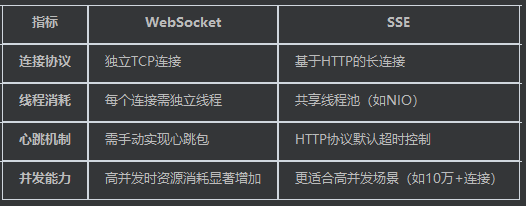
低频推送:SSE的HTTP连接在空闲时几乎不消耗资源,仅在推送时传输数据。
单向需求:无需维护双向通信的复杂逻辑,SSE的单向特性更简单可靠。
自动重连:浏览器原生支持断线重连,减少客户端开发成本。
SSE
现在敲定使用sse作为消息中心的技术选型
SseEmitter管理类
package com.zwnsyw.yunpicturebackend.controller;

import com.zwnsyw.yunpicturebackend.service.SseEmitterRepository;
import org.springframework.beans.factory.annotation.Autowired;
import org.springframework.http.MediaType;
import org.springframework.web.bind.annotation.GetMapping;
import org.springframework.web.bind.annotation.RequestMapping;
import org.springframework.web.bind.annotation.RequestParam;
import org.springframework.web.bind.annotation.RestController;
import org.springframework.web.servlet.mvc.method.annotation.SseEmitter;

@RestController
@RequestMapping("/sse")
public class SseController {

    @Autowired
    private SseEmitterRepository emitterRepository;

    @GetMapping(value = "/connect", produces = MediaType.TEXT_EVENT_STREAM_VALUE)
    public SseEmitter connect(@RequestParam Long userId) {
        SseEmitter existing = emitterRepository.get(userId);
        if (existing != null) {
            existing.complete();
            emitterRepository.remove(userId);
        }

        SseEmitter emitter = new SseEmitter(300000L); // 5分钟超时

        emitter.onTimeout(() -> {
            emitter.complete();
            emitterRepository.remove(userId);
            System.out.println("连接超时:用户" + userId);
        });
        emitter.onCompletion(() -> {
            emitterRepository.remove(userId);
            System.out.println("连接关闭:用户" + userId);
        });
        emitter.onError(ex -> {
            emitterRepository.remove(userId);
            System.out.println("连接异常:" + ex.getMessage());
        });

        emitterRepository.save(userId, emitter);
        return emitter;
    }
}
SSE控制器
package com.zwnsyw.yunpicturebackend.controller;

import com.zwnsyw.yunpicturebackend.model.entity.Message;
import com.zwnsyw.yunpicturebackend.model.enums.MessageEnums.MessageTypeEnum;
import com.zwnsyw.yunpicturebackend.service.SseEmitterRepository;
import org.springframework.beans.factory.annotation.Autowired;
import org.springframework.web.bind.annotation.GetMapping;
import org.springframework.web.bind.annotation.RequestMapping;
import org.springframework.web.bind.annotation.RequestParam;
import org.springframework.web.bind.annotation.RestController;
import org.springframework.web.servlet.mvc.method.annotation.SseEmitter;

@RestController
@RequestMapping("/sse")
public class SseController {

    @Autowired
    private SseEmitterRepository emitterRepository;

    @GetMapping("/connect")
    public SseEmitter connect(@RequestParam Long userId) {

        SseEmitter emitter = new SseEmitter(300000L);// 5分钟超时
        emitter.onCompletion(() -> {
            emitterRepository.remove(userId);
            System.out.println("连接完成/关闭:用户" + userId);
        });
        emitter.onError(ex -> {
            emitterRepository.remove(userId);
            System.out.println("连接异常:" + ex.getMessage());
        });
        emitterRepository.save(userId, emitter);
        return emitter;
    }
}
前端
SSE连接虽然由浏览器自动维护 但最好还是添加一些手动维护
需要手动处理连接断开的场景:
-
用户退出登录时:前端应主动关闭连接
-
页面关闭时:前端通过
beforeunload事件关闭连接 -
服务器端需要处理超时/异常自动清理(当前代码已通过
onCompletion/onError处理)
浏览器自动维护特性:
-
网络中断时自动重连(默认每3秒重试)
-
需要前端主动调用.close()才能完全终止连接
<template>
<div id="globalHeader">
<a-row :wrap="false">
<a-col flex="200px">
<RouterLink to="/">
<div class="title-bar">
<img class="logo" src="api/images/KlhwQTMetTT7/logo.svg" alt="logo" />
<div class="title">云图库</div>
</div>
</RouterLink>
</a-col>
<a-col flex="auto">
<a-menu
v-model:selectedKeys="current"
mode="horizontal"
:items="filteredItems"
@click="doMenuClick"
/>
</a-col>
<div class="notification-btn" @mouseenter="stopPolling" @mouseleave="resumePolling">
<a-badge :count="unreadCount">
<a-button @click="showNotificationDrawer" class="bell-btn">
<template #icon>
<BellOutlined />
</template>
</a-button>
</a-badge>
</div>
<a-col flex="150px">
<div class="user-login-status">
<div v-if="loginUserStore.loginUser?.id">
<a-dropdown>
<a-space>
<a-avatar :src="api/images/WpAy4A7zuXX8/loginUserStore.loginUser.userAvatar" />
<span>{{ loginUserStore.loginUser.userName ?? '无名' }}</span>
</a-space>
<template #overlay>
<a-menu>
<a-menu-item @click="navigateToUserProfile">
<UserOutlined />
用户中心
</a-menu-item>
<a-menu-item @click="navigateToActivateVip">
<UnlockOutlined />
激活会员
</a-menu-item>
<a-menu-item @click="doLogout">
<LogoutOutlined />
退出登录
</a-menu-item>
</a-menu>
</template>
</a-dropdown>
</div>
<div v-else>
<a-button type="primary" @click="navigateToLogin">登录</a-button>
</div>
</div>
</a-col>
</a-row>
</div>
<a-drawer
v-model:open="openNotification"
title="通知中心"
placement="right"
width="360"
:closable="true"
>
<div v-if="loading">加载中...</div>
<div v-else-if="errorMessage">
<div class="error-message">{{ errorMessage }}</div>
</div>
<div v-else-if="notifications.length === 0">
<div class="no-notice">暂无通知</div>
</div>
<div class="notification-list" v-else>
<a-card
v-for="notification in notifications"
:key="notification.id"
class="notification-item"
:class="{ unread: !notification.read, read: notification.read }"
>
<template #title>
<div class="card-title">
{{ notification.title }}
</div>
</template>
<template #default>
<div class="card-content">
{{ safeText(notification.content!) }}
</div>
</template>
<template #extra>
<div class="card-footer">
<div class="footer-left">
{{ formatDate(notification.createTime) }}
</div>
<div class="footer-right">
<a-button
v-if="!notification.read"
type="text"
@click="handleMarkRead(notification.id)"
>
<CheckOutlined />
已读
</a-button>
<a-button v-if="notification.read" type="text" @click="handleDelete(notification.id)">
<DeleteOutlined />
删除
</a-button>
</div>
</div>
</template>
</a-card>
</div>
</a-drawer>
</template>
import { h, ref, onMounted, onUnmounted, computed, watch } from 'vue'
import {
HomeOutlined,
LogoutOutlined,
UserOutlined,
UnlockOutlined,
CheckOutlined,
DeleteOutlined,
} from '@ant-design/icons-vue'
import { message, notification } from 'ant-design-vue'
import { useRouter } from 'vue-router'
import { useLoginUserStore } from '@/stores/useLoginUserStore.ts'
import { userLogoutUsingPost } from '@/api/userController.ts'
import type { MenuProps } from 'ant-design-vue/lib'
import { BellOutlined } from '@ant-design/icons-vue'
import {
deleteMessageUsingDelete,
getMessagesUsingGet,
markAsReadUsingPut,
} from '@/api/messageController.ts'
import { NOTIFICATION_READ_STATUS, type NotificationReadStatus } from '@/constants/isRead.ts'
const loginUserStore = useLoginUserStore()
loginUserStore.fetchLoginUser()
const userId = computed(() => loginUserStore.loginUser?.id)
const current = ref<string[]>(['home'])
const items = ref<MenuProps['items']>([
{
key: '/',
icon: () => h(HomeOutlined),
label: '主页',
title: '主页',
},
{
key: '/add_picture',
label: '添加图片',
title: '添加图片',
},
{
key: '/about',
label: '关于',
title: '关于',
},
{
key: '/admin/userManage',
label: '后台管理',
title: '后台管理',
},
{
key: '/admin/pictureManage',
label: '图片管理',
title: '图片管理',
},
{
key: 'others',
label: h('a', { href: 'http://www.zwnsyw.top', target: '_blank' }, '听凭风引'),
title: '听凭风引',
},
])
// 过滤菜单项
const filterMenus = (menus?: MenuProps['items']) => {
return (menus || []).filter((menu) => {
if (menu && typeof menu.key === 'string' && menu.key.startsWith('/admin')) {
const loginUser = loginUserStore.loginUser
return loginUser && Array.isArray(loginUser.roles) && loginUser.roles.includes('ADMIN')
}
return true
})
}
// 展示在菜单的路由数组
const filteredItems = computed(() => filterMenus(items.value))
const router = useRouter()
const routeGuard = router.afterEach((to) => {
current.value = [to.path]
})
// 路由跳转事件
const doMenuClick = async ({ key }: { key: string }) => {
try {
await router.push({ path: key })
} catch (error) {
console.error('路由跳转失败:', error)
message.error('路由跳转失败,请稍后再试')
}
}
// 用户注销
const doLogout = async () => {
const res = await userLogoutUsingPost()
console.log(res)
if (res.data.code === 0) {
loginUserStore.setLoginUser({ userName: '未登录' })
message.success('退出登录成功')
await router.push('/user/login')
} else {
message.error('退出登录失败,' + res.data.description)
}
}
// 导航到登录页面
const navigateToLogin = () => {
router.push('/user/login')
}
// 导航到用户中心页面
const navigateToUserProfile = () => {
router.push('/user/profile')
}
// 导航到激活会员页面
const navigateToActivateVip = () => {
router.push('/user/activateVip')
}
let eventSource: EventSource | null = null
let pollInterval: number | null = null
let isSSEActive = ref(false)
// 监听登录状态变化
watch(userId, (newVal) => {
if (newVal) {
connectSSE()
fetchMessages()
} else {
disconnectSSE()
}
})
const connectSSE = () => {
if (!userId.value) return
eventSource = new EventSource(`http://localhost:8123/api/sse/connect?userId=${userId.value}`)
eventSource.onopen = () => {
isSSEActive.value = true
stopPolling()
}
eventSource.onmessage = (event) => {
const data = JSON.parse(event.data)
handleNewMessage(data)
}
eventSource.onerror = (err) => {
console.error('SSE连接失败:', err)
disconnectSSE()
}
}
const disconnectSSE = () => {
eventSource?.close()
isSSEActive.value = false
resumePolling()
}
// 处理新消息
const handleNewMessage = (messageData: API.Message) => {
const existing = notifications.value.find((n) => n.id === messageData.id)
if (!existing) {
notifications.value.unshift({
...messageData,
read: false,
isRead: NOTIFICATION_READ_STATUS.UNREAD,
})
}
// 触发全局通知弹窗
notification.info({
message: '新消息',
description: messageData.content,
duration: 3,
})
}
const stopPolling = () => pollInterval && clearInterval(pollInterval)
const resumePolling = () => {
pollInterval = window.setInterval(fetchMessages, 300000)
}
// 通知相关逻辑
interface NotificationItem extends API.Message {
read: boolean
isRead: NotificationReadStatus
}
const notifications = ref<NotificationItem[]>([])
const loading = ref<boolean>(false)
const errorMessage = ref<string | null>(null)
// 抽屉状态
const openNotification = ref<boolean>(false)
// 请求控制器
let abortController: AbortController | null = null
// 安全文本处理
const safeText = (text: string | undefined): string => {
return text ? text.replace(/</g, '<').replace(/>/g, '>') : ''
}
// 数据获取函数
const fetchMessages = async () => {
try {
abortController?.abort() // 取消前一个请求
abortController = new AbortController()
const signal = abortController.signal
const response = await getMessagesUsingGet({ signal })
if (response.data.code === 0 && Array.isArray(response.data.data)) {
notifications.value = response.data.data.map((item) => ({
...item,
read: item.isRead === NOTIFICATION_READ_STATUS.READ,
})) as NotificationItem[]
errorMessage.value = null
} else {
errorMessage.value = '获取消息失败,请稍后再试'
}
} catch (error: any) {
if (error.name !== 'AbortError') {
errorMessage.value = '请求消息时出错,请检查网络连接'
}
} finally {
loading.value = false
}
}
onMounted(() => {
loading.value = true
fetchMessages()
pollInterval = window.setInterval(fetchMessages, 300000) // 5分钟轮询 保留轮询逻辑 避免sse失效
})
// 组件卸载时取消请求
onUnmounted(() => {
routeGuard() // 清除路由监听器
if (abortController) abortController.abort()
clearInterval(pollInterval) //清除轮询
disconnectSSE() // 清除SSE连接
})
// 抽屉显示逻辑
const showNotificationDrawer = () => {
openNotification.value = true
}
// 未读计数计算属性
const unreadCount = computed(() => notifications.value.filter((n) => !n.read).length)
// 删除消息
const handleDelete = async (messageId: number) => {
try {
await deleteMessageUsingDelete({ messageId })
notifications.value = notifications.value.filter((n) => n.id !== messageId)
unreadCount.value = notifications.value.filter((n) => !n.read).length
message.success('删除成功')
} catch (error) {
message.error('删除失败,请重试')
}
}
// 标记已读
const handleMarkRead = async (messageId: number) => {
try {
await markAsReadUsingPut({ messageId })
const index = notifications.value.findIndex((n) => n.id === messageId)
if (index !== -1) {
notifications.value[index].read = true
notifications.value[index].isRead = NOTIFICATION_READ_STATUS.READ
}
unreadCount.value = notifications.value.filter((n) => !n.read).length
message.success('标记成功')
} catch (error) {
message.error('标记失败,请重试')
}
}
const formatDate = (dateString: string): string => {
const date = new Date(dateString)
return date.toLocaleString()
}
.title-bar {
display: flex;
align-items: center;
}
.title {
color: black;
font-size: 18px;
margin-left: 16px;
}
.logo {
height: 48px;
}
.notification-btn {
margin-right: 30px;
}
.bell-btn {
padding: 4px;
border: none;
background: none;
}
.notification-item {
display: flex;
flex-direction: column;
padding: 16px;
border-bottom: 1px solid #e8e8e8;
background-color: #fff;
transition: background-color 0.3s ease;
margin-bottom: 24px;
}
.notification-item:last-child {
border-bottom: none;
}
.notification-item:hover {
background-color: #f5f5f5;
}
.card-title {
font-size: 16px;
font-weight: bold;
margin-bottom: 8px;
}
.card-content {
font-size: 14px;
line-height: 1.5;
margin-bottom: 8px;
}
.card-footer {
display: flex;
justify-content: space-between;
align-items: center;
}
.footer-left {
color: #999;
font-size: 12px;
}
.footer-right {
display: flex;
gap: 8px;
}
.buttons button {
padding: 4px 8px;
border-radius: 4px;
cursor: pointer;
transition: background-color 0.3s ease;
}
.buttons button:hover {
background-color: #f5f5f5;
}
.unread {
font-weight: bold;
color: #2f54eb;
}
.error-message {
color: #f5222d;
text-align: center;
padding: 16px;
}
.no-notice {
color: #666;
text-align: center;
padding: 16px;
}
.notification-item {
display: flex;
align-items: center;
justify-content: space-between;
padding: 8px 0;
border-bottom: 1px solid #e8e8e8;
}
💬 评论